Mastering Functional Testing: A Comprehensive Guide to Software Quality Assurance, Methodologies, and Automation Strategies
In the fast-paced ecosystem of modern software development, ensuring that applications perform precisely as intended is paramount. As digital transformation accelerates across global enterprises, the demand for robust, reliable software has thrust Quality Assurance (QA) into the spotlight. At the heart of this discipline lies Functional Testing—a foundational black-box testing methodology designed to confirm that a system or application operates in strict compliance with its functional and requirement specifications.
This comprehensive guide explores the core facets of functional testing, detailing its various types, industry techniques, practical use cases, and the evolving role of test automation in modern software engineering lifecycles (SDLC).
Main Facts: What is Functional Testing?
Functional testing is a type of black-box testing where the internal system architecture, code paths, and database structures are hidden from the tester. Instead, the focus is entirely on the outputs generated in response to specific inputs, evaluated against predetermined business requirements.

The Core Objective
The primary goal of functional testing is to validate all operational aspects of an application to ensure it meets user expectations and business scenarios. Specifications—typically outlined in requirement documents—define what a user is permitted to do and establish the boundaries of acceptable application behavior.
Because testing is an expansive discipline within the SDLC, understanding how functional testing interconnects with other testing paradigms is essential for delivering defect-free software.
Chronology and Evolution of the Testing Lifecycle
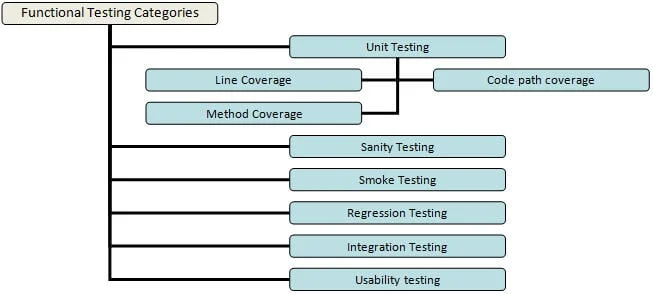
Within a standard software release cycle, testing is implemented progressively, starting from isolated code blocks and culminating in end-to-end user validations. The chronological flow of functional testing typically follows a structured trajectory:

- Unit Testing: Executed early in the development cycle by software engineers. Developers test individual methods or functions with targeted parameters to ensure line, path, and method coverage.
- Smoke and Sanity Testing: Upon every new build release, smoke testing acts as a build verification check to ensure baseline stability. Sanity testing follows closely to verify vital functionalities post-patch.
- Integration Testing: As individual modules are completed, they are combined and tested collectively to ensure seamless data flow and communication between disparate system components.
- System and End-to-End Testing: Once all modules are fully integrated, comprehensive system testing validates the entire application against both functional and non-functional requirements.
- User Acceptance (UAT) and Beta Testing: The product is introduced to real-world users in a production-like environment to gather critical feedback and ensure user comfort.
Supporting Data: Key Functional Testing Types and Techniques
Achieving complete test coverage without inflating project timelines or budgets requires strategic optimization. Testers employ various specialized techniques to uncover the maximum number of defects efficiently.
1. Equivalence Partitioning (Equivalence Tests)
Instead of testing every conceivable data input, equivalence partitioning segments test data into distinct partitions (classes). Because data within the same partition is expected to elicit identical system behaviors, testing a single representative value from that partition is sufficient. If one condition fails, all conditions in that partition are presumed to fail.
2. Boundary Value Analysis (Boundary Tests)
This technique focuses on the limits or edges of input ranges. For instance, if a username field mandates a minimum of six characters, boundary testing will evaluate inputs with precisely five characters (negative testing) and six characters (positive testing) to ensure the system handles edge cases gracefully.

3. Decision-Based Testing
Centered around logic and business rules, decision-based tests determine system outputs when specific preconditions are met or altered, mapping out distinct execution paths based on user decisions.
4. Ad-Hoc Testing
Unscripted and unstructured, ad-hoc testing relies on the intuition and creativity of the tester. The objective is to intentionally attempt to "break" the system and uncover obscure discrepancies that formal test cases might miss.
Practical Example: The HRMS Online Portal Use Case
To contextualize these techniques, consider an online Human Resource Management System (HRMS) login portal governed by the following specifications:

- User ID Field: Requires a minimum of 6 and a maximum of 10 characters. Accepts numbers (0-9), letters (a-z, A-Z), and limited special characters (underscore, period, and hyphen). It cannot be left blank and must begin with a letter or a number.
- Password Field: Requires 6 to 8 characters, accepts all numbers, letters, and special characters, and cannot be left blank.
Testing Approaches:
- Positive Testing (Happy Path): Validates standard, expected user behavior—such as entering a valid 8-character alphanumeric User ID and a secure 7-character password—to ensure successful navigation to the home page.
- Negative Testing: Exposes the application to unexpected or invalid data—such as submitting a 4-character User ID or leaving the password field blank—to verify that appropriate error messages are displayed and system stability is maintained.
Official Industry Perspectives on Functional Test Automation
While manual testing remains a cornerstone of exploratory and usability evaluations, the sheer volume of repetitive test cases in modern CI/CD pipelines makes functional test automation indispensable.
Benefits of Automation
According to industry experts, automation significantly reduces manual execution time, minimizes human error, prevents bug slippage during regression cycles, and improves overall test coverage. However, experts caution against common pitfalls:
- Over-Automation: Attempting to automate every single test case is inefficient and cost-prohibitive, particularly for workflows that require frequent manual reconfiguration.
- UI Fragility: Poorly constructed automated scripts can break easily if user interface (UI) elements shift locations, leading to widespread false positives.
Key Considerations for Implementing Automation
Organizations looking to scale their automation frameworks must adhere to best practices:

- Tool Selection: Choose the right functional automation tool (such as Selenium, UFT, Ranorex, or open-source alternatives like Sahi and Watir) based on project requirements, team expertise, and budget.
- Strategic Test Selection: Automate tests that are repetitive, executed across multiple builds, prone to human error, or require large datasets (Data-Driven Testing).
- Dedicated Automation Teams: Rather than overloading manual testers with scripting duties, assign dedicated automation engineers with specialized programming skill sets.
- Robust Framework Design: Ensure automated test scripts are resilient to minor UI modifications and leverage centralized data sources (such as XML files or databases) for reusability.
Implications for Software Quality and Future Outlook
Functional testing is not merely a box-checking exercise within the development lifecycle; it is a vital safeguard for brand reputation and user trust. When executed effectively alongside non-functional testing—which measures performance metrics like responsiveness and throughput—functional testing ensures that software products are both operationally correct and exceptionally performant.
Despite its limitations—such as its inability to gauge system speed or server load in isolation—functional testing remains the bedrock of software reliability. By striking an ideal balance between manual exploratory testing and intelligent test automation, engineering teams can achieve the rigorous quality standards demanded by today’s digital marketplace.