From Localhost to the Cloud: A Step-by-Step Engineering Journey of Containerizing and Deploying a Node.js App to Azure Container Instances
In the modern landscape of software engineering, bridging the gap between theoretical knowledge and practical execution is often the most formidable hurdle for developers. While textbooks, documentation, and online courses provide the syntax and foundational concepts, true technical mastery is forged through trial, error, and end-to-end implementation.

To solidify a working understanding of containerization and cloud orchestration, developer and systems enthusiast David set out to build, break, fix, and ship a real-world application from scratch. The result of this experiment is Container Vibes—a deliberately simple Express.js application designed not for complex algorithmic processing, but to master the comprehensive workflow of containerizing code, managing image registries, and orchestrating cloud deployments via Microsoft Azure.

This article details the comprehensive, step-by-step engineering journey of building Container Vibes, deploying it to Azure Container Instances (ACI), diagnosing the inevitable roadblocks along the way, and establishing robust version control.

Main Facts: The Anatomy of a Containerized Workflow
The core objective of the Container Vibes project was to navigate the entire modern deployment lifecycle without relying on automated platform-as-a-service (PaaS) abstractions like Vercel or Heroku. Instead, the focus was placed squarely on infrastructure-adjacent tools: Node.js, Express, Docker, Docker Hub, the Azure CLI, Git, and GitHub.

Project Specifications
- Application Framework: Node.js with Express.js.
- Frontend: Vanilla HTML/JavaScript with dynamic CSS gradient manipulation.
- Container Engine: Docker (using a multi-stage optimized Alpine Linux base image).
- Container Registry: Docker Hub (
4thman/hagital:v1). - Cloud Provider: Microsoft Azure (Azure Container Instances / ACI).
- Version Control: Git and GitHub.
The application itself is lightweight: it exposes a home page, a health-check endpoint (/health), and a JSON API endpoint (/api/vibe) that returns a randomized aesthetic theme—combining a color palette, a motivational engineering quote, live server uptime, and a UTC timestamp. However, the true value of the project lies outside the application code: configuring the container environment, resolving runtime errors, handling cloud resource providers, and establishing network configurations.

Chronology: The Engineering Process
The project followed a strict, methodical chronology: scoping the architecture, writing the code, containerizing locally, debugging runtime failures, pushing to a public registry, provisioning cloud infrastructure, resolving Azure-specific constraints, and finally securing the codebase in version control.

Phase 1: Laying the Groundwork and Application Logic
The project began by establishing a clean, modular folder structure. Using the terminal, a primary working directory was initialized, followed by a subdirectory for the application code:

mkdir docker-project-1 && cd docker-project-1
mkdir hagital && cd hagital
npm init -y
touch Dockerfile server.js .dockerignore
mkdir public && cd public
touch index.html
The npm init -y command automatically generated a default package.json file, establishing a foundation for Node.js dependencies.

In server.js, an Express server was constructed to manage the core application logic. The server implements a static middleware handler to serve the frontend UI, along with two distinct API routes:

const express = require('express');
const path = require('path');

const app = express();
const PORT = process.env.PORT || 3000;

const VIBES = [
   name: 'Sunset Deploy', colors: ['#FF6B6B', '#FFD93D'], quote: 'Life is good and could be challenging — ship it anyway.' ,
   name: 'Ocean Rollout', colors: ['#4ECDC4', '#556270'], quote: 'Every container has a bad day. Restart policy: always.' ,
   name: 'Neon Nightshift', colors: ['#8E2DE2', '#4A00E0'], quote: "Logs don't lie. Neither do good tests." ,
   name: 'Forest Uptime', colors: ['#11998e', '#38ef7d'], quote: 'Healthy pods, happy engineers.' ,
   name: 'Candy CI/CD', colors: ['#f857a6', '#ff5858'], quote: 'Green pipeline, good vibes.' ,
   name: 'Golden Hour Git', colors: ['#f7971e', '#ffd200'], quote: 'Commit small, dream big.' ,
   name: 'Cosmic Cluster', colors: ['#0f0c29', '#302b63', '#24243e'], quote: 'Somewhere out there, a pod is scaling for you.' ,
];

app.use(express.static(path.join(__dirname, 'public')));
app.use(express.json());

app.get('/api/vibe', (req, res) =>
  const vibe = VIBES[Math.floor(Math.random() * VIBES.length)];
  res.json(
    ...vibe,
    timestamp: new Date().toISOString(),
    uptime: Math.floor(process.uptime()),
  );
);

app.get('/health', (req, res) =>
  res.json( status: 'ok', message: 'Life is good and could be challenging. But we are up.' );
);

app.listen(PORT, () =>
  console.log(`🚀 Server running on port $PORT — go visit http://localhost:$PORT`);
);
Phase 2: Writing the Dockerfile
To package the application for containerization, a lightweight, production-ready Dockerfile was authored utilizing Alpine Linux:

# Pull the official Node.js image from Docker Hub
FROM node:20-alpine

# Set the working directory in the container
WORKDIR /app

# Copy package.json and package-lock.json to the working directory
COPY package*.json ./

# Install dependencies
RUN npm install

# Copy the rest of the application code to the working directory
COPY . .

# Expose the port that the application will run on
EXPOSE 3000

# Define the command to run the application
CMD [ "node", "server.js" ]
This multi-tiered instruction set leverages Docker’s layer caching mechanism. By copying package*.json and running npm install prior to copying the rest of the codebase, subsequent builds can reuse cached node modules if package dependencies remain unchanged.

Supporting Data: Diagnosing and Resolving Engineering Roadblocks
No engineering journey is complete without encountering unexpected failures. David documented three distinct errors during the build and deployment phases, providing valuable diagnostic data for fellow developers.

Error 1: The Case of the Missing Module (Local Runtime Crash)
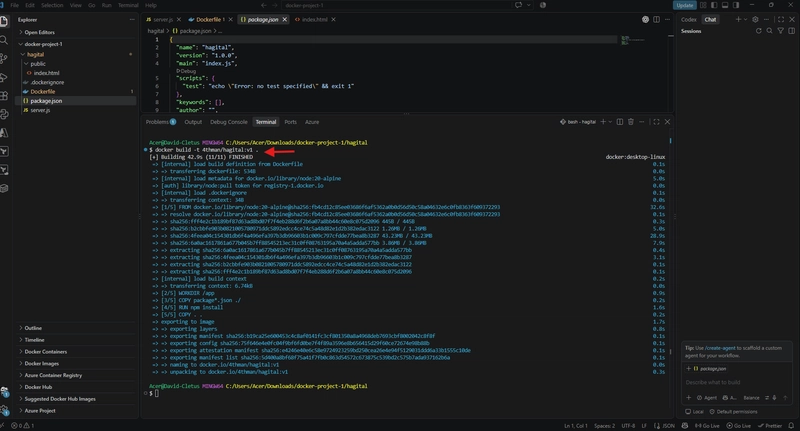
- The Symptom: After building the Docker image (
docker build -t 4thman/hagital:v1 .) and launching the container (docker run -d -p 3000:3000 --name hagital-app 4thman/hagital:v1), navigating tolocalhost:3000resulted in a "Connection Refused" error. - The Investigation: Running
docker ps -arevealed that the container status wasExited (1), indicating an immediate crash upon startup. Checking the logs viadocker logs hagital-appoutputted:Error: Cannot find module 'express' - The Root Cause: The developer had written
require('express')inserver.jsbut had neglected to runnpm install expresslocally prior to building the image. Consequently,package.jsoncontained zero dependencies. Docker built the image successfully because the build script found no syntax errors, but the container failed at runtime when Node.js attempted to load a non-existent package. - The Resolution: Executing
npm install expresslocally, updating the dependency tree, and rebuilding the image resolved the issue permanently.
Error 2: The Unregistered Azure Namespace
- The Symptom: Upon logging into Azure via the CLI (
az login), creating a resource group, and attempting to provision a container instance, the following error was thrown:(MissingSubscriptionRegistration) The subscription is not registered to use namespace 'Microsoft.ContainerInstance' - The Root Cause: Azure enforces explicit resource provider registration across subscriptions to optimize resource management. Because this specific Azure account had never utilized Azure Container Instances (ACI) before, the corresponding API namespace was disabled.
- The Resolution: The namespace was explicitly registered and verified via the Azure CLI:
az provider register --namespace Microsoft.ContainerInstance
az provider show -n Microsoft.ContainerInstance --query "registrationState"
Error 3: Ambiguous Operating System Type
- The Symptom: Immediately following the provider registration, re-running the container creation command resulted in:
(InvalidOsType) The 'osType' for container group '<null>' is invalid. The value must be one of 'Windows,Linux'. - The Root Cause: The Azure CLI command
az container createdoes not automatically infer the target operating system from the container image metadata. It requires an explicit declaration. - The Resolution: The command was updated to include the
--os-type Linuxflag:az container create --resource-group david-docker-rg --name david-app-container --image 4thman/hagital:v1 --port 3000 --dns-name-label david-hagital --os-type Linux --cpu 1 --memory 1
Official Responses and Conceptual Clarifications
A frequent point of confusion among engineers transitioning to containerization involves the distinction between network exposure directives. David outlined three critical concepts that became apparent during the project:

EXPOSE 3000(in Dockerfile): Purely documentation. It informs anyone inspecting the image about the intended listening port, but it opens no network sockets to the host machine or the public internet by itself.-p 3000:3000(indocker run): Local network bridging. This maps a port on the host machine to a port inside the container, allowing local traffic to traverse the network boundary. Without this flag, local requests result in connection refusals.--dns-name-label(in Azure CLI): Cloud domain allocation. Because raw public IP addresses assigned by cloud providers are volatile and cumbersome, this flag binds a stable, human-readable subdomain (e.g.,david-hagital.eastus.azurecontainer.io) to the cloud container instance.
Implications: Cost Management, Version Control, and Best Practices
The final stages of the project highlighted critical cloud management and software engineering maintenance habits.

Cloud Resource Lifecycle Management
Azure Container Instances bill consumers based on active execution time and resource allocation. Leaving idle containers running unnecessarily incurs continuous cloud expenses. Therefore, immediate post-deployment validation was followed by systematic infrastructure teardown using the Azure CLI:

# Delete the specific container instance
az container delete
  --resource-group david-docker-rg
  --name david-app-container
  --yes

# Delete the parent resource group asynchronously
az group delete
  --name david-docker-rg
  --yes
  --no-wait
Version Control Best Practices
While the deployment pipeline pulled images directly from Docker Hub rather than cloning a GitHub repository, maintaining clean source code integrity remains essential. A robust .gitignore and .dockerignore strategy was implemented to exclude sensitive environment variables (.env), version control metadata (.git), and local dependency directories (node_modules) from both build contexts and public repositories:

# .dockerignore & .gitignore entries
node_modules
.git
.env
The repository was subsequently initialized, committed, and pushed to a private GitHub repository named Hagital-Docker-App, ensuring full traceability of the application source code.

Conclusion
Projects like Container Vibes demonstrate that meaningful technical growth rarely stems from flawless execution; it arises from the friction of encountering errors, parsing logs, and understanding system-level interactions. By building a rudimentary app, containerizing it, troubleshooting runtime module failures, navigating cloud provider registrations, and orchestrating a live deployment on Azure, the developer successfully transformed theoretical concepts into tactile engineering competence.