Empowering Cross-Platform AI: Official TensorFlow Lite Plugin for Flutter Migrates to TensorFlow Repository
SAN FRANCISCO — In a significant move for the mobile and edge artificial intelligence development community, Google has officially announced the migration and release of the TensorFlow Lite plugin for Flutter directly under the primary TensorFlow GitHub account. This transition marks a major milestone for cross-platform application developers looking to harness the power of local on-device machine learning without sacrificing performance.
The announcement, spearheaded by Developer Relations Engineer Paul Ruiz, highlights how a community-driven project initiated years ago has matured into an essential tool for modern software architecture. By centralizing maintenance within the core TensorFlow engineering team, Google aims to provide robust, long-term support, seamless updates, and an expanding suite of features for developers worldwide.
Main Facts: Bridging Flutter and On-Device Intelligence
At its core, the newly officialized plugin bridges two of Google’s most powerful technological ecosystems: Flutter, the globally adopted UI toolkit for building natively compiled applications across mobile, web, and desktop from a single codebase, and TensorFlow Lite, a lightweight solution designed to run machine learning models locally on resource-constrained devices.
Key Highlights of the Release:
- Official Repository Migration: The plugin is now hosted and maintained directly within the official TensorFlow GitHub organization.
- Up-to-Date Architecture: Refreshed to support the latest iterations of TensorFlow Lite.
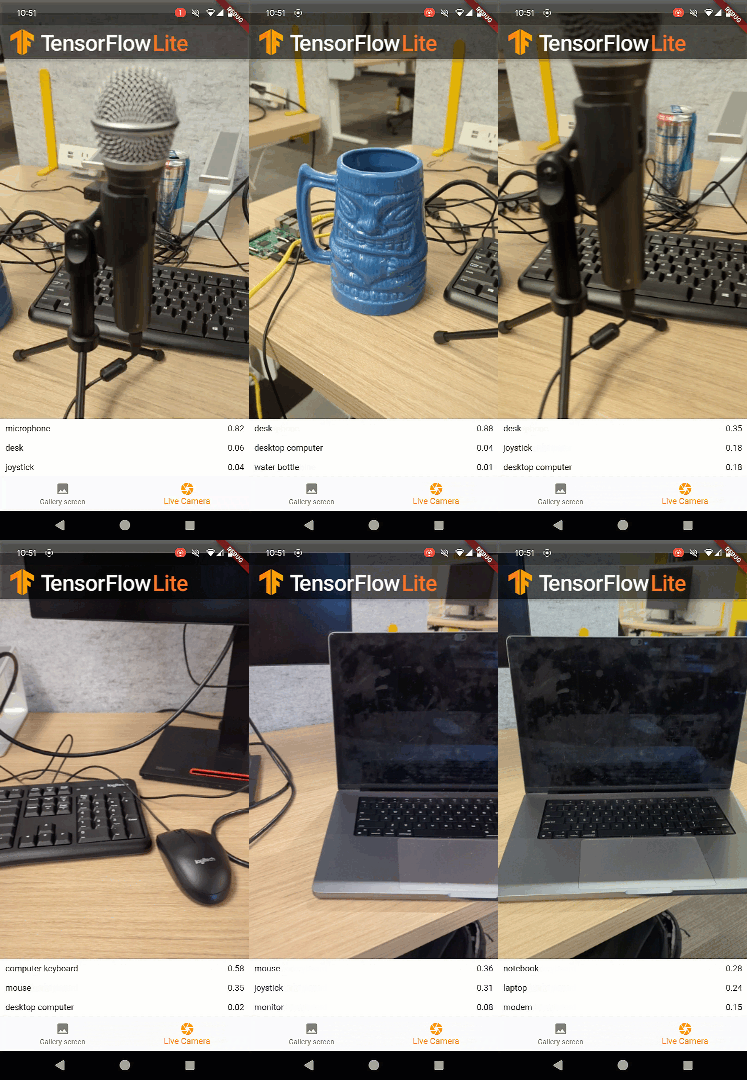
- Expanded Capabilities: Includes advanced out-of-the-box examples, such as real-time object detection via live camera feeds.
- Broad Compatibility: Primarily targeted at mobile platforms (iOS and Android), with active community-led development currently expanding support to desktop operating systems.
- Future Roadmap: Anticipated integration with MediaPipe Tasks to bring low-code, specialized machine learning capabilities to developers.
Chronology: From Google Summer of Code to Official Mainstay
The journey of the TensorFlow Lite Flutter plugin is a testament to the power of open-source collaboration and community-driven innovation.
Phase 1: The Grassroots Beginning (Three Years Ago)
The project originated through the Google Summer of Code (GSoC) program. Amish Garg, a talented contributor and developer, identified a critical gap in the Flutter ecosystem: the lack of a streamlined, performant way to integrate TensorFlow Lite models into Flutter applications. Garg engineered an initial version of the plugin that quickly captured the attention of the global developer community.
Phase 2: Viral Adoption
Over the subsequent years, Garg’s plugin became the de facto standard for Flutter developers seeking to embed local AI models, accumulating widespread usage across thousands of mobile applications. As dependencies evolved and user demands for real-time inference grew, the community continuously stepped up to maintain and patch the tool.

Phase 3: Official Absorption and Modernization
Recognizing the plugin’s critical role in modern application development, Google decided to transition the project into its official repository. Through a combined effort of internal engineers and community contributors, the codebase has been thoroughly overhauled, optimized for performance, and updated with modern examples—culminating in today’s official release on pub.dev.
Supporting Data & Technical Implementation
TensorFlow Lite enables developers to bypass cloud latency by running models locally on mobile, embedded, and edge devices. This ensures lower latency, enhanced privacy—since user data never has to leave the device—and offline functionality.
Developers can source pre-trained models from repositories like Kaggle Models or train custom architectures tailored to specific use cases. Below is a technical walkthrough of how the plugin simplifies image classification using a standard MobileNet model.
1. Installation and Model Initialization
To begin, developers integrate the package via pub.dev. The following implementation demonstrates how to load an interpreter and establish input/output tensor shapes:
// Load model
Future<void> _loadModel() async
    final options = InterpreterOptions();

    // Load model from assets
    interpreter = await Interpreter.fromAsset(modelPath, options: options);

    // Get tensor input shape [1, 224, 224, 3]
    inputTensor = interpreter.getInputTensors().first;

    // Get tensor output shape [1, 1001]
    outputTensor = interpreter.getOutputTensors().first;
2. Loading Classification Labels
MobileNet is pre-trained to recognize 1,000 distinct object categories. These labels are mapped locally within the app:
// Load labels from assets
Future<void> _loadLabels() async
    final labelTxt = await rootBundle.loadString(labelsPath);
    labels = labelTxt.split('n');
3. Executing Real-Time Inference
Once pre-processing is complete, running inference requires passing the structured image matrix through the interpreter:

// Run inference
Future<void> runInference(
  List<List<List<num>>> imageMatrix,
) async
   // Tensor input [1, 224, 224, 3]
   final input = [imageMatrix];

   // Tensor output [1, 1001]
   final output = [List<int>.filled(1001, 0)];

   // Run inference
   interpreter.run(input, output);

   // Get first output tensor
   final result = output.first;
With these results mapped against loaded labels, developers can instantly trigger UI changes, power live camera bounding boxes, or execute automated tagging workflows.
Official Responses and Perspectives
Google’s engineering team has expressed immense gratitude toward the contributors who shaped the ecosystem before its official adoption.
"We are deeply grateful to Amish Garg for his foundational contributions to the TensorFlow Lite Flutter plugin," noted Paul Ruiz during the release briefing. "The plugin’s immense popularity proved that developers urgently need native, high-performance paths to bring machine learning to cross-platform mobile apps. By bringing this project into our official repository, we are committing to its long-term viability and ease of use."
Community feedback has been overwhelmingly positive. Early testers have praised the elimination of outdated third-party wrapper dependencies, noting that official support significantly reduces security vulnerabilities and maintenance overhead in production environments.
Implications for the AI and Mobile Development Landscape
The official migration of the TensorFlow Lite Flutter plugin carries profound implications for the software development industry, lowering the barrier to entry for artificial intelligence integration.
1. Democratization of Edge AI
Cloud-based AI APIs often incur recurring server costs, introduce network latency, and raise data privacy concerns. By optimizing local execution through Flutter and TensorFlow Lite, independent developers and enterprise teams alike can deploy sophisticated AI features—such as facial recognition, predictive text, audio analysis, and object tracking—directly onto consumer hardware for free.

2. Streamlining the Flutter Ecosystem
Flutter has long been celebrated for its UI rendering performance and unified codebase benefits. However, integrating low-level machine learning runtimes historically required complex platform-specific bridging (writing custom Swift/Kotlin code). This official plugin abstracts that complexity, allowing developers to write pure Dart logic for complex AI pipelines.
3. Looking Ahead: The MediaPipe Integration
Google is not stopping at TensorFlow Lite. The engineering team has confirmed that they are actively developing a brand-new plugin dedicated to MediaPipe Tasks.
MediaPipe Tasks will serve as a low-code framework designed to accelerate standard on-device machine learning workflows. Beyond basic image classification and object detection, the upcoming tooling will support advanced modalities, including:
- Audio classification
- Face landmark detection
- Gesture and pose recognition
- Interactive segmentation
Conclusion and Next Steps
Developers eager to experiment can access the official GitHub Repository to explore comprehensive code samples covering text classification, super-resolution, style transfer, and more.
As the lines between traditional application development and machine learning continue to blur, tools like the official TensorFlow Lite plugin for Flutter ensure that building intelligent, responsive, and privacy-conscious applications is faster and more accessible than ever before. Developers are encouraged to share their creations with the global community using the hashtags and handles @googledevs and @TensorFlow.