Building a Hardened Software Supply Chain: Integrating JFrog Artifactory with Fujitsu Enterprise Postgres
In the modern enterprise software development lifecycle (SDLC), managing and securing software binaries, metadata, and dependencies has transitioned from a backend operational task into a critical boardroom priority. Software supply chain security is under intense scrutiny, with organizations increasingly demanding robust, enterprise-grade artifact repositories coupled with high-performance, ultra-secure backend databases.
To meet these exacting standards, a powerful architectural synergy has emerged: pairing JFrog Artifactory—a cornerstone of universal artifact management—with Fujitsu Enterprise Postgres. Because JFrog has standardized on PostgreSQL as the preferred and recommended database for its entire product suite, leveraging its PostgreSQL-compatible ecosystem is a natural fit. However, by substituting standard PostgreSQL with Fujitsu Enterprise Postgres, organizations unlock advanced, enterprise-grade capabilities—most notably Transparent Data Encryption (TDE)—thereby sealing critical vulnerabilities around metadata, access controls, and supply chain intelligence held at the database level.
Main Facts: The Architectural Synergy
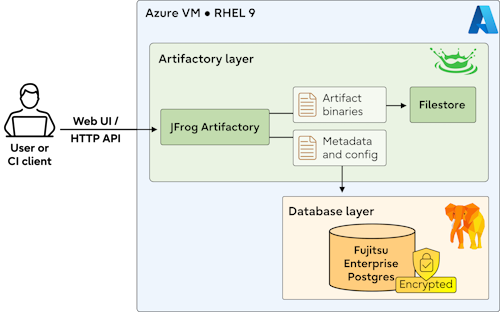
At its core, this integration relies on separating binary data storage from metadata management. While artifact binaries are efficiently handled within the file system ($JFROG_HOME/artifactory/var/data/artifactory/filestore), all critical contextual metadata, security configurations, identity management, and supply chain intelligence are persisted directly within the database.
- The Primary Engine: JFrog Artifactory Pro provides comprehensive enterprise artifact governance, universal package support, and continuous vulnerability scanning.
- The Database Backend: Fujitsu Enterprise Postgres serves as the ACID-compliant relational anchor, offering deep PostgreSQL compatibility combined with proprietary security enhancements.
- The Security Advantage: Fujitsu Enterprise Postgres introduces robust cryptographic controls via Transparent Data Encryption (TDE), ensuring that database files and physical storage disks are rendered unreadable to unauthorized actors, even in the event of a physical or cloud-level data breach.
- The Deployment Model: While production-grade deployments typically mandate high availability (HA), isolated database nodes, and end-to-end SSL encryption, single-node configurations—such as those deployed on Azure Linux Virtual Machines (VMs)—serve as effective models for validating functionality and performance.
Chronology: Step-by-Step Deployment and Configuration
Implementing this unified architecture requires a structured, sequential deployment pipeline. Below is the chronological blueprint for establishing a single-node environment on an Azure Red Hat Enterprise Linux 9 (RHEL 9) Virtual Machine.

Phase 1: Provisioning and Filesystem Architecture
Before deploying applications, the underlying infrastructure must be carefully provisioned. Using the Azure Portal, an Azure Linux VM running RHEL 9 is created with administrative SSH access (azureuser). Because default cloud images do not automatically maximize available storage, the logical volume manager (LVM) must be manually expanded.
The recommended filesystem partitioning strategy isolates system components from application data and database stores:

/(15 GB): Operating system and/optinstallations./usr(20 GB): System packages./tmp(8 GB): Temporary space for uploads and unpacking./pgdata(24 GB): Dedicated storage for Fujitsu Enterprise Postgres metadata.- Swap (8 GB): Memory safety buffer for the Java Virtual Machine (JVM) and the database.
/var(~175 GB): Absorbs the remaining capacity, dominated by the JFrog Artifactory filestore.
Expanding the OS disk and persisting these changes via custom shell scripts ensures stability across reboots, mounting /pgdata with optimized performance flags (defaults,noatime,nofail).
Phase 2: Installing and Pre-flighting JFrog Artifactory
With the storage layer secured, the administrator initiates the JFrog Artifactory installation via RPM packages on RHEL 9.
- Pre-flight Checks: Administrators download the JFrog diagnostics utility (
diagnostics-linux-amd64) to verify that system resources, file descriptors, and kernel parameters meet enterprise thresholds. - Repository Registration: The Artifactory Pro repository is added to the system’s package manager, followed by the installation of the core application (
jfrog-artifactory-pro). - Firewall Adjustments: Port
8082is opened viafirewalldto allow administrative traffic to reach the JFrog web interface. - Database Configuration: The core configuration file (
/opt/jfrog/artifactory/var/etc/system.yaml) is modified to point Artifactory toward the local Fujitsu Enterprise Postgres instance, utilizing the native PostgreSQL JDBC driver (org.postgresql.Driver) targeting port27500.
Phase 3: Preparing the Fujitsu Enterprise Postgres Environment
Fujitsu Enterprise Postgres requires specific system libraries and dependencies to function optimally on RHEL 9. Administrators must install required packages such as alsa-lib, libicu, liburing, protobuf-c, and numactl-libs using dnf.
- Dedicated Service Account: A dedicated system user and group (
postgres) are created to isolate database operations. - Directory Initialization: The
/pgdatamount is assigned to thepostgresuser with strict permissions (700), alongside a dedicated logging directory (/pgdata/logs) managed by system log rotation routines. - Systemd Integration: A custom systemd service file (
/usr/lib/systemd/system/fsepsvoi_jfrog_db.service) is registered, ensuring the database starts automatically upon boot before theartifactory.serviceinitializes.
Phase 4: Database Clustering and Encryption Setup
Switching to the postgres user session, the database cluster is initialized with specific collation rules to ensure compatibility with Artifactory:

initdb -D /pgdata/jfrog_db --encoding=UTF8 --lc-collate=C --lc-ctype=CTo secure data at rest, Transparent Data Encryption (TDE) is configured by appending parameters to postgresql.conf:
keystore_location = '/pgdata/ks'
tablespace_encryption_algorithm = 'AES256'
default_tablespace = 'tsencrypt'
The Master Encryption Key is generated and locked behind a robust passphrase using pgx_set_master_key(), with auto-open capabilities enabled via pgx_keystore. Finally, through the psql interface, the dedicated database and user are provisioned:

CREATE USER artifactory WITH PASSWORD 'secure_password';
CREATE DATABASE artifactory WITH OWNER=artifactory ENCODING='UTF8';
GRANT ALL PRIVILEGES ON DATABASE artifactory TO artifactory;
With configurations finalized, the system is rebooted to validate the automated startup sequence, bringing both Fujitsu Enterprise Postgres and JFrog Artifactory online seamlessly.
Supporting Data: Infrastructure and Resource Metrics
To maintain optimal performance in production environments, system architects must balance memory allocation, disk I/O throughput, and database transaction processing capabilities.
- Database Isolation vs. Co-location: While the outlined single-node model demonstrates integration feasibility, high-volume production pipelines require decoupling the database onto a dedicated server or managed cloud cluster.
- Storage Distribution: Binary artifacts consume vast storage footprints (accommodated here by the massive
/varallocation), whereas database transactions prioritize ultra-low latency input/output operations per second (IOPS), making dedicated high-performance solid-state drives (SSDs) mandatory for/pgdata. - Authentication Security: Enforcing strict
scram-sha-256authentication protocols within the database’spg_hba.confguarantees that internal communications between Artifactory and Fujitsu Enterprise Postgres are cryptographically protected against interception.
Official Responses: Industry Perspectives on Enterprise Integration
As software supply chains face increasingly sophisticated cyber threats, enterprise architects and database vendors have emphasized the importance of tightening foundational layers.
Industry analysts note that while containerization and artifact repositories have accelerated software delivery, they have occasionally created blind spots regarding metadata security. By standardizing on PostgreSQL-compatible architectures, software platforms like JFrog make it frictionless for organizations to adopt enterprise database variants.

Fujitsu engineering representatives highlight that integrating Transparent Data Encryption directly into the database engine—without requiring application-level modifications—provides a vital safety net for organizations managing sensitive intellectual property and proprietary codebases. When paired with an enterprise artifact manager, organizations achieve a dual-layer defense: binaries are governed and scanned within Artifactory, while configuration intelligence and user access matrices are secured behind cryptographic vaults at the database layer.
Implications: Future-Proofing the Software Supply Chain
The successful integration of JFrog Artifactory with Fujitsu Enterprise Postgres carries significant long-term implications for enterprise IT strategies:

- Elevated Compliance Posture: With stringent global data protection regulations and software bill of materials (SBOM) mandates taking effect across industries, securing metadata storage with TDE ensures compliance with financial, healthcare, and government security baselines.
- Operational Resilience: Automating startup dependencies via
systemdensures that dependent applications never outpace their underlying data stores, minimizing downtime during system reboots or maintenance windows. - Scalability Pathways: Organizations utilizing this single-node validation blueprint possess a clear migration path toward distributed, highly available (HA) multi-node architectures as their repository loads and developer ecosystems scale.
By bridging world-class artifact management with advanced enterprise database security, organizations can build, store, and deploy software assets with absolute confidence in the integrity of their digital supply chains.