Securing the Digital Perimeter: A Comprehensive Review of Acunetix Web Vulnerability Scanner (WVS)
In the modern digital economy, web applications serve as the primary interface between businesses and their clientele. From e-commerce platforms and banking portals to internal enterprise resource planning (ERP) systems, the web application layer is the backbone of operational success. However, as these digital assets grow in complexity, so too does the attack surface available to malicious actors. With cyberattacks becoming more sophisticated, the integration of automated security auditing into the software development life cycle (SDLC) is no longer a luxury—it is an absolute necessity.
Among the tools leading the charge in this defensive posture is the Acunetix Web Vulnerability Scanner (WVS). Known for its precision and depth, Acunetix has established itself as a cornerstone for security professionals tasked with identifying and mitigating threats like SQL Injection, Cross-Site Scripting (XSS), and the full spectrum of vulnerabilities defined by the OWASP Top 10.

Main Facts: What is Acunetix WVS?
Acunetix WVS is an automated web application security testing solution designed to act as an "attacker in the room." By simulating a series of sophisticated, real-world attacks against a target, the software audits the security posture of websites and applications. Unlike static analysis tools, Acunetix employs a dynamic, black-box approach. This means the scanner probes the application without requiring prior knowledge of the underlying source code, mimicking how a real-world hacker would attempt to breach the perimeter.
The software does not merely identify vulnerabilities; it provides actionable intelligence, including concise reporting, impact analysis, and, crucially, specific remediation guidance. This makes it an invaluable asset for both security auditors who need to report on compliance and software engineers who need to patch bugs efficiently.

Chronology of Security Testing: The Scanning Workflow
Understanding how to leverage Acunetix effectively requires a look at its operational workflow. The process is designed to be user-friendly, catering to both novices and seasoned penetration testers.
The Initial Setup and Scan Wizard
The process begins with the "Scan Wizard," which simplifies the daunting task of security configuration. Users input the target URL and are guided through a series of logical steps to tailor the scan. For this review, we utilized a standard PHP test site, demonstrating how easily the tool adapts to various environments.

Customization via Scanning Profiles
One of the core strengths of Acunetix is its flexibility. A "Scanning Profile" acts as a filter, allowing testers to group specific tests based on their requirements. While a "Default" profile runs the entire suite of security checks, an administrator can create custom profiles—for instance, focusing exclusively on high-risk vulnerabilities—to optimize time and resource allocation.
Granular Control and Advanced Options
For advanced users, the "Scan Setting" menu offers deep, granular control. Whether it involves configuring HTTP proxies for secure network traversal, or excluding specific pages from the crawl path, the tool provides the necessary leverage. Furthermore, the ability to import results from external tools like BurpSuite, Fiddler, or the built-in HTTP Sniffer, allows for a unified testing environment that prevents data silos.

Supporting Data: Advanced Technologies Under the Hood
Acunetix differentiates itself through a suite of "intelligent" features that go beyond basic pattern matching.
1. Technology Fingerprinting and Optimization
The scanner is remarkably efficient at "fingerprinting" the target environment. By identifying the underlying technology stack (e.g., PHP, ASP.NET, Java, or Ruby on Rails), the tool automatically ignores tests irrelevant to that stack. This drastically reduces scan times, ensuring that computational power is directed only toward potential threats.

2. Handling Complex Authentication
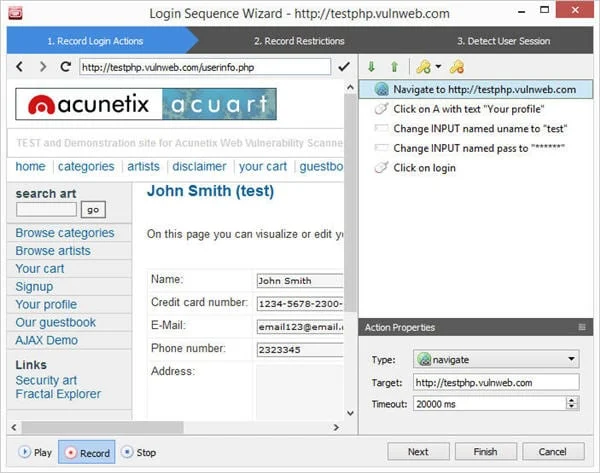
Scanning password-protected areas is a classic challenge for many security tools. Acunetix resolves this with its "Login Sequence Recorder." By simply recording the user’s manual login process, the tool learns how to maintain an active session throughout the scan. It intelligently manages session patterns and even handles nonces (one-time tokens), ensuring the scanner does not inadvertently log itself out during the audit.
3. The DeepScan Engine
Modern web applications rely heavily on AJAX and JavaScript. Traditional scanners often fail to "see" content rendered dynamically by these technologies. The Acunetix DeepScan engine—a fully integrated, headless browser—executes JavaScript and interacts with the page in real-time. This provides the scanner with a comprehensive understanding of the DOM, allowing it to detect DOM-based XSS with industry-leading accuracy.

The Role of AcuSensor and AcuMonitor
To move from "black-box" testing to a more nuanced "Interactive Application Security Testing" (IAST) methodology, Acunetix offers two distinct components:
- AcuSensor: An optional, server-side agent for PHP and .NET applications. Because it has visibility into the server’s execution environment, AcuSensor can identify the exact line of code responsible for a vulnerability. This eliminates the guesswork for developers, allowing them to fix bugs in minutes rather than hours. It also identifies vulnerabilities that traditional scanners miss, such as certain types of SQL injections that occur in non-leaking, deep-seated backend queries.
- AcuMonitor: This is a "set-it-and-forget-it" intermediary service. It is designed to catch "second-order" vulnerabilities—threats that do not manifest an immediate response during the scan. This includes complex issues like Blind XSS, Server Side Request Forgery (SSRF), and Blind Out-of-Band SQL injection. By acting as a background listener, AcuMonitor allows the scanner to detect these "invisible" attacks, providing a complete security shield.
Official Responses and Reporting
In a corporate environment, the value of a security tool is measured by its output. The Acunetix "Reporter" module is highly robust, offering a variety of formats including PDF and HTML.

Compliance and Executive Reporting
For management, the tool offers high-level "Executive Summaries" and "Quick Reports" that highlight the overall risk posture. For compliance officers, the software provides tailored reports for industry standards such as OWASP Top 10, PCI-DSS, and HIPAA. These reports are updated regularly to reflect changes in regulatory requirements, ensuring that the business remains compliant with evolving global standards.
Developer-Centric Insights
The "Developer Report" is the most comprehensive, providing deep-dive details into each vulnerability, including proof-of-concept attacks and remediation steps. When integrated with AcuSensor, these reports point directly to the vulnerable source file and code line, effectively bridging the gap between security auditing and software development.

Implications for Modern Business
The implications of adopting a robust scanner like Acunetix are profound. In an era where a single data breach can result in millions of dollars in fines, legal fees, and irreparable reputational damage, the "cost" of such a tool is dwarfed by the potential cost of inaction.
The "Retest" Advantage
The software’s "Retest" feature is a critical component for the DevSecOps workflow. Once a developer implements a fix, they can right-click the alert and trigger a targeted retest. If the issue is resolved, the status is updated, and the vulnerability is marked with a strike-through. This real-time validation loop accelerates the deployment of secure code, turning security from a bottleneck into an enabler of speed.

Global Accessibility
Acunetix is available as both an on-premise installation and an online service (Acunetix OVS). This flexibility allows businesses to choose the deployment model that best fits their infrastructure. With a 14-day trial period available for both versions, the barrier to entry is minimal, allowing organizations to conduct a pilot test before committing to a full-scale deployment.
Conclusion: A Proactive Defense Strategy
The Acunetix Web Vulnerability Scanner is more than just a diagnostic tool; it is an intelligent, automated security partner. By combining sophisticated technologies like DeepScan and IAST via AcuSensor with a highly intuitive user interface, it addresses the most critical pain points in web application security.

As we look toward a future where cyber threats will only increase in frequency and sophistication, the ability to rapidly scan, identify, and remediate vulnerabilities is the only way to maintain a secure digital perimeter. Whether you are a security auditor, a penetration tester, or a lead developer, integrating a tool like Acunetix into your workflow is a decisive step toward safeguarding your business data and maintaining the trust of your customers.
Final Verdict: For any organization serious about web security, the combination of depth, speed, and reporting functionality makes Acunetix an industry leader that merits serious consideration.

Have you integrated automated vulnerability scanning into your development pipeline? Share your experiences and questions in the comments below; our community of security professionals is here to help.