Securing the Modern Web: A Comprehensive Review of Acunetix Web Vulnerability Scanner (WVS)
Main Facts: The State of Web Application Security
In today’s hyper-connected digital economy, web applications and websites serve as the core operational backbone for businesses of all sizes. From e-commerce portals to internal enterprise dashboards, these applications manage sensitive corporate data, intellectual property, and confidential consumer information. However, this heavy reliance on web-based technologies has also made them the primary target for cybercriminals. As the volume of web traffic grows, threat actors are increasingly active, launching sophisticated attacks designed to exploit application-layer vulnerabilities and exfiltrate critical business assets.

To counter these evolving threats, organizations are realizing that traditional perimeter defenses—such as firewalls and intrusion detection systems—are no longer enough. Security testing must be seamlessly integrated into the complete software development lifecycle (SDLC). At the forefront of this proactive defense strategy is automated vulnerability scanning.

This comprehensive review examines Acunetix Web Vulnerability Scanner (WVS), an industry-standard automated security testing tool designed to audit web applications and websites. Renowned for its proficiency in detecting SQL Injection (SQLi), Cross-Site Scripting (XSS), and the broader OWASP Top 10 vulnerabilities, Acunetix WVS provides security professionals and software engineers with a robust platform to identify, analyze, and remediate critical security flaws before malicious actors can exploit them.

Chronology: Navigating the Acunetix WVS Testing Workflow
Evaluating the capabilities of a vulnerability scanner requires a hands-on walk-through of its primary operational phases. Acunetix WVS structures its assessment process through an intuitive user interface, guiding users from initial configuration to final reporting.

1. Initiating the Scan Wizard
Launching a security audit in Acunetix WVS is streamlined through the Scan Wizard, accessible via the main toolbar’s "New Scan" button. Users begin by designating the target uniform resource locator (URL). For testing and demonstration purposes, Acunetix maintains dedicated vulnerable test environments, such as http://testphp.vulnweb.com, allowing administrators to safely evaluate the tool’s detection capabilities.

2. Selecting Scanning Profiles
Once the target is established, the user selects a Scanning Profile. This feature organizes a logical grouping of security tests, allowing testers to tailor the audit to their specific requirements. While the Default profile executes every available test in the scanner’s library, users can customize profiles to target only high-risk alerts or specific vulnerability classes, significantly reducing scan times when dealing with strict operational deadlines.

3. Configuring Granular Scan Settings
While default configurations are optimized to handle the vast majority of web applications, Acunetix WVS offers deep granular control. Users can configure proxy settings, establish custom HTTP headers, and fine-tune crawling parameters. Furthermore, advanced options allow security teams to exclude specific pages from a scan or import traffic logs and test results from external tools, such as PortSwigger’s Burp Suite, Telerik’s Fiddler, or the built-in Acunetix HTTP Sniffer.

4. Navigating Password-Protected Areas
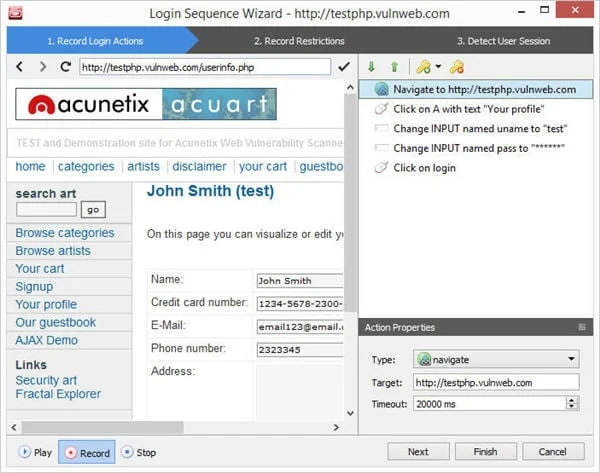
Modern web applications frequently require user authentication, presenting a significant hurdle for automated scanners. Acunetix WVS solves this challenge through its Login Sequence Recorder.

- Automated vs. Manual Recording: While simple login forms can be handled automatically, complex authentication portals require manual recording. The user simply logs into the application normally, and the recorder logs every action.
- Replay and Verification: The recorded sequence can be replayed to ensure the scanner successfully establishes a session.
- Session Restrictions: Users can designate specific links (such as "Logout" buttons) that the scanner must avoid clicking, ensuring the session remains active throughout the crawl. The recorder also supports wildcards to handle dynamic, single-use tokens (nonces).
- Session Patterns: To ensure the scanner accurately distinguishes between an authenticated and an unauthenticated state, the recorder detects or permits the customization of a unique "Session Pattern."
Supporting Data: Deep Dive into Advanced Scanning Engines
Acunetix WVS distinguishes itself from standard black-box scanners through a suite of advanced technologies designed to maximize detection accuracy, minimize false positives, and handle complex modern web architectures.

The DeepScan Engine: Mastering AJAX and JavaScript
Modern web applications rely heavily on HTML5, single-page frameworks, AJAX, and complex JavaScript. Traditional crawlers often fail to interpret these dynamic interfaces, leaving vast sections of an application unexamined.

Acunetix overcomes this limitation via its proprietary DeepScan Engine. Operating as a fully functional headless browser integrated directly into the crawler, DeepScan executes and interacts with JavaScript-heavy pages just as a real user’s browser would. This grants the scanner full visibility into Document Object Model (DOM) mutations, enabling it to detect DOM-based XSS vulnerabilities with exceptional accuracy. To assist developers, the scanner provides a detailed stack trace illustrating how the malicious payload flowed through the DOM.

AcuSensor: Bridging Black-Box and White-Box Testing
Black-box scanners analyze applications externally without prior knowledge of the source code, making it difficult to uncover vulnerabilities hidden deep within backend logic. Conversely, static source code analysis tools often fail to understand how code behaves during actual execution.

Acunetix addresses this dilemma with AcuSensor, an optional server-side component available for PHP and .NET applications that introduces Interactive Application Security Testing (IAST).

- Seamless Installation: For .NET applications, AcuSensor can be injected and un-injected directly into precompiled DLLs without requiring recompilation.
- Enhanced Visibility: By combining external scanning with internal execution monitoring, AcuSensor gains visibility into backend operations. It can uncover difficult-to-reach flaws—such as SQL injections within
INSERTstatements—that standard black-box techniques might miss. - Precision Reporting: When a vulnerability is identified, AcuSensor points directly to the exact file and line of vulnerable code, vastly accelerating remediation efforts for development teams.
AcuMonitor: Uncovering Second-Order Vulnerabilities
Many critical security flaws do not manifest immediately during an automated scan. These second-order vulnerabilities require an external intermediary service to detect out-of-band communication or delayed payloads.

Acunetix integrates AcuMonitor to automatically identify these complex issues without requiring manual configuration. Operating in the background, AcuMonitor enables the detection of:

- Blind Cross-Site Scripting (Delayed XSS)
- XML External Entity Injection (XXE)
- Server-Side Request Forgery (SSRF)
- Host Header Attacks and Email Header Injection
- Password Reset Poisoning
- Blind Out-of-Band SQL Injection and Remote Code Execution (RCE)
Official Responses and Remediation Workflows
Identifying a vulnerability is only half the battle; ensuring effective remediation is vital to maintaining a secure posture. Acunetix WVS approaches remediation through structured reporting, interactive retesting, and detailed educational resources.

Detailed Vulnerability Insights
Upon completion of a scan, Acunetix presents a prioritized list of high-severity alerts. Clicking on a specific vulnerability—such as an SQL injection—reveals the exact input parameter involved, alongside variations of attack payloads tested against that parameter. Selecting a variation opens a comprehensive advisory that includes:

- Executive Summary: A clear, concise overview of the security flaw.
- Impact Analysis: An explanation of what an attacker could achieve by exploiting the vulnerability.
- Remediation Guidance: Step-by-step instructions on how to secure the code.
- External References: Curated URLs and documentation links for deeper study.
The Retest Feature
Verifying whether a patch was successful traditionally required running a complete, time-consuming scan from scratch. Acunetix WVS streamlines this process with its Retest feature. Security personnel can simply right-click a resolved alert and select "Retest alert(s)." The software selectively re-runs the specific tests associated with that vulnerability. If the fix is verified, Acunetix updates the interface, marking the alert in a grey, strike-through font.

Flexible Reporting Engine
Stakeholders across an organization require varying levels of technical detail. Acunetix meets this need via a versatile reporting engine accessible through the main toolbar.

- High-Level Reports: Formats such as the Executive Summary, Quick Report, and Affected Items provide concise overviews for management and non-technical stakeholders.
- Compliance Standards: The platform generates dedicated reports aligned with major regulatory frameworks and industry benchmarks, including the OWASP Top 10, PCI-DSS, and HIPAA. These templates are regularly updated to reflect the latest compliance revisions.
- Developer Reports: Highly configurable and granular, these reports deliver deep technical metrics, source file references, and line-number data tailored specifically for software engineering teams. Reports can be exported seamlessly into PDF, HTML, and other standard formats.
Implications: The Strategic Value of Automated Web Vulnerability Scanning
The integration of advanced vulnerability scanners like Acunetix WVS carries significant implications for modern cybersecurity strategies and software development practices.

- Shift-Left Security: By embedding automated scans and IAST capabilities into the development lifecycle, organizations can identify and remediate security flaws during the coding and testing phases rather than post-deployment. This significantly reduces the financial and reputational cost of patching vulnerabilities in production.
- Bridging the Skills Gap: Automated tools equipped with intelligent engines—such as DeepScan and AcuMonitor—lower the barrier to entry for effective security testing. Development teams do not need to be elite penetration testers to uncover complex, second-order vulnerabilities.
- Regulatory Compliance and Accountability: With data privacy regulations becoming increasingly stringent, the ability to generate audit-ready compliance reports ensures that businesses can demonstrate due diligence to regulators, partners, and clients.
- Comprehensive Attack Simulation: By operating as both a black-box scanner and an interactive testing suite, Acunetix mimics the methodologies of real-world adversaries. This provides organizations with an accurate, realistic assessment of their external attack surface.
Conclusion
Acunetix Web Vulnerability Scanner combines robust automation, advanced crawling engines, and precise remediation guidance into a cohesive, user-friendly package. Whether deployed via its 14-day online (OVS) or on-premise trial editions, it equips security professionals and software engineers with the necessary tooling to defend critical web assets against an increasingly hostile digital landscape.