The Agentic Evolution: Android Studio Revolutionizes Development with "Bring Your Own Agent" (BYOA) Support
The landscape of software engineering is undergoing a seismic shift. As artificial intelligence moves beyond simple autocomplete and chat-based assistants, we are entering the era of "agentic development"—where AI entities don’t just suggest code, but proactively plan, execute, and troubleshoot complex technical workflows. Recognizing this paradigm shift, Google has announced a monumental update to Android Studio, introducing the "Bring Your Own Agent" (BYOA) feature. This move effectively transforms the world’s most popular Android IDE into an agnostic hub for the industry’s most powerful coding models.
The New Frontier: Why BYOA Matters
In a professional engineering environment, developer productivity is rarely driven by a single tool. Teams are increasingly experimenting with a diverse ecosystem of specialized AI agents, custom enterprise harnesses, and autonomous coding tools designed to handle specific segments of the software development lifecycle (SDLC).
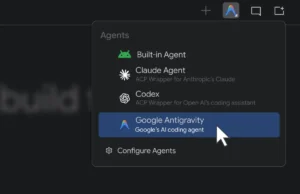
Previously, developers were largely tethered to the built-in AI solutions provided by the IDE vendor. While these solutions are often high-quality, they lack the flexibility required by specialized engineering teams who may prefer Anthropic’s Claude for architectural reasoning, OpenAI’s Codex for boilerplate generation, or proprietary custom agents tailored to their unique codebase. By introducing BYOA, Android Studio is acknowledging a core tenet of modern DevOps: developers need the freedom to build using the tools that fit their unique workflow, rather than forcing their workflow to fit the tool.
Chronology of the AI Integration
To understand the significance of this update, one must look at the recent trajectory of Android Studio’s evolution:

- 2025: The Model Agnostic Pivot: Recognizing that the AI race was not a "winner-take-all" scenario, Android Studio introduced support for remote AI models. This was the first major step toward decoupling the IDE from a singular, proprietary model.
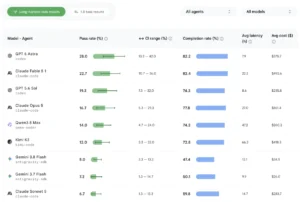
- Early 2026: Benchmarking for Autonomy: Google released "Android Bench," a framework designed to measure how well AI models handle long-horizon tasks, such as multi-file refactoring or dependency management. This laid the groundwork for trusting autonomous agents with significant architectural changes.
- Present Day: The BYOA Launch: Android Studio Canary ("Rabbit 2" release) marks the arrival of the BYOA feature. This integration allows developers to plug their preferred agent directly into the IDE’s infrastructure, granting these external models access to the Android Knowledge Base and the IDE’s deep context-awareness.
Supporting Data: The Case for Agentic Productivity
The integration of agents into the IDE is not merely a convenience feature; it is an economic necessity. Data from early adopters of agentic workflows suggests a 30% to 45% reduction in "time-to-first-commit" for complex features.
The core value proposition of BYOA lies in the combination of the agent’s reasoning capability and the IDE’s native intelligence. An agent is only as good as the context it is provided. By running within Android Studio, these third-party agents gain access to:
- Project Context: The agent understands the specific architecture, Gradle configurations, and existing library dependencies of the active project.
- Android-Specific Best Practices: Through the Android Knowledge Base, agents are continuously updated on the latest Material Design guidelines, Jetpack Compose patterns, and API deprecations.
- Local Execution Feedback: If an agent suggests a code change that breaks the build, the IDE’s native compiler feedback loop allows the agent to self-correct in real-time, drastically reducing the "human-in-the-loop" friction.
Official Guidance: Navigating the Ecosystem
While the BYOA feature allows for broad flexibility, Google continues to emphasize its flagship offering: the Google Antigravity agent. For developers heavily invested in the Google ecosystem, Antigravity is the recommended choice. It is optimized to support the latest Gemini Flash 3.8 models, which have been specifically fine-tuned for high-velocity, high-accuracy coding tasks.
According to official documentation, the Antigravity agent provides a "zero-friction" path to enhanced quotas. Developers can authenticate via their Google AI Pro or Ultra plans, or utilize a standard Gemini API key for pay-per-token flexibility. For enterprise users, the message is clear: security and privacy remain paramount. Whether using the built-in agent or a third-party model, organizations utilizing Gemini Enterprise licenses retain the full protections of the Google Cloud infrastructure, ensuring that proprietary source code is never used to train base models.

Implications for the Industry
The introduction of BYOA is likely to trigger a ripple effect across the IDE market. By inviting competitors like Anthropic and OpenAI into the heart of the Android development experience, Google is signaling a shift toward a "platform-first" strategy.
1. The Death of the Monolithic IDE
For decades, IDEs were closed-source fortresses. The shift toward BYOA suggests that the future of IDEs is to act as a "control plane" for AI. The value of the IDE will no longer be measured by its text editor, but by how well it orchestrates the various specialized agents that the developer brings to the table.
2. Standardization of Agentic Workflows
With tools like Android Bench and the new Agent Registry, we are moving toward a standard where agents are evaluated based on their performance in specific technical domains. We expect to see a market emerge for "specialized agents"—for instance, an agent optimized exclusively for Kotlin Coroutines performance tuning, or an agent that specializes in migrating legacy XML layouts to Compose.
3. The Enterprise Dilemma: Security vs. Flexibility
Large-scale organizations will face a new set of compliance challenges. While BYOA provides unprecedented freedom, it also necessitates a new layer of governance. IT departments will need to establish policies regarding which agents are "approved" for use in corporate environments, particularly regarding data egress and external API calls. The integration with Google Cloud’s enterprise security features for Antigravity will likely make it the "default" choice for large enterprises, even if they allow the use of other models for prototyping.

How to Get Started: A Practical Guide
The BYOA feature is currently available in the Android Studio "Rabbit 2" Canary release. The process for integration is designed to be seamless:
- Environment Setup: Ensure your Android Studio instance is updated to the latest Canary build.
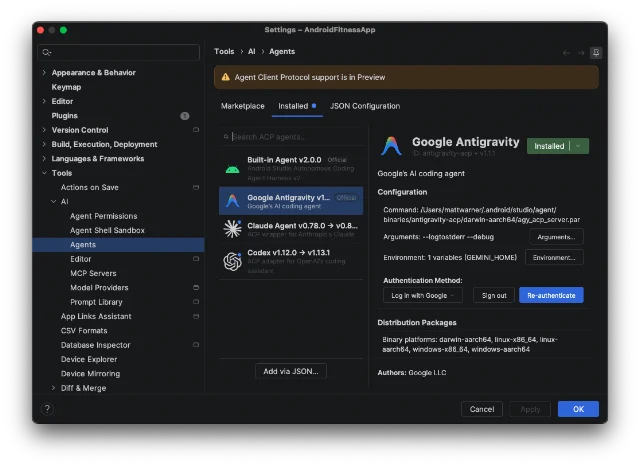
- Agent Registry Access: Navigate to the "AI Agents" tab within the settings menu. Here, you will see a list of pre-verified providers including Anthropic, OpenAI, and Google.
- Authentication: Select your preferred agent. You will be prompted to input your API key or authenticate via your organization’s OAuth provider.
- Context Configuration: Once connected, the agent will perform an initial scan of your project. You can designate specific folders for the agent to monitor, ensuring it has the necessary context to perform high-level refactors.
- Execution: Use the agent command palette (shortcut:
Cmd/Ctrl + I) to issue prompts, such as "Implement a ViewModel for this UI" or "Optimize these database queries."
Conclusion: A New Dawn for Android Developers
The "Bring Your Own Agent" initiative is more than just a software update; it is a declaration that the future of Android development is collaborative, modular, and AI-first. By dismantling the barriers between the developer and their preferred AI tools, Google is empowering the community to define what the next generation of mobile applications will look like.
As developers begin to experiment with these powerful new capabilities, the focus will inevitably shift from "how do I write this code?" to "what can I build with this level of automated assistance?" The potential for innovation is limited only by the imagination of the engineer. Whether you are a solo developer looking to scale your output or an enterprise team managing millions of lines of code, the tools are now in your hands—or rather, at the end of your prompts.
We encourage all developers to test these agents, monitor their performance against their specific project needs, and provide feedback through the official channels. The era of agentic Android development has arrived, and it is more open, more flexible, and more powerful than ever before. What will you build?