The Dawn of Googlebook: Transforming the Android Ecosystem into a Desktop Powerhouse
The computing landscape is undergoing a tectonic shift. For over a decade, Android has been the undisputed king of mobile, powering billions of smartphones and tablets. Now, Google is bridging the gap between mobile agility and desktop productivity with the introduction of Googlebook, a new category of laptops built on a shared Android foundation.
By unifying high-performance hardware from industry titans—including HP, Dell, Lenovo, Acer, and Asus—with the flexibility of the Android OS, Google is creating a seamless continuum for users. Whether you are drafting a document on your phone during a commute or finalizing a presentation on a high-resolution OLED laptop, the experience is no longer fragmented. It is fluid, intelligent, and, most importantly, deeply integrated.
The Core Fundamentals: What is Googlebook?
Googlebook is not merely a laptop running Android; it is a specialized platform designed to bring the "mobile-first" philosophy to the "desktop-first" environment. These devices are engineered for the modern power user, featuring precision-tuned trackpads, dedicated physical keyboards, and the integration of Gemini Intelligence at the OS level.

The technical architecture is built on the concept of a shared Android core. This allows developers to maintain a single codebase that scales elegantly across diverse device postures—from the compact screen of a smartphone to the expansive, high-resolution canvas of a laptop. For the end user, this means that an app optimized for a foldable phone automatically "knows" how to behave when it moves to a Googlebook, reflowing its interface to leverage the extra screen real estate without requiring a separate app installation.
Chronology of an Ecosystem Shift
The path to Googlebook was not an overnight endeavor. It is the culmination of years of strategic development within the Android ecosystem:
- 2021–2022: The Foundation of Adaptivity. Google introduced "Window Size Classes," teaching developers to build for "available space" rather than fixed screen dimensions. This was the first step toward breaking the mobile-centric shackles of app design.
- 2023: The Rise of Large Screens. With the proliferation of foldables and tablets, Google pushed for "multi-pane architecture," encouraging developers to adopt layouts that display more information simultaneously.
- Early 2024: The Desktop Experiment. Google refined its multi-windowing and keyboard-input support, laying the groundwork for free-form desktop windowing.
- Late 2024: The Official Launch. Google unveiled the Googlebook initiative, partnering with major OEMs to bring the platform to market, backed by a comprehensive suite of developer tools, including Android Studio Canary and AI-assisted layout migration.
Supporting Data: Why Developers Should Care
The economic incentive for developers to "desktop-optimize" their applications is significant. Google Play has implemented a rigorous curation strategy to highlight these titles. Apps that meet specific quality standards for large screens are awarded dedicated badging, which signals to users that the app is reliable, high-performing, and designed for their specific hardware.

Key Performance Metrics:
- Visibility: Optimized apps are featured on curated Google Play homepages, leading to higher conversion rates for installations.
- The Apps Experience Program: Developers who meet the high-quality threshold are eligible for the Apps Experience Program, unlocking a favorable rate card designed to incentivize sustained business growth.
- Day-One Presence: When a user sets up a new Googlebook, the system analyzes their Android phone’s app list. Optimized apps are surfaced during the setup process, ensuring that your application is one of the first things a user interacts with on their new laptop.
Bridging the Gap: The Technical "How-To"
The most compelling aspect of the Googlebook platform is that it does not demand a complete rebuild of existing applications. The transition relies on Adaptive Development.
Designing for Desktop Fundamentals
On a laptop, the user’s cognitive expectations change. They move from "snackable" interactions to "deep work." To succeed, developers must shift their focus from simple mobile layouts to information-dense architectures.
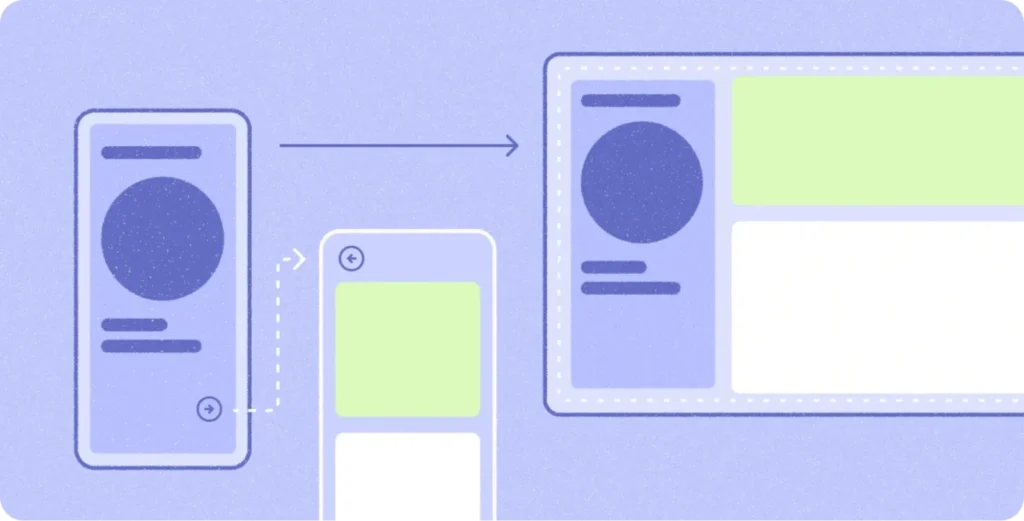
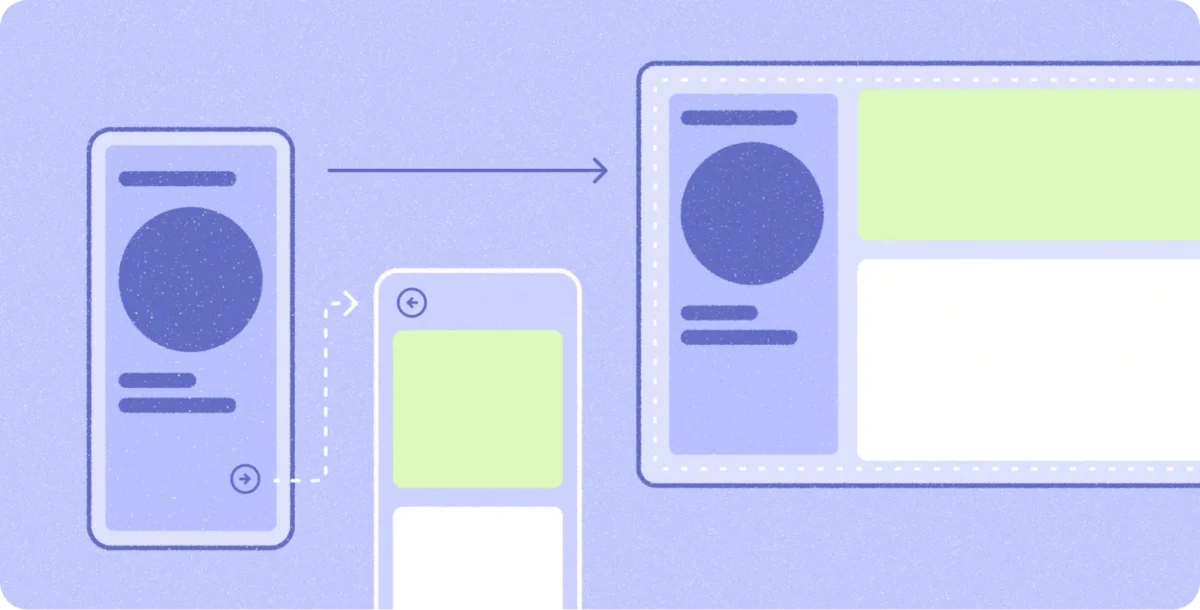
- Multi-Pane Architecture: Utilize
ListDetailSceneStrategyandSupportingPaneSceneStrategyvia Navigation 3. This allows apps to transform from a single list on a phone into a side-by-side view on a laptop, where the list resides on the left and the detailed content populates the right. - Precision Input: Mobile apps designed for thumbs fail on laptops. Developers must integrate contextual cursors, hover states, and keyboard shortcuts. The
Keyboard Shortcuts Helperis now an essential tool for surfacing these functions to the user. - Free-Form Windowing: Unlike mobile, where apps are usually full-screen, Googlebooks allow for fluid resizing. Using
window size classesensures that your app’s layout remains stable as the user drags the window corner.
The Role of AI in Migration
Google is aggressively lowering the barrier to entry. Through the use of Adaptive Skills accessible via the Android CLI, developers can now use AI to help refactor existing mobile layouts into responsive Compose containers. This automation reduces the "grunt work" of UI migration, allowing teams to focus on high-value desktop-specific features like drag-and-drop file transfers and multi-instance window support.

Official Perspectives: The Notability Case Study
To understand the practical application of these tools, one need only look at Notability, the popular note-taking app. According to Ryan Shea, Android Engineering Manager at Notability, the team found the transition remarkably smooth.
"We had already been targeting first-class experiences for tablets and foldables," Shea noted. "By the time Googlebook came along, scaling Notability up to a laptop-class experience was mostly turning a dial we had already built."
Shea highlights that the real opportunity isn’t just in making the app "fit" the screen, but in utilizing platform-specific features like "Continue On." This allows a user to write a note on their phone and, through a seamless handoff, open the exact same note—at the exact same scroll position—on their Googlebook. This is the "differentiated experience" Google is banking on to win over power users.

The Implications: A New Era for Professional Android
The arrival of Googlebook changes the value proposition of the Android ecosystem in several profound ways.
1. The Death of the "Mobile-Only" Mindset
Developers who ignore the desktop form factor risk irrelevance. As users shift their workflows to laptops, the apps that stay on the home screen are those that provide a "full-stack" experience—from quick mobile tasks to deep desktop productivity.
2. Standardized Ecosystem Quality
By enforcing desktop design principles, Google is effectively raising the bar for the entire Play Store. The "Optimized for Desktop" badge acts as a trust signal. This competition will likely force developers to improve their UI/UX even on smaller devices, as they incorporate more robust navigation and layout strategies.

3. Productivity as a Growth Engine
The inclusion of Gemini Intelligence and multi-instance support positions Googlebook as a legitimate competitor to traditional Windows and macOS productivity environments. If an app can handle complex drag-and-drop tasks, multi-window document comparison, and offline-first performance, it becomes a professional-grade tool.
4. Hardware and Software Synergy
For the first time, Google is exerting "Apple-like" control over the ecosystem’s hardware-software marriage. By setting standards for trackpad interaction, keyboard layouts, and window management, Google ensures that the experience is consistent whether the user chooses a budget-friendly Acer or a premium HP device.
Conclusion: The Road Ahead
The Googlebook initiative is a bold admission that mobile devices have reached a plateau in their ability to handle high-intensity professional tasks. By expanding the Android footprint into the laptop space, Google is ensuring that the ecosystem remains the primary digital home for its users, regardless of what device they are holding.

For developers, the message is clear: The "desktop" is no longer a separate target. It is simply the next step in the evolution of your existing Android application. With the tools provided in the Android Studio Canary, the guidance of the desktop design principles, and the AI-driven migration paths, the effort required to make your app "Googlebook-ready" is lower than it has ever been.
As the first wave of Googlebooks reaches consumers, the apps that provide the most seamless transition between phone, tablet, and laptop will inevitably capture the lion’s share of the market. The transition has begun—and for those who embrace adaptive design, the possibilities are boundless.