Back from the Brink: The Remarkable Revival of Angular’s ngx-daterangepicker-material
By Tech & Development Desk
Published: October 2026
Introduction: Main Facts
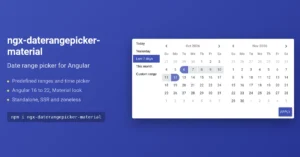
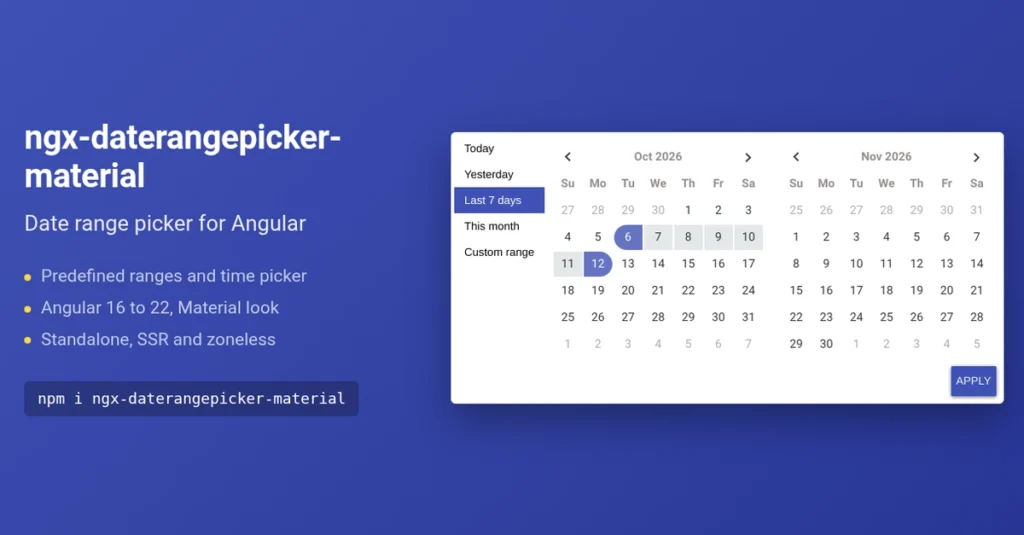
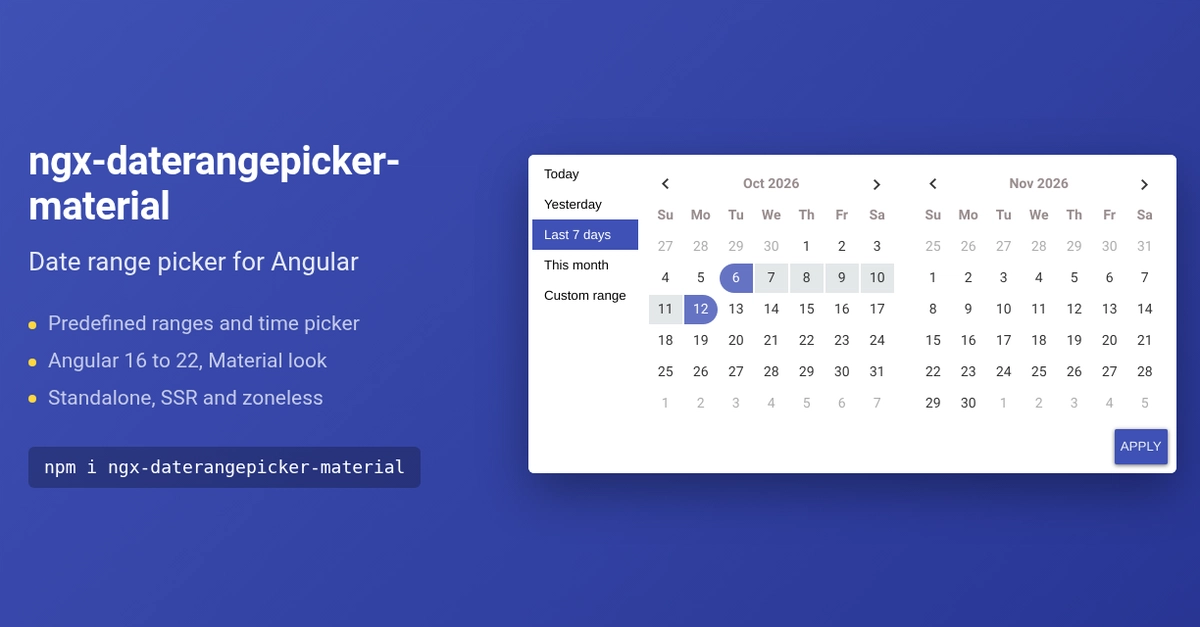
For developers building enterprise dashboards, data-heavy administration panels, or custom reporting tools, a reliable date range picker is an absolute staple of the user interface. Among the vast ecosystem of Angular component libraries, ngx-daterangepicker-material long held a premier reputation. Boasting an impressive average of roughly 250,000 downloads a month on npm, the package offered developers a seamless blend of Material Design aesthetics, optional time-selection capabilities, and crucial out-of-the-box predefined date ranges ("Today," "Last 7 Days," "This Month").
However, for nearly three and a half years, the project entered an ominous state of digital limbo. Following the release of version 6.0.4 in October 2022, all development flatlined. No new features were rolled out, compatibility updates for burgeoning modern Angular versions were nonexistent, and the repository ballooned to nearly 200 unaddressed open issues. Developers relying on the package faced a growing sense of unease, frequently leaving comments asking the quintessential open-source question: "Is this project alive?"
The definitive answer, as of 2026, is a resounding yes. Following a comprehensive maintenance overhaul, the library has officially roared back to life, aligning its versioning directly with modern Angular releases up to version 22. This comprehensive revival report details why the project stalled, how it was successfully resuscitated, how it stacks up against competing alternatives, and what developers need to know to safely upgrade.
Chronology: The Rise, The Stall, and The Resurgence
To understand the current state of ngx-daterangepicker-material, one must look at the timeline of its lifecycle—marked by rapid adoption, an understandable human burnout phase, and a methodical technical recovery.
Phase 1: The Initial Glory Days and Sudden Silence
After capturing the attention of the Angular community with its lightweight implementation and highly intuitive UI design, the library quickly scaled to a quarter-million monthly downloads. It solved a very specific gap in the market by offering intuitive range selections wrapped in a familiar Material-inspired wrapper.
Then came October 2022. Version 6.0.4 dropped, and suddenly, the repository went dark. According to the maintainer, there was no catastrophic drama or sudden abandonment out of malice; rather, it was the classic open-source casualty: a profound lack of time compounded by mounting psychological weight.
Phase 2: The Snowball Effect of Technical Debt
In a candid retrospective, the project maintainer detailed the anatomy of open-source burnout. At first, a few months passed without attention. During that vacuum, new bug reports, feature requests, and compatibility questions piled up. Upon returning to the repository, the sheer volume of the backlog felt overwhelming—each open issue represented a psychological debt.
Compounding the human element was the technical degradation of the codebase. Continuous Integration (CI) pipelines began to fail. A clean checkout failed to build out of the box, modern versions of the Google Chrome browser broke test execution pipelines, and automated demo deployments crashed. Fixing each isolated issue demanded hours of focused debugging that the maintainer simply did not have. Consequently, the task was deferred repeatedly until the project hovered dangerously close to permanent abandonment.
Phase 3: The 2026 Return to Code
The turning point arrived when the maintainer shifted strategy. Instead of immediately tackling the insurmountable mountain of user issues, they focused entirely on fixing the foundational, unglamorous infrastructure: the build pipeline, the testing suites, the CI workflows, and the automated demo environments. Once the core engineering engine was repaired and passing green, confronting the backlog transformed from an impossible psychological hurdle into an achievable engineering workflow.
Supporting Data: Feature Analysis and Technical Ecosystem
For developers weighing whether to integrate or retain ngx-daterangepicker-material in their production stacks, an objective feature and architectural breakdown highlights why the library remains uniquely positioned in the Angular ecosystem.
How the Library Operates
At its core, the library functions via an intuitive directive attached directly to a standard HTML input element:
<input ngxDaterangepickerMd
       [ranges]="ranges"
       [timePicker]="true"
       [(ngModel)]="selected" />
Data handling relies on dayjs dates, returning a clean, immutable object structure containing startDate, endDate . For business applications, this eliminates the friction of users manually clicking through individual calendar days to specify analytical windows.
Version Alignment Strategy
In its modern incarnation, the package has adopted a strict version-parity model with the Angular framework itself:
- Package v16 supports Angular 16.
- Package v17 supports Angular 17.
- This direct lineage extends smoothly up to v22, allowing engineering teams to instantly identify compatibility based on the major version number.
Comparative Analysis: Why Not Angular Material’s Native Picker?
A frequent question raised by enterprise architects is why developers don’t simply default to the native Angular Material date range picker. While Angular Material offers a robust, officially supported component, it inherently lacks critical enterprise-grade conveniences:
- Predefined Ranges: Native Material offers no built-in presets. While developers can construct custom calendar headers, doing so requires writing and maintaining bespoke UI logic.
- Range Time Selection: The native Material timepicker is strictly designed for single date instances rather than fluid range intervals.
- Input Architecture: Native Material relies on a dual-input structure, whereas
ngx-daterangepicker-materialunifies range selection into a single input field capable of handling direct typing or calendar clicks.
Furthermore, ngx-daterangepicker-material does not depend on @angular/material. It merely mimics its aesthetic, allowing it to integrate cleanly alongside Material component suites or function entirely independently in non-Material applications.
UI Component Feature Matrix
| Library | Native Presets | Time Selection on Ranges | External UI Kit Dependency |
|---|---|---|---|
| ngx-daterangepicker-material | Yes | Yes | No (Standalone aesthetic) |
| Angular Material | No (Requires custom code) | No | Angular Material required |
| ngx-bootstrap | Yes | Yes | Bootstrap required |
| ng-zorro | Yes | Yes | Ant Design required |
| PrimeNG | No (Requires custom templates) | Yes | PrimeNG required |
Official Responses and Maintainer Insights
The resurrection of the library offers vital lessons regarding the psychological and structural realities of open-source software maintenance.
Reflecting on the experience, the maintainer shared a profound operational insight: “I thought bringing the project back would need a big plan and a rewrite. It didn’t. It needed someone to answer the issues, one by one, and to ship small releases often. People are very patient with an open source project, as long as someone is there.”
Tackling the Backlog
Upon returning to the repository, every historical issue—dating as far back as 2018—was systematically evaluated. Chronic bugs, including timezone shifts, inaccurate month rendering, calendar popups clipped by mat-form-field constraints, and missing event triggers, were addressed.
Crucially, the test coverage was heavily expanded. While the legacy library featured virtually zero automated tests, the modern codebase incorporates roughly 140 robust unit tests. Today, open issues are actively managed, and new community bug reports receive prompt triage and developer interaction.
Implications for Developers and the Enterprise
With the release of version 22.2, the implications for the Angular developer community are substantial, particularly for teams currently tethered to legacy versions.
The Migration Challenge from v6
Market data indicates that approximately 70% of current installs remain anchored on version 6.0.4. Because semantic versioning constraints ("^6.0.4" in package.json) prevent these projects from automatically migrating to modern major releases, developers must explicitly target the version matching their current Angular environment:
npm install ngx-daterangepicker-material@22 # For Angular 22 applicationsBreaking Changes and Improvements
While the public API remains largely consistent (NgxDaterangepickerMd.forRoot(), alongside familiar inputs and outputs), several under-the-hood behaviors have drastically improved:
- Timezone Accuracy: Emitted dates now correctly reflect native local dates. Engineering teams that previously implemented custom patches or code workarounds to correct timezone shifts during v6 usage are advised to strip out those legacy hacks.
- Modern Angular Paradigms: The latest iterations feature robust out-of-the-box support for standalone components, Server-Side Rendering (SSR), and zoneless Angular applications. Initialization has also been simplified via standard
ng addschematics.
Looking Ahead: Version 23 Roadmap
Looking forward, the roadmap for version 23—slated for release alongside Angular 23—promises even deeper architectural modernization. Planned features currently tracked in pinned repository issues include:
- Introduction of
provideDaterangepicker()configuration for modern standalone applications. - Adoption of native Signal inputs.
- Enhanced keyboard accessibility support.
- Integration of the Angular CDK Overlay for popup management, completely resolving historical clipping issues caused by
mat-form-fieldelements.
Conclusion
The story of ngx-daterangepicker-material serves as an inspiring case study in open-source resilience. By confronting technical debt methodically, upgrading through major framework iterations with rigorous browser validation, and restoring active communication channels, the maintainer has successfully rescued a vital tool from obsolescence.
For enterprise engineering teams looking to upgrade their applications to modern Angular architectures without sacrificing specialized UI conveniences like predefined date ranges and range-level timepickers, the library is officially back, fully supported, and ready for production deployment.