Comprehensive Security Audit: An In-Depth Review and Analysis of Acunetix Web Vulnerability Scanner (WVS)
Introduction and Main Facts
In the contemporary digital landscape, web applications and online platforms serve as the central nervous system for modern enterprises. As organizations increasingly migrate their operations, customer service touchpoints, and financial transactions to the web, the digital attack surface expands exponentially. Malicious actors continuously devise sophisticated methods to infiltrate these web layers, seeking to siphon sensitive corporate assets, compromise user data, and disrupt vital services.
To combat this escalating threat landscape, automated security auditing tools have evolved from optional add-ons into critical components of the standard Software Development Life Cycle (SDLC). At the forefront of this defensive technology is the Acunetix Web Vulnerability Scanner (WVS), an industry-standard automated web application security testing tool. Designed to root out catastrophic vulnerabilities such as SQL Injection (SQLi), Cross-Site Scripting (XSS), and the broader OWASP Top 10 security risks, Acunetix WVS operates as a rigorous, autonomous black-box auditing system. By mimicking the behavior of real-world attackers, the software evaluates web infrastructure without prior knowledge of its internal architecture, delivering actionable reports and concrete remediation guidance to security teams and developers alike.

Chronology and Hands-On Evaluation: Navigating the Scan Lifecycle
To understand how Acunetix WVS performs in real-world scenarios, a hands-on technical walkthrough reveals the structured chronological stages an auditor or developer follows during a routine security assessment.
Step 1: Initiating the Scan Wizard
The scanning process begins with simplicity in mind. Users access the main toolbar and click the New Scan button to launch the Scan Wizard. This interface guides the operator through necessary customization phases, starting with the target selection. For testing and demonstration purposes, platforms like Acunetix’s dedicated PHP test environment (http://testphp.vulnweb.com) provide a safe playground to evaluate the tool’s effectiveness.

Step 2: Configuring Scanning Profiles and Settings
Once the target URL is established, operators select a Scanning Profile. These profiles represent logical groupings of specific security tests designed to target precise vulnerabilities. While the Default profile executes every available test suite, users aiming for efficiency can customize profiles to target high-risk alerts exclusively.
Beyond pre-set profiles, Scan Settings offer granular control over network behavior. For instance, enterprises operating behind corporate HTTP proxies can configure routing details seamlessly. Advanced options further allow users to crawl and scan specific directories, exclude redundant pages, or import traffic logs from third-party tools like PortSwigger’s Burp Suite, Telerik’s Fiddler, or the built-in Acunetix HTTP Sniffer.

Step 3: Technology Fingerprinting and Optimization
To conserve bandwidth and reduce scan durations, Acunetix WVS performs intelligent technology fingerprinting. By identifying the underlying web framework—whether it is PHP, ASP.NET, Ruby on Rails, or a popular Java platform—the engine dynamically prunes irrelevant test vectors. For example, when auditing a native PHP application, the scanner bypasses security checks exclusive to Microsoft ASP.NET environments, streamlining the audit without sacrificing depth.
Step 4: Navigating Authenticated Areas via Login Sequences
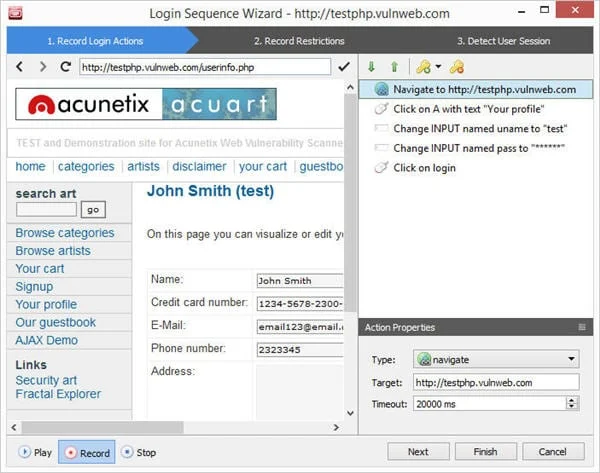
Modern web applications require users to authenticate before accessing sensitive data, presenting a traditional bottleneck for automated scanners. Acunetix WVS addresses this challenge using the Login Sequence Recorder.

Operators can record their browser actions while logging into a target application. The scanner subsequently replays these recorded interactions to maintain an active session during the crawl and audit phases. To ensure stability, the recorder allows users to restrict specific links—such as Logout buttons or one-time tokens (nonces) managed through wildcards—preventing the scanner from accidentally terminating its own session. Furthermore, the recorder captures a Session Pattern, a unique digital fingerprint distinguishing authenticated states from logged-out states, ensuring continuous validation throughout the assessment.
Supporting Data: Advanced Engines and Technical Capabilities
The efficacy of Acunetix WVS relies on its sophisticated underlying architecture, featuring specialized engines designed to tackle modern web complexities.

The DeepScan Engine for AJAX and JavaScript
As modern web applications transition toward heavy client-side rendering frameworks utilizing AJAX, HTML5, and complex JavaScript, traditional crawlers often fail to parse dynamic content. Acunetix integrates an innovative DeepScan engine—a fully functional headless browser embedded directly within the crawler.
This headless browser grants the scanner complete visibility into the Document Object Model (DOM). It enables the tool to execute, interact with, and analyze JavaScript-heavy environments, achieving high accuracy in detecting DOM-based XSS vulnerabilities. To assist developers with swift remediation, the scanner provides a detailed stack trace mapping the precise path of the XSS payload through the browser’s DOM structure.

Interactive Application Security Testing (IAST) via AcuSensor
While black-box scanners operate externally without code visibility, and static source code analyzers struggle with runtime execution behaviors, Acunetix bridges this gap through AcuSensor.
AcuSensor is an optional server-side component available for PHP and .NET applications. By installing this sensor, the audit transitions into Interactive Application Security Testing (IAST). For .NET environments, deployment is frictionless; administrators can inject or un-inject the sensor directly within precompiled DLLs without requiring recompilation.

With backend visibility, AcuSensor exposes vulnerabilities hidden deep within the application architecture that standard black-box scanners might miss. For instance, while typical tools identify SQL injections primarily through error messages or blind injection techniques, AcuSensor detects injection flaws across all SQL queries, including internal INSERT statements. Crucially, AcuSensor pinpoints the exact file name and line of code responsible for the vulnerability, radically accelerating the debugging process.
Second-Order Vulnerability Detection via AcuMonitor
Complex vulnerabilities often manifest indirectly through secondary actions where immediate system responses are absent. These "second-order" threats include:

- Blind Cross-Site Scripting (Delayed XSS)
- XML External Entity Injection (XXE)
- Server-Side Request Forgery (SSRF)
- Host Header Attacks and Email Header Injection
- Password Reset Poisoning
- Blind Out-of-Band SQL Injection and Remote Code Execution
To detect these elusive flaws, Acunetix incorporates AcuMonitor, a cloud-based intermediary service operating transparently in the background. By routing controlled payloads through AcuMonitor, the scanner effortlessly tracks out-of-band callbacks, enabling the automated discovery of vulnerabilities that evade standard synchronous testing methods.
Official Responses and Remediation Frameworks
Identifying vulnerabilities is only half the battle; remediating them efficiently determines an organization’s overall security posture. Acunetix WVS approaches remediation through structured data presentation and iterative validation tools.

Comprehensive Vulnerability Reporting
When a scan concludes, Acunetix classifies and presents high-severity findings alongside detailed attack variations. Selecting a specific vulnerability—such as an SQL injection—reveals the affected input parameter, the exact attack payloads used, and a comprehensive impact summary.
To accommodate various enterprise stakeholders, the built-in Reporter generates tailored documentation:

- High-Level Overviews: The Executive Summary, Quick Report, and Affected Items reports provide concise metric overviews for leadership teams.
- Compliance Standards: Organizations bound by regulatory frameworks can generate dedicated compliance reports mapped to the OWASP Top 10, PCI-DSS, HIPAA, and other global security standards. These templates update periodically to align with evolving regulatory mandates.
- Developer Reports: The most granular document type available, providing engineers with precise technical specifications, remediation steps, reference URLs, and code snippets. Reports can be exported seamlessly into PDF or HTML formats for distribution across engineering squads.
Automated Retesting
Verifying whether a security patch has successfully neutralized a threat is traditionally time-consuming. Acunetix WVS streamlines this workflow through its native Retest feature.
Security personnel can right-click any resolved alert within the interface and select Retest alert(s). The software re-runs the specific validation vectors associated with that flaw. If the vulnerability has been successfully mitigated, Acunetix updates the interface by marking the item in a grey, strike-through font, eliminating the need to execute full system scans from scratch.

Implications for Enterprise Security and Development Lifecycles
The integration of robust vulnerability scanning tools like Acunetix WVS carries profound implications for modern software development and organizational risk management.
- Shift-Left Security: By incorporating automated vulnerability scanning and IAST sensors (AcuSensor) directly into the development pipeline, organizations can identify and neutralize critical bugs before code reaches production environments. This proactive posture drastically reduces the financial and reputational costs associated with enterprise data breaches.
- Bridging the Dev-Sec Gap: Detailed developer reports, precise line-of-code identification, and actionable remediation guidelines dismantle communication barriers between security auditors and software engineers. Security shifts from an obstructive gatekeeper to an integrated collaborative partner.
- Regulatory Compliance Assurance: With automated mapping to rigorous standards such as PCI-DSS and HIPAA, businesses can maintain continuous audit readiness, mitigating the risk of severe legal penalties and loss of customer trust.
Conclusion and Availability
Acunetix Web Vulnerability Scanner combines deep technical sophistication with an intuitive, user-friendly interface. Whether deployed on-premises or utilized via online cloud options (Acunetix OVS), the platform provides a complete ecosystem for automated scanning, manual verification, and regulatory compliance reporting. Organizations seeking to evaluate their web defense mechanisms can leverage available 14-day trial programs to experience the platform’s comprehensive auditing capabilities firsthand.