Illuminating the IoT Era: Building a Distributed NeoPixel Lighting System with Wi-Fi Control
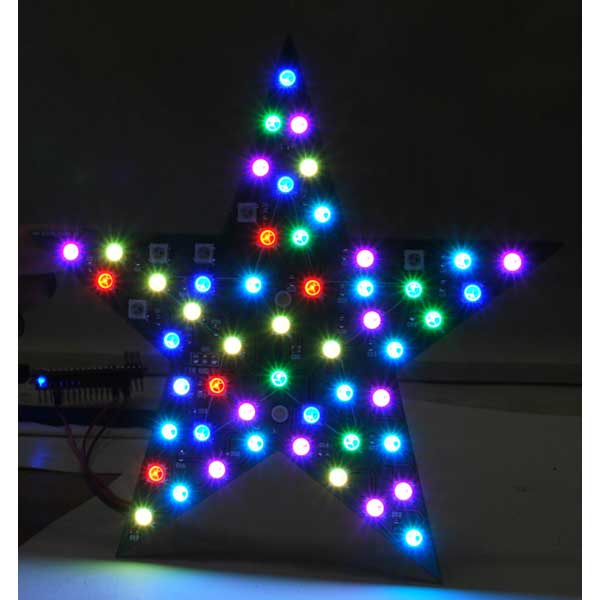
The landscape of modern lighting has undergone a radical transformation since the introduction of addressable RGB LEDs. At the forefront of this evolution is the NeoPixel—a technology that moved beyond simple illumination to become a fundamental building block for interactive art, home automation, and professional-grade light installations. By integrating a dedicated controller within each individual LED, Adafruit Industries empowered creators to manage complex color sequences and intricate patterns with minimal wiring.
However, as projects scale from a single desk-lamp to entire home-wide installations, the limitations of traditional microcontrollers become apparent. Static, hard-coded animations often tether systems to local hardware, necessitating tedious manual updates for every change in design. This article details a sophisticated, distributed system that leverages Fishino Guppy and NodeMCU boards to control NeoPixel installations over Wi-Fi, orchestrated by a centralized Python-based controller running on a PC or a Raspberry Pi.
Main Facts: The Architecture of Distributed Light
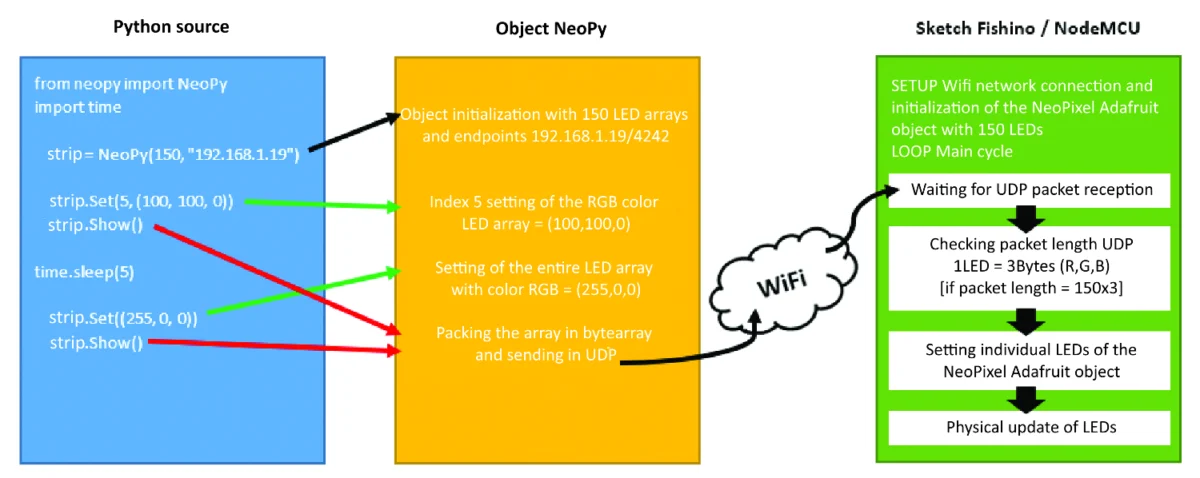
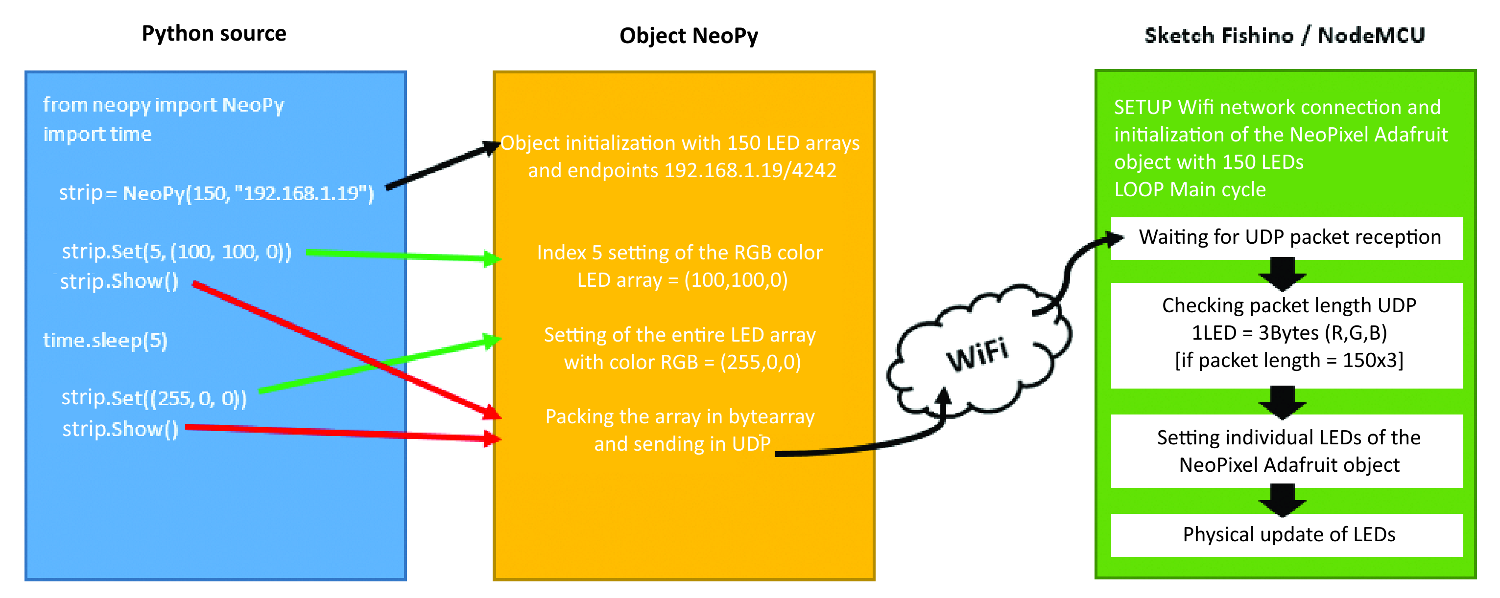
The core objective of this project is to decouple the animation logic from the physical LED driver. By utilizing the ESP8266-based Fishino Guppy and NodeMCU platforms, we enable remote, wireless control of disparate lighting nodes. The system architecture functions through a client-server relationship:
- The Controller: A Python-based software library (
NeoPy) serves as the "brain," capable of running on any system supporting Python 3. It generates color data and transmits it via User Datagram Protocol (UDP). - The Nodes: The microcontrollers act as endpoints. They listen for incoming UDP packets, translate the binary data into specific color values for each LED in the chain, and execute the physical lighting update.
- The Transport: UDP was chosen for its low latency. Unlike TCP, which prioritizes packet delivery confirmation—often resulting in perceptible "lag" in high-speed animation—UDP prioritizes speed, ensuring that rapid color transitions remain fluid and synchronized.
This setup eliminates the need to re-flash firmware whenever a user wishes to modify an animation, effectively turning any static installation into a dynamic, software-driven display.
Chronology of Development
The development of the NeoPy framework followed a modular progression to ensure stability and scalability:
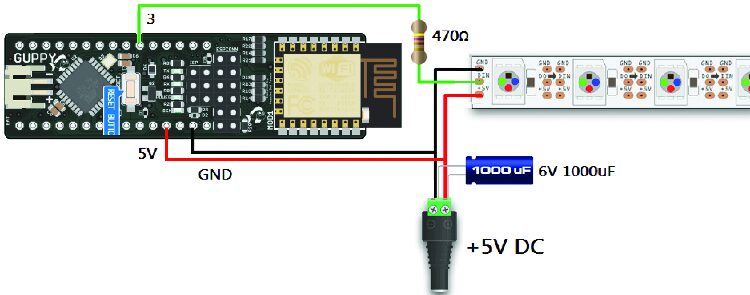
- Phase 1: Hardware Prototyping: The initial stage involved validating the power requirements. Given that each NeoPixel can draw up to 60mA at full white brightness, a 5-meter, 150-LED strip requires a robust 9A power supply. Careful attention was paid to the integration of 470-ohm resistors and 1,000µF capacitors to mitigate voltage spikes and signal interference.
- Phase 2: Firmware Standardization: The development of the Arduino-based sketches for Fishino and NodeMCU was the next hurdle. Both boards required configuration to handle Wi-Fi handshakes and UDP socket listening.
- Phase 3: Library Abstraction: The creation of the
NeoPylibrary allowed for a user-friendly API. Commands likeSet(),SetAll(), andWheel()abstracted the complex bit-shifting required to send RGB data to the hardware. - Phase 4: Deployment and Automation: Finally, the system was moved from a desktop environment to a headless Raspberry Pi, utilizing
crontabto schedule animations, thereby achieving a truly autonomous "set-and-forget" lighting installation.
Supporting Data: Technical Specifications and Requirements
To ensure the success of this build, users must adhere to specific technical standards. The system components are as follows:
| Component | Role | Notes |
|---|---|---|
| 5m NeoPixel Strip | Lighting Medium | 150-LED count, WS2812B compatible. |
| Fishino Guppy / NodeMCU | Wireless Controllers | ESP8266-based for Wi-Fi connectivity. |
| 5V Power Supply | Power Source | Minimum 50W capacity required for stability. |
| Logic Level Converter | Signal Integrity | Essential for NodeMCU (3.3V logic) to 5V LEDs. |
| Raspberry Pi | Central Hub | Low-power, 24/7 Python execution. |
The Power Equation
Precision in power management is non-negotiable. A miscalculation in current capacity leads to voltage drops, which cause the "far end" of an LED strip to dim or flicker. By using high-quality 5V power supplies and properly placing decoupling capacitors, the system remains stable even during peak brightness demands.
Official Guidelines for Implementation
Preparing the Development Environment
The setup process begins with the Arduino IDE. Users must install the ESP8266 board manager via the http://arduino.esp8266.com/stable/package_esp8266com_index.json URL. Once the board support package is installed, the Adafruit_NeoPixel library must be imported to handle the timing-sensitive data signals required by the WS2812B protocol.
Logic Level Conversion
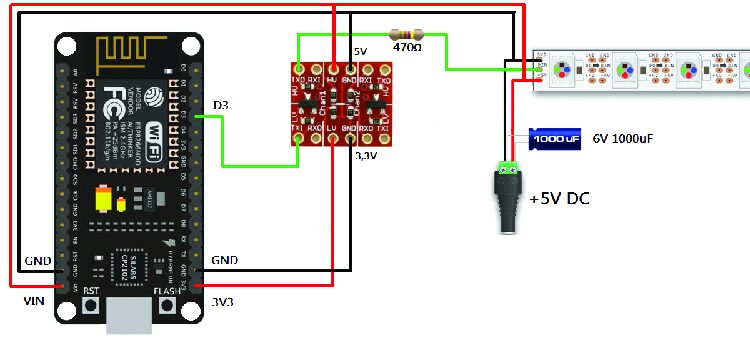
A critical technical nuance involves the NodeMCU board. Operating at 3.3V, the NodeMCU is incompatible with the 5V data requirements of the NeoPixel strips. The use of an LLCTTL logic level converter is mandatory to translate the signal, preventing potential data corruption or damage to the first LED in the chain.
The Python Controller
The NeoPy library simplifies interaction. By creating an instance of the NeoPy class with the target board’s IP address, the user gains direct control:
stella = NeoPy(56, "192.168.1.3")
stella.SetAll((0, 255, 0)) # Turn all green
stella.Show()
This simplicity allows users to script complex, multi-stage animations that would be impossible to code efficiently within the memory constraints of an Arduino-style microcontroller.
Implications: The Future of Smart Environments
The implications of this system extend far beyond decorative lighting. By establishing a framework where lighting nodes are addressable over Wi-Fi, the user creates a localized "Internet of Lights."
1. Enhanced Home Automation
The integration with crontab on a Raspberry Pi transforms the system into an automated environmental tool. Lights can be scheduled to mimic the color temperature of the sun, shifting from cool blue in the morning to warm amber in the evening, aligning with human circadian rhythms.
2. Presence Simulation
Security is a key implication. By scripting randomized patterns across multiple rooms, the system can simulate occupancy while the home is empty, providing a significantly more convincing deterrent than standard mechanical timers.
3. Sensory Feedback and Integration
Because the system is controlled by Python, it is inherently extensible. A developer could link the NeoPy library to other data streams. For instance, the LEDs could shift to red if a smart security sensor detects an open window, or pulse blue when an email arrives in a specific inbox. The lighting becomes an ambient dashboard for the home’s digital health.
4. Scalability and Future-Proofing
The choice of UDP as the communication protocol allows the network to grow. One could theoretically control hundreds of nodes simultaneously by broadcasting packets, limited only by the bandwidth of the local Wi-Fi network. This "node-based" approach ensures that if a single controller fails, the rest of the installation remains operational—a robustness that centralized, hard-wired systems lack.
Conclusion
The project presented here is more than just a method for flashing lights; it is a demonstration of how low-cost, off-the-shelf hardware can be repurposed through open-source software to create professional-grade automation. By leveraging the flexibility of Python and the ubiquity of Wi-Fi, the NeoPy system provides a pathway for enthusiasts to transition from simple hardware tinkering to building complex, software-defined ecosystems. Whether used for festive holiday displays or integrated into a permanent smart home architecture, this system provides the modularity and power required to bring any space to life.