Mastering TestLink: A Comprehensive Guide to Advanced Test Management, Requirements, and Execution (Part 2)
Introduction: Elevating Your QA Workflow
In the fast-paced world of software development, the efficiency of a Quality Assurance (QA) team is often defined by the robustness of their test management ecosystem. Following our introductory exploration of TestLink installation and basic test plan creation, this second installment of our tutorial series shifts focus toward the sophisticated operational capabilities of the platform.

TestLink is far more than a repository for test cases; it is an integrated management solution designed to bridge the gap between business requirements and final software delivery. By mastering features such as granular user role management, requirement traceability, structured test execution, and data-driven reporting, QA professionals can transition from simple execution to comprehensive quality oversight.

The Chronology of Effective Test Management
To leverage TestLink effectively, teams must follow a logical progression. The workflow begins with defining the environment—assigning the right people to the right tasks—followed by aligning the technical testing efforts with business-defined requirements. Only after these foundations are laid can a team move into the execution phase, culminating in the analytical phase of reporting and data migration.

1. User Management and Governance
Access control is the cornerstone of any secure enterprise tool. TestLink facilitates this through a tiered role-based access control (RBAC) system. By restricting or granting permissions, managers ensure that data integrity remains intact throughout the testing lifecycle.

Implementing User Roles:

- Initialization: Access the "Users/Roles" module via the primary navigation bar.
- Provisioning: Utilize the "Create" function to define new personnel profiles.
- Assignment: The "Assign Test Project Roles" and "Assign Test Plan Roles" tabs allow administrators to define scope. For example, a Junior QA analyst may be granted "Tester" rights to execute test cases, while a Senior Lead is assigned "Leader" or "Admin" roles to manage requirements and configuration settings.
2. Requirements Management: The Bedrock of Traceability
A common pitfall in software testing is the "disconnect" between what the business asks for and what the QA team verifies. Requirements management in TestLink solves this by allowing testers to map test cases directly to specific project constraints.

The Workflow for Requirements:

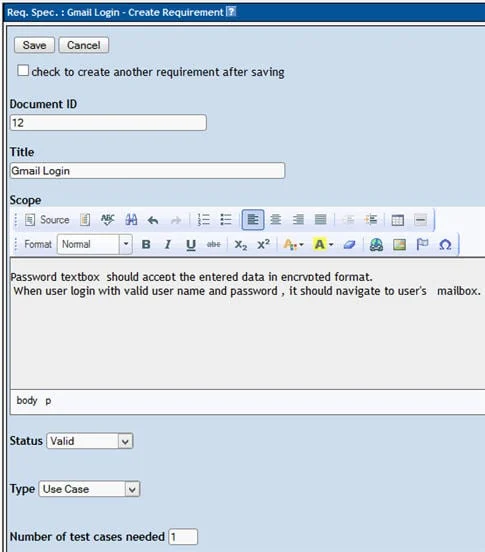
- Define: Within the "Requirements" section, define a Document ID, Title, and Description for each business need.
- Structuring: Organize these requirements into logical specifications on the left-hand panel.
- Traceability: Open a specific test case within the "Test Specification" module. Using the "Requirements" icon, you can link the test case to the corresponding business rule. This creates a powerful audit trail. When generating reports, this linkage allows stakeholders to visualize "Test Coverage," identifying gaps where requirements lack corresponding validation.
3. Executing Test Cases: The Practical Application
Execution is where the strategy meets the reality of the software build. TestLink categorizes execution status into clear, actionable states: "Passed," "Failed," and "Blocked."

- Process: Navigate to the "Test Execution" dashboard.
- Action: Select the specific test case from the hierarchy.
- Documentation: Once execution is complete, input your findings in the execution notes. This is crucial for developers; a "Failed" status without detailed notes or log attachments serves little purpose in a bug-tracking workflow.
- Persistence: It is vital to note that once a status is committed, the system prevents reverting to "Not Run." This ensures an accurate, historical audit of the test cycle’s progress.
Supporting Data: Why Integration Matters
The true power of TestLink lies in its ability to generate data-backed reports. These reports serve as the "evidence of testing" required for compliance, audits, and stakeholder updates.

Generating Analytical Reports:
The "Test Reports" module supports multiple formats, including HTML, MS Word, and Excel. By selecting specific metrics—such as execution status per user, requirement coverage, or defect trends—teams can provide management with a high-level overview of the product’s release readiness. The ability to visualize project health in real-time is the primary justification for utilizing a dedicated tool like TestLink over fragmented, manual spreadsheets.

Implications of Portability: Import/Export Operations
In modern agile or DevOps environments, infrastructure is rarely static. You may need to migrate a testing repository from an on-premises development server to a cloud-based testing environment.

The Export/Import Mechanism:

- Export: Select your test suites or individual cases, navigate to the settings menu, and choose "Export." TestLink bundles these into an XML format.
- Import: On the target server, select the destination folder, trigger the "Import" operation, and upload your XML file.
- Strategic Advantage: This feature effectively eliminates the redundant labor of recreating entire test libraries. It allows for the creation of "Golden Repositories" of test cases that can be shared across multiple project teams or geographically distributed testing hubs.
Professional Perspective: Beyond Manual Execution
While this tutorial has focused on the manual interface, it is essential to recognize the professional trajectory of TestLink. The platform is designed to be extensible. Its native support for an API means that testers are not tethered to the browser interface.

The industry standard is moving toward "Automated Test Reporting," where test frameworks (like Selenium or Playwright) execute suites and automatically report the pass/fail status back to TestLink via the API. This reduces the manual entry time to zero and ensures that the TestLink database remains a "Single Source of Truth."

Conclusion and Future Outlook
TestLink represents a mature, open-source solution that provides the structure necessary to scale software testing. By mastering the nuances of user rights, requirement traceability, and data portability, you transform your QA process from a reactive task to a proactive strategic function.

In the final part of this series, we will bridge the gap between manual management and modern automation. We will demonstrate how to write custom scripts to update TestLink status directly from Selenium WebDriver. Automating these repetitive updates is the final step in achieving a high-velocity testing pipeline.

Summary of Key Takeaways
- Access Control: Use role-based permissions to maintain data integrity and security.
- Coverage: Always link test cases to requirements to ensure 100% test coverage.
- Integrity: Maintain consistent documentation during test execution; notes are the primary communication channel for developers.
- Portability: Use XML imports/exports to maintain a reusable library of test assets across different server environments.
- Automation: View TestLink not just as a manual tracker, but as a database for your automated test results.
Stay tuned for our final installment, where we explore API integration and the future of automated test management.