The Definitive Guide to Functional Testing: Strategies, Techniques, and Automation
In the fast-paced world of software development, the difference between a market-leading product and a failed release often hinges on one critical factor: does the application actually do what it is supposed to do? This is the core mandate of Functional Testing, a pillar of the Software Development Life Cycle (SDLC) that ensures software behaves exactly as specified in the requirements.
As digital ecosystems grow in complexity, understanding the nuances of functional testing—ranging from manual verification to sophisticated automation—is no longer optional; it is a necessity for any quality assurance (QA) professional.
The Core Concept: What is Functional Testing?
At its essence, functional testing is a form of "black-box testing." The tester does not need to know the internal code structure; instead, the focus is entirely on the inputs and the resulting outputs. If a user clicks a "Submit" button, does the database record the entry? If an employee logs into an HR portal, are they granted access only with valid credentials?
Functional testing serves as the ultimate bridge between technical implementation and business intent. It validates that every feature—from simple buttons to complex workflows—aligns with the functional specifications document.

The Hierarchy of Testing
To understand the landscape, one must view functional testing within the broader context of software quality:
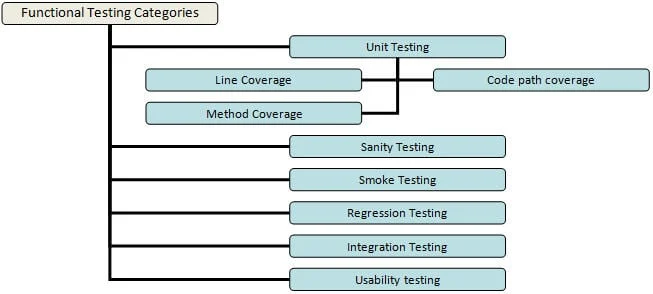
- Unit Testing: The microscopic view, where developers verify individual methods or components.
- Integration Testing: Ensuring that disparate modules communicate correctly.
- System Testing: Validating the application as a holistic, integrated entity.
- End-to-End Testing: Simulating a real-world user journey from start to finish.
Chronology of the Testing Process
A successful functional testing campaign follows a structured lifecycle. By adhering to a formal process, teams minimize the risk of "defect leakage"—where bugs escape into production.
1. Preparation (Entry Criteria)
Before testing begins, the environment must be stable. This includes:
- Requirement Analysis: Ensuring the Functional Specification Document (FSD) is clear and signed off.
- Environment Readiness: The test server must mirror production configurations.
- Test Data Availability: Valid, anonymized data sets must be ready for input.
2. Execution (The Testing Phase)
The actual testing is broken down into a repeatable rhythm:

- Test Case Authoring: Creating scenarios with defined inputs, expected outcomes, and actual results.
- Execution: Running tests—first manually to ensure the "happy path" works, then via automation for repetitive checks.
- Defect Logging: Any deviation from the expected outcome is documented with steps to reproduce, screenshots, and logs.
3. Closure (Exit Criteria)
Testing is not an infinite loop. It concludes when:
- All critical and high-priority test cases have been executed.
- No "Showstopper" bugs remain open.
- The application meets the exit criteria defined at the start of the project.
Supporting Data: Techniques for Precision
Testing every possible combination of data is mathematically impossible. Therefore, QA professionals use optimization techniques to maximize coverage while minimizing effort.
Equivalence Partitioning
Instead of testing every number, divide inputs into groups (partitions). If an age field accepts 18–65, you test one value from the valid range, one from below 18, and one from above 65. This reduces redundant tests.
Boundary Value Analysis (BVA)
Bugs most frequently lurk at the edges. If a password field requires 6 to 8 characters, BVA focuses on testing 5, 6, 7, 8, and 9 characters. This is where the system is most likely to fail.

Decision-Based Testing
This involves mapping logical outcomes. If "User is Admin" AND "Subscription is Active," THEN "Grant Access." Testing these logical branches ensures that business rules are strictly enforced.
Functional Test Automation: Balancing Speed and Quality
Automation is the engine of modern QA, but it is not a silver bullet. While it significantly reduces the time required for regression testing—the process of ensuring new code doesn’t break existing features—it requires a strategic approach.
When to Automate
Not every test is a candidate for automation. The ideal candidates are:
- High-frequency tests: Processes executed in every build (e.g., login, logout, navigation).
- Data-driven tests: Processes that require the same action with dozens of different data inputs.
- Stable features: Do not automate a feature that is still undergoing frequent UI changes.
The Pitfalls of Automation
A common mistake is "automating for the sake of automating." If a team forces automation on unstable, rapidly changing features, they will spend more time maintaining scripts than finding bugs. Furthermore, automation cannot replace Ad-hoc Testing, where a human tester uses intuition and "creative destruction" to find edge cases that scripted code might miss.

Implications: The Business Value of Quality
The cost of a bug discovered in production is often orders of magnitude higher than one discovered during the development phase. Functional testing acts as a financial safeguard for the organization.
The Human Element
Despite the rise of AI and sophisticated testing tools, the human tester remains irreplaceable. The ability to understand the user experience, empathize with customer pain points, and perform exploratory testing—testing that is not documented but guided by professional instinct—is a vital component of any robust quality strategy.
Integration with Non-Functional Testing
While functional testing asks, "Does the system work?" non-functional testing (performance, security, usability) asks, "How well does it work?"
- Performance: Will the system crash under a heavy load of 10,000 simultaneous users?
- Usability: Is the interface intuitive, or is the user getting lost in the navigation?
A product that is functionally perfect but crashes under pressure or is impossible to navigate will still fail. Therefore, the most successful projects are those that run functional and performance testing in parallel, ensuring a holistic standard of excellence.

Conclusion: Building a Culture of Quality
Functional testing is more than a checklist; it is the heartbeat of software reliability. Whether you are a developer writing unit tests, a manual tester conducting exploratory sessions, or an automation engineer building a robust framework, the goal remains the same: to deliver a product that is stable, reliable, and worthy of the user’s trust.
As the industry moves toward Agile and DevOps methodologies, the integration of continuous testing—where automated functional tests run at every code commit—will become the gold standard. By adopting the strategies outlined in this guide, teams can move from reactive bug-fixing to proactive quality assurance, ensuring that every release provides value, stability, and a seamless experience for the end user.
Key Takeaways for Teams:
- Start Early: Integrate testing into the requirements phase.
- Optimize Coverage: Use BVA and Equivalence Partitioning to work smarter, not harder.
- Balance: Maintain a healthy mix of manual and automated testing.
- Continuity: Always conduct regression testing to protect your existing features from "collateral damage" during updates.
Quality is not an accident; it is the result of intelligent effort. By prioritizing functional testing, organizations secure their reputation and build the foundation for long-term digital success.