The Return of the Finger: Immurok Reinvents Desktop Biometric Authentication for Power Users
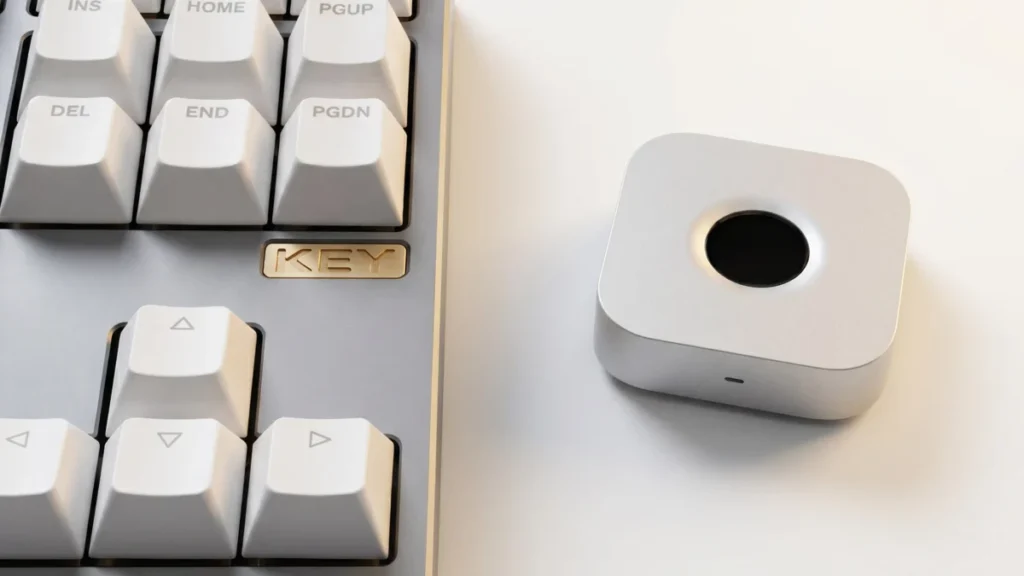
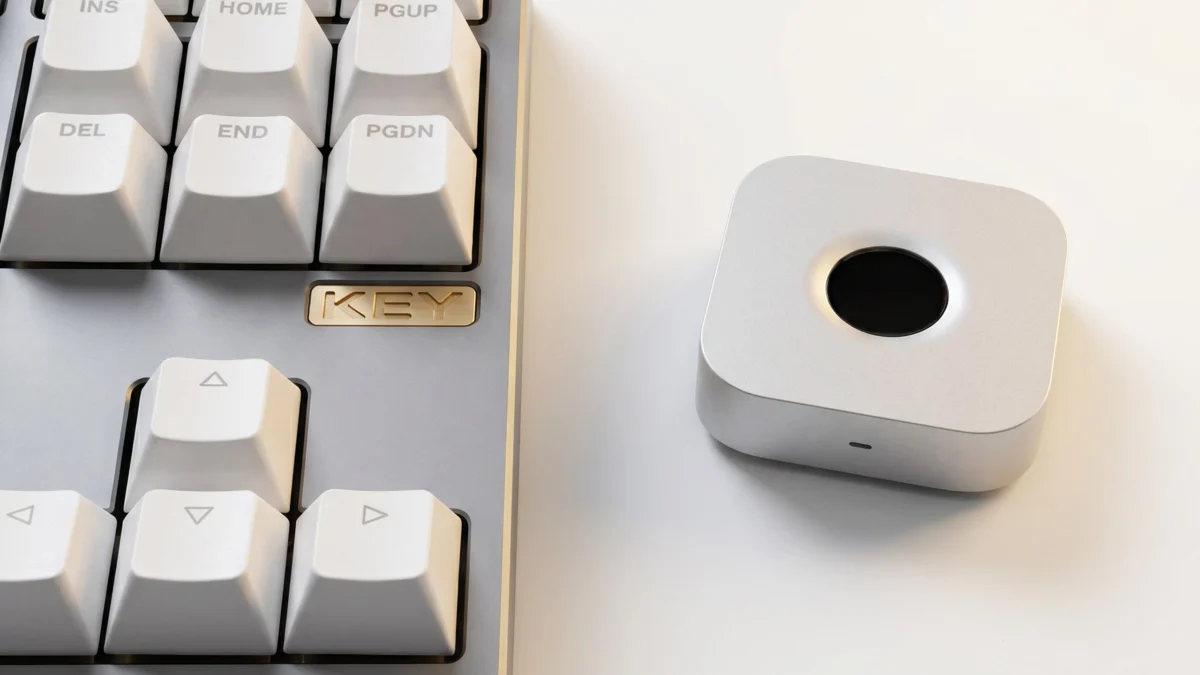
London, UK – In an era dominated by ubiquitous smartphone biometrics, the convenience of fingerprint authentication has largely bypassed the traditional desktop and laptop computing landscape, especially for power users of macOS and Linux. While a fleeting fad in the early 2000s, dedicated hardware for seamless biometric login on these platforms has become increasingly scarce. This gap in the market, coupled with the persistent frustration of repetitive password prompts, has spurred a visionary maker, known only as [superdog] in online communities, to engineer an ingenious solution: immurok, a wireless fingerprint authentication key.
This innovative device aims to bring the frictionless security of biometric authentication back to the desks of developers, system administrators, and anyone tired of constantly typing passwords. Designed specifically for users leveraging external keyboards and engaging in intensive terminal work on Mac and Linux machines, immurok promises to streamline workflows by providing instant, secure access through a simple touch, mirroring the intuitive experience of unlocking a modern smartphone.
Main Facts: Bridging the Biometric Gap
Immurok represents a significant, user-driven advancement in personal computing security and convenience. At its core, it is a self-contained, wireless fingerprint authentication device meticulously crafted to integrate seamlessly with macOS and Linux environments. Its primary purpose is to eliminate the constant interruption of password requests, particularly for system logins, sudo commands, and administrator prompts, which can severely hinder productivity during deep work sessions.
The device’s architecture is built around a WCH CH592F microcontroller, a choice driven by its integrated Bluetooth connectivity. This enables immurok to establish a wireless link with the host computer, presenting itself as a standard Bluetooth Human Interface Device (HID) keyboard. This clever emulation ensures broad compatibility without requiring custom drivers or complex software installations on the operating system level for basic recognition.
For biometric processing, immurok incorporates an R559S capacitive fingerprint sensor. Crucially, the device performs all fingerprint matching locally. This design choice is paramount for privacy and security, as no biometric data is ever transmitted wirelessly or stored on the host computer. The device simply sends an "authentication successful" signal, masquerading as a specific key sequence, only after a verified match.
Software integration on the host side is handled elegantly through platform-specific applications. Linux users benefit from a command-line interface (CLI) or text-based user interface (TUI) application, coupled with Pluggable Authentication Modules (PAM) integration. This robust setup allows immurok to manage authorization for system logins and sudo commands directly within the terminal environment. macOS users are provided with a dedicated menu bar application and similar PAM integration for administrative prompts, alongside a separate helper path specifically designed for lock screen authentication.
Immurok is more than just a gadget; it’s a statement about user autonomy and the power of open-source innovation to address specific, unfulfilled needs in the technology landscape. It offers a tangible solution for those who crave the advanced security and convenience typically reserved for mobile devices, bringing it directly to their professional workstations.
Chronology: From Frustration to Functional Hardware
The journey of immurok is a classic tale of identifying a pain point and leveraging technical prowess to craft a solution.
The Genesis of an Idea: A Fading Fad and a Persistent Problem
The seed for immurok was planted in the fertile ground of developer frustration. For years, fingerprint authentication on mainstream desktop and laptop computers had waned, despite its burgeoning popularity on smartphones. While Windows users gained "Windows Hello," Mac and Linux users were largely left without native, convenient biometric options beyond password managers, which often required a master password entry anyway. [superdog], a power user deeply entrenched in terminal work on both macOS and Linux, experienced firsthand the disruptive nature of constant password prompts. Every sudo command, every system login, every administrative action demanded a re-entry of credentials, breaking concentration and slowing down an otherwise fluid workflow. This recurring annoyance, coupled with the knowledge that the technology existed and was effective on other platforms, ignited the desire to bring this convenience back to the desktop. The idea wasn’t just about security; it was about enhancing productivity and user experience.
Design and Prototyping: The Blueprint of Biometric Freedom
With a clear objective, [superdog] embarked on the design phase. The core challenge was to create a device that was both effective and unobtrusive, seamlessly integrating into an existing desktop setup. Key decisions revolved around component selection and overall architecture. The WCH CH592F microcontroller was chosen for its integrated Bluetooth Low Energy (BLE) capabilities, simplifying the wireless communication aspect and reducing the bill of materials. This chip offered a robust foundation for handling both the communication protocol and the internal logic of the device.
The selection of the R559S capacitive fingerprint sensor was critical. Capacitive sensors are known for their reliability and compact size, making them ideal for a standalone peripheral. More importantly, the decision to perform local biometric matching directly on the device was a cornerstone of the design philosophy. This immediately addressed potential privacy concerns associated with transmitting raw biometric data, ensuring that user fingerprints never leave the immurok device itself. This principle of "privacy by design" was a non-negotiable aspect.
The prototyping phase likely involved extensive experimentation with circuit design, firmware development for the CH592F to interface with the sensor and manage Bluetooth communications, and the physical enclosure design. Crafting a compact, durable, and aesthetically pleasing device that could sit unobtrusively on a desk or be easily moved would have presented its own set of challenges, from PCB layout to material choices.
Software Integration Journey: Weaving into the Operating System Fabric
Hardware is only half the battle; seamless software integration is where a project like immurok truly shines. [superdog] invested significant effort in developing the client-side applications and integration mechanisms for both Linux and macOS.
For Linux, the path involved creating a command-line interface (CLI) and a text-based user interface (TUI) application. These applications serve as the bridge between the immurok hardware and the operating system’s authentication system. The crucial component here is the Pluggable Authentication Modules (PAM) integration. PAM is a powerful framework in Unix-like systems that allows administrators to dynamically choose how applications authenticate users. By developing a custom PAM module, immurok could intercept login requests and sudo commands, redirecting them to the fingerprint device for verification. This required a deep understanding of Linux system internals and security protocols.
Similarly, for macOS, a menu bar application was developed to provide a user-friendly interface for managing immurok. macOS also utilizes PAM, allowing for a consistent integration strategy for administrative prompts. A separate "helper path" was also necessary for the lock screen functionality, as lock screen authentication often operates differently from standard login or sudo prompts, requiring a more specialized approach to ensure seamless operation. This dual-platform development underscored the commitment to providing a comprehensive solution for the target demographic.
Community Engagement and Future: The Open-Source Ethos
While the article highlights the project’s existence, the spirit of Hackaday.io implies an open-source or at least publicly shared development process. This phase would involve documenting the project, sharing schematics, code, and build instructions, inviting feedback, and fostering a community around immurok. The initial reception, as evidenced by its feature on Hackaday, suggests a strong interest from the maker and developer communities. Future steps could involve refinements based on user feedback, contributions from other developers, exploring alternative components, or even considering a more polished, commercial version if demand warrants.
Supporting Data: The Underpinnings of a Modern Solution
The success and relevance of immurok are rooted in several technological and sociological trends, supported by its astute technical design.
The Resurgence of Biometrics: Beyond the Smartphone
The initial "fad" of desktop fingerprint readers in the early 2000s largely faded due to a combination of factors: high cost, inconsistent reliability, nascent security protocols, and a general lack of widespread user adoption. However, the last decade has seen a dramatic shift. Smartphones have normalized biometric authentication, making it an expected feature for quick, secure access. This user acceptance, coupled with advancements in sensor technology (e.g., capacitive sensors becoming cheaper and more reliable) and processing power, has paved the way for a resurgence.
Companies like Microsoft have integrated "Windows Hello" into their operating system, pushing biometric login for Windows PCs. Corporate security is increasingly embracing multi-factor authentication, often including biometrics. Immurok taps into this renewed demand, specifically targeting the overlooked segment of Linux and macOS power users who value both security and speed.
Technical Deep Dive: The Immurok Architecture Explained
The judicious choice of components and architectural decisions are central to immurok’s functionality and security posture.
- WCH CH592F Microcontroller: This low-cost, low-power microcontroller is a strategic choice. Its integrated Bluetooth 5.3 module simplifies the design significantly, eliminating the need for external Bluetooth transceivers and associated complexities. It also likely offers sufficient processing power to manage the fingerprint sensor, perform local matching, and handle Bluetooth communication efficiently, making it ideal for a standalone peripheral. Its open-source friendly nature (often with SDKs and community support) also aligns well with a maker project.
- R559S Capacitive Sensor: Capacitive fingerprint sensors work by measuring the capacitance variations between the sensor’s surface and the ridges and valleys of a user’s finger. This creates a detailed map of the fingerprint. The R559S is a common, relatively inexpensive sensor, indicating a focus on accessibility without compromising core functionality.
- Local Verification for Enhanced Privacy: This is immurok’s strongest security feature. Unlike some commercial solutions that might offload biometric processing to a host computer or even a cloud service, immurok performs all matching internally. This means that raw fingerprint data never leaves the device. If the device were compromised, only the "yes/no" authentication signal could be intercepted, not the biometric template itself. This significantly reduces the attack surface and enhances user privacy.
- Bluetooth HID Emulation: By advertising itself as a standard Bluetooth HID keyboard, immurok achieves maximum compatibility. When authentication is successful, it can send a predefined keystroke sequence (e.g., a complex password string, or simply a "login" signal) to the host computer. This universal approach means it doesn’t require specific drivers or deep OS modifications beyond the PAM integration, making it highly portable across various Linux distributions and macOS versions.
- PAM Integration: The Backbone of OS Security: Pluggable Authentication Modules (PAM) is a fundamental component of authentication on Unix-like systems. It provides a modular way to handle authentication, account management, session management, and password management. By developing a custom PAM module, immurok can be seamlessly integrated into the system’s authentication chain. This allows it to replace or augment password entry for virtually any service that uses PAM, from graphical logins to
sudocommands, ensuring both flexibility and security within the existing OS framework.
The User Experience Imperative: Quantifying Convenience
For power users, every second counts. The repeated interruption of typing passwords, even short ones, adds up over a workday. Anecdotal evidence from developers suggests that these micro-interruptions can significantly impact "flow state" – a crucial psychological condition for deep, creative work. By simply touching a sensor, immurok eliminates this friction. While difficult to precisely quantify, the time saved over hundreds of password entries per week, combined with the psychological benefit of uninterrupted focus, translates into a substantial boost in productivity and job satisfaction. It transforms a security hurdle into a seamless, almost invisible interaction.
Comparison with Commercial Solutions and Other DIY Projects
While there are commercial USB fingerprint readers available (e.g., Kensington VeriMark for Windows Hello), few offer native, robust wireless support for Linux and macOS, especially with the open-source ethos of immurok. Other DIY projects have explored similar concepts, such as integrating fingerprint scanning with Home Assistant, as noted in the original article. However, immurok stands out for its dedicated focus on workstation authentication, its wireless design, and its comprehensive integration with both major Unix-like desktop operating systems, making it a unique and compelling offering in the maker space.
Official Responses: The Voice of Innovation and Community
While no direct "official responses" from a corporation exist for a hobbyist project, we can infer the developer’s intent and the likely community reception.
Developer’s Insights: [superdog]’s Vision
If [superdog] were to articulate the driving force behind immurok, it would likely be a blend of personal necessity and the desire to empower fellow power users. "The constant password prompts were a real bottleneck in my workflow," [superdog] might say. "I knew the technology was mature, but commercial solutions just weren’t cutting it for Mac and Linux. I wanted something that was wireless, secure, and integrated deeply, not just a tacked-on gimmick."
Regarding the technical challenges, [superdog] might elaborate: "Getting the Bluetooth HID emulation just right, and then wrestling with PAM on both Linux and macOS to ensure robust, system-level integration, those were the biggest hurdles. But seeing it work, knowing that biometric data never leaves the device – that was the reward. It’s about bringing phone-level convenience and security to the desktop, but with the control and transparency that only an open-source project can offer." The vision is clear: frictionless security, user control, and community empowerment.
Community Reception and Expert Opinions
The broader open-source hardware and software communities would likely laud immurok as an excellent example of practical innovation. Security experts would appreciate the local biometric verification, often preferring it over cloud-based or host-side processing due to its inherent privacy advantages. The use of PAM integration would be seen as a technically sound approach, leveraging existing OS security frameworks rather than creating insecure workarounds.
The maker community, in particular, would celebrate the project for its ingenuity, the detailed documentation (implied by its presence on Hackaday.io), and the potential for customization and further development. It serves as an inspiration for others to tackle similar problems with creative, DIY solutions. While commercial product managers might see it as a niche product, the community sees it as a highly valuable tool for a dedicated segment of users.
Implications: Reshaping the Desktop Experience
Immurok’s existence carries several significant implications for the future of personal computing, security, and the maker movement.
Enhancing Workflow and Productivity: The Power of Seamlessness
The most immediate implication of immurok is its profound impact on workflow and productivity for its target users. By virtually eliminating the need to type passwords for frequent system interactions, it allows developers, system administrators, and other power users to maintain their "flow state." This isn’t just about saving a few seconds; it’s about reducing cognitive load, preventing interruptions, and fostering a more focused and productive work environment. In a world where every distraction costs valuable time and mental energy, immurok offers a tangible benefit that goes beyond mere convenience. It transforms a necessary security step into an almost subconscious action.
The Future of Personal Authentication: Beyond Passwords
Immurok aligns perfectly with the broader trend towards more personalized, seamless, and secure authentication methods. Passwords, despite their ubiquity, are inherently flawed – they can be forgotten, stolen, or weak. Biometrics offer a compelling alternative, leveraging unique physiological characteristics. Projects like immurok demonstrate that advanced authentication doesn’t have to be proprietary or confined to specific ecosystems. It highlights a future where users have more choice and control over how they secure their devices, pushing for more integrated and user-friendly security practices across all platforms.
Security and Privacy Considerations: Local Verification as a Gold Standard
The choice to perform local biometric verification within immurok sets a high bar for privacy and security. In an era of increasing data breaches and privacy concerns, the assurance that one’s biometric template never leaves the physical device is a powerful selling point. This approach mitigates risks associated with data transmission, server-side storage, and potential vulnerabilities in host-side biometric processing. While no system is entirely unhackable, local verification significantly reduces the attack surface and enhances user trust. Future discussions around biometric authentication will increasingly emphasize the importance of such localized processing.
However, implications also extend to the physical security of the device itself. If immurok were stolen, an attacker wouldn’t gain access to biometric data, but could potentially attempt to brute-force the device’s internal security or, if the device stored a simple "success" signal, attempt to spoof it. These are common considerations for any hardware security module, and ongoing development would focus on hardening the device against such attacks.
Empowering the Maker Community: Innovation from the Ground Up
Immurok is a testament to the power of the maker community to identify unmet needs and deliver innovative, practical solutions that commercial entities often overlook or deprioritize. It exemplifies the spirit of "if you want it, build it," inspiring others to tackle complex technical challenges and contribute to a more open and customizable technological landscape. Such projects foster collaboration, knowledge sharing, and the development of skills that are crucial for technological advancement. It demonstrates that cutting-edge solutions don’t always come from corporate labs but can emerge from passionate individuals.
Potential for Broader Adoption and Evolution: A Glimpse into the Future
While immurok is currently a DIY project, its utility and thoughtful design suggest potential for broader adoption. Could it evolve into a niche commercial product, offering a polished, ready-to-use version for those who prefer not to build it themselves? Its wireless nature and multi-platform support (Mac/Linux) give it a unique edge. Future iterations could explore enhanced security features, improved form factors, or even integration with other services beyond system login and sudo, such as web authentication (e.g., FIDO2 support). The project lays foundational groundwork for what could become a new standard in personalized, secure desktop authentication for specific user groups, demonstrating that the future of computing security is increasingly in the hands of its users.