Securing the Perimeter: An In-Depth Review of the Acunetix Web Vulnerability Scanner (WVS)
In the contemporary digital landscape, web applications have evolved from simple informational pages into the backbone of global commerce, internal business operations, and sensitive data management. As organizations increasingly migrate their infrastructure to the cloud, the "attack surface"—the total sum of vulnerabilities that an unauthorized user can exploit—has expanded exponentially. Cybercriminals are no longer relying solely on brute-force tactics; they are surgically targeting the application layer. In this environment, integrating robust security testing into the Software Development Life Cycle (SDLC) is no longer a luxury—it is an existential necessity.

This article provides a comprehensive review of the Acunetix Web Vulnerability Scanner (WVS), a cornerstone tool in the arsenal of security auditors and penetration testers tasked with defending modern web assets against sophisticated threats like SQL Injection, Cross-Site Scripting (XSS), and the broader spectrum of OWASP Top 10 vulnerabilities.

Main Facts: What is Acunetix WVS?
Acunetix WVS is a sophisticated, automated security testing solution designed to conduct black-box audits of web applications. Unlike white-box testing, which requires access to the underlying source code, a black-box approach simulates the methodology of a real-world attacker. It probes the application from the outside in, testing how the system responds to malicious inputs without prior knowledge of the internal architecture.

At its core, the tool functions by launching a controlled barrage of simulated attacks against a target URL. By observing how the application handles these inputs, the scanner identifies potential weaknesses, generates detailed vulnerability reports, and, crucially, offers actionable remediation advice. Whether an organization is running a legacy PHP portal or a modern JavaScript-heavy framework, Acunetix is engineered to adapt, identifying vulnerabilities before they can be weaponized by malicious actors.

The Chronology of a Scan: From Setup to Remediation
Understanding the workflow of Acunetix reveals why it has become a industry standard for security professionals. The process is designed to be both user-friendly and highly granular.

1. Initiation and Customization
The process begins with the "Scan Wizard." Upon entering the target URL, users are guided through a series of configuration steps. The power of the tool lies in its "Scanning Profiles." These profiles act as logical templates that group specific tests together. While the default profile is comprehensive, security teams often create custom profiles to focus on high-risk vulnerabilities or to adhere to specific regulatory requirements.

2. Advanced Scan Settings
For more complex environments, the "Scan Settings" allow for granular control. This is where a professional auditor might configure HTTP proxy settings, manage crawl depth, or exclude specific directories that do not require testing. Furthermore, the ability to import results from auxiliary tools like BurpSuite or Fiddler allows for a seamless integration into existing security workflows, ensuring that no stone is left unturned.

3. Handling Authentication
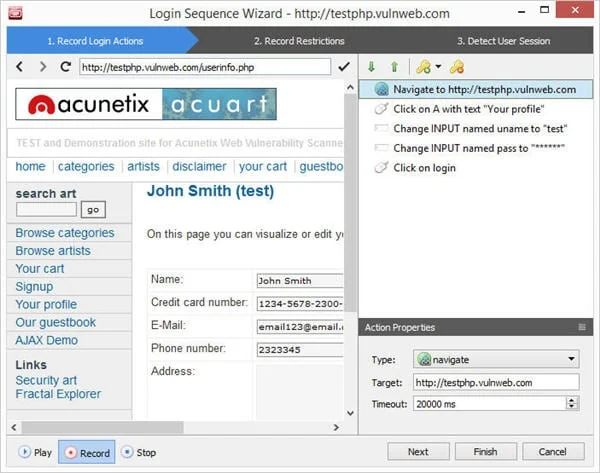
One of the most common friction points in automated scanning is the "login barrier." Many vulnerabilities exist only behind password-protected walls. Acunetix addresses this with a "Login Sequence Recorder." By simply navigating through the login process in a browser-like interface, the user creates a recording that the scanner can replay. This ensures the tool maintains a valid session, and by setting "session patterns," the scanner can distinguish between being logged in and being kicked out by an idle timeout.

4. Analysis and Reporting
Once the crawl and scan conclude, the results are presented in an intuitive dashboard. Clicking on a specific vulnerability—such as a detected SQL injection—reveals the exact input parameter responsible and provides variations of the attack. This level of transparency is critical for developers who need to understand exactly where the "break" occurred in the code.

Supporting Data: Why "Intelligent" Scanning Matters
The efficiency of a scanner is measured by its accuracy and its impact on performance. Acunetix differentiates itself through several high-tech features:

- Technology Fingerprinting: Acunetix does not waste time testing for ASP.NET vulnerabilities on a PHP server. By fingerprinting the server and technology stack, the scanner optimizes its test suite to focus only on relevant threats, drastically reducing scan times.
- The DeepScan Engine: Modern websites are rarely just HTML; they are dynamic ecosystems of JavaScript and AJAX. The DeepScan engine is a headless browser that allows the scanner to interact with DOM-based elements. It effectively "executes" the page as a user would, allowing it to identify XSS vulnerabilities that traditional scanners would miss entirely.
- AcuSensor (IAST): Perhaps the most significant advancement is the optional AcuSensor. By installing a lightweight server-side component, the tool shifts from pure black-box testing to Interactive Application Security Testing (IAST). This allows the scanner to "see" the backend code, identifying the exact file and line number where a vulnerability exists. This effectively bridges the gap between the security auditor and the software developer.
Official Perspectives: The Role of Second-Order Testing
While primary vulnerabilities are often easy to spot, "second-order" vulnerabilities are the silent killers of web security. These are issues that do not immediately respond to an input, such as Blind XSS or Out-of-Band SQL Injection.

Acunetix utilizes a proprietary technology known as AcuMonitor. This service acts as an intermediary, monitoring for delayed responses from the server. By providing a "set-it-and-forget-it" infrastructure, AcuMonitor allows the scanner to detect sophisticated, asynchronous attacks that would otherwise remain hidden from standard automated tools. This is a critical feature for organizations that deal with complex, distributed data processing where an input provided in one module might only trigger an exploit when processed by a completely different system later.

Implications for Business Security
The implications of using a tool like Acunetix are profound. In an era where a single data breach can cost a company millions in legal fees, regulatory fines, and reputation loss, the cost-benefit analysis of professional-grade vulnerability scanning is heavily skewed in favor of investment.

Regulatory Compliance
For organizations handling sensitive financial or personal health information, compliance is mandatory. Acunetix offers automated reporting tailored to standards like PCI-DSS, HIPAA, and the OWASP Top 10. These reports are not just static documents; they are living proof of due diligence, which can be provided to auditors to demonstrate that the organization is taking proactive steps to secure its web presence.

Developer Efficiency
One of the most persistent bottlenecks in the DevSecOps pipeline is the friction between security teams and developers. By providing precise, actionable, and verified vulnerability data—complete with remediation advice and, in the case of AcuSensor, line-of-code references—Acunetix turns the "security report" into a "developer to-do list." This minimizes the back-and-forth between departments and accelerates the time-to-patch for critical vulnerabilities.

The Human-Tool Partnership
It is important to emphasize that while Acunetix is a powerful automated solution, it is intended to augment, not replace, human expertise. The integrated manual penetration testing tools allow for "deep dives" into findings. A skilled auditor can use the scanner to handle the mundane, repetitive tasks, freeing up their cognitive resources to hunt for complex, logic-based flaws that require a human eye to detect.

Conclusion: The Path Forward
The digital frontier is fraught with risk, but tools like Acunetix WVS provide a necessary line of defense. By combining the speed of automation with the depth of IAST technology and the accuracy of intelligent crawling, it offers a robust solution for the modern enterprise.

As we look toward the future, the integration of such tools will likely become even more deeply embedded in the CI/CD (Continuous Integration/Continuous Deployment) process. Security will no longer be an "end-of-cycle" event; it will be an ongoing, automated process that happens in parallel with code development. For security professionals and software engineers, the message is clear: whether you are managing a small business website or a global enterprise application, you cannot secure what you cannot see. With its comprehensive coverage, detailed reporting, and intelligent scanning engines, Acunetix remains a premier choice for those committed to maintaining a secure and resilient web presence.

Have you used Acunetix or other web vulnerability scanners in your professional capacity? How has your organization managed the balance between rapid deployment and rigorous security testing? We invite you to share your experiences, questions, and insights in the comments section below.