The Future of Android Development: Empowering AI Agents with CLI and Advanced Skills
The landscape of mobile development is undergoing a tectonic shift. As Large Language Models (LLMs) and AI-driven coding assistants become fixtures of the modern software engineering workflow, the challenge for developers has moved from merely writing code to effectively orchestrating these autonomous agents. Today, Google is addressing this challenge head-on, announcing significant upgrades to the Android Command Line Interface (CLI) and an expanded repository of "Android Skills." These updates are designed to bridge the gap between generic AI capabilities and the highly specialized, platform-specific requirements of the Android ecosystem.
Main Facts: A New Era of AI-Assisted Development
The core of this announcement revolves around two primary pillars: the integration of Android Device Streaming into the Android CLI and the expansion of the Android Skills library.
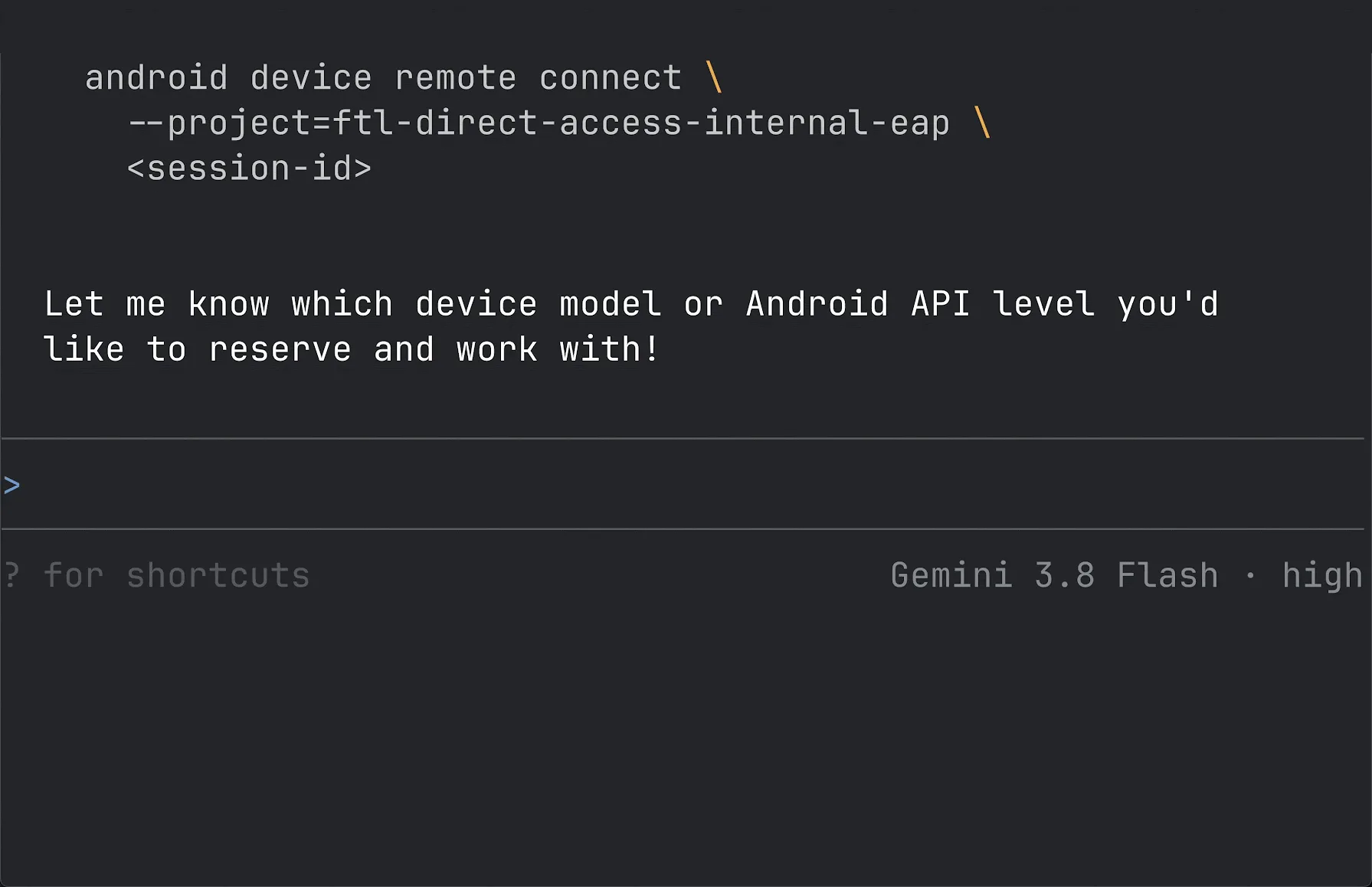
For years, Android developers have relied on Android Studio as the primary gateway for development. However, the modern developer’s toolkit is increasingly fragmented, involving a mix of terminal-based workflows, third-party IDEs, and diverse AI coding agents. The updated Android CLI serves as the connective tissue for these workflows. It enables AI agents to perform complex operations—such as managing projects, configuring environments, running emulators, and now, interacting with physical hardware—entirely via the command line.
The second pillar, Android Skills, represents a strategic move to provide AI agents with "grounded" knowledge. LLMs are often constrained by their training cutoffs and a lack of awareness regarding the latest, highly specific Android architectural patterns. By providing structured, modular instructions (SKILL.md files) that mirror the guidance found on official Android documentation, Google is essentially giving agents a "cheat sheet" that ensures their output adheres to current best practices, APIs, and design guidelines.
Chronology of Development
The evolution of these tools has been deliberate and iterative.
- Initial Concept: Recognizing that developers were increasingly using AI to write code, the Android team identified a "context gap." AI models were hallucinating outdated libraries or suggesting deprecated UI patterns.
- The Skill Repository Launch: Google initiated the Android Skills project to house official guidance in machine-readable formats. This allowed developers to feed context directly into agents like Claude, Gemini, or Codex.
- CLI Integration: Following the success of the initial skills, the team focused on making these tools more accessible through the CLI. This ensured that regardless of the IDE or interface, the logic remained consistent.
- Real-Device Streaming: The most recent development involves the extension of Android Device Streaming—a feature previously restricted to browser or IDE-based environments—into the command-line workflow. This allows developers to remotely connect to physical devices, execute ADB-over-SSL commands, and perform remote testing as if the device were physically tethered to their workstation.
Supporting Data and Technical Capability
The technical implications of these updates are profound, particularly for large-scale production environments.

Remote Physical Device Interaction
The integration of Android Device Streaming into the CLI is not merely a convenience; it is a fundamental shift in testing infrastructure. By leveraging a secure ADB-over-SSL connection, an AI agent can:
- Spin up and tear down devices: Automatically manage remote device sessions based on testing needs.
- Headless Deployment: Deploy builds, collect logs, and capture screenshots without ever requiring a GUI interface.
- Real-world Verification: Eliminate the "it works on my machine" syndrome by testing on actual hardware rather than relying solely on emulators, which may not capture specific hardware-level bugs.
The Power of Android Skills
With over 20 skills currently available, the repository covers a wide spectrum of development needs. These skills are "environment-agnostic," meaning they function regardless of whether the developer is using Android Studio, VS Code, or a custom-built agent interface.
The methodology behind these skills is rooted in the philosophy of "built for deprecation." Because Android is a fast-moving ecosystem, the Android team designs these skills to be easily updated or replaced, ensuring that the AI agent is always utilizing the latest version of the Android SDK.
Official Responses and Industry Case Studies
The impact of these tools is already being felt in the field. The engineering team at FotMob, a leader in sports data applications, serves as a primary case study for the effectiveness of the new Wear Compose Material 3 (M3) skill.
The FotMob Success Story
Building for Wear OS has historically been a complex endeavor, requiring mastery of rotary inputs, specific container hierarchies like TransformingLazyColumn, and strict power-consumption optimization. Prior to the release of the Wear Compose M3 skill, agents often struggled to generate code that met these nuanced requirements.
Roy Solberg, Android Tech Lead at FotMob, reported a massive productivity gain after utilizing the new skill. By feeding the skill into their AI workflow, the team successfully migrated eight complex lists to the new architecture in a single afternoon. Crucially, the skill caught errors that the underlying LLM missed—such as improper handling of ScreenScaffold content padding and the use of hardcoded sp units instead of theme-appropriate typography.

"One skill, one afternoon, eight lists migrated and a pile of custom rotary code gone!" Solberg noted. This testimonial highlights that the value of these skills lies not just in writing boilerplate, but in enforcing architectural integrity.
Implications for the Android Ecosystem
The implications of this update for the Android developer community are multi-faceted:
1. Standardization of Best Practices
By providing AI agents with standardized "Skills," Google is effectively raising the floor for code quality across the ecosystem. When an agent is grounded in official documentation, the resulting code is more likely to follow Material Design 3 guidelines, use modern Jetpack Compose patterns, and adhere to security best practices.
2. Democratization of Complex Development
Tasks that were once considered "expert-level"—such as optimizing for Wear OS or managing remote hardware testing—are becoming more accessible. By abstracting the boilerplate and providing agents with the logic required to handle these tasks, the barrier to entry for developing high-quality, professional-grade Android apps is significantly lowered.
3. The Future of the "Human-in-the-Loop"
It is essential to note that these tools are not intended to replace the developer. Instead, they redefine the role of the developer as an architect and editor. The human developer is now responsible for setting the objectives, verifying the output of the agents, and maintaining the broader product vision, while the agents handle the repetitive, detail-oriented implementation tasks.
4. A Shift in Tooling Paradigms
The move toward CLI-first, agent-compatible tools signals a departure from the "integrated" IDE model. While Android Studio remains a powerful tool, the ability to perform these tasks via the CLI means that developers can build, test, and deploy using the tools they are most comfortable with. This flexibility is critical for teams working in heterogeneous environments or those looking to automate their CI/CD pipelines more deeply with AI.

Conclusion: Looking Ahead
The announcement from the Android team marks a critical point in the convergence of software engineering and artificial intelligence. By acknowledging that developers use a variety of tools and by providing the necessary "grounding" for AI agents through the CLI and Skills repository, Google is ensuring that the Android platform remains a developer-first ecosystem in the age of AI.
As these tools continue to evolve, we can expect to see an even greater integration between development environments and AI agents. For the developer, the takeaway is clear: the focus is shifting from "how to write code" to "how to build systems that write code." With the latest updates to the Android CLI and the growing library of Android Skills, the path to building beautiful, high-quality, and robust Android applications has never been more efficient.
For those looking to integrate these tools into their own workflows, the documentation and release notes are available on the official Android Developer portal. Whether you are migrating a legacy app to Wear OS or automating your device testing, these new capabilities provide a robust, standardized framework to help you succeed in an increasingly automated world.