The Definitive Guide to Functional Testing: Strategies, Techniques, and Automation Best Practices in Modern Software Development
In the fast-paced ecosystem of modern software engineering, ensuring that an application delivers on its core promises is paramount. As digital transformation accelerates across global enterprises, the demand for rigorous quality assurance (QA) has never been higher. At the heart of this discipline lies functional testing—a cornerstone black-box testing methodology designed to confirm whether a software application or system operates precisely in accordance with predefined business requirements and specifications.
Authored by industry veteran Sanjay Zalavadia, VP of Client Service at Zephyr, this comprehensive exploration dives deep into the architecture, execution, and automation of functional testing. Whether you are a seasoned QA professional or a development lead looking to refine your software development lifecycle (SDLC), understanding the nuances of functional testing is critical to minimizing defect escapes and delivering a polished end-user experience.
Main Facts: What is Functional Testing?
At its core, functional testing is a black-box testing technique. This means testers evaluate the functionality of the software against the system specifications without needing to inspect the internal code structures, database schemas, or underlying algorithms. The primary objective is straightforward: verify that every feature of the application behaves as expected under various operational conditions.

Specifications serve as the benchmark for functional testing. They dictate what an authorized user is permitted to do and establish the exact parameters of acceptable versus unacceptable behavior. By validating actual business-side scenarios against these documentation baselines, quality assurance teams can certify that the software is fit for deployment.
The Testing Spectrum
Testing is a vast ocean within the SDLC, encompassing numerous specialized disciplines. While individual testers may specialize in distinct areas—such as performance, security, or usability—a holistic understanding of testing types allows teams to build cohesive strategies. Functional testing sits squarely at the center of this ecosystem, bridging the gap between raw code development and real-world user adoption.
Chronology and Process: The Functional Testing Lifecycle
Integrating functional testing into the software development lifecycle requires a structured, multi-phase approach. The process is generally broken down into three core steps, governed by strict entry and exit criteria.

1. Entry Criteria
Before functional testing can officially commence, specific prerequisites must be met to ensure the environment and artifacts are stable:
- Requirements and functional specifications must be fully documented, reviewed, and signed off.
- Test plans and preliminary test cases must be authored and mapped to specific requirements.
- The software build must be successfully deployed to the test environment, typically verified via smoke testing.
- Test data and necessary tool configurations must be in place.
2. The Execution Steps
Once entry criteria are satisfied, the testing process follows a clear chronological progression:
- Requirement Analysis: Understanding the business logic, expected user flows, and technical boundaries defined in the specifications.
- Test Planning and Strategy: Determining the scope, resource allocation, and optimization techniques to maximize coverage without exhausting time and budgets.
- Test Case Design: Structuring test scenarios using standard formats—typically encompassing a test ID, description, pre-conditions, steps, expected results, and actual results.
- Test Execution: Running tests manually or via automation scripts, comparing actual outcomes against expected outcomes.
- Defect Reporting and Retesting: Logging anomalies, tracking bugs through resolution, and performing regression testing to verify fixes.
3. Exit Criteria
Testing concludes for a given release cycle when specific exit thresholds are met:

- Execution of all planned test cases reaches a target percentage (e.g., 95% to 100%).
- All critical and high-severity defects are resolved, verified, and closed.
- Defect density falls within acceptable pre-release thresholds.
- A formal sign-off is granted by QA leadership.
Supporting Data: Types and Techniques of Functional Testing
Functional testing is not a monolithic activity; it spans several categories and granular techniques tailored to different stages of the development cycle.
Key Functional Testing Types
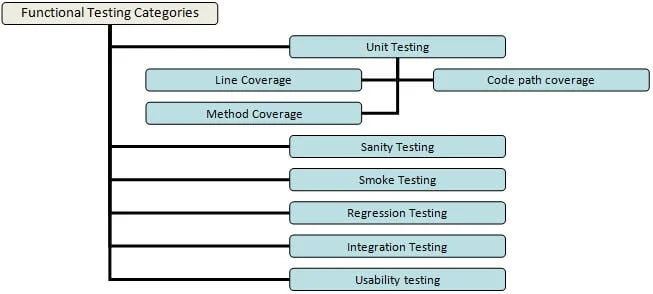
- Unit Testing: Typically performed by developers, this involves testing individual code units or methods independently. Code coverage metrics—such as line coverage, code path coverage, and method coverage—are vital here.
- Smoke Testing: A rapid, high-level evaluation executed immediately after a new build is released to verify build stability (often called Build Verification Testing).
- Sanity Testing: Performed post-smoke test, this dives slightly deeper into specific major functionalities to ensure no catastrophic regressions occurred in minor updates.
- Integration Testing: Validates how individual functional modules interact and communicate when combined into an end-to-end user scenario.
- System Testing: Performed on the complete, fully integrated system to evaluate compliance against both functional and non-functional requirements.
- Regression Testing: Executed whenever code changes, bug fixes, or new features are introduced, ensuring that existing functionality remains stable and unbroken.
- Usability / Beta Testing: Exposing the product to real-world users in a production-like environment to gather feedback on user comfort and system intuitiveness.
Advanced Functional Testing Techniques (With Use-Case Examples)
To illustrate how these techniques apply in the real world, consider an online Human Resource Management System (HRMS) portal login page.
The specification states:

- User ID: Must be 6 to 10 characters long. Accepts numbers (0–9), letters (a–z, A–Z), and specific special characters (underscore, period, hyphen). Cannot be blank and must begin with an alphanumeric character, not a special character.
- Password: Must be 6 to 8 characters long. Accepts numbers, letters, and all special characters. Cannot be blank.
Based on this, QA engineers deploy several optimization techniques:
- End-User/System Tests: Validates standard user flows, such as entering valid credentials, clicking "Login," arriving at the home page, performing actions, and logging out successfully.
- Equivalence Partitioning: Segregates test data into equivalence classes. For instance, entering a User ID longer than 10 characters falls into a single failure partition; if one invalid length fails, all data points in that class behave identically.
- Boundary Value Analysis: Tests the absolute limits of the application. For the User ID minimum limit of 6 characters, testing inputs with exactly 5 characters (
< 6) serves as a classic boundary value negative test. - Decision-Based Tests: Centers on system outcomes based on logical conditions (e.g., If Username is valid AND Password is valid $rightarrow$ Navigate to Home Page; If Username is invalid $rightarrow$ Display Error Message).
- Alternate Flow Tests: Validates secondary pathways, such as clicking the "Cancel" button on the login screen instead of proceeding.
- Ad-Hoc Tests: Unplanned, intuitive testing driven by the tester’s mindset of deliberately attempting to break the system to uncover edge-case discrepancies.
Official Industry Perspectives: Functional vs. Non-Functional Testing
A common point of discussion in QA leadership circles is the distinction between functional and non-functional testing. While functional testing answers what the system does and whether it meets business logic, non-functional testing evaluates how well the system performs under various conditions—focusing on attributes such as responsiveness, throughput, scalability, and security.
Industry experts stress that neither discipline can replace the other. Releasing a software product that passes every functional test but suffers from unacceptable latency or security vulnerabilities is a recipe for commercial failure. Consequently, organizations are increasingly adopting parallel testing strategies where functional and performance tests are coordinated simultaneously or sequentially within agile sprints.

Implications: The Evolution of Functional Test Automation
As software delivery cycles compress due to continuous integration and continuous deployment (CI/CD) pipelines, manual testing alone is no longer sufficient. Test automation has become an indispensable strategy for scaling QA operations, reducing time-to-market, and preventing defect slippage.
Why Automate?
Automating repetitive regression and functional tests saves time, eliminates human fatigue, and increases overall test coverage. However, experts warn against the trap of attempting to automate everything. Tests that require frequent manual environment setup or constant configuration changes are poor candidates for automation.
Best Practices for Functional Test Automation
- Select the Right Tool: Organizations must evaluate tools based on project requirements, ease of use, and cost. While open-source frameworks like Selenium remain industry staples—alongside alternatives like Sahi, Watir, Robotium, and AutoIt—enterprise solutions offer robust commercial backing.
- Target High-Value Test Cases: Prioritize stable, repetitive regression tests and data-driven tests that require multiple input permutations.
- Establish a Dedicated Automation Team: Imposing automation duties across an entire manual QA team often leads to friction and burnout. Designating specialized automation engineers ensures higher-quality script maintenance and framework design.
- Build Resilient UI locators: User interface changes frequently break brittle test scripts. Designing tests with robust locators minimizes mass test failures when UI updates occur.
- Execute Frequently: Integrating automated test suites into CI/CD pipelines ensures rapid feedback loops, catching bugs earlier in the development cycle.
Conclusion
Functional testing remains the ultimate litmus test for software reliability. By combining rigorous manual exploratory techniques with strategic, well-maintained automation frameworks, engineering teams can achieve the optimal balance of speed and quality. As Sanjay Zalavadia notes, striking this ideal mix is vital for any organization striving to deliver flawless, customer-centric digital experiences.