Revolutionizing Mobile Development: The Launch of ADB Wi-Fi 2.0
In the high-stakes world of mobile application development, the ability to rapidly iterate, test, and debug code is the difference between a market-leading application and a failing project. For years, the Android Debug Bridge (ADB)—the command-line utility that facilitates communication between a development machine and an Android device—has been the backbone of this process. However, the reliance on tethered USB connections has long been a source of frustration for developers, leading to cluttered workstations and physical limitations.
Today, Google’s Android Studio team, led by Steven Jenkins, Sherif Eid, and Fabien Sanglard, has officially announced the rollout of ADB Wi-Fi 2.0. This major overhaul promises to transform the wireless debugging experience, delivering significant improvements in speed, reliability, and ease of use. By rebuilding the core architecture of the debugging stack, the Android team is effectively removing the physical "umbilical cord" that has tied developers to their machines for over a decade.
Main Facts: The Core of the Upgrade
The release of ADB Wi-Fi 2.0 is not merely a feature update; it is a fundamental reconstruction of the Android debugging ecosystem. The engineering team has overhauled the three pillars of the ADB architecture: the ADB server, the adbd daemon (running on the Android device), and the Android Studio IDE integration.
Key Technical Improvements:
- Enhanced Server Stack: The underlying communication protocol has been rewritten to handle modern network topologies more gracefully.
- Intelligent Network Handling: The system now proactively manages network state changes, preventing the "drop-offs" that plagued previous versions of wireless debugging.
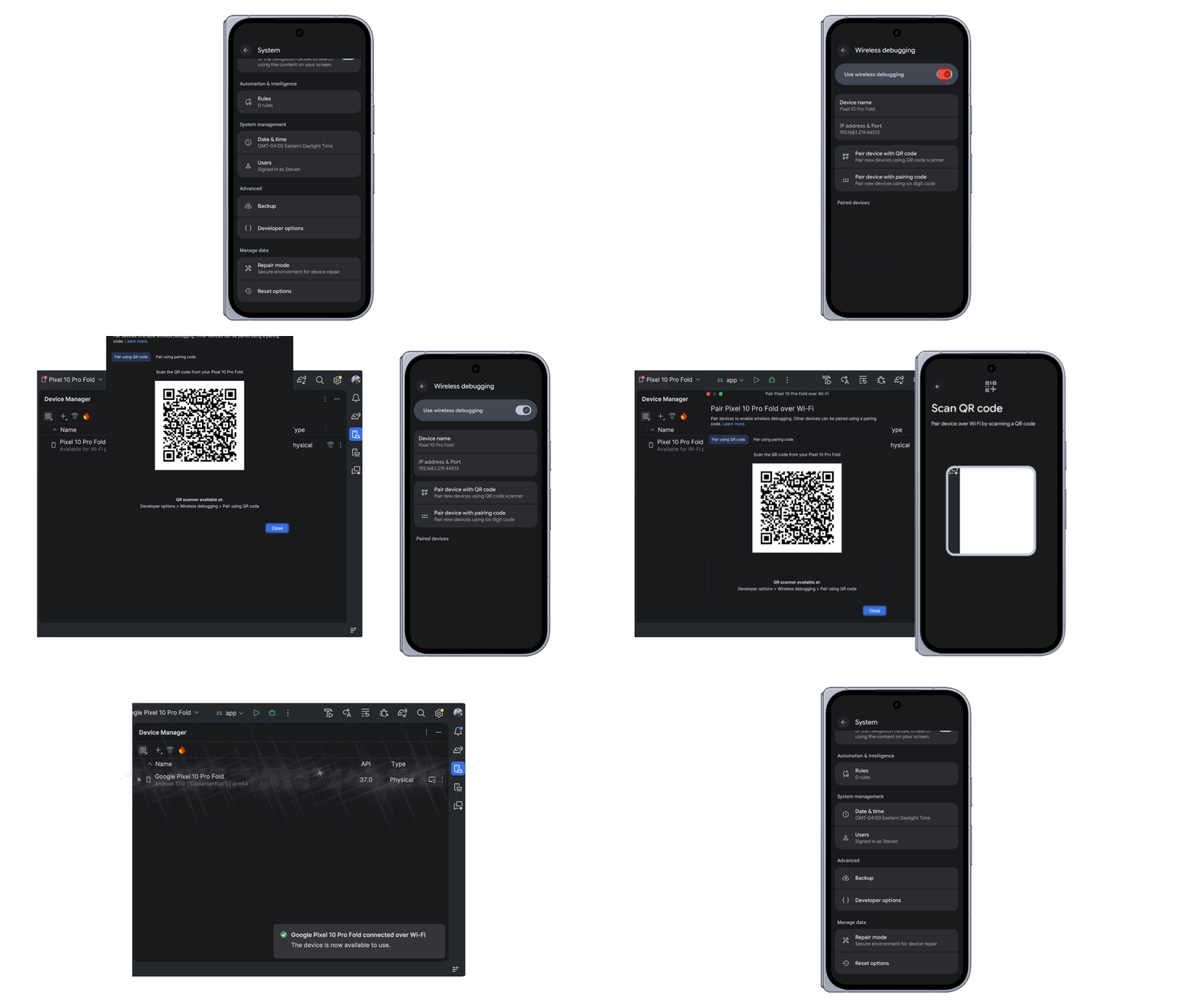
- Simplified Pairing: A new, streamlined setup process utilizes QR-code-based pairing, eliminating the need for manual IP address input or complex command-line configurations.
- Broad Device Compatibility: The update supports the full spectrum of the Android ecosystem, including smartphones, tablets, Wear OS smartwatches, and Android TV units.
Chronology: The Evolution of Debugging
The journey toward a robust wireless debugging environment has been a long one. To understand the significance of the 2.0 update, one must look at the historical trajectory of Android development tools.
2008–2015: The Tethered Era
In the early days of Android, debugging was strictly a wired affair. Developers were tethered to their computers via micro-USB cables. While this provided a stable connection, it was fragile. USB ports were prone to wear and tear, and "cable fatigue" was a common complaint among developers working on large-scale projects.

2016–2020: The Experimental Phase
As Android matured, the community began clamoring for wireless options. Google introduced early, experimental versions of Wi-Fi debugging via command-line tools. However, these were often unstable, requiring constant re-pairing and suffering from high latency. They were viewed more as a novelty for quick checks rather than a professional-grade solution for active development.
2021–2023: The Modernization
With the release of Android 11, wireless debugging became an official feature, utilizing a pairing code system. While this was a massive step forward, it still suffered from inconsistent connection success rates and difficulty navigating complex office network environments where subnets and firewalls often blocked communication between the workstation and the device.
2024–2025: The Path to 2.0
Recognizing that "good enough" was no longer acceptable, the Android Studio engineering team spent the last eighteen months engaging with developers to identify the exact points of failure. The result is the current 2.0 release, which prioritizes a "set it and forget it" experience, aiming to make wireless debugging the default for the majority of developers.
Supporting Data: Quantifying the Leap Forward
The shift to ADB Wi-Fi 2.0 is supported by concrete metrics that highlight the performance gains over the previous generation. Google’s internal testing and beta feedback reveal a massive improvement in stability and speed.
Performance Benchmarks
- Connection Success Rate: The engineering team reports a 32% improvement in auto-connection success rates. This means fewer instances of the "Device not found" error that frequently interrupts the coding flow.
- Latency and Throughput: For approximately 90% of connections, the speed of establishing a link has increased by 66%. This reduction in handshake time translates to faster deployment of APKs to the device, allowing developers to see changes in their code nearly as quickly as they would with a USB 3.0 cable.
These metrics are particularly impressive given the volatility of Wi-Fi networks in office environments, where interference from other devices and network traffic management often complicate local peer-to-peer connections. By optimizing the handshake protocol, the new architecture maintains a tighter, more resilient link even in congested network environments.

Official Responses and Developer Integration
The announcement, spearheaded by Product Manager Steven Jenkins and engineers Sherif Eid and Fabien Sanglard, emphasizes that this update was "developer-first." The team actively solicited feedback from the community, recognizing that the previous usability gaps were preventing wider adoption of wireless workflows.
Insights from the Android Studio Team
"We heard the feedback loud and clear," the team stated during the unveiling. "Developers want to focus on their code, not on debugging their debugger." By moving to a server-side architecture that handles the complexities of network discovery, the team has effectively abstracted away the underlying technical hurdles.
Community Engagement
Google has also doubled down on its commitment to the developer community. By presenting these updates at major industry events—such as the Android Makers by droidcon 2026—the company is ensuring that developers have access to direct tutorials and expert Q&A sessions. Furthermore, the integration of extensive documentation and easy-to-access bug reporting portals demonstrates a move toward a more transparent and responsive development lifecycle.
Implications: The Future of Android Development
The implications of ADB Wi-Fi 2.0 extend far beyond a faster debugging process. By making wireless debugging as reliable as a physical connection, Google is changing the physical nature of mobile app development.
1. Improved Hardware Ergonomics
Developers can now test their applications while holding the device naturally, rather than keeping it flat on a desk to accommodate a cable. This is particularly crucial for testing gesture-based navigation, camera features, and AR/VR applications, where the device must be held in the hand to be used properly.

2. Multi-Device Testing
For developers working on cross-device applications (e.g., a phone app that talks to a smartwatch), the ability to debug multiple wireless devices simultaneously is a game-changer. Previously, the need for multiple USB hubs and cables created a "cable salad" that made managing test benches difficult. Wireless debugging simplifies the hardware setup significantly.
3. The "Desktop-Class" Experience
As Android Studio continues to evolve, the goal is to make the development environment as fluid as possible. ADB Wi-Fi 2.0 is a critical step in reaching "desktop-class" parity, where the friction of the development environment no longer hinders the creative process.
4. Enterprise and Education
For schools and large development firms, the ability to quickly connect to a fleet of test devices without managing hundreds of physical cables reduces overhead and maintenance costs. This scalability is vital as Android continues to grow in the enterprise space.
5. A Call to Action
As the industry moves toward this new standard, the Android Studio team encourages developers to embrace the update. By utilizing the new QR-code pairing and leveraging the improved stability, teams can expect a measurable increase in daily productivity.
"We believe that the best tools are the ones that disappear," the team concluded. With ADB Wi-Fi 2.0, the barrier between the developer’s intent and the device’s execution has never been thinner. As the community begins to integrate these tools into their daily workflows, the ripple effect on app quality and development speed will undoubtedly be felt across the entire Android ecosystem.

For those ready to make the switch, the documentation is now live, and the transition process is designed to be seamless. The future of Android debugging is wireless, and for the first time, it is truly reliable.