Bridging AI and Cross-Platform Development: Bringing Reinforcement Learning to Flutter with TensorFlow Lite
The landscape of mobile development is undergoing a paradigm shift, where the integration of on-device machine learning (ML) is no longer a luxury but an expected standard for modern, intelligent applications. For developers, the challenge has historically been bridging the gap between sophisticated model training—often conducted in Python-heavy environments like TensorFlow or JAX—and the deployment of these models across disparate mobile operating systems.
With the recent official release of the TensorFlow Lite (TFLite) plugin for Flutter, the barrier to entry for cross-platform AI development has been significantly lowered. In this comprehensive look at the evolution of board game automation, we explore how developers can transition from Android-native implementations to fluid, cross-platform experiences using the TFLite Flutter ecosystem.
The Genesis: A Chronology of Reinforcement Learning Deployment
The journey toward this milestone began with a desire to democratize reinforcement learning (RL) for mobile application developers. The trajectory of this project can be traced through three distinct phases:
1. The Android-Native Foundation (2021)
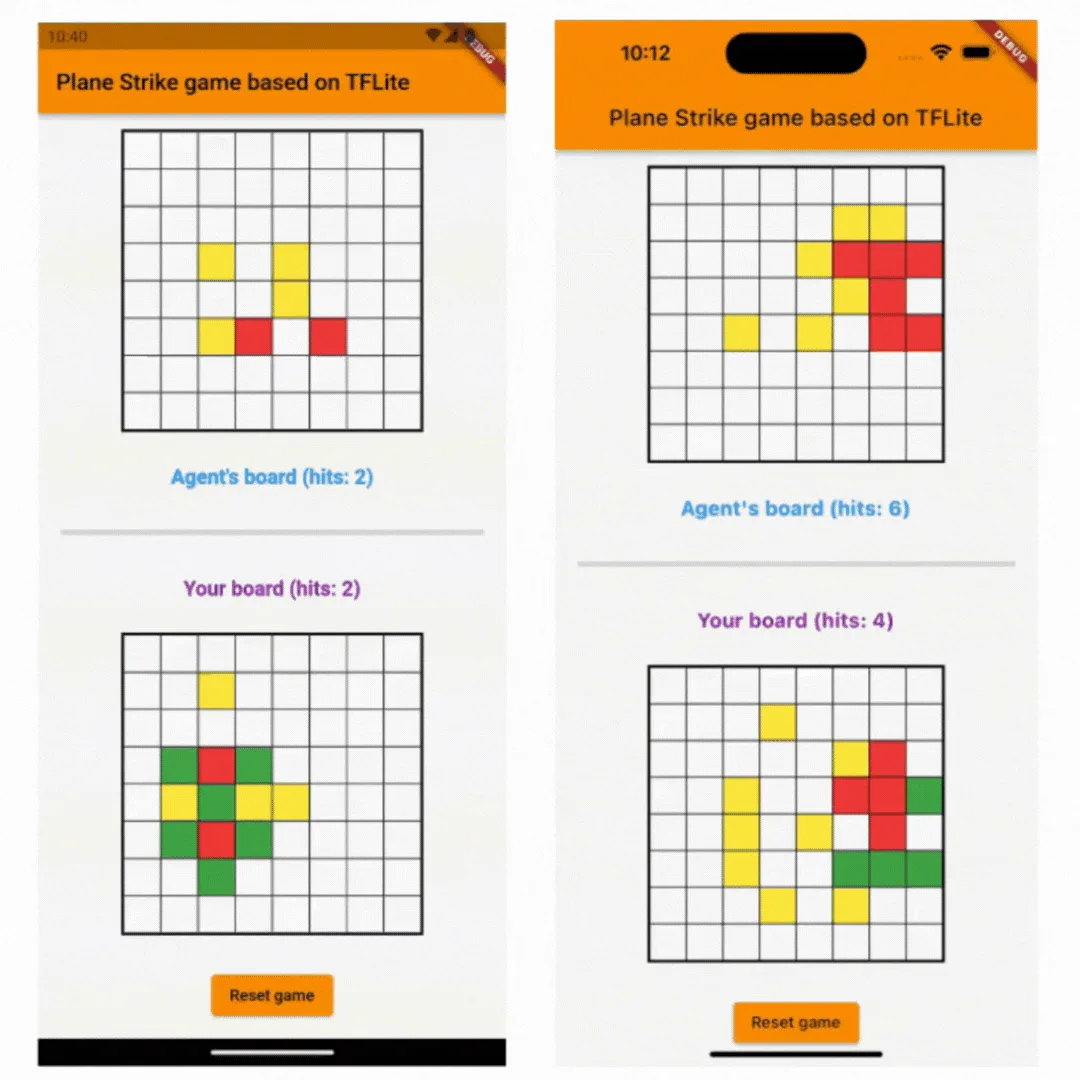
In October 2021, the TensorFlow team introduced a reference app for a board game dubbed "Plane Strike." The goal was to provide a hands-on tutorial for training an RL agent. By using TensorFlow, the team demonstrated how an agent could learn to navigate a game board and make strategic decisions. The deployment was strictly native, utilizing TFLite to run inference directly on Android devices. This established the foundational logic for the game’s decision-making engine.
2. Expanding the Mathematical Horizon (2022)
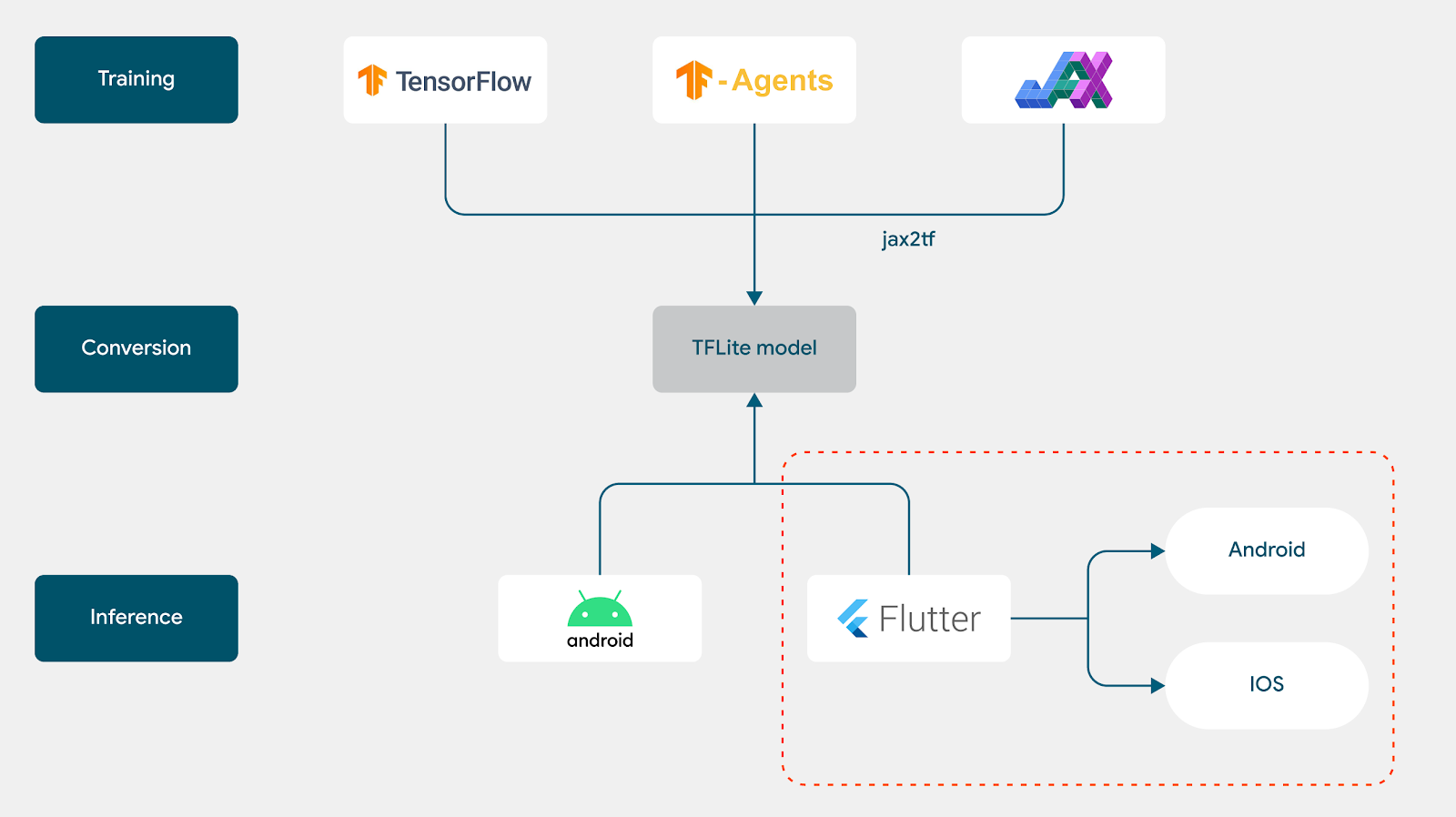
By September 2022, the project evolved to include JAX, a high-performance numerical computing library. This iteration focused on the flexibility of model architecture, showing developers that the choice of training framework—whether standard TensorFlow or the more research-oriented JAX—did not prevent the eventual deployment of a robust TFLite model on Android. This phase solidified the pipeline: Train, Convert, Deploy.

3. The Flutter Revolution (2023–Present)
The final piece of the puzzle arrived with the official launch of the TensorFlow Lite Plugin for Flutter. Recognizing the massive community of Flutter developers eager to incorporate AI, the team pivoted to porting the "Plane Strike" app. This transition marks the culmination of a multi-year effort to ensure that once a model is trained, it can reach the widest possible audience across both Android and iOS with a single codebase.
Supporting Data: The Mechanics of the Integration
The transition to Flutter does not require retraining the model. Because TFLite is a cross-platform format, the heavy lifting—the model architecture and the learned weights—remains consistent. The integration process is reduced to two primary technical steps: model loading and inference execution.
Loading the Interpreter
In a Flutter environment, the TFLite plugin abstracts much of the complex C++ boilerplate that once burdened Android-native developers. Loading a model is as straightforward as initializing an asynchronous interpreter from an asset:
void _loadModel() async
  // Create the interpreter from the TFLite asset
  _interpreter = await Interpreter.fromAsset(_modelFile);
Executing Inference
The core of the game’s "intelligence" lies in the predict function. By passing the boardState into the interpreter, the model evaluates the current configuration of the game and returns a probability distribution. The code then utilizes an argmax operation to identify the highest-probability cell for the next strike:
int predict(List<List<double>> boardState)
  var input = [boardState];
  var output = List.filled(_boardSize * _boardSize, 0)
      .reshape([1, _boardSize * _boardSize]);

  // Run inference via TFLite
  _interpreter.run(input, output);

  // Argmax logic to select the most promising move
  double max = output[0][0];
  int maxIdx = 0;
  for (int i = 1; i < _boardSize * _boardSize; i++)
    if (max < output[0][i])
      maxIdx = i;
      max = output[0][i];


  return maxIdx;
This streamlined approach allows the Flutter frontend to remain responsive, as the inference happens within the TFLite runtime, leaving the UI thread free to handle animations and user input.

Official Perspective: Empowering the Developer Community
Wei Wei, Developer Advocate at Google, emphasized that this move was a direct response to community feedback. "We heard from the Flutter developer community that it would be interesting to make the app cross-platform," Wei noted.
The strategy behind the TFLite plugin is to treat AI as a first-class citizen in the Flutter ecosystem. By providing official support, Google is signaling that mobile AI is moving away from experimental research and into the realm of standard production tooling. The availability of the plugin on pub.dev, coupled with comprehensive documentation, ensures that developers no longer need to maintain separate codebases for iOS and Android when building intelligent features.
Implications: The Future of Cross-Platform AI
The successful porting of the "Plane Strike" game to Flutter has significant implications for the broader software industry.
1. Unified Development Lifecycles
Historically, the "Data Science" and "Mobile Engineering" silos created friction. Data scientists would provide a model, and mobile developers would struggle to integrate it. The Flutter-TFLite workflow forces a unification of these lifecycles, where the model is a portable asset, and the UI layer is a unified, cross-platform interface.
2. Efficiency in Resource Constraints
On-device inference is inherently more private and faster than cloud-based AI. By deploying models via Flutter, developers can now offer advanced features—such as real-time object recognition, predictive typing, or game AI—without incurring the latency or privacy concerns associated with network requests.
3. Accelerated Prototyping
With the ability to deploy to both iOS and Android simultaneously, the speed at which developers can iterate on AI-powered features has increased exponentially. A developer can now train a model, convert it to a .tflite file, and test it on both operating systems in a matter of hours, rather than days.
Looking Ahead: Expanding the Scope
While the current implementation covers basic board game logic, the door is now open for more complex integrations. For developers looking to take this further, the official recommendations include:
- Custom Model Architectures: Experimenting with Convolutional Neural Networks (CNNs) for games with visual boards, rather than the simple array-based state used in "Plane Strike."
- On-Device Feedback Loops: Exploring how user moves can be fed back into the model to improve agent performance locally, potentially using Transfer Learning techniques on-device.
- Performance Optimization: Utilizing NNAPI (Android) or CoreML (iOS) delegates within the TFLite plugin to leverage dedicated hardware accelerators, such as NPUs (Neural Processing Units), for faster inference.
As the ecosystem matures, we can expect to see more sophisticated, AI-driven applications built with Flutter. From predictive health monitoring to real-time image processing, the marriage of Google’s UI toolkit and its machine learning prowess is setting a new standard for the mobile industry.
The "Plane Strike" tutorial serves as more than just a game; it is a roadmap. It demonstrates that the future of mobile intelligence is not found in complex, custom-built solutions, but in accessible, standardized, and cross-platform tools that empower every developer to build the next generation of intelligent apps. Developers are encouraged to explore the complete source code on GitHub and join the ongoing conversation via community channels, as the industry continues to push the boundaries of what is possible on a handheld device.