Mastering Motion: A Comprehensive Guide to the CSS offset-path Property
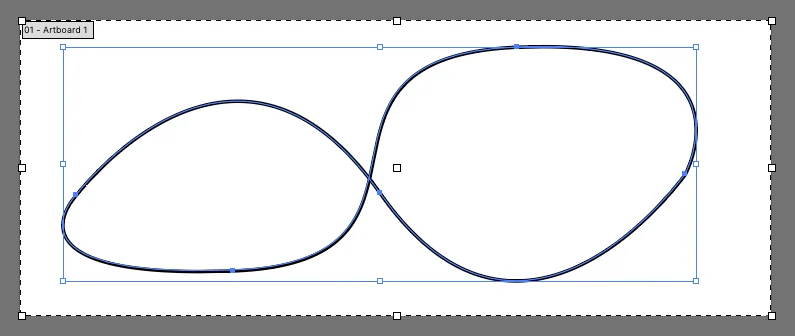
In the evolving landscape of web design, the ability to create sophisticated, fluid animations has shifted from the realm of complex JavaScript libraries to the native power of CSS. Among the most potent tools in a modern developer’s arsenal is the offset-path property. By allowing elements to follow a defined geometric path, offset-path transforms static layouts into dynamic, interactive experiences. This guide explores the technical mechanics, historical evolution, and practical application of motion paths in modern CSS.
Main Facts: Defining the Motion Path
At its core, the offset-path property defines a geometric path along which an element is animated. It acts as the "track" for an object, while its sibling property, offset-distance, acts as the "train" that determines the element’s position along that track.
It is a common misconception that offset-path itself initiates motion. Rather, it acts as a declaration of intent, setting the coordinates or the shape that the browser will interpret. To actually move an element, you must animate the offset-distance property using standard CSS @keyframes.
Core Components of Motion
To implement motion paths effectively, developers typically work with three primary properties:
offset-path: Defines the shape (usually via SVG path syntax).offset-distance: Determines the percentage or length along the path (0% to 100%).offset-rotate: Dictates the orientation of the element as it travels (e.g., whether it stays upright or rotates to follow the curve of the path).
When these properties are combined, they provide a declarative, performant way to move elements along intricate shapes without requiring frame-by-frame calculations in JavaScript.
Chronology: From motion-path to offset-path
The journey of motion paths in CSS has been one of standardization and refinement. Initially introduced under the prefix motion-path, the property was part of an experimental effort to bring SVG-like animation capabilities into the CSS specification.
The Standardization Process
As the W3C (World Wide Web Consortium) worked to formalize these capabilities, it became clear that the term "motion" was too narrow. The working group opted to rename the entire suite of properties to the offset-* prefix. This change was designed to align with broader layout concepts, emphasizing that these properties define an "offset" from a parent container or a reference box.
- 2015: The
motion-pathsyntax first appeared in Blink-based browsers (such as Chrome), sparking widespread interest in path-based animations. - 2016–2017: The transition to
offset-*began. During this period, developers were advised to provide both versions—motion-pathandoffset-path—to ensure backward compatibility as browsers updated their rendering engines. - Modern Era: Today,
offset-pathis the established standard. While legacy codebases may still containmotion-*prefixes, current projects should exclusively utilize theoffset-*syntax.
Supporting Data: Implementing the Syntax
One of the most powerful features of offset-path is its ability to accept SVG path() data directly within a CSS declaration. This allows developers to export complex shapes from design tools like Adobe Illustrator or Figma and translate them directly into CSS code.
The Power of path()
The syntax for offset-path is straightforward:
.mover
  offset-path: path("M 10 10 L 100 100 L 200 10");
  offset-distance: 0%;
  animation: travel 5s linear infinite;


@keyframes travel
  to  offset-distance: 100%;
When working with SVG data, it is critical to understand the coordinate system. If the CSS is applied to an element within an SVG, the path coordinates refer to the SVG’s viewBox. If applied to standard HTML elements, the values default to pixels. This distinction is vital for maintaining the intended scale of your animation across different screen sizes.
Controlling Rotation
Often, you don’t want an element to remain static as it travels along a curve. The offset-rotate property provides granular control over the element’s heading:
auto: The element rotates automatically to face the direction of the path.reverse: The element rotates 180 degrees from the path direction.30deg: A fixed angle is maintained throughout the journey.auto 45deg: A hybrid approach where the element follows the path but includes a manual offset angle.
Official Responses and Browser Support
The adoption of offset-path has been a significant win for web performance. By offloading these calculations to the browser’s compositor thread, offset-path avoids the "jank" often associated with heavy JavaScript-based animations.
The Standardization Landscape
Browser vendors have largely converged on the offset-* specification. While early versions required prefixes, modern browsers (Chrome, Edge, Firefox, and Opera) provide robust support for the standard syntax.
However, developers should remain cautious regarding "working values." While the specification theoretically allows for various shapes (like circle() or ellipse()), the path() value remains the most reliable and widely supported option. References via url() to external SVG paths have historically faced implementation inconsistencies, leading most professionals to favor the embedded path() string for cross-browser stability.
Implications for Web Design
The implications of offset-path for the web design industry are profound. Before this property, creating a "bouncing ball" or a "sliding navigation item" that followed a curved path required either complex math in JavaScript or the use of SMIL (Synchronized Multimedia Integration Language) within SVG.
Performance vs. Complexity
The primary implication is the democratization of high-end motion. Because offset-path is declarative, it is inherently easier to optimize. Browsers can pre-calculate the path and render the frames efficiently.
Furthermore, the integration with the Web Animations API (WAAPI) allows for hybrid approaches. A developer can define the path in CSS for static layout purposes but manipulate the timing or progress of that animation via JavaScript during user interaction. This creates a "best-of-both-worlds" scenario: CSS handles the geometry, while JavaScript handles the logic.
Comparison with Alternatives
While offset-path is powerful, it is not the only solution.
- SMIL: While native to SVG, SMIL has seen declining support and is often discouraged in favor of CSS or JS.
- GreenSock (GSAP): For developers needing extreme precision or legacy browser support, the MotionPathPlugin from GSAP remains the industry gold standard. It provides a more robust, cross-platform engine that handles edge cases and browser quirks more gracefully than native CSS.
Future Outlook: A New Standard for Motion
As we look toward the future, the CSS Working Group continues to refine how elements interact with space. Properties like offset-anchor and offset-position further expand the developer’s ability to pin and offset elements with mathematical precision.
The transition from the clunky, experimental motion-path to the refined offset-path reflects a broader maturity in CSS. We are no longer simply styling boxes; we are choreographing movement.
Best Practices for Developers
- Prioritize Performance: Always favor CSS-based motion paths over JavaScript animations for simple, repetitive paths.
- Use Modern Syntax: Abandon
motion-*naming conventions in favor ofoffset-*to ensure longevity. - Validate Paths: When exporting paths from design software, ensure the coordinates are simplified. Overly complex paths with thousands of anchor points can negatively impact browser rendering performance.
- Accessibility: Remember that motion can be distracting or cause vestibular issues for some users. Always wrap your complex animations in a
prefers-reduced-motionmedia query:@media (prefers-reduced-motion: reduce) .mover animation: none;
Conclusion
The offset-path property represents the maturation of web animation. By moving away from proprietary or script-heavy solutions, the industry has embraced a native, performant, and standard-compliant way to bring interfaces to life. Whether you are creating a simple hover effect or a complex, path-following UI component, offset-path provides the structure necessary to create professional-grade motion with minimal overhead. As browser support continues to solidify, the creative possibilities for path-based animations are limited only by the designer’s imagination.