Modernizing Cluster Management: A Comprehensive Guide to Migrating from Kubernetes Dashboard to Headlamp
By Vincent T. (Microsoft) | Monday, July 13, 2026
As the Kubernetes ecosystem matures, the tools used to observe and manage clusters must evolve to meet the demands of modern, multi-cloud, and developer-centric workflows. For many years, the Kubernetes Dashboard served as the default web-based UI for cluster administrators. However, as organizations shift toward more robust, identity-aware, and extensible interfaces, Headlamp has emerged as the industry-standard successor.
This article provides an authoritative guide on why and how teams are transitioning from the legacy Kubernetes Dashboard to Headlamp, ensuring a seamless shift that enhances security, usability, and operational efficiency.
1. The Architectural Shift: Understanding the Transition
The fundamental difference between Kubernetes Dashboard and Headlamp lies in their relationship with the cluster. While the legacy Dashboard operates strictly as an in-cluster web application relying on static service account tokens, Headlamp is designed as a sophisticated Kubernetes client.
1.1 The Legacy Model: Kubernetes Dashboard
The Kubernetes Dashboard functions as a web server living inside the cluster. It is inherently monolithic, relying on service accounts for its permissions. This often leads to "permission bloat," where the dashboard’s service account is granted excessive privileges to ensure it can display all resources, creating potential security gaps.
1.2 The Modern Approach: Headlamp
Headlamp adopts a client-side architecture. When running on the desktop, it leverages the user’s existing kubeconfig file, meaning the UI inherits the exact permissions—and identity—of the logged-in user. When deployed in-cluster, it utilizes OIDC (OpenID Connect) to authenticate users, ensuring that RBAC (Role-Based Access Control) is applied on a per-user basis rather than a per-application basis. This shift ensures that the UI is no longer a "privileged insider" but a reflection of the user’s own verified identity.
2. Pre-Migration Checklist: Preparing Your Infrastructure
Before initiating the migration, it is critical to establish a baseline. You must document your current reliance on Dashboard features to ensure no critical workflows are lost during the transition.
2.1 Establishing the Baseline
List your current usage patterns. Are your developers using the dashboard for read-only monitoring, or are they executing shell commands and editing YAML manifests? Understanding this allows you to configure Headlamp’s permissions correctly from day one.
2.2 Validating Identity and Access
Headlamp relies heavily on the integrity of your kubeconfig. Before installation, verify that your CLI environment is correctly configured:
# Ensure you are targeting the correct context
kubectl config current-context

# Validate permissions
kubectl get pods -n <your-namespace>
If these commands execute successfully, your environment is ready to integrate with Headlamp’s identity-aware engine.
3. Deployment Strategies: Desktop vs. In-Cluster
Choosing between a desktop or in-cluster deployment depends on your team’s operational structure.
- Desktop (User-Managed): Ideal for power users and developers who need a high-performance, low-latency interface that runs locally and integrates directly with their local terminal sessions.
- In-Cluster (Shared Access): Best for platform teams providing a centralized, "single pane of glass" for multiple developers. This approach allows for standardized access control, centralized logging, and easier onboarding.
4. Installation and Lifecycle Management
Headlamp’s flexibility is reflected in its installation methods. Whether you are on Windows, macOS, or Linux, the installation is streamlined for modern package managers.
4.1 Desktop Installation
- macOS:
brew install --cask headlamp - Windows:
winget install headlampor Chocolatey. - Linux: Flathub/Flatpak remains the recommended path for distribution-agnostic deployment.
4.2 In-Cluster Deployment (Helm)
For production environments, Helm is the preferred delivery vehicle.
helm repo add headlamp https://kubernetes-sigs.github.io/headlamp/
helm install headlamp headlamp/headlamp --namespace headlamp --create-namespace
Once installed, the platform team can expose the service via an Ingress controller, ensuring that the /oidc-callback endpoint is correctly configured to facilitate secure authentication.
5. Security: Authentication and RBAC
Security is the primary driver for this migration. Headlamp’s ability to act as a proxy for user identity is a significant upgrade over the service-account-heavy model of the past.
5.1 OIDC Integration
When deploying in-cluster, Headlamp allows integration with your existing identity provider (e.g., Azure AD, Okta, or Google Workspace). This ensures that when a user logs in, they are authenticated against the enterprise directory, and their Kubernetes actions are audited against their individual RBAC roles.
5.2 The Principle of Least Privilege
Migrating to Headlamp is the perfect opportunity to audit your cluster’s RBAC policies. Because Headlamp does not require an "all-access" service account, you can create fine-grained Roles and ClusterRoles that restrict access based on specific namespaces or resource types.
6. Multi-Cluster Management
One of the most frequent complaints regarding the legacy Dashboard is its "one-cluster-at-a-time" limitation. Headlamp breaks this barrier by acting as a multi-cluster orchestrator. By loading multiple kubeconfig files or using a context-switching UI, developers can toggle between staging, development, and production clusters within a single browser tab or application window.
7. Operational Workflows: Navigating Resources
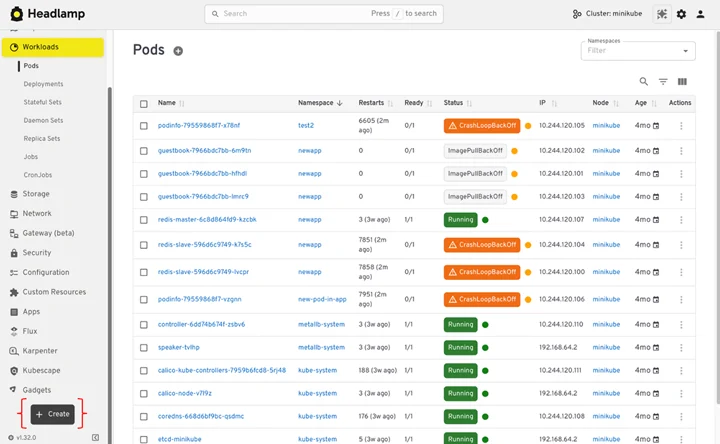
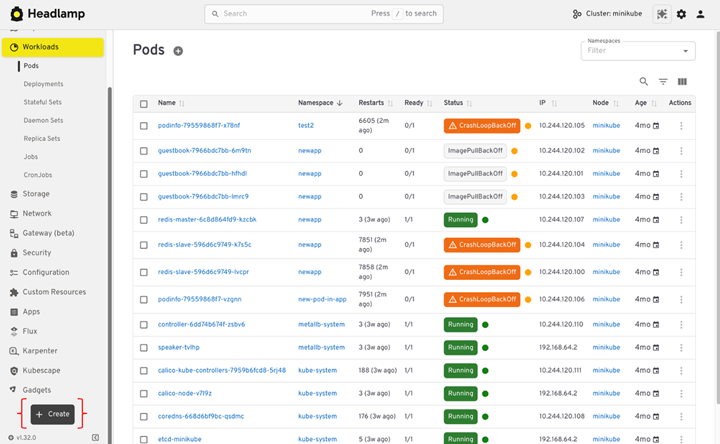
Headlamp maintains the familiar structure of the Kubernetes Dashboard while introducing advanced visualization tools like the "Map View."
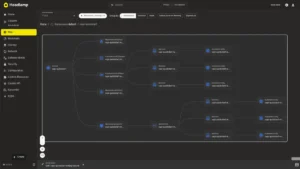
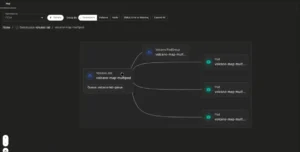
7.1 The Power of Map View
Unlike the traditional list-based views, Map View visualizes resource relationships—such as how a Service maps to a Deployment, which in turn relies on specific Secrets or ConfigMaps. This is invaluable during incident response, as it allows engineers to visually trace the impact of a failing component across the cluster hierarchy.
7.2 From Forms to Manifests
The legacy Dashboard’s reliance on "deployment wizards" often led to "configuration drift," where UI-created resources were not accurately reflected in the team’s GitOps repositories. Headlamp shifts the paradigm by focusing on YAML. By requiring users to apply manifests, Headlamp encourages a "GitOps-first" mindset, ensuring that the changes made in the UI are compatible with the changes made in CI/CD pipelines.
8. Debugging and Troubleshooting
Headlamp excels in day-to-day operations. It allows for:
- Live Log Streaming: View logs from multiple containers in a single view.
- Interactive Exec: Open a secure, authenticated shell directly into a pod.
- Event Analysis: A dedicated dashboard for surfacing Kubernetes events, which serves as the "ground truth" during service outages.
9. Decommissioning the Legacy Dashboard
Once the migration is complete and teams are fully onboarded to Headlamp, it is essential to clean up. Leaving an unused Dashboard instance active is a security risk—it is an unmonitored service that could be exploited.
- Remove via Helm:
helm uninstall kubernetes-dashboard -n kubernetes-dashboard - Audit Service Accounts: Ensure that the specific ServiceAccounts, ClusterRoles, and RoleBindings associated with the legacy dashboard are deleted.
- Final Verification: Use
kubectl get podsto ensure no remnants of the old infrastructure remain.
10. Conclusion: The Future of Cluster UI
The transition from Kubernetes Dashboard to Headlamp is more than just a software swap; it is a shift toward a more secure, identity-driven, and developer-friendly operational model. By embracing Headlamp, organizations gain a tool that grows with their needs—from simple local debugging to complex, multi-cluster, enterprise-grade management.
For teams looking to stay at the forefront of Kubernetes best practices, this migration is a vital step. We encourage teams to visit headlamp.dev to contribute, review the latest documentation, and join the thriving community of engineers shaping the future of cluster administration.
This article is a mirror of the original technical guidance published on the official Headlamp blog.