AWS Redefines Application Management: Introducing Elastic Beanstalk Cluster Mode with Amazon EKS
Fifteen years after its initial debut in 2011, Amazon Web Services (AWS) has radically overhauled one of its foundational developer tools. AWS Elastic Beanstalk, long trusted by engineering teams to manage deployment, scaling, and infrastructure operations for full-stack applications in languages like Java, .NET, Python, Node.js, PHP, Ruby, and Go, has entered a new era.
Today, AWS announced the general availability of Elastic Beanstalk Cluster Mode. This transformative addition to the service takes full, continuous operational responsibility for production environments backed by a modern, containerized architecture. By fusing the simplicity of Elastic Beanstalk with the raw power of Amazon Elastic Kubernetes Service (Amazon EKS), AWS is offering developers a streamlined path to managing multi-service application portfolios without the traditional operational overhead.
Main Facts: What is Elastic Beanstalk Cluster Mode?
Elastic Beanstalk Cluster Mode is a fully managed deployment paradigm designed specifically for teams operating diverse portfolios of microservices and web applications. Rather than running each application in isolated, dedicated infrastructure, Cluster Mode allows multiple applications to securely share a unified infrastructure baseline powered by Amazon EKS.
- Unified Operational Baseline: Organizations can manage anywhere from ten to a hundred applications through a single experience, applying consistent operational guarantees across every technology stack.
- Cost Efficiency: Because applications share underlying computing resources, per-application infrastructure costs scale down naturally as a portfolio grows, eliminating redundant resource allocation.
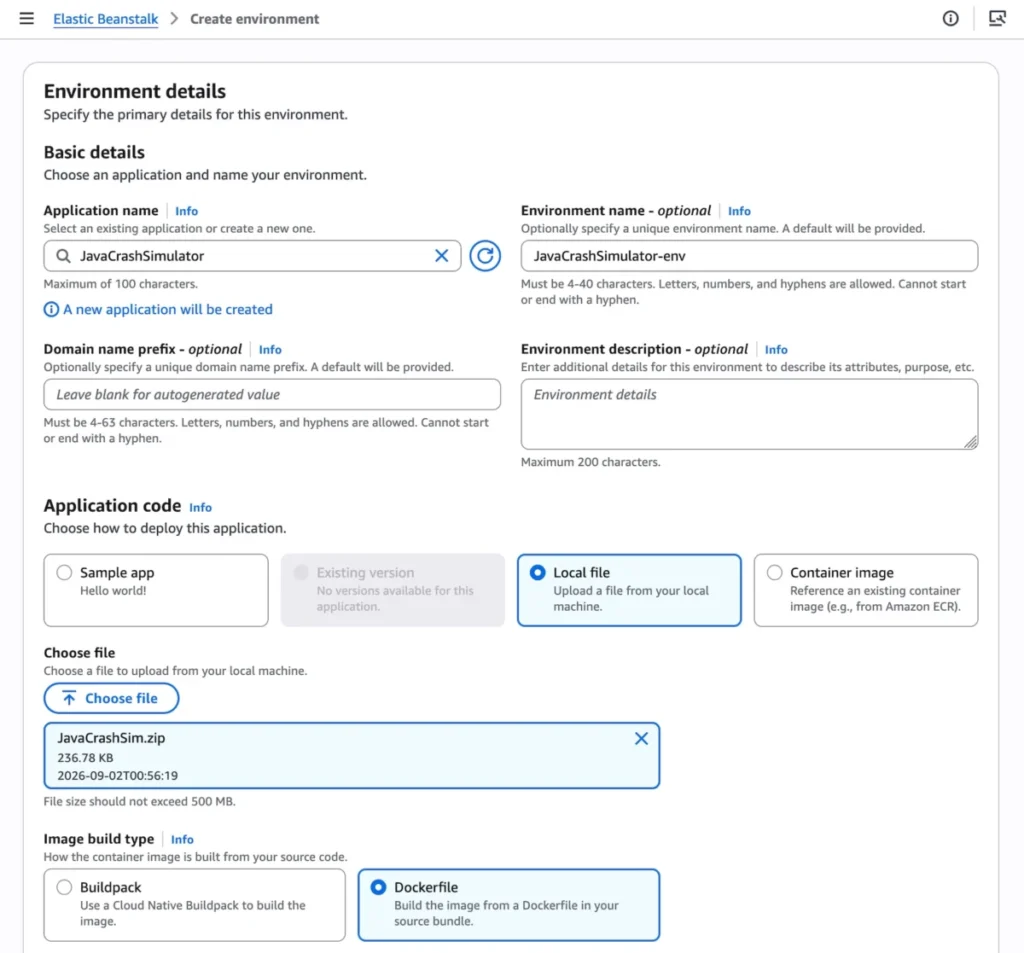
- Flexible Deployment Inputs: Developers can bring their applications in whatever format suits them best—raw source code, custom Dockerfiles, or pre-built container images stored in Amazon Elastic Container Registry (Amazon ECR).
- End-to-End Lifecycle Management: AWS assumes responsibility for deploying, scaling, patching, monitoring, and upgrading workloads continuously for the entire lifespan of the application.
Chronology: Fifteen Years of Evolution to Kubernetes Integration
To understand the significance of Cluster Mode, it is helpful to look back at how AWS Elastic Beanstalk has evolved to meet changing enterprise demands.
2011–2020: The Foundation of Simplified Deployment
When AWS launched Elastic Beanstalk in 2011, its core value proposition was simple: let developers focus strictly on business logic while AWS handles the provisioning and scaling of underlying servers, load balancers, and operating systems. Over the next decade, it became a go-to platform for rapid prototyping and production deployments across multiple programming languages.
2024–2026: The Modernization Wave
Recognizing that modern architectures were shifting rapidly toward containers, microservices, and AI-driven tooling, AWS began rebuilding the underlying operational engine of Elastic Beanstalk.

- April 2026: AWS introduced AI-powered environment analysis, enabling the service to autonomously diagnose runtime health issues and recommend targeted fixes.
- February 2026: The release of an official GitHub Action allowed engineering teams to deploy straight from existing CI/CD pipelines via concise YAML configurations.
- Mid-2026: AWS modernized the platform’s infrastructure foundation to include OpenTelemetry-based observability, traffic-splitting deployments with automatic rollbacks, event-driven autoscaling, centralized secrets management via AWS Secrets Manager, and HTTPS by default through AWS Certificate Manager.
Today: The Cluster Mode Launch
Culminating these infrastructure upgrades, AWS has officially rolled out Cluster Mode. The feature bridges the gap between classic Beanstalk simplicity and the enterprise-grade orchestration capabilities of Amazon EKS, marking the next logical step in the platform’s fifteen-year history.
Supporting Data: Technical Implementation and Architecture
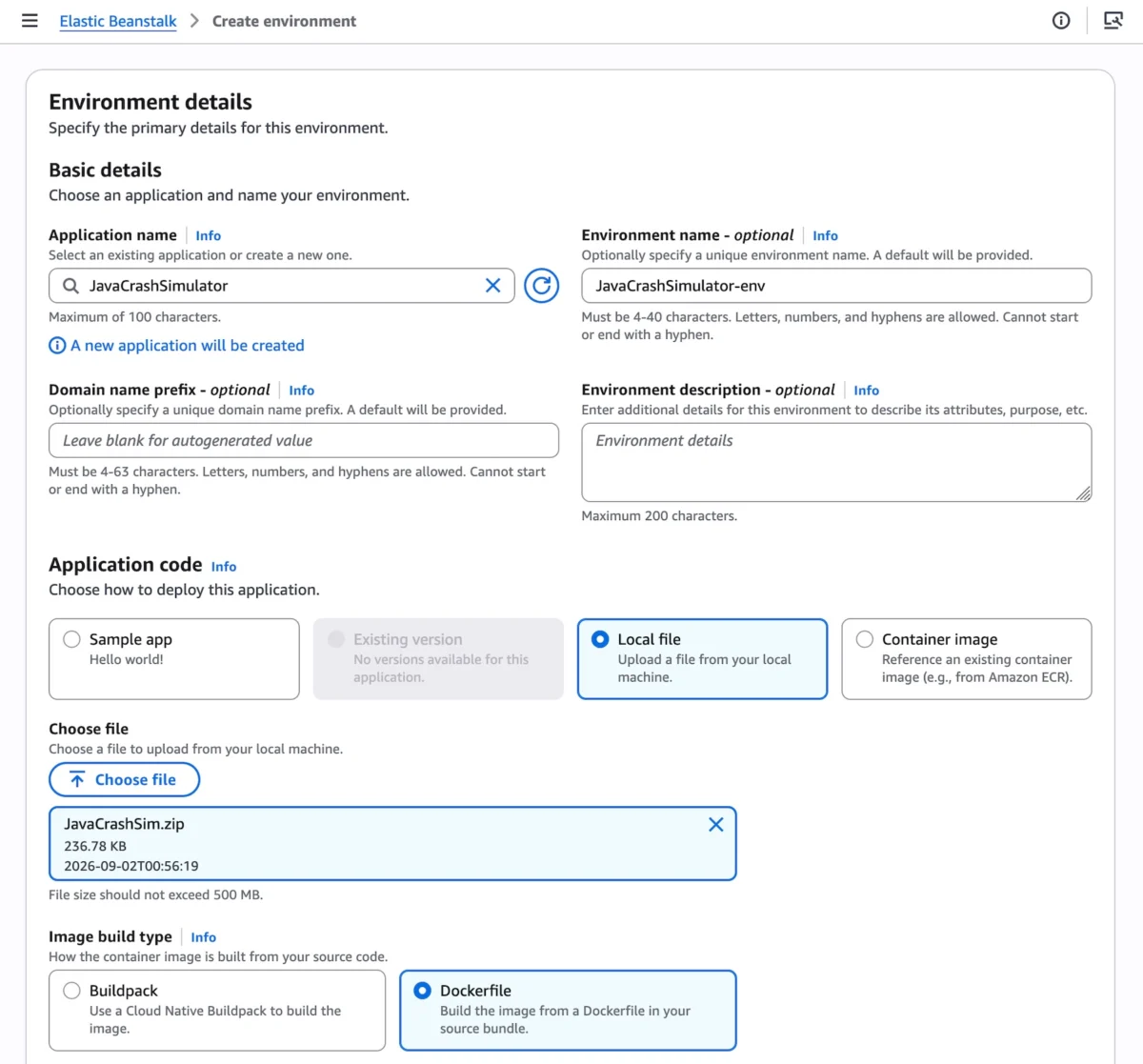
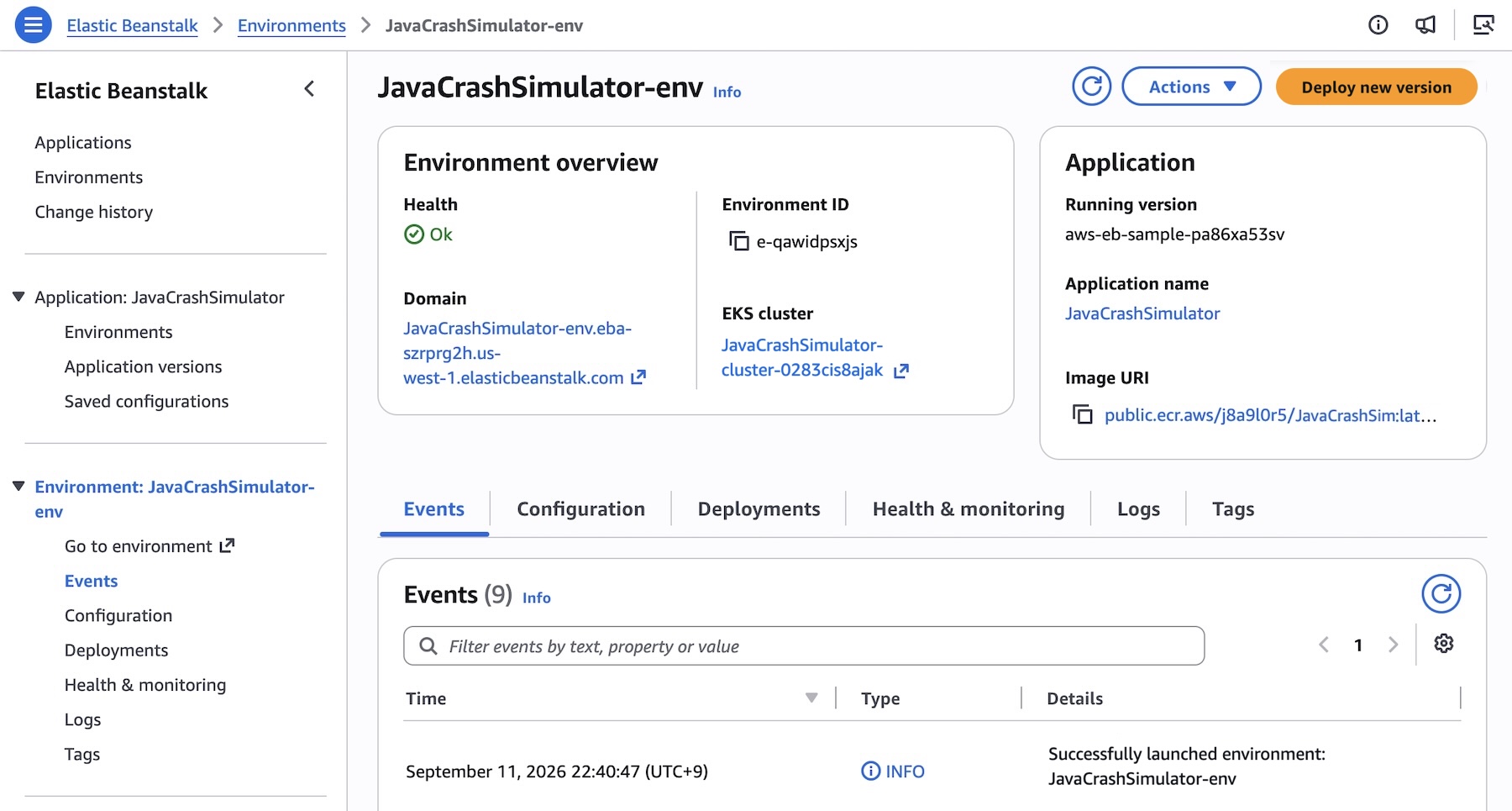
Adopting Cluster Mode does not require a steep learning curve. Developers can provision a cluster directly through the AWS Management Console, the AWS Command Line Interface (EB CLI), or via native AWS SDKs.
Step-by-Step Console and CLI Workflow
When setting up a new environment in the Elastic Beanstalk console, administrators simply select Cluster under the Deployment type menu.

When deploying via the AWS CLI, initializing a multi-service microservice architecture follows a structured sequence. For example, registering pre-built application versions from Amazon ECR is handled via shell scripts:
IMAGES=(
    "frontend-v1|public.ecr.aws/my-microservices/frontend:v1"
    "cartservice-v1|public.ecr.aws/my-microservices/cart:v1"
    "paymentservice-v1|public.ecr.aws/my-microservices/payment:v1"
    "shippingservice-v1|public.ecr.aws/my-microservices/shipping:v1"
)

for entry in "$IMAGES[@]"; do
    IFS='|' read -r label uri <<< "$entry"
    aws elasticbeanstalk create-application-version
        --application-name $APP_NAME
        --version-label "$label"
        --image-configuration Source="Uri=$uri"
        --region "us-west-2"
    echo "Registered: $label"
done
Granular Configuration Options
Cluster Mode allows teams to define specialized configuration namespaces for individual services. For instance, a frontend web service requiring public internet exposure can be configured with an Application Load Balancer (ALB) and custom health checks using a JSON configuration file:
[
    "Namespace": "aws:elasticbeanstalk:eks", "OptionName": "cluster-role", "Value": "arn:aws:iam::0123456789012:role/EKSClusterRole",
    "Namespace": "aws:elasticbeanstalk:eks", "OptionName": "node-role", "Value": "arn:aws:iam::0123456789012:role/EKSNodeRole",
    "Namespace": "aws:elasticbeanstalk:eks:environment", "OptionName": "observability-role", "Value": "arn:aws:iam::0123456789012:role/ObservabilityRole",
    "Namespace": "aws:elasticbeanstalk:eks:environment", "OptionName": "subnets", "Value": "subnet-1,subnet-2,subnet-3",
    "Namespace": "aws:elasticbeanstalk:eks:environment:autoscaling", "OptionName": "min-replica", "Value": "1",
    "Namespace": "aws:elasticbeanstalk:eks:environment:autoscaling", "OptionName": "max-replica", "Value": "2",
    "Namespace": "aws:elasticbeanstalk:eks:environment", "OptionName": "cpu", "Value": "0.5",
    "Namespace": "aws:elasticbeanstalk:eks:environment", "OptionName": "memory", "Value": "256Mi",
    "Namespace": "aws:elasticbeanstalk:eks:environment", "OptionName": "memory-limit", "Value": "512Mi",
    "Namespace": "aws:elasticbeanstalk:eks:environment", "OptionName": "service-port", "Value": "8080",
    "Namespace": "aws:elasticbeanstalk:eks:alb", "OptionName": "scheme", "Value": "internet-facing",
    "Namespace": "aws:elasticbeanstalk:eks:alb", "OptionName": "healthcheck-path", "Value": "/_healthz"
]
Executing the deployment command finalizes the infrastructure buildout:

aws elasticbeanstalk create-environment
    --application-name my-microservice
    --environment-name frontend
    --version-label frontend-v1
    --tier Name=Cluster,Type=EKS
    --option-settings file:///tmp/frontend-options.json
Official Responses and Coexistence with Standard Mode
AWS has emphasized that existing users of Elastic Beanstalk Standard Mode—which relies on Amazon Elastic Compute Cloud (EC2) instances—have nothing to fear. Standard Mode remains fully supported, and both Standard and Cluster Mode environments can run side by side within the exact same Elastic Beanstalk application structure.
This side-by-side capability enables engineering organizations to migrate workloads to Kubernetes-backed clusters at their own pace. Automated compatibility validation checks run before any modifications are executed, ensuring that workloads are never forced into an involuntary migration.
Pricing Structure
AWS has confirmed that there is no additional management charge for utilizing Elastic Beanstalk Cluster Mode. Customers continue to pay strictly for the underlying AWS resources consumed by their architectures. This includes:
- The Amazon EKS control plane fee
- EKS Auto Mode compute resources
- Amazon ECR storage and data transfer
- Amazon CloudWatch monitoring metrics
Note: Elastic Beanstalk Cluster Mode is not eligible for the AWS Free Tier.
Implications: What This Means for Enterprise Engineering Teams
The introduction of Cluster Mode signals a broader shift in how cloud providers view platform engineering. By abstracting the steep learning curves typically associated with native Kubernetes management (such as complex Helm charts, custom ingress controllers, and manual cluster upgrades), AWS is democratizing access to enterprise-grade container orchestration.
- Reduced Cognitive Load for Developers: Small to mid-sized engineering teams that want the elasticity and resilience of Kubernetes no longer need dedicated platform engineers to write and maintain raw Kubernetes manifests.
- Streamlined Governance: Security compliance, HTTPS enforcement via ACM, and centralized secrets management are baked into the platform architecture by default, reducing configuration drift and security vulnerabilities.
- Flexible Migration Pathways: Enterprises burdened by legacy monolithic or distributed architectures can incrementally containerize and migrate services to EKS without disrupting active production pipelines.
AWS Elastic Beanstalk Cluster Mode is generally available today across all AWS Regions where Elastic Beanstalk operates. Teams looking to explore Regional roadmaps can reference AWS Regional Capabilities documentation or leverage AI integration tools like the AWS MCP Server and associated plugins to query APIs and troubleshoot configurations directly from their preferred development environments.