ONLYOFFICE Docs 10.0: A Modular Revolution in Open-Source Office Suites
The release of ONLYOFFICE Docs 10.0 marks a significant turning point in the evolution of open-source office productivity suites. By pivoting toward a modular architecture and embracing deep AI integration, the developers behind ONLYOFFICE are positioning the suite not just as a document editor, but as a comprehensive, extensible workspace. This update arrives at a time when the industry is deeply divided over the role of artificial intelligence in local software environments, with ONLYOFFICE choosing a path that prioritizes user choice and granular control.
Main Facts: What Defines the 10.0 Release?
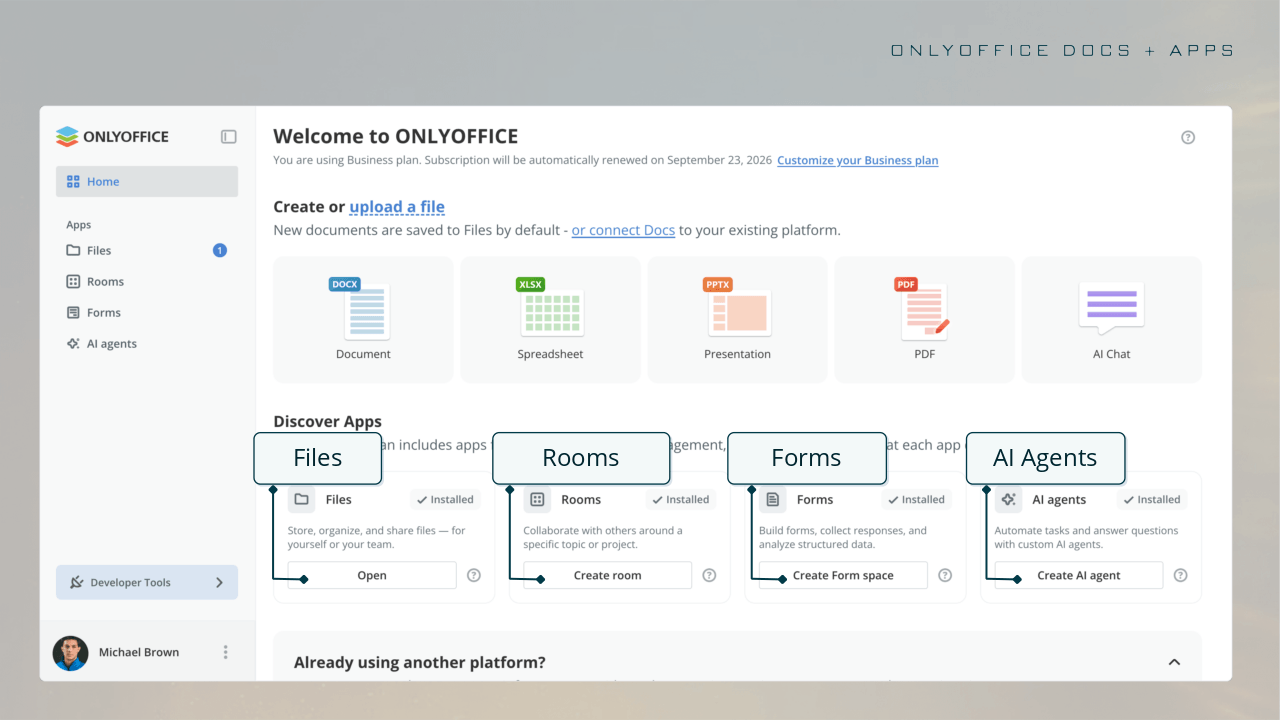
At its core, ONLYOFFICE Docs 10.0 introduces a fundamental shift in how users interact with the suite. The most immediate change is the implementation of a centralized home screen featuring a "Discover Apps" interface. This hub serves as a launchpad for four primary modular applications: Files, Rooms, Forms, and AI Agents.
By decoupling these functions from the monolithic core, ONLYOFFICE allows users to install only what they need, reducing bloat and optimizing system performance. The "Files" module streamlines document management and organization, while "Rooms" provides a dedicated space for collaborative efforts. "Forms" continues the suite’s strength in structured data collection, and the new "AI Agents" module brings advanced automation capabilities—including support for MCP (Model Context Protocol) servers—to the self-hosted ecosystem.
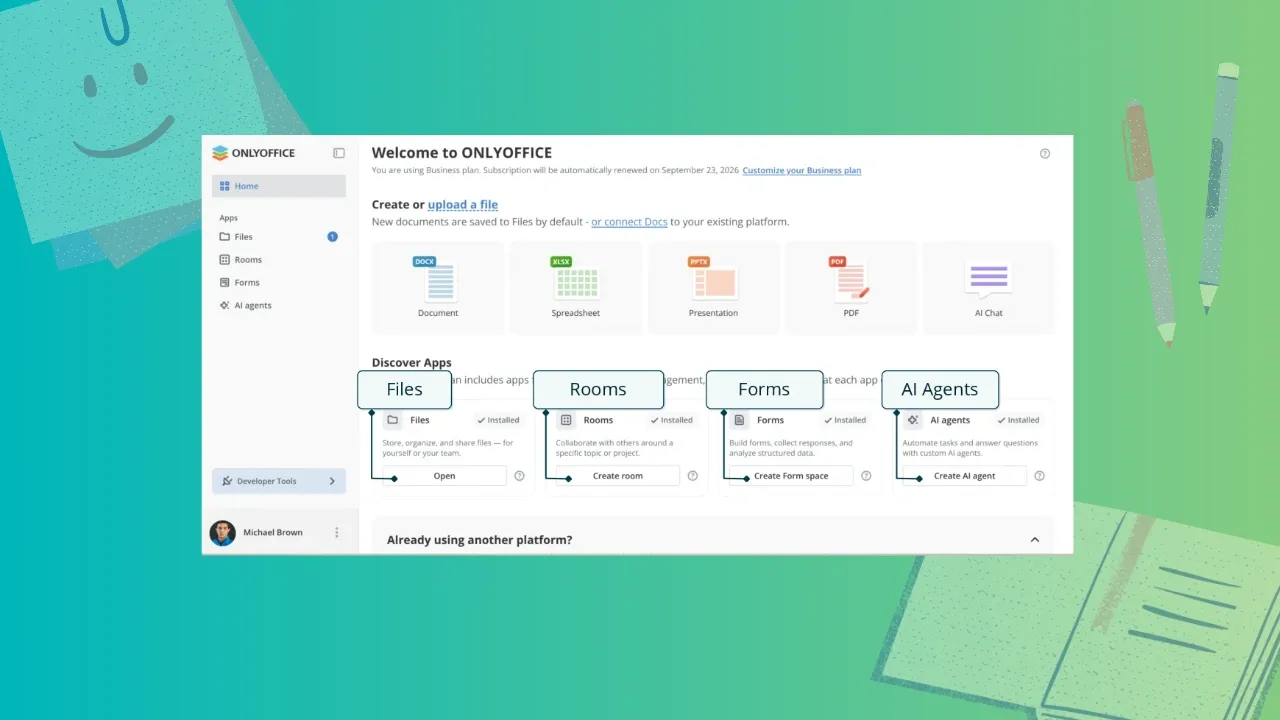
For the end user, this modularity means that the core document editors (Document, Spreadsheet, Presentation, and PDF) remain lean, while the specialized functionality is available on-demand. This architectural decision directly addresses feedback from the open-source community, which has increasingly expressed concern over the integration of AI components into base software installations.
Chronology: The Path to Modernization
The trajectory leading to version 10.0 has been marked by incremental but impactful updates. Following the release of Docs 9.4, which introduced refined layout tools and improved collaborative features, the development team accelerated its focus on UI/UX stability and AI compatibility.
- Early 2026: Development cycles prioritized the modular engine that would eventually power the 10.0 release, focusing on resource isolation for heavy computational tasks.
- Mid-2026: Beta testing of the AI integration focused on compatibility with local LLMs (Large Language Models) via platforms like Ollama, ensuring that users could achieve privacy-focused automation without relying exclusively on proprietary cloud APIs.
- October 2026: The official launch of ONLYOFFICE Docs 10.0 across web, cloud, and desktop platforms, signaling a shift in the company’s long-term product roadmap.
Deep Dive: Editor Enhancements and Productivity Gains
While the modular architecture takes center stage, the actual document editors have received significant refinements that improve daily workflows for professionals.

The PDF and Document Experience
The PDF Editor has matured into a powerhouse tool for document management. The new "Remove hidden information" feature in the Redact tab is a vital addition for users handling sensitive data, as it ensures that metadata is scrubbed before a file leaves the secure environment. The addition of signature support and automatic table recognition further bridges the gap between static PDF viewing and active document editing.
In the Document Editor, the introduction of the "Keep with next" setting is a subtle but essential improvement for long-form writers and researchers. By preventing headers from being orphaned at the bottom of a page, the suite ensures professional document formatting. Additionally, improvements to right-to-left language support and refined horizontal line settings demonstrate a commitment to global accessibility.
Spreadsheet and Presentation Upgrades
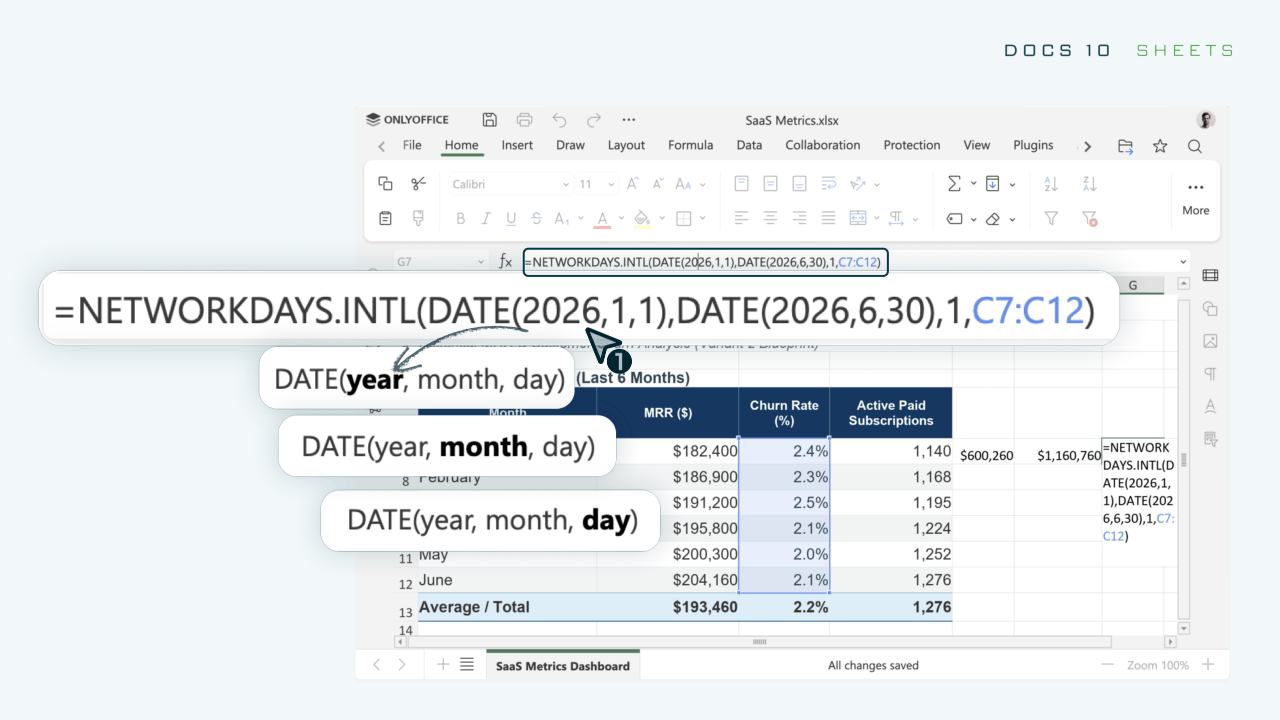
The Spreadsheet Editor has undergone a performance overhaul. By separating style data from the core cell processing logic, ONLYOFFICE has significantly improved handling speeds for large-scale workbooks. Visual feedback, such as the new dynamic outlines for cut-and-paste actions and real-time function hints, lowers the cognitive load on the user.
The Presentation Editor has expanded its utility beyond simple slide creation. With the ability to export directly to GIF or video formats, users can now create dynamic content for social media or presentations without external conversion software. The introduction of multiple specialized views—including Outline, Reading, and various Master views—brings the suite closer to parity with enterprise-grade presentation tools.
The AI Strategy: Empowerment Through Choice
Perhaps the most contentious and significant aspect of the 10.0 release is the implementation of AI. Unlike competitors who often force AI features into the software, ONLYOFFICE has adopted an "opt-in" modular approach.
AI Integration Features
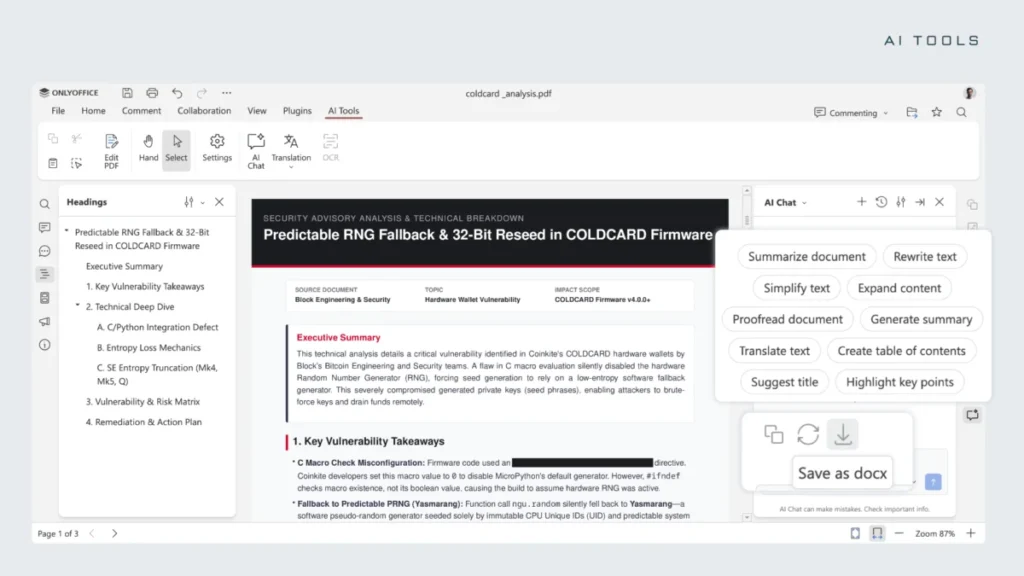
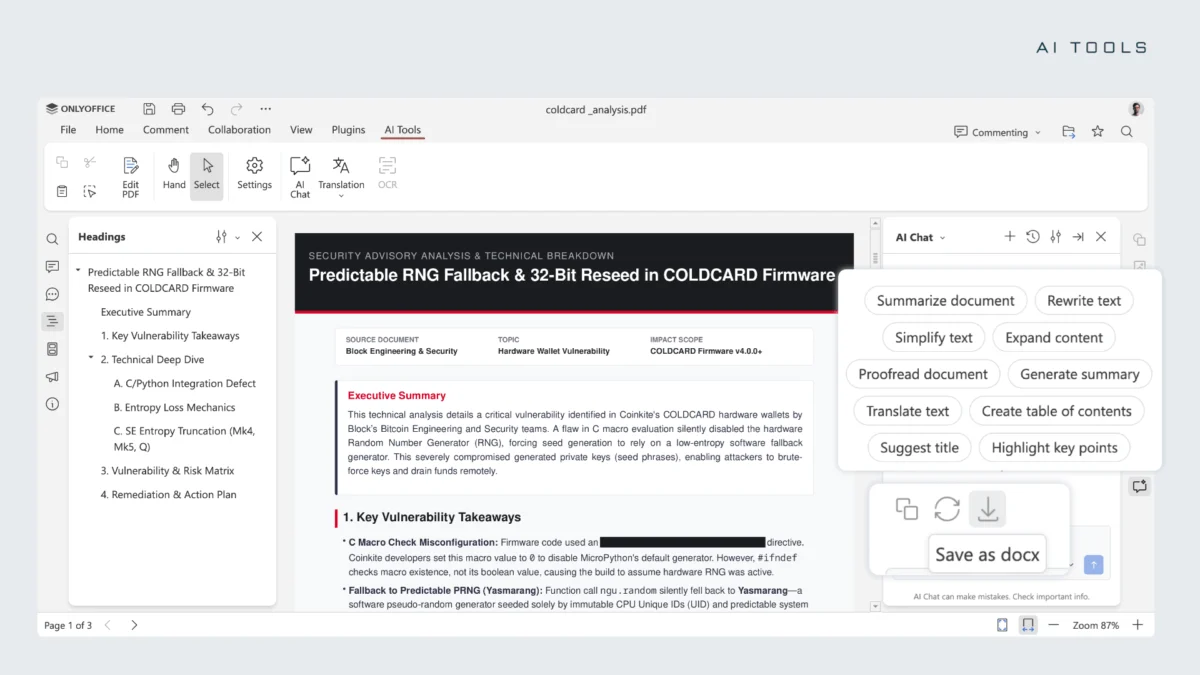
- Dedicated AI Tab: Each editor features a persistent AI Tools tab, providing immediate access to chat-based assistance.
- Contextual Assistance: The AI can summarize long documents, rewrite text to adjust the tone, translate content, or perform proofreading.
- Predictive Analysis: In spreadsheets, the AI assistant is capable of identifying trends, writing complex formulas, and generating Pivot Tables based on user-supplied data sets.
- Agentic Workflows: The AI Agents module is the most advanced addition, supporting persistent agents that can manage personalized knowledge bases and automate repetitive document-processing tasks.
The Stance on Deployment
ONLYOFFICE maintains a clear distinction between its cloud-based offerings and its self-hosted, open-source versions. For those using the cloud-based DocSpace, the company offers a streamlined, wallet-based access system for its AI services. For the self-hosted crowd, however, the doors are wide open. Users can configure their own local AI instances using Ollama or connect to external enterprise-grade models via API, ensuring that their data remains under their control—a feature that distinguishes them from many proprietary counterparts.
Implications: The Industry Landscape
The release of ONLYOFFICE Docs 10.0 has profound implications for the open-source software market. As established players like LibreOffice double down on their "no AI" stance to preserve the purity of the office suite, ONLYOFFICE is betting that the future of productivity lies in managed, user-controlled AI integration.
Bridging the Gap
By providing a platform that is "AI-ready" without being "AI-dependent," ONLYOFFICE is effectively catering to two different demographics: the privacy-conscious developer who wants to self-host local models, and the corporate professional who needs efficient, AI-assisted tools for daily tasks. This modular approach mitigates the risk of software bloat while providing a pathway for future technological expansion.
The Collaborative Future
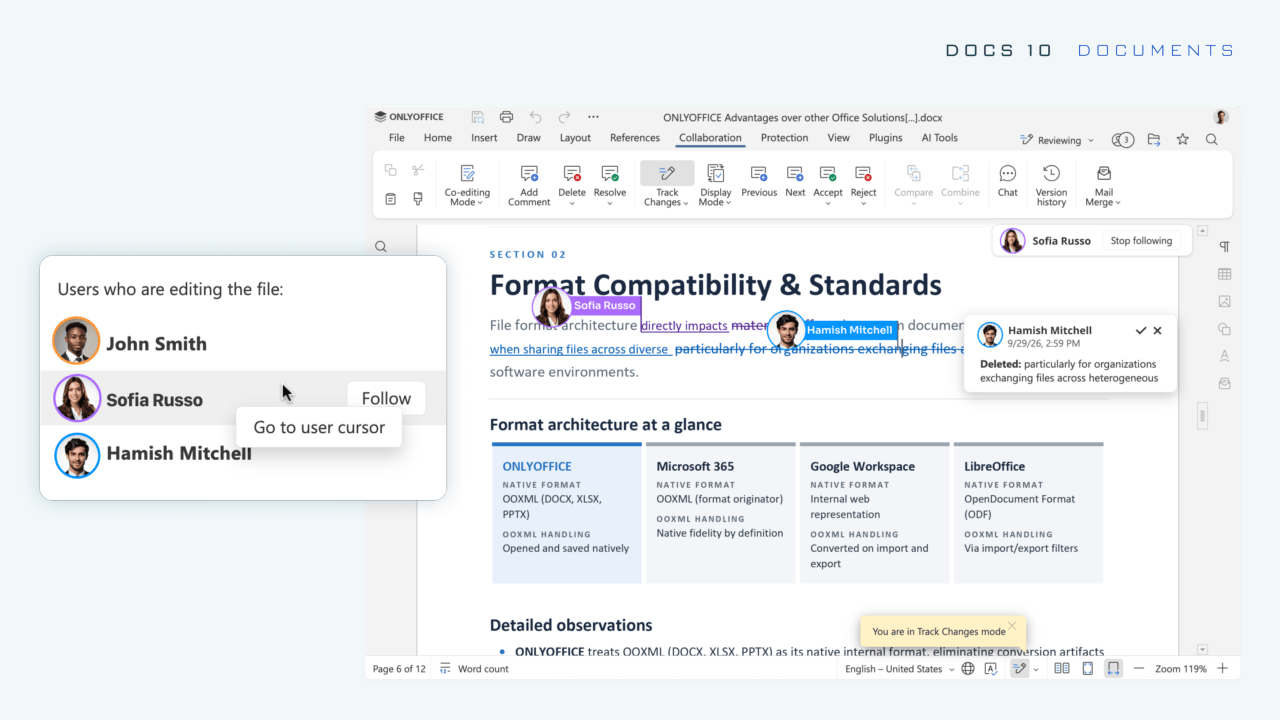
Collaborative features have also seen a boost with the "Follow/Stop" cursor-tracking system. In remote-work environments where digital collaboration is the standard, this feature reduces the friction of pair-editing. It allows users to synchronize their view with a colleague’s cursor movement, making real-time, synchronous editing sessions more intuitive and less prone to communication errors.
Conclusion: A New Standard?
ONLYOFFICE Docs 10.0 is a testament to the maturation of open-source office suites. By moving away from the "all-in-one" application model toward a modular system, the developers have created a flexible, performant, and future-proof toolset.
While the inclusion of AI will continue to be a topic of debate, the method of its inclusion—modular, optional, and self-hostable—sets a standard that other developers should watch closely. As users continue to demand more power without sacrificing performance or privacy, ONLYOFFICE is positioning itself as a vital alternative to the dominant, subscription-based closed-source ecosystems.
For those ready to upgrade, the cloud-based DocSpace is already live, while self-hosted users can expect the update to hit their repositories shortly. Whether you are a professional requiring precise document control or a privacy advocate looking to integrate AI into your local workflow, version 10.0 offers a compelling reason to revisit your office suite choices.