
Mastering Motion: A Comprehensive Guide to the CSS offset-path Property
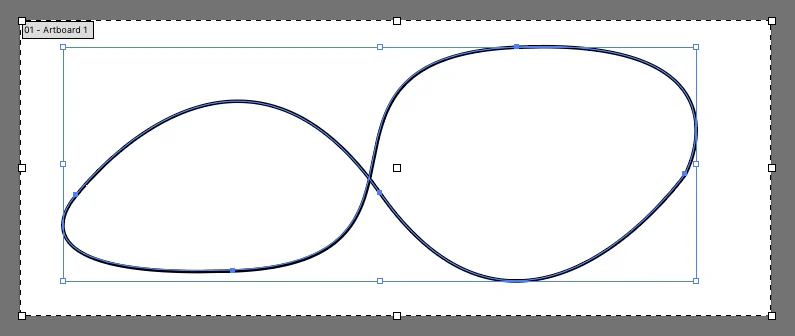
In the evolving landscape of web design, the ability to create sophisticated, fluid animations directly within CSS has become a hallmark of professional development. One of the most powerful tools in this arsenal is the offset-path property. By allowing developers to define complex movement trajectories for elements without relying on heavy JavaScript libraries or external plugins, offset-path has fundamentally changed how we approach UI/UX choreography.
However, the journey of this property—from its experimental beginnings to its standardized implementation—has been marked by significant nomenclature shifts and evolving browser support. Understanding offset-path requires more than just learning the syntax; it requires an appreciation for the structural mechanics of modern CSS animation.
Main Facts: What is offset-path?
The offset-path property defines a specific trajectory—a "motion path"—that an element follows during an animation. Unlike traditional CSS transforms, which are often limited to linear transitions or simple keyframe rotations, offset-path allows an element to traverse a geometric shape, such as a curve, a spiral, or a complex SVG-defined vector.
The Mechanism of Motion
It is critical to distinguish between defining the path and executing the motion. The offset-path property does not animate the element on its own; rather, it sets the stage. The actual animation is driven by the offset-distance property. By animating offset-distance from 0% to 100% within a @keyframes rule, the element is commanded to travel along the previously defined offset-path.
Furthermore, developers often utilize offset-rotate to govern how the element behaves during its journey. By default, the element will rotate to "face forward" along the path, but this can be overridden to maintain a fixed orientation, face backward, or rotate at a specific angle relative to the trajectory.
Chronology: From motion-path to offset-path
The history of this property is a case study in the standardization of web specifications. When the concept was first introduced to the CSS Working Group, it was known as motion-path. Under this original naming convention, related properties were also prefixed with motion-* (e.g., motion-offset, motion-rotation).
The Standardization Pivot
As the specification matured within the W3C and the FXTF (Effects Task Force), it became clear that "motion" was too broad a term for a property specifically focused on geometric offsets. To better align with the naming conventions of other CSS properties—such as offset-anchor and offset-position—the spec was rebranded.
- 2015: Initial implementation appears in Blink-based browsers under the
motion-*moniker. - 2016: The CSS Working Group officially shifts the spec to the
offset-*prefix. - 2016-2017: Browser vendors begin the transition to the new syntax.
For developers managing legacy codebases, the transition phase proved challenging. During this period, the "best practice" was to define both the old and new syntax simultaneously to ensure cross-browser compatibility. While modern browsers have largely deprecated the motion-* syntax, referencing the history of this change is vital for understanding why legacy tutorials or older Stack Overflow answers may still feature the original, deprecated naming convention.
Supporting Data: Syntax and Implementation
To implement offset-path, developers typically leverage the path() function. This function accepts standard SVG path data—the same syntax used in the d attribute of an <svg> element.
Practical Syntax Example
.moving-element
  /* Defining the path using SVG coordinate syntax */
  offset-path: path('M 10 80 C 40 10, 65 10, 95 80 S 150 150, 180 80');

  /* Setting the motion */
  animation: move-along-path 4s linear infinite;


@keyframes move-along-path
  from  offset-distance: 0%;
  to    offset-distance: 100%;
Coordinate Systems
A frequent point of confusion for developers is the unit system. If you are applying offset-path to an element within an SVG, the coordinate values are relative to the SVG’s viewBox. If you are applying it to an HTML element (like a <div> or an <img>), the coordinates are treated as pixels. This distinction is crucial; failing to account for the context of the element will result in the animation either appearing off-screen or behaving in unexpected, non-responsive ways.
Official Responses and Browser Support
The browser support for offset-path has seen steady growth. As of the current state of the web, major engines (Chromium-based browsers like Chrome, Edge, and Opera, as well as Firefox) provide robust support for the path() value.
The "Functional" Reality
While the CSS specification theoretically allows for other values—such as url() to reference an external SVG path—in practice, support for these more complex values is inconsistent. Many developers have reported that using url() to point to an external path definition often fails to render correctly across different engines. Consequently, the industry standard has converged on using the path() function with inline data strings.
Web Animations API (WAAPI)
For developers requiring high-performance, dynamic control, the Web Animations API (WAAPI) offers a programmatic alternative to CSS. Using JavaScript, you can manipulate offset-path and offset-distance in real-time, allowing for user-driven interactions. For instance, you could tie the progress of an element along a path to the user’s scroll position, creating high-fidelity parallax effects that were previously the domain of heavy animation libraries.
Implications: The Future of Web Choreography
The adoption of offset-path signifies a broader shift toward "Native Animation." Historically, if a designer wanted an icon to move along a complex, non-linear path, they would have been forced to either:
- Export a massive, bloated video file.
- Use a JavaScript animation library like GreenSock (GSAP).
- Use the now-deprecated SMIL (Synchronized Multimedia Integration Language) within SVG.
The Efficiency Dividend
By moving this logic into CSS, we reduce the "JavaScript tax" on the browser. The browser engine is highly optimized for CSS property updates, often offloading them to the GPU. This means that even complex animations using offset-path are significantly more performant than their JS-driven counterparts, particularly on mobile devices with limited processing power.
Accessibility and UX
However, with great power comes great responsibility. The ability to move elements across the screen creates an implicit requirement for motion accessibility. Developers must be mindful of prefers-reduced-motion media queries. If an element is moving along an offset-path, it is standard practice to wrap that animation in a media query to ensure that users who are sensitive to motion are not overwhelmed by the design.
@media (prefers-reduced-motion: no-preference)
  .moving-element
    animation: move-along-path 4s linear infinite;
Beyond offset-path: Alternatives and Ecosystems
While offset-path is the native champion, it is not the only way to achieve path-based animation.
GSAP (GreenSock)
GreenSock remains the industry standard for professional-grade animation. Its MotionPathPlugin is more feature-rich than the native CSS implementation, offering easier easing control, better support for complex SVG interactions, and legacy support for older browsers. For enterprise-level projects where consistency across every possible browser version is required, GSAP remains the preferred choice.
SMIL and SVG
SMIL, while largely considered "dead" by some, is still functional in many environments for specific SVG-in-SVG animations. However, given its spotty history and cross-browser inconsistency, it is generally recommended that developers migrate their SMIL-based animations to offset-path where possible to future-proof their code.
The Roadmap Ahead
The CSS Working Group continues to refine the offset-* properties. Future updates may include better support for url() references and perhaps even more advanced control over path-bending and scaling. As the web platform matures, the goal is to make the browser a truly capable animation studio.
Conclusion
The offset-path property is a testament to the maturation of CSS as a design language. What started as a niche, experimental feature—subject to name changes and browser-specific prefixes—has evolved into a stable, high-performance pillar of modern web development.
By understanding the mechanics of the path() function, the role of offset-distance in driving the motion, and the importance of browser-native performance, developers can create truly immersive user experiences. Whether you are building a simple UI interaction or a complex, animated data visualization, mastering offset-path is no longer optional—it is an essential skill for the modern front-end engineer. As we look toward the future, the integration of these properties with new CSS features will undoubtedly continue to push the boundaries of what is possible in the browser, moving the web further away from static pages and closer to fluid, interactive experiences.








