Navigating the Shift: A Comprehensive Guide to Migrating from Kubernetes Dashboard to Headlamp
By Vincent T. (Microsoft) | Monday, July 13, 2026
As the Kubernetes ecosystem matures, the tools developers use to interact with their clusters are evolving. For years, the Kubernetes Dashboard served as the default web-based interface for cluster management. However, as organizations shift toward more flexible, security-conscious, and multi-cluster environments, Headlamp has emerged as the modern successor. This guide provides a deep dive into why this transition is occurring, how to execute it, and the long-term implications for your infrastructure teams.
1. The Core Philosophy: Understanding the Architectural Shift
To appreciate why the industry is pivoting toward Headlamp, one must understand the fundamental difference in how these two tools communicate with Kubernetes.
1.1 The In-Cluster Model vs. Client-Side Agility
The Kubernetes Dashboard is traditionally deployed as a workload inside the cluster. It relies heavily on ServiceAccount tokens, which creates a centralized point of management but can also introduce security overhead regarding token rotation and privilege management.
Headlamp, conversely, acts as a sophisticated Kubernetes client. When running on your desktop, it utilizes your existing kubeconfig file. This means Headlamp inherits your local identity and permissions seamlessly. When run in-cluster, it leverages standard RBAC rules, ensuring that the UI acts as a transparent extension of your existing security posture rather than a separate, elevated entity.
1.2 Implications for Security and Identity
By following your identity rather than the cluster’s internal service accounts, Headlamp aligns with the "least privilege" principle. Users do not need to share a cluster-wide service account token to view logs or debug pods; they simply use the credentials already vetted by their organization’s authentication provider.
2. Pre-Migration Strategy: Preparing Your Environment
A successful migration is 90% preparation. Before sunsetting the legacy dashboard, teams must ensure that their workflows remain uninterrupted.
2.1 Establishing a Baseline
Begin by auditing your current usage. Are your teams using the Dashboard primarily for viewing logs, or are they relying on its "Form-based" deployment wizards? Documenting these habits is critical, as Headlamp favors manifest-driven deployments over UI wizards.
2.2 Verifying Connectivity
Since Headlamp relies on your kubeconfig, your local environment must be correctly configured. Validate your access with standard commands:
kubectl config current-contextkubectl get pods -n <namespace>
If these commands return the expected data, you are ready for Headlamp. If they fail, resolving these authentication issues first will prevent frustration during the installation phase.
2.3 Selecting a Rollout Path
We recommend a Parallel Rollout. By running Headlamp alongside the existing Dashboard, teams can familiarize themselves with the new interface without the pressure of an immediate cutover. Once the team demonstrates proficiency, the "Cutover" phase—removing the legacy dashboard—becomes a non-event.
3. Deployment Architectures: Desktop vs. In-Cluster
Headlamp’s versatility allows it to serve two distinct personas: the individual developer and the platform engineering team.
3.1 The Desktop Experience (User-Managed)
For individual contributors, the desktop application is the preferred starting point. It provides a native, responsive experience that doesn’t require any changes to the cluster’s configuration. It is an excellent tool for local development, providing a visual representation of complex resources without the latency of a browser-based, in-cluster UI.
3.2 The In-Cluster Experience (Shared Access)
For centralized platform teams, the in-cluster deployment—often managed via Helm—is the standard. It provides a consistent, web-accessible URL for the entire engineering department. By integrating OIDC (OpenID Connect), you can enforce corporate single sign-on (SSO) for your Kubernetes management interface, providing a unified security layer across all environments.
4. Installation and Lifecycle Management
4.1 Rapid Deployment across OS Platforms
Headlamp is designed for ease of adoption. Whether you are on macOS, Windows, or Linux, the installation process is streamlined:
- macOS:
brew install --cask headlamp - Windows:
winget install headlampor via Chocolatey. - Linux: Available via Flatpak for seamless distribution.
4.2 Managing In-Cluster Lifecycle
When deployed as a Helm chart, upgrading Headlamp is as simple as running a helm upgrade. This ensures that your entire organization stays current with the latest features, security patches, and UI improvements without manual intervention on individual machines.
5. Security and RBAC: Maintaining Control
The most significant advantage of moving to Headlamp is the granular control over RBAC. Because Headlamp does not require special "Dashboard-specific" roles, your existing security policies are automatically respected.
5.1 OIDC Integration for Shared Environments
When deploying in-cluster, Headlamp’s support for OIDC is a game-changer. It allows you to delegate authentication to your existing identity provider (e.g., Okta, Azure AD, or Google). The configuration of the /oidc-callback URL is the only major hurdle; ensuring that your ingress controller properly forwards X-Forwarded-Proto headers is the key to a successful, secure login flow.
5.2 The Principle of Least Privilege
Always scope your ServiceAccounts used by Headlamp to the specific namespaces or resources they need. Avoid cluster-wide cluster-admin roles unless absolutely necessary.
6. Multi-Cluster Orchestration
Unlike the Kubernetes Dashboard, which is traditionally locked to a single cluster, Headlamp is built for the modern multi-cluster reality.
6.1 Unified Visibility
By aggregating multiple kubeconfig files, Headlamp allows engineers to switch between development, staging, and production clusters with a single click. This reduces "context-switching fatigue" and minimizes the risk of executing a command in the wrong environment.
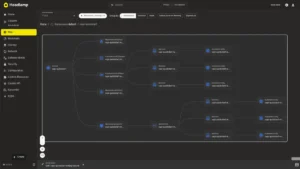
6.2 Navigating Complexity with Map View
Headlamp’s "Map View" is an invaluable tool for visualizing dependencies. In a microservices architecture, seeing how a Service connects to a Deployment, which in turn references a ConfigMap, is often easier in a visual graph than in a raw YAML file. This feature significantly accelerates incident response times during production outages.
7. The Paradigm Shift: From Forms to Manifests
Perhaps the most significant adjustment for long-time users is the shift away from form-based creation.
7.1 Why Manifests are Superior
The legacy dashboard encouraged "point-and-click" resource creation. While user-friendly, this practice creates "snowflake" configurations that are difficult to replicate or version control. Headlamp encourages users to provide YAML manifests, which reinforces GitOps best practices.
7.2 The "Dry-Run" Workflow
Users missing the convenience of forms can still use kubectl create deployment --dry-run=client -o yaml to generate boilerplate manifests, which can then be pasted into the Headlamp UI. This maintains speed while ensuring that every change is documented and repeatable.
8. Debugging and Operational Excellence
Headlamp excels in day-to-day operations. Whether it is tailing logs during a deployment or exec-ing into a container to troubleshoot a configuration error, the interface is tuned for performance.
- Log Streaming: Live log streaming is standard and allows for quick container switching.
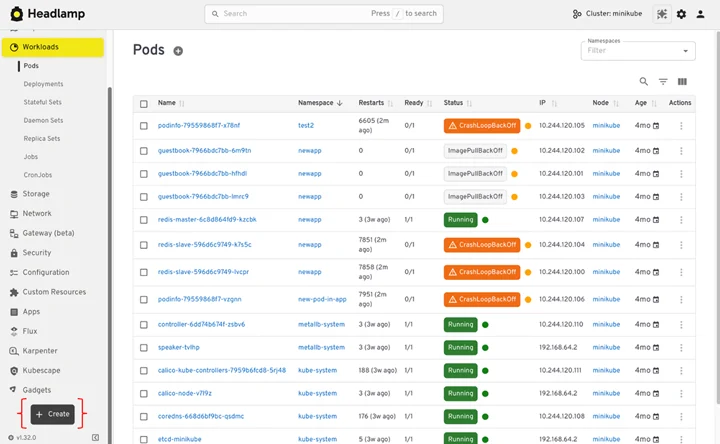
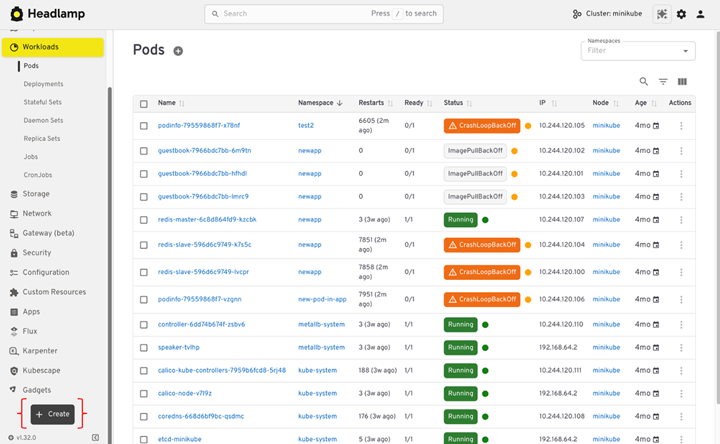
- Events View: The events feed is prioritized, ensuring that when a Pod enters a
CrashLoopBackOff, the root cause is visible within seconds. - Resource Metrics: Integration with metrics servers provides real-time CPU and memory visualization, helping developers optimize resource requests and limits.
9. Sunset: Removing the Kubernetes Dashboard
Once your team has fully transitioned, it is vital to clean up. Leaving the old Dashboard installed creates an unnecessary security surface area.
9.1 Decommissioning
Use Helm to uninstall the legacy deployment. Before doing so, ensure that any custom ClusterRoles or ClusterRoleBindings associated with the old dashboard are also deleted. This "spring cleaning" of your cluster’s security configuration is a best practice that reduces technical debt.
9.2 Communicating the Change
Send a clear, concise notice to your engineering teams. Highlight the benefits—improved security, multi-cluster support, and a better UI—to ensure team buy-in. Provide a link to the internal documentation and a point of contact for any migration-related questions.
10. Conclusion: The Future of Cluster Management
The migration from the Kubernetes Dashboard to Headlamp is not merely a software update; it is a shift toward a more professional, secure, and developer-centric workflow. By embracing Headlamp, organizations gain a tool that grows with them—from local development to complex, multi-cluster production environments.
As we look toward the future of Kubernetes, tools that respect the existing ecosystem of kubectl, RBAC, and GitOps are the ones that will stand the test of time. Headlamp is clearly positioned to lead this space. For those ready to contribute to the project, visit headlamp.dev to join the community.
This article is a comprehensive guide based on the original documentation provided by the Headlamp project. For specific technical troubleshooting, please refer to the official Headlamp GitHub repository.