Precision in Foam: The Rise of the Open-Source 2-Axis CNC Hot Wire Foam Cutter
Main Facts
In the rapidly evolving landscape of digital fabrication, additive 3D printing and subtractive CNC milling have long dominated the conversation. However, a specialized niche of precision manufacturing has quietly expanded from industrial workshops into the hands of hobbyists, educators, and makers: thermal-vector foam cutting.

At the center of this movement is a newly detailed open-source project: a two-axis CNC hot wire foam cutter capable of slicing through expanded and extruded materials up to 12 centimeters thick. Utilizing a heated nickel-chromium (NiCr) alloy wire, the machine translates digital vector graphics into complex, three-dimensional physical objects carved from flat sheets of polystyrene, polyurethane foam, EPP, and standard household sponges.

Unlike traditional multi-axis industrial hot wire setups, this design bridges the accessibility gap by repurposing standard 3D printer hardware architecture. Powered by an Arduino Mega paired with a RAMPS (RepRap Arduino Mega Pololu Shield) expansion board, the system uses off-the-shelf NEMA 17 stepper motors, toothed timing belts, and a modified Marlin-derivative firmware. This adaptation allows makers to leverage familiar software pipelines—specifically vector manipulation in Inkscape and machine-control interfaces like Repetier-Host—to execute intricate cuts with sub-millimeter precision.

Chronology of Development: From Industrial Cutting to Desktop Fabrication
The Evolution of Subtractive Thermal Shaping
- Pre-2010s: Hot wire cutting was largely confined to industrial packaging facilities, architectural model-making shops, and specialized aerospace manufacturing. These machines were often proprietary, expensive, and operated via complex, closed-source CAD/CAM environments.
- The RepRap Revolution (2010–2015): As the open-source 3D printing community standardized around Arduino and RAMPS hardware, experimenters began recognizing the modularity of stepper-motor shields. The underlying electronics—designed to drive X, Y, and Z axes alongside extruder heaters—proved remarkably adaptable to alternative tooling.
- The Birth of the Foam Cutter Project: Developers recognized that while a hot wire operates inherently in two dimensions (X and Y), vertical and horizontal translation of a continuous sheet of material allows for complex, multi-faceted three-dimensional creations. The project synthesized low-cost laser-cut or 3D-printed brackets, aluminum extrusion profiles, and modified 3D-printer firmware into a cohesive unit.
- Software Integration: The creation of the
FoamCutterPluginfor Inkscape marked a critical milestone. By bypassing the need for heavy, proprietary G-code generators, the workflow was streamlined: users could draw in a free vector editor, translate shapes directly into machine paths, and output standard G-code readable by everyday print clients.
Supporting Data & Technical Architecture
The architecture of the hot wire foam cutter relies on a clever fusion of standard 3D-printing hardware and specialized mechanical modifications.

Electrical and Electronic Specifications
- Control Board: Arduino Mega 2560 microcontroller.
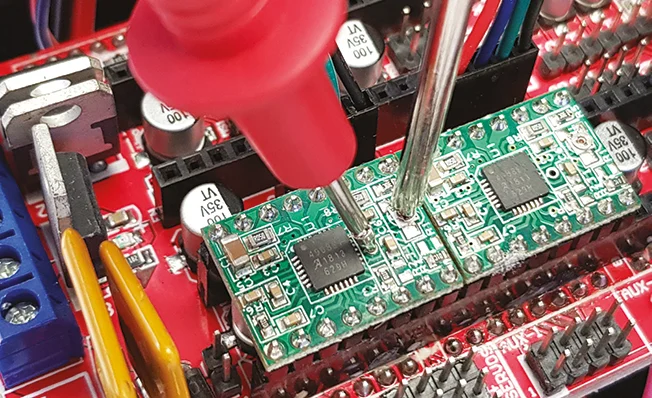
- Interface Shield: RAMPS 1.4 expansion board equipped with Pololu-style stepper driver modules. Jumpers are configured across all three microstepping pins to establish a 1/16 microstepping division factor, ensuring smooth, high-resolution movement.
- Power Management: Powered via a 12V DC input tied directly to the 5A circuit of the RAMPS shield.
- Heating Element Management: The NiCr wire is connected to the
D10output terminal on the RAMPS shield—a port traditionally reserved for the primary extruder heater in additive manufacturing setups. Because the system lacks a thermal feedback thermistor for the wire, the firmware is modified so that theD10PWM (Pulse Width Modulation) signal behaves identically to an extruder cooling fan output. Consequently, adjusting the "Fan Speed" slider within a print client like Repetier-Host directly scales the voltage, current, and temperature of the cutting wire.
Mechanical Layout
- Chassis: Constructed from a combination of sturdy plexiglass side shoulders and structural aluminum framing profiles.
- Axes of Motion:
- X-Axis: A horizontal carriage driven by a NEMA 17 stepper motor coupled via a toothed belt, sliding across the main base profile.
- Y-Axis: A vertical elevation system mounted to the horizontal carriage, utilizing dual mini-carriages and hidden upright-channel belts to raise and lower the hot-wire assembly smoothly.
- Cutting Filament: A high-tensile nickel-chromium (NiCr) wire held under constant mechanical tension by helical traction springs. This spring-loaded mounting system compensates for thermal expansion, preventing the wire from sagging or snapping as it heats up and cools down.
- Material Retention: Specialized sliding "pins" and molded edge supports secure foam slabs firmly against the machine frame, ensuring stability during high-speed vertical passes.
Official Guidelines: Installation and Workflow
Operating the hot wire foam cutter requires a streamlined software pipeline running from graphic design to physical execution.

Step 1: Vector Preparation in Inkscape
- Download and install Inkscape (version 0.92.4 or compatible releases).
- Install the FoamCutterPlugin by extracting its contents directly into the Inkscape extensions directory (
C:Program Files (x86)Inkscapeshareextensions). - Set the document properties to match the exact physical dimensions of the foam plate in millimeters.
- Draft or import the desired graphic (e.g., text or corporate logos) into the workspace.
- Convert all text elements into paths via the Path > Object to Path command, or vectorize bitmap imagery via Path > Trace Bitmap.
Step 2: G-Code Generation via the Plugin
- Navigate to Extensions > FoamCutter to open the G-Code generation dialog box.
- Configure the Setup tab parameters according to the material specifications:
- Execution Speed: Set to approximately 300 mm/min for standard 1 cm polystyrene.
- Wire Power: Set to roughly 25% power for 1 cm polystyrene (adjust upward for thicker blocks or faster feeds).
- Apply settings and save the output G-code file.
Step 3: Execution via Repetier-Host
- Launch Repetier-Host, connect to the Arduino Mega via the designated virtual COM port at a baud rate of 115,200, and define the machine’s maximum cutting boundaries (480×500 mm).
- Enable toolpath visualization by toggling the eye-shaped route-preview icon.
- Power on the machine and use the Manual Control interface to home the X and Y axes. Homing moves the X carriage to its minimum limit stop and the Y carriage to its topmost position, ensuring the wire remains safe from accidental snags.
- Load the generated G-code file, position the foam slab securely against the frame pins, and align the heated wire with the top corner of the material.
- Initiate the cut. Monitor the process closely, using the print client’s fan-speed slider to dynamically adjust wire temperature if the cutting trace widens excessively or if the filament encounters mechanical resistance.
Implications for Makers, Education, and Industry
The democratization of thermal CNC cutting carries significant implications across multiple sectors:

Educational Prototyping and STEM Learning
In school environments, traditional subtractive CNC routers can be loud, intimidating, and generate hazardous airborne dust. Laser cutters, while precise, are often cost-prohibitive for secondary education. Hot wire foam cutters offer a safe, quiet, and exceptionally affordable alternative. Students can learn fundamental principles of G-code, vector geometry, and electromechanical automation while fabricating architectural models, lightweight drone components, and structural prototypes within minutes.

Sustainable Packaging and Rapid Prototyping
Industrial packaging relies heavily on custom-molded expanded foams to protect sensitive electronics and machinery during transit. By lowering the barrier to entry for custom foam routing, small businesses and local fulfillment centers can fabricate bespoke packaging inserts on demand, drastically reducing reliance on rigid, single-size molded plastics and minimizing waste.

The Open-Source Hardware Synergy
Projects like the open-source Foam Cutter underscore the enduring vitality of the RepRap ecosystem. By demonstrating that mature hardware platforms (such as Arduino and RAMPS) can be successfully cross-purposed far beyond their original additive manufacturing intent, the maker community continues to prove that innovation does not always require proprietary, ground-up engineering. Instead, modularity, shared firmware modifications, and accessible vector tooling can unlock entirely new dimensions of desktop fabrication.