The Comprehensive Guide to Functional Testing: Strategies, Tools, and Best Practices
In the high-stakes world of software development, the primary objective is simple yet profound: ensuring that an application does exactly what it was designed to do. This is the core mandate of Functional Testing, a critical component of the software development lifecycle (SDLC) that serves as the bedrock of quality assurance. As software systems grow in complexity, understanding the nuances of functional testing—from manual verification to advanced automation—is no longer optional; it is a professional necessity for every quality engineer.
Understanding the Core: What is Functional Testing?
At its essence, functional testing is a form of black-box testing. It ignores the internal code structure and instead focuses on the "what" rather than the "how." The goal is to validate the application against the business requirements or functional specifications. If the input "A" is provided to a system, does it consistently produce output "B" as defined in the requirements?
Functional testing acts as the ultimate checkpoint, confirming that the end-user experience aligns with the initial vision of the product stakeholders. It is the bridge between technical implementation and business utility.
Chronology of the Testing Lifecycle
Effective functional testing is not an ad-hoc activity; it is a disciplined process that mirrors the stages of development. To achieve maximum coverage, testers follow a structured chronological approach:

1. Planning and Analysis
Before a single test case is written, the QA team must dissect the requirement documents. This phase involves identifying the features to be tested, determining the priority of these features, and mapping out the expected system behavior.
2. Test Design
During this stage, testers author test cases. These documents typically include:
- Test Case ID/Description: A unique identifier for the scenario.
- Pre-conditions: The state the system must be in before the test begins.
- Test Steps: The specific actions the user must take.
- Expected Results: The precise outcome that confirms the system is working correctly.
3. Execution
Once the environment is ready, the testing team executes the planned test cases. This is where bugs are surfaced. Each failure is logged, analyzed, and assigned to the development team for remediation.
4. Reporting and Closure
After the execution cycle, a comprehensive report is generated, highlighting the pass/fail percentage and the status of critical bugs. The process is only considered complete once the exit criteria—such as 100% test coverage for high-priority items—are met.

Key Types of Functional Testing
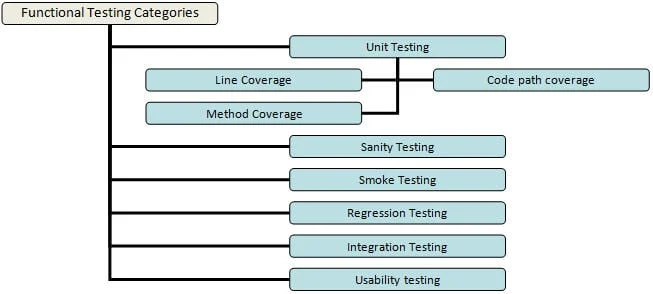
The "ocean" of software testing is divided into specialized zones, each serving a distinct purpose in the validation process:
- Unit Testing: The first line of defense, typically performed by developers. It tests individual methods or code blocks to ensure they function in isolation.
- Smoke and Sanity Testing: Smoke testing is the "heartbeat" check of a new build; if the application crashes on launch, the build is rejected. Sanity testing follows, ensuring that the major functional components are stable enough for deeper testing.
- Regression Testing: As new features are added, regression testing ensures that existing, previously functioning features haven’t been "broken" by the new code.
- Integration Testing: This validates the interfaces between different modules. A system may have five perfectly working modules that fail to communicate once connected; integration testing catches these handshake errors.
- System Testing: A holistic view where the entire system is tested as a single entity to ensure it meets end-to-end business requirements.
Techniques for Optimized Testing
Attempting to test every possible permutation of an application is logically impossible and economically unfeasible. To maximize bug detection while minimizing time expenditure, professionals use specific optimization techniques:
Equivalence Partitioning
Instead of testing every possible input value, testers group inputs into "equivalence classes." For instance, if a field accepts a numeric value between 1 and 100, testing values 50, 5, and 95 should yield the same systemic behavior. Testing one value from each class is sufficient.
Boundary Value Analysis (BVA)
Bugs are most frequently found at the "edges" of input ranges. If an ID field requires 6 to 10 characters, BVA dictates that we must test 5 (too short), 6 (minimum), 10 (maximum), and 11 (too long).

Decision-Based Testing
This technique maps out every possible "if-then" scenario. If a user enters a valid password but an expired username, what does the system do? By focusing on these decision points, testers can uncover complex logical flaws.
The Role of Automation in Modern QA
While manual testing is indispensable for exploratory tasks, Functional Test Automation is the engine that drives efficiency in modern, agile environments.
Why Automate?
- Speed: Automated tests can run overnight, providing feedback by the start of the next business day.
- Consistency: Machines do not suffer from fatigue; they perform the exact same steps in the exact same way every time.
- Reusability: Once a script is written for a stable feature, it can be reused indefinitely for regression cycles.
Selecting the Right Tool
The market is saturated with options—from industry standards like Selenium and UFT to specialized tools like Ranorex Studio and Jubula. The selection should not be based on popularity alone, but on specific project needs:
- Language Support: Does the tool support the language your developers use?
- Integration: Can it plug into your existing CI/CD pipeline (e.g., Jenkins, Azure DevOps)?
- Maintenance Cost: How easy is it to update scripts when the UI changes?
The "Golden Rule" of Automation
Not everything should be automated. Focus on high-risk, high-frequency, and stable features. Tests that require complex setup or are prone to frequent UI changes are often better left to manual testers. A successful strategy requires a "hybrid" approach: use manual testing for exploratory and usability work, and automation for repetitive regression and core functionality checks.

Implications of Inadequate Testing
The consequences of skipping or rushing functional testing can be catastrophic. When a product reaches the user with functional defects, the impact includes:
- Reputational Damage: Users lose trust in a brand that delivers buggy software.
- Increased Costs: The "Cost of Quality" grows exponentially the later a bug is found. A bug found in production is significantly more expensive to fix than one caught during the development or QA phase.
- Operational Risk: In sectors like fintech or healthcare, a functional failure can lead to legal liabilities and data breaches.
Conclusion: Bridging the Gap
Functional testing is more than just clicking buttons; it is a systematic approach to ensuring that software provides real-world value. By balancing rigorous manual techniques with strategic automation, quality assurance teams can significantly reduce defect escape rates and improve the overall software experience.
The path to excellence in functional testing involves constant learning. Whether you are a junior tester just starting or a seasoned lead, remember that your role is the final barrier between a product and its users. Embrace the tools available, master the techniques of partitioning and boundary analysis, and never lose sight of the end-user’s perspective.
As the industry continues to evolve, the integration of functional and non-functional testing will become even more seamless. Always stay updated on the latest tools and methodologies, and remember: quality is not an act, but a habit.