The "Ghost" File Devouring Windows 11 Storage: A Saga of Technical Negligence
For years, Windows users have grown accustomed to the encroachment of system services. From the persistent, often unwanted presence of Copilot in core applications like Notepad to the aggressive background processes that consume CPU cycles, the modern Windows 11 experience often feels like a balancing act between utility and intrusion. However, a recently unearthed technical defect has taken this frustration from the realm of "annoying UI changes" to a critical hardware management crisis.
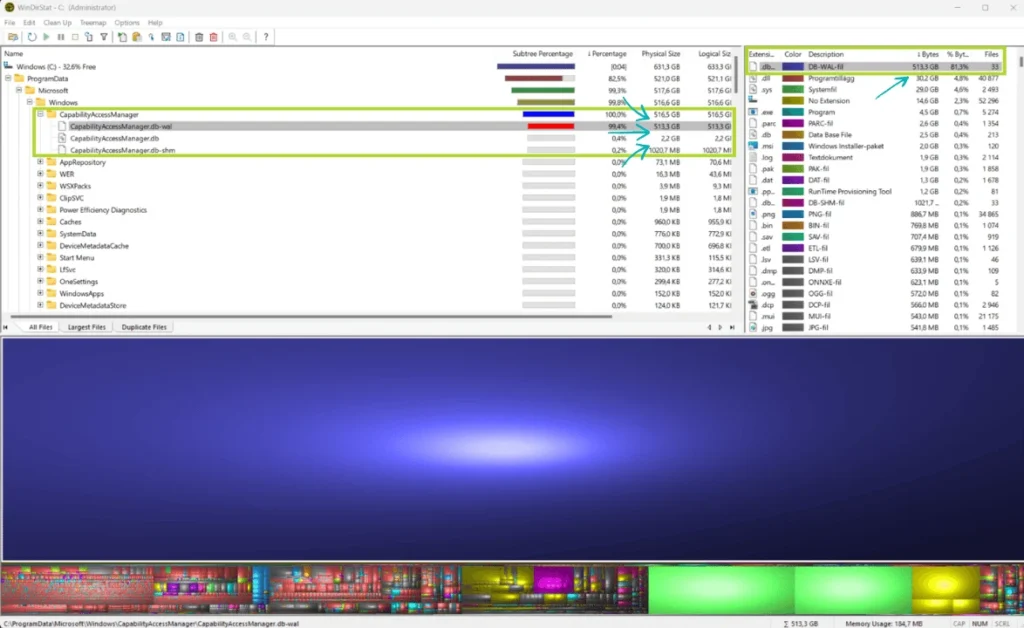
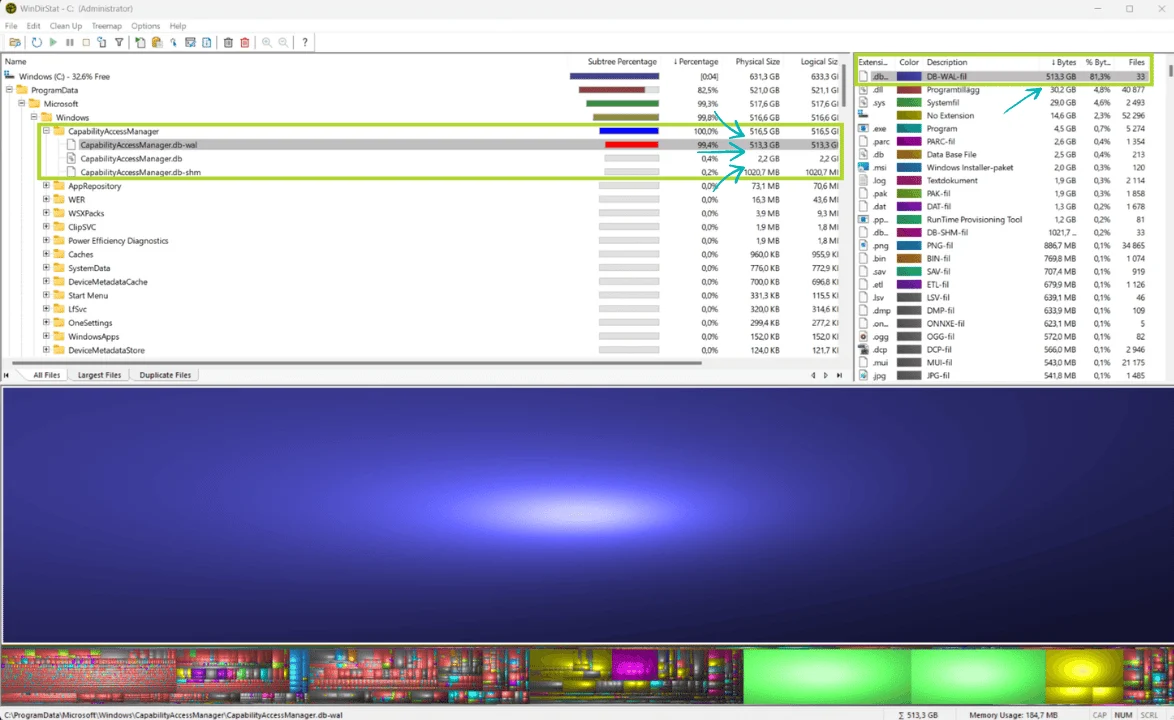
A rogue Windows log file, CapabilityAccessManager.db-wal, has been identified as a silent storage killer, capable of ballooning to massive proportions—in some documented cases, exceeding 500GB—effectively suffocating the host machine’s storage drive. Even more alarming than the technical bug itself is the initial response from Microsoft’s support apparatus, which appeared woefully uninformed, leading to suggestions that users simply "purchase more storage" rather than addressing the underlying system failure.
The Anatomy of the Bug: What is CapabilityAccessManager.db-wal?
To understand why this file is so dangerous, one must first understand its intended function. The CapabilityAccessManager.db-wal is a write-ahead log (WAL) associated with a critical Windows database. This database is responsible for tracking and managing permission requests for system hardware—specifically, your webcam, microphone, and location services.
Under normal operating conditions, this database should remain diminutive, typically occupying only a few megabytes of space. The "WAL" component is designed to be a temporary holding area for incoming database changes before they are committed to the primary database file, at which point they are meant to be purged. Ideally, this file should flush its contents and reset itself on a monthly cycle.
However, a persistent flaw in the Windows 11 handling of this log causes the file to ignore its self-cleaning instructions. Instead, it enters a "runaway" state, continuously appending data without ever pruning the old logs. Because this file resides within protected system directories that are often restricted by Windows permissions, the average user cannot easily delete or even locate the source of the missing storage. Users find their "System and Reserved" storage metrics climbing into the hundreds of gigabytes, yet when they investigate their primary directories, the space appears to be missing into a digital void.
A Chronology of Neglect: From Reddit Threads to Official Recognition
The timeline of this issue is perhaps the most damning aspect of the entire affair. While Microsoft has only recently acknowledged the problem, evidence suggests that this "storage-eating" bug has been plaguing users for well over a year.

Early Warnings (2025)
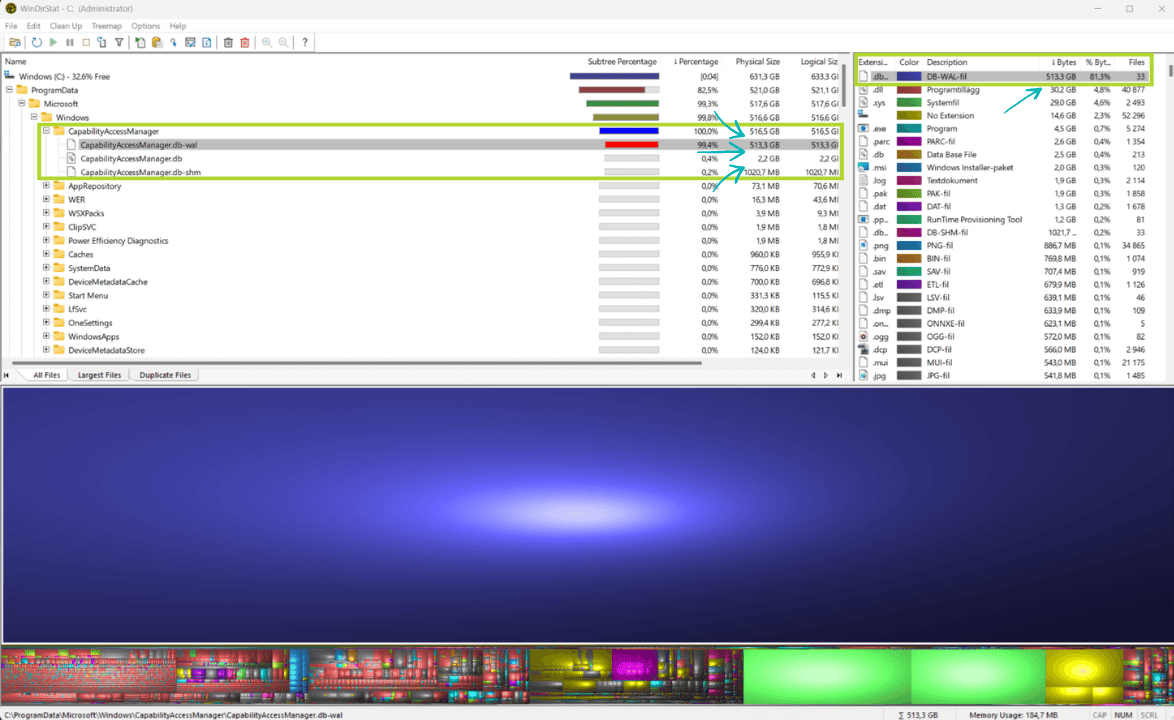
As early as mid-2025, reports began surfacing on community forums like Reddit. In one high-profile thread, a user documented their shock upon discovering that a single system file had grown to an astounding 513GB. At the time, the issue was largely dismissed as an anomaly or a localized driver conflict. Because the file is buried deep within system-protected folders, most users simply assumed they were running out of space due to heavy app usage, never realizing the culprit was a hidden log file.
The Escalation (March 2026)
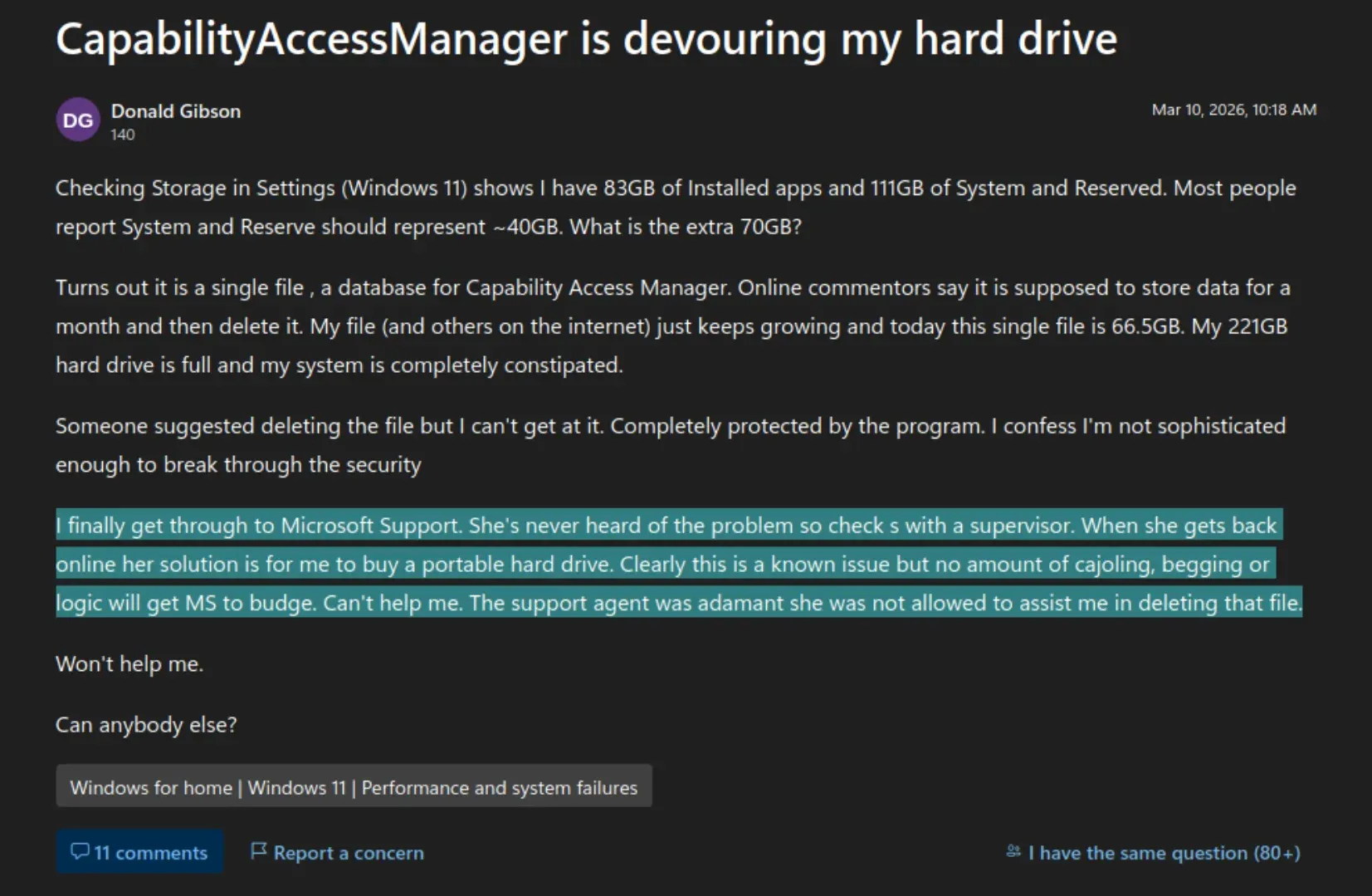
The issue reached a boiling point in March 2026, when Donald Gibson, a Windows user, posted a detailed inquiry on the official Microsoft Q&A forums. Gibson reported that his "System and Reserved" storage had exploded to 111GB—nearly double its typical footprint. Upon forensic analysis using disk management tools, he identified a single 66.5GB CapabilityAccessManager.db-wal file.
Gibson’s experience with Microsoft Support became a flashpoint for the community. When he reached out for assistance, the assigned support agent was not only unfamiliar with the file but, after consulting a supervisor, offered the advice that Gibson should simply purchase a new portable hard drive to compensate for the "lack of space." This dismissive attitude highlighted a significant disconnect between the reality of the software’s behavior and the internal knowledge base of Microsoft’s support team.
The "Quiet" Fix (June 2026)
It was not until June 29, 2026, that Microsoft finally addressed the issue. The resolution was not a standalone patch or a public announcement; rather, it was a minor, buried note in the change log for a preview update (KB5095093). The fix was tacked onto a release that primarily focused on aesthetic changes, such as a redesigned Start menu, and functional upgrades like support for larger local AI models.
Supporting Data: The Impact on Hardware
The implications of this bug are far-reaching, particularly for users with limited storage configurations, such as those with 256GB SSDs. For these users, a 60GB to 500GB log file isn’t just a nuisance—it is a catastrophic failure that renders the computer unusable.
When a drive reaches near-full capacity, Windows begins to exhibit a cascade of performance degradation:
- Virtual Memory Failure: The Pagefile (used as virtual RAM) cannot expand, leading to system crashes and "Out of Memory" errors.
- Update Failures: Windows Update requires a significant buffer of free space to install patches. A full drive prevents the installation of security updates, leaving the machine vulnerable.
- SSD Longevity: Modern SSDs suffer from "write amplification" when nearly full. Constantly writing to a near-full drive, as the
CapabilityAccessManager.db-walfile does, accelerates the degradation of the NAND flash memory cells, effectively shortening the lifespan of the hardware.
The fact that Microsoft’s support agents suggested buying more hardware—rather than flagging this for the engineering team—suggests a systemic failure in how customer feedback is triaged.
The Corporate Perspective: Engineering Priorities vs. Stability
Why did it take over a year to fix a bug that effectively treats a user’s SSD like a black hole? The answer likely lies in the current corporate roadmap at Microsoft.
Throughout 2025 and 2026, the company’s engineering resources have been heavily funneled into the integration of AI models and the "Copilot-ification" of the Windows ecosystem. The same update that finally contained the fix for the CapabilityAccessManager also introduced advanced, resource-heavy local AI capabilities.

This creates a narrative of misplaced priorities. When a company is so focused on building new, revenue-generating features, the "boring" maintenance tasks—such as auditing database logs or managing system stability—often fall to the bottom of the ticket pile. The decision to bury the fix in a preview update release note, rather than issuing a dedicated security or stability bulletin, suggests a desire to minimize public awareness of the severity of the oversight.
Implications for the Future of Windows 11
The CapabilityAccessManager saga serves as a cautionary tale for both developers and consumers. For consumers, it reinforces the importance of using third-party disk analysis tools (like WinDirStat or WizTree). Without these tools, the average user would have no way of knowing why their system was failing, as the standard Windows "Storage Settings" interface often mislabels or hides the true nature of these system-generated files.
For Microsoft, the reputational damage is subtle but cumulative. While a single bug is a technical error, the response to it—the lack of support, the slow turnaround, and the dismissive advice—is a management error. As Windows 11 continues to grow in complexity, the "surface area" for such bugs increases. If the operating system cannot reliably manage its own housekeeping tasks, it undermines the trust of power users and IT professionals who rely on the platform for stability.

What Users Should Do
If you suspect you are affected by this issue:
- Run a Disk Analysis: Use a utility like WizTree or WinDirStat to visualize your storage. If you see a file labeled
CapabilityAccessManager.db-walin yourSystem32directory that is larger than a few megabytes, you are likely affected. - Update Windows: Ensure you have installed the latest cumulative updates. If you are on the "Preview" channel, ensure you have the latest KB update that includes the fix.
- Exercise Caution: Do not manually delete system files unless you are certain of their function. While this specific file is a log, Windows often protects these files with strict permissions. Always back up your data before attempting to clear space in system-critical directories.
Conclusion
The "Ghost" file incident is a stark reminder that even in the age of advanced artificial intelligence and cloud-integrated operating systems, the foundational elements of software engineering—database management, log rotation, and quality assurance—cannot be ignored. Microsoft’s eventual fix is a welcome relief, but the path taken to reach it highlights a growing gap between the software’s ambition and its reliability. As we look toward the next iteration of Windows, one can only hope that "cleaning up after itself" becomes a higher priority than adding new, flashy features that may just bring more bugs in their wake.