The Invisible Storage Thief: How a Windows 11 Bug Has Been Quietly Devouring Hundreds of Gigabytes
In the landscape of modern operating systems, users have grown accustomed to the persistent encroachment of AI-driven features. From the aggressive integration of Copilot into system-level applications to the ballooning resource requirements of background telemetry, the friction between Microsoft’s vision for the future of Windows and the practical needs of the end-user has never been more apparent.
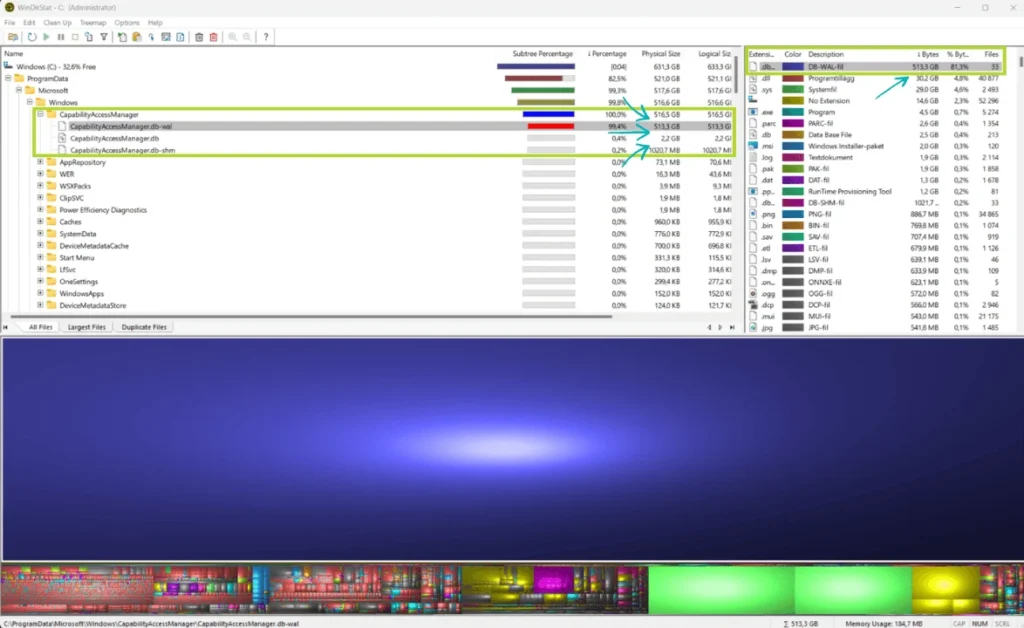
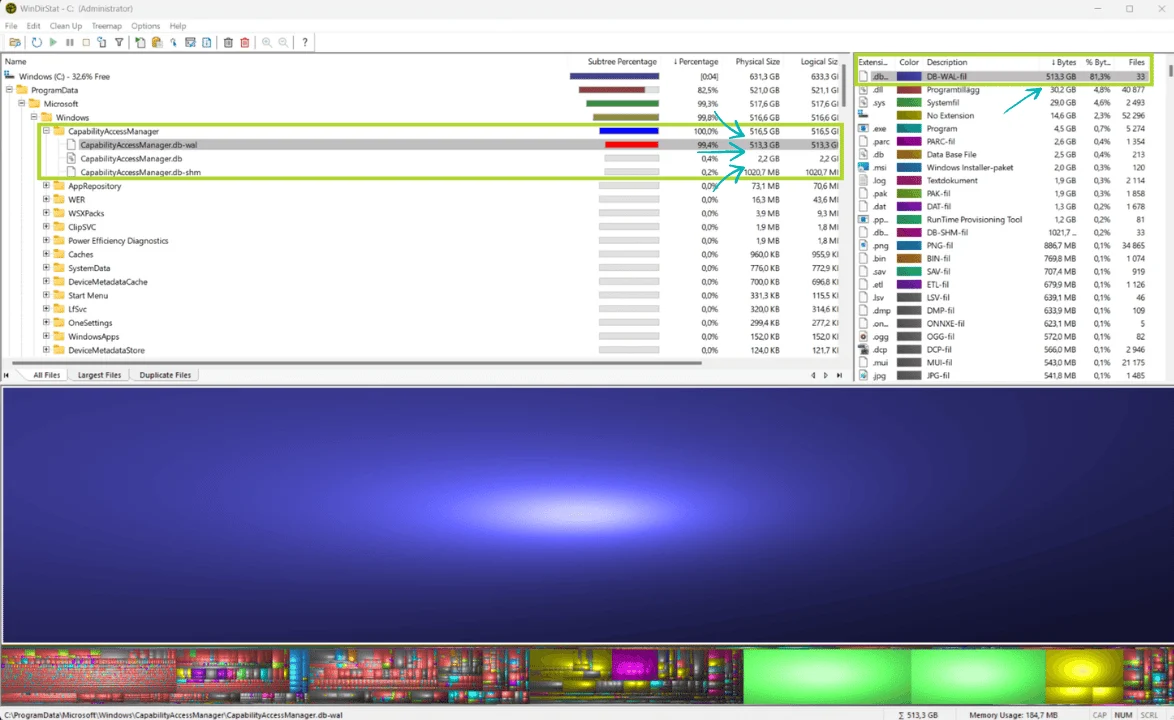
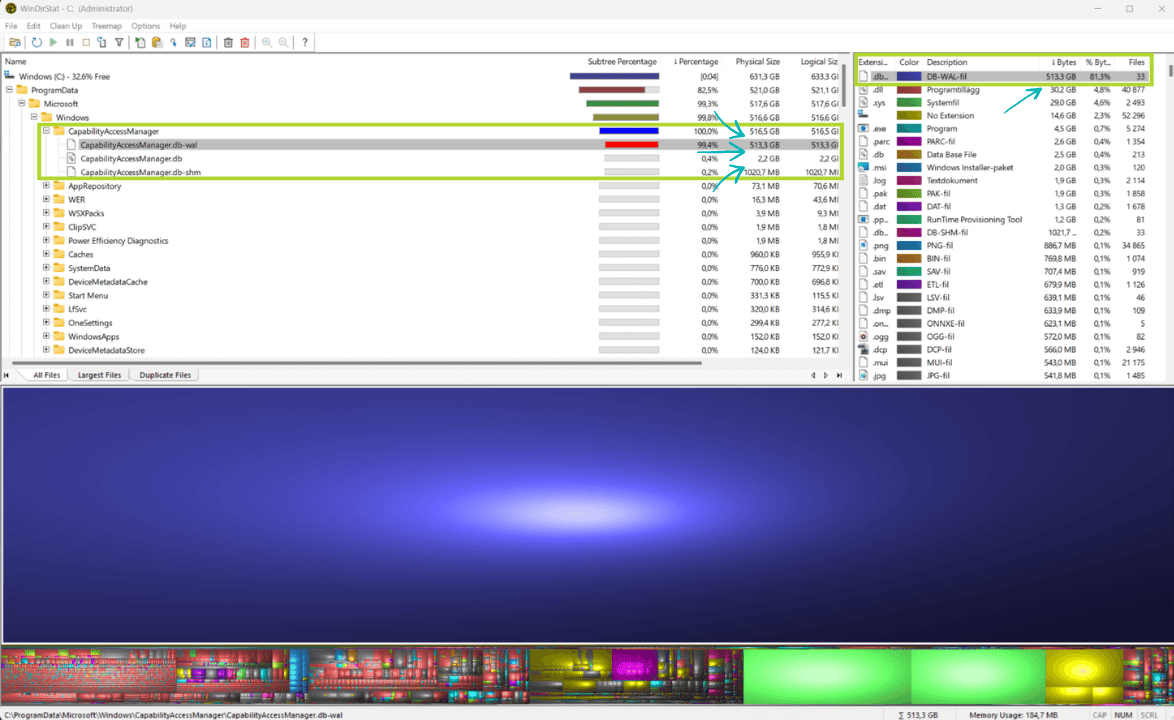
However, beyond the philosophical debates regarding AI implementation, a far more visceral problem has emerged: a silent, technical failure that is physically consuming users’ storage drives. A specific database file, CapabilityAccessManager.db-wal, has been identified as the culprit behind mysterious storage depletion, sometimes ballooning to a staggering 500GB. For many, the first sign of trouble isn’t a notification—it is the catastrophic "Low Disk Space" warning that renders their machines nearly unusable.
The Anatomy of the Bug: What is CapabilityAccessManager.db-wal?
To understand the scope of the issue, one must first understand what the file is intended to do. The CapabilityAccessManager.db-wal file functions as a write-ahead log (WAL) for the Windows database responsible for managing system permissions. This database tracks critical privacy-related data, specifically requests from applications to access the camera, microphone, and location services.
Under normal operating conditions, a write-ahead log should remain lean. It serves as a temporary buffer that records changes before they are committed to the main database file. Typically, such a file should occupy only a few megabytes and should be purged or truncated automatically after a cycle of roughly 30 days.
Instead, in affected versions of Windows 11, the file enters an infinite loop of expansion. It accumulates data without ever cleaning itself, eventually swelling to hundreds of gigabytes. Worse still, the file resides within protected system directories that Windows prevents users from accessing, effectively creating a "black hole" of storage that remains hidden from standard disk cleanup utilities until the drive reaches a critical state of exhaustion.
A Chronology of Neglect
The timeline of this issue is particularly damning for Microsoft’s quality assurance processes. Reports of this behavior have been surfacing in community forums and technical support hubs for well over a year.

Early Warnings (2025)
The earliest public documentation of the issue dates back to mid-2025, when users on Reddit and other tech-focused forums began reporting inexplicable storage loss. One particularly egregious case involved a user who discovered a 513GB log file occupying their primary storage drive. At that stage, the community struggled to identify the root cause, as the file’s location and the cryptic nature of the database made it difficult to correlate with any specific Windows update or feature change.
The Escalation (March 2026)
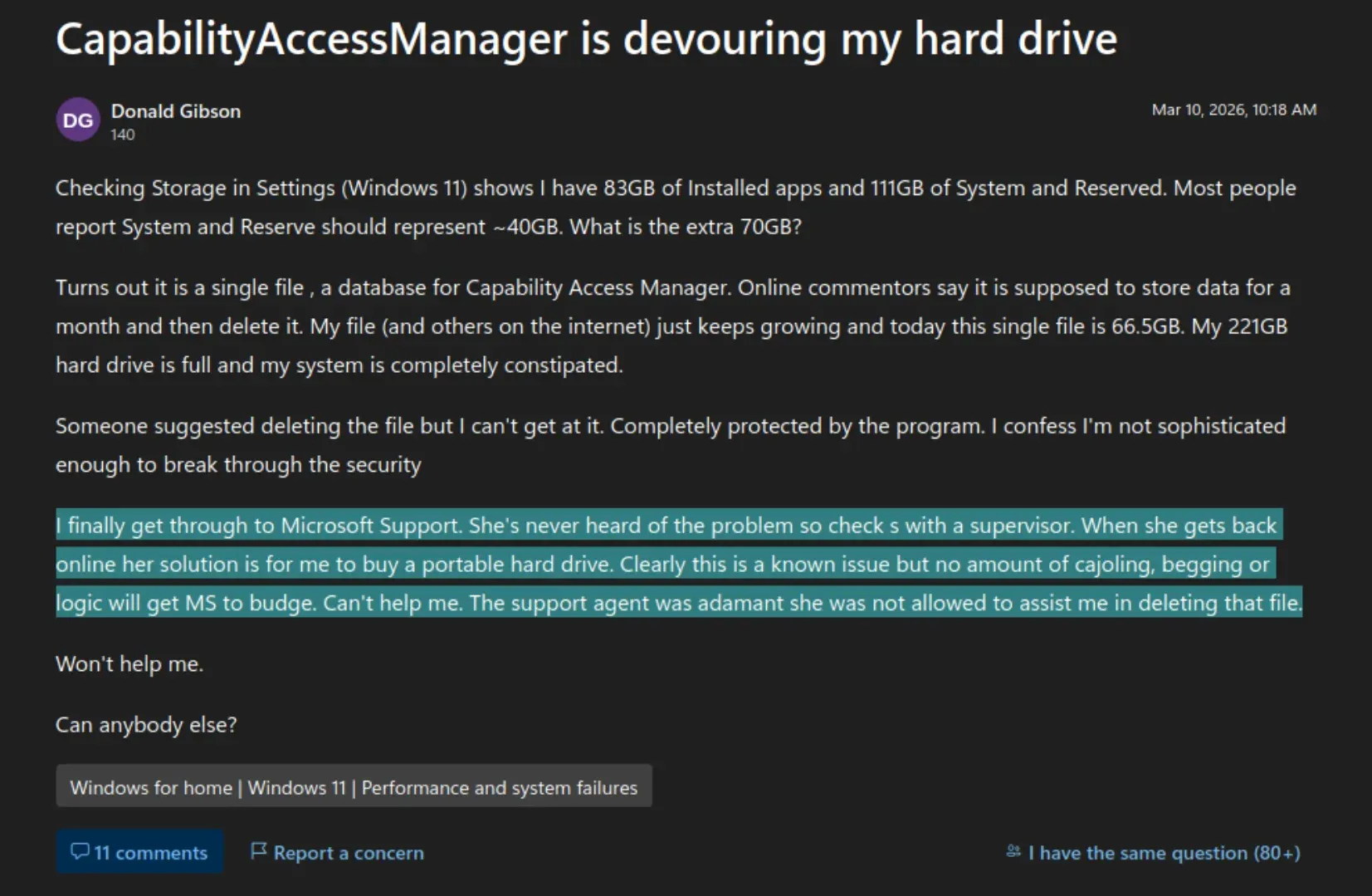
The issue gained significant traction in March 2026, when Donald Gibson, a Windows user, posted a detailed inquiry on the official Microsoft Q&A forum. Gibson’s report highlighted a 221GB drive that had been reduced to a critical state due to a 66.5GB CapabilityAccessManager.db-wal file. By this time, the "System and Reserved" storage category on his machine had expanded to 111GB, nearly double what the system should have required.
The Support Failure
Perhaps more distressing than the bug itself was the response from Microsoft’s customer support channels. When Gibson reached out for assistance, the assigned support agent appeared entirely unaware of the existence of such a bug. After a period of consultation with a supervisor, the agent provided a recommendation that was widely ridiculed in the tech community: they suggested that Gibson simply purchase a new portable hard drive to alleviate the space constraints. The advice offered no path to deleting the corrupted log file or preventing further growth, effectively suggesting that the user pay for additional hardware to accommodate a system-level software error.
The "Quiet Fix" and the Patch Tuesday Delay
After months of speculation and growing frustration among the user base, Microsoft finally acknowledged the bug in late June 2026. However, the acknowledgment was not presented as a high-priority hotfix or a dedicated security advisory. Instead, it was buried in the "Change log" section of a preview update (KB5095093), which had been released on June 23, 2026.
The fix was effectively "shadow-dropped" in the release notes, six days after the update had already begun rolling out to early adopters. For the general public, the resolution is expected to arrive as part of the July 2026 "Patch Tuesday" update.
This release cadence raises serious questions about Microsoft’s internal prioritization. During the same period that the company was supposedly unable to address a massive, user-impacting storage bug, it was simultaneously pushing updates that included a redesigned Start menu, a sophisticated point-in-time restore feature, and expanded local AI model support. The allocation of engineering resources toward aesthetic and feature-heavy updates while a fundamental data-management bug remained unaddressed for over a year highlights a significant misalignment in development priorities.
Supporting Data and Technical Implications
The technical implications of this bug are far-reaching. Beyond the immediate loss of space, the runaway growth of the CapabilityAccessManager.db-wal file causes secondary performance issues.
- Write Amplification: As the file expands, the OS must manage an increasingly large index for the database. This leads to increased I/O overhead, which can degrade system responsiveness, particularly on machines using standard SSDs that are nearing their capacity limit.
- System Instability: Windows relies on the integrity of its permission management databases to govern security. When the write-ahead log fails to merge with the primary database, the potential for corruption increases. This could theoretically lead to issues with application permissions, where software is unable to reliably access the camera or microphone because the permission service is bogged down by an oversized, unresponsive database file.
- Storage Wear: For users with smaller drives, the constant writing and rewriting of a massive, bloated log file contribute to premature flash memory wear. While modern SSDs are resilient, the unnecessary write cycles forced by this bug are objectively harmful to the hardware’s longevity.
Implications for the User Experience
The "CapabilityAccessManager" incident is symptomatic of a broader shift in the desktop computing paradigm. As Windows becomes increasingly modular and reliant on cloud-connected services and AI, the underlying architecture becomes more complex and, consequently, more difficult to audit.
When an operating system begins to treat user storage as an infinite resource, it loses the trust of its power users. The suggestion from a Microsoft support agent to buy more hardware to fix a software bug is not merely an anecdote of poor service; it is a reflection of a corporate culture that has become detached from the reality of the desktop environment.

For the Linux community and proponents of open-source software, this incident serves as a potent reminder of the importance of transparency. In a Linux environment, a log file of this magnitude would be immediately visible through standard command-line tools like du or ncdu, and the process responsible would be easily traceable. By contrast, Windows 11’s tendency to obfuscate system operations behind proprietary databases and locked folders creates an environment where users are at the mercy of Microsoft’s internal testing—or lack thereof.
Conclusion: The Path Forward
As of July 2026, users affected by the CapabilityAccessManager.db-wal bloat are finally being offered a reprieve through the latest cumulative updates. However, the damage to user confidence remains. The delay between the initial reports and the official fix demonstrates a systemic failure in the feedback loop between the user base and the software engineers responsible for the Windows kernel and its associated services.
Moving forward, the focus must shift toward more robust automated maintenance. If Windows is to continue incorporating complex, data-heavy features like AI and integrated permission management, it must also implement self-healing mechanisms that can detect and prune runaway logs before they jeopardize the health of the host machine. Until then, users are left with a cautionary tale: in the world of modern Windows, your storage space is no longer entirely your own, and the "fix" for a system error might just be a suggestion to open your wallet.

For those currently affected, it is highly recommended to verify that their Windows 11 build is updated to the latest July 2026 Patch Tuesday release and to monitor the C:WindowsSystem32 directory—or its associated subfolders—to ensure that the log file is no longer exhibiting signs of exponential growth. For the rest of the industry, this incident stands as a stark reminder that even the most "routine" system files require constant vigilance, lest they become the silent thieves of our digital workspace.