Pushing the Limits of 8-Bit Computing: Maker Builds a Fully Functional Multitasking Desktop Environment on an ATmega2560 Laptop
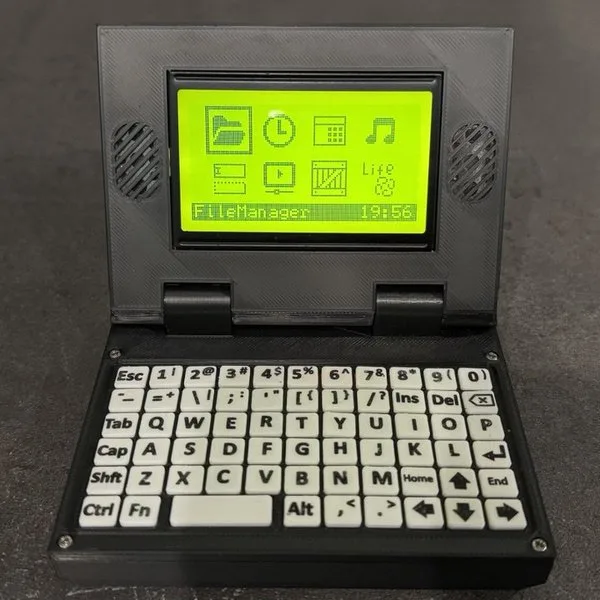
In an era dominated by multi-core processors, gigabytes of RAM, and cloud-based operating systems, the retro-computing and maker communities continue to find profound joy in extracting extraordinary performance from humble silicon. Proving that resource constraints often breed the most creative engineering solutions, a maker named Vladimir has designed and built a fully functional, self-contained DIY laptop powered by an 8-bit ATmega2560 microcontroller.
Measuring a mere 12 x 11 x 3.4 cm, this pint-sized workstation packs a physical QWERTY keyboard, a 128×64 monochrome ST7920 display, onboard audio playback, microSD card storage, a Real-Time Clock (RTC), and an 18650 lithium-ion battery into a custom 3D-printed and CNC-machined enclosure. Defying conventional expectations of an 8-bit architecture, Vladimir’s creation runs FreeRTOS to deliver genuine multitasking capabilities—allowing a user to stream 24 frames-per-second video with synchronized audio while simultaneously playing a game of Sokoban, complete with Alt-Tab window switching.
Main Facts: Inside the Micro-Laptop
At the heart of the project is the Mega 2560 Pro Mini, an Arduino-compatible board featuring the ATmega2560 microcontroller running at 16 MHz. While the chip is a familiar staple in the maker community, Vladimir’s implementation pushes its hardware boundaries to their absolute limits.
- Processing and Memory Constraints: The ATmega2560 provides just 8 KB of SRAM. With global system variables consuming roughly half of that memory from the outset, Vladimir had to meticulously optimize every single byte of the system, leaving only a razor-thin margin for application execution, window management, and frame buffers.
- Real Multitasking via FreeRTOS: Rather than relying on a simple cooperative loop, the device runs a port of FreeRTOS. This enables preemptive or cooperative task scheduling, managing background processes such as audio decoding while foreground applications handle user input.
- Display and Graphics Engine: Visual output is handled by a 128×64 ST7920 monochrome LCD operating in parallel mode. Driven by a custom-written driver utilizing a 1 KB video buffer in SRAM, the UI engine supports forms, buttons, checkboxes, lists, input fields, and dialog boxes.
- Custom Video and Audio Playback: The laptop features a specialized media player capable of rendering 24 fps video paired with MP3 audio. It reads a custom single-file format containing an XBM image stream alongside audio data, streaming it efficiently without overflowing the system’s volatile memory.
- Physical Interface & Expansion: The 64-key keyboard is laid out in an 11×6 physical rectangle, scanned via an 8×8 matrix configuration. Hardware expansion and peripheral integration are supported via dedicated SPI interfaces for microSD storage and audio decoding modules.
Chronology: From Concept to a Portable 8-Bit Workstation
The journey to creating a micro-laptop capable of multitasking on 8 KB of RAM was not achieved overnight. It required an iterative design process spanning hardware architecture, firmware development, and physical packaging.
Phase 1: Architecture and Firmware Foundations
The project began with a fundamental software architecture challenge: how to structure applications so they could run independently without crashing a resource-starved microcontroller. Vladimir designed a modular task system where individual applications are implemented as independent classes containing setup, loop, and menu-rendering methods. A central shell handles task registration, memory stacks, and event routing. Adding a new application requires zero modifications to existing tasks, ensuring high code maintainability.
Phase 2: Solving the RAM and Display Bottleneck
With only 8 KB of SRAM available and global variables consuming 4 KB, display management posed a severe hurdle. Vladimir bypassed standard, memory-heavy graphics libraries by writing a custom parallel-mode driver for the ST7920 display. Allocating precisely 1 KB of SRAM for the video buffer allowed the system to render text, XBM images, and pixel-level graphics smoothly while keeping enough headroom for the RTOS kernel and active tasks.
Phase 3: Keyboard Evolution and Hardware Interfacing
Input mechanics underwent multiple revisions. Initially, a standard 8×8 matrix required two full 8-bit ports on the microcontroller. To free up valuable I/O pins for other peripherals, Vladimir optimized the scanning logic and integrated a 4-to-16 decoder. This reduced the pin requirement for column selection to just four, opening the door for future keyboard expansions of up to 16 columns. Key labels were precisely fabricated using a 3D printer equipped with a 0.25 mm nozzle.
Phase 4: Enclosure Design and System Integration
Once the computational and input challenges were solved, Vladimir focused on making the device entirely self-contained. Schematics were drafted using EasyEDA, while the mechanical enclosure was fabricated using a CNC3018 milling machine and 3D printing. Integrating an RTC module, an 18650 battery for portable power, a microSD card reader for file storage, and an audio shield transformed the raw development boards into a cohesive, pocket-sized laptop.
Supporting Data: Technical Specifications
To fully appreciate the engineering feat achieved by this project, it is helpful to examine the hardware specifications and resource allocations side-by-side:
| Component / Parameter | Specification |
|---|---|
| Microcontroller | ATmega2560 (Mega 2560 Pro Mini) |
| Clock Speed | 16 MHz |
| SRAM | 8 KB (~4 KB consumed by global variables) |
| Operating System | FreeRTOS (Real-Time Operating System) |
| Display | 128×64 monochrome ST7920 LCD (Parallel mode) |
| Video Buffer | 1 KB in SRAM |
| Input Device | 64-key physical QWERTY keyboard (8×8 matrix, 11×6 layout) |
| Storage | MicroSD card via SPI interface |
| Media Capabilities | 24 fps video (custom XBM stream) + MP3 audio playback |
| Power Source | Rechargeable 18650 lithium-ion battery |
| Physical Dimensions | 12 x 11 x 3.4 cm |
| Enclosure Fabrication | 3D printed and CNC-machined (CNC3018) |
Official Perspectives and Community Reception
While Vladimir’s project is an independent maker initiative rather than a commercial product from a mainstream tech manufacturer, it has generated significant buzz across open-source hardware platforms, including Hackaday and Open Electronics.
The maker community has widely praised the project for its ingenuity in reviving and stretching the capabilities of legacy silicon. Industry observers frequently note that modern software development often suffers from "bloatware," where applications consume gigabytes of memory simply because hardware resources are abundant. Projects like Vladimir’s AVR laptop serve as a stark reminder of efficient engineering principles—demonstrating that sophisticated user experiences, complete with window managers, task switching, and media playback, can be achieved with a fraction of the computing power found in a modern smart lightbulb.
Furthermore, the project highlights the enduring relevance of the AVR architecture and Arduino ecosystem in advanced embedded systems design. By proving that a real-time operating system can orchestrate complex, event-driven applications on a chip with 8 KB of RAM, the project expands the educational toolkit available to students and hobbyists learning low-level systems programming.
Implications: What the AVR Laptop Means for the Future of Retro-Computing
Vladimir’s ATmega2560 laptop is much more than a clever novelty; it carries several broad implications for the DIY electronics, retro-computing, and embedded systems communities:
1. Redefining the Limits of 8-Bit Microcontrollers
For years, 8-bit chips like the ATmega2560 have been relegated to simple automation tasks, sensor reading, and basic robotics. By successfully implementing a preemptive/cooperative multitasking OS (FreeRTOS), a graphical window engine, and 24 fps video decoding, this project redefines what developers believe is possible on legacy hardware. It challenges engineers to rethink memory optimization and custom driver development.
2. Educational Value in Low-Level Systems Design
As higher-level abstractions and heavy frameworks dominate modern software engineering, students and junior developers are increasingly insulated from the metal. Projects that require hand-crafted memory buffers, manual pin debouncing, and bare-metal display drivers offer invaluable educational lessons. Understanding how to squeeze performance out of severely constrained hardware builds a deep, foundational appreciation for computer science and electrical engineering principles.
3. Sustainable and Minimalist Tech
In an era increasingly concerned with electronic waste and the relentless consumption of power-hungry hardware, minimalist computing projects champion a philosophy of efficiency. Building functional, portable computing devices out of inexpensive, readily available components demonstrates that utility does not always require high-end silicon.
For enthusiasts eager to replicate, study, or expand upon Vladimir’s work, comprehensive documentation, schematics, and project logs are publicly available on his Hackaday.io project page. Whether viewed as a masterclass in memory management or an extraordinary weekend build, the AVR laptop stands as a testament to the boundless creativity of the global maker community.