Demystifying Kubernetes Scheduling: Streamlining Kueue Workload Troubleshooting with Headlamp
In the complex orchestration ecosystem of Kubernetes, the transition from submitting a workload to seeing it execute is often a "black box" experience. You submit a Kubernetes Job, expect immediate activity, and instead encounter a silent, suspended state. Minutes pass, logs remain empty, and in many cases, there is not even a Pod to inspect. For operators managing clusters with Kueue, this silence is often not a failure, but a sign of sophisticated resource governance in action.
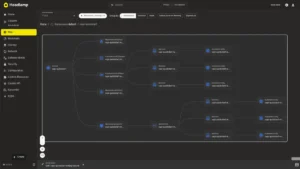
Kueue acts as a job queuing and quota management controller, deciding whether a job is eligible for execution based on available cluster resources. The critical shift in modern Kubernetes operations is acknowledging that the question "Why is my Pod pending?" is insufficient. The more pertinent query is, "Has Kueue admitted the workload?" To bridge this visibility gap, the Kueue plugin for Headlamp has been introduced, offering a visual, intuitive path to navigate the admission process without relying on fragmented command-line gymnastics.
The Architecture of Admission: Decoupling Scheduling from Queuing
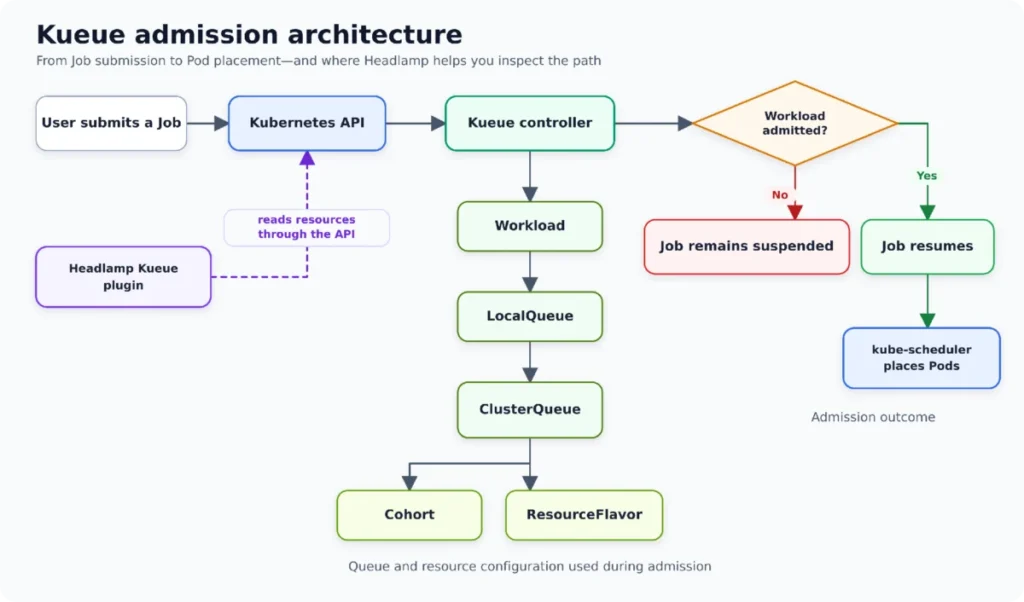
To understand why a job stalls, one must first distinguish between two distinct phases: Kueue Admission and Pod Scheduling.
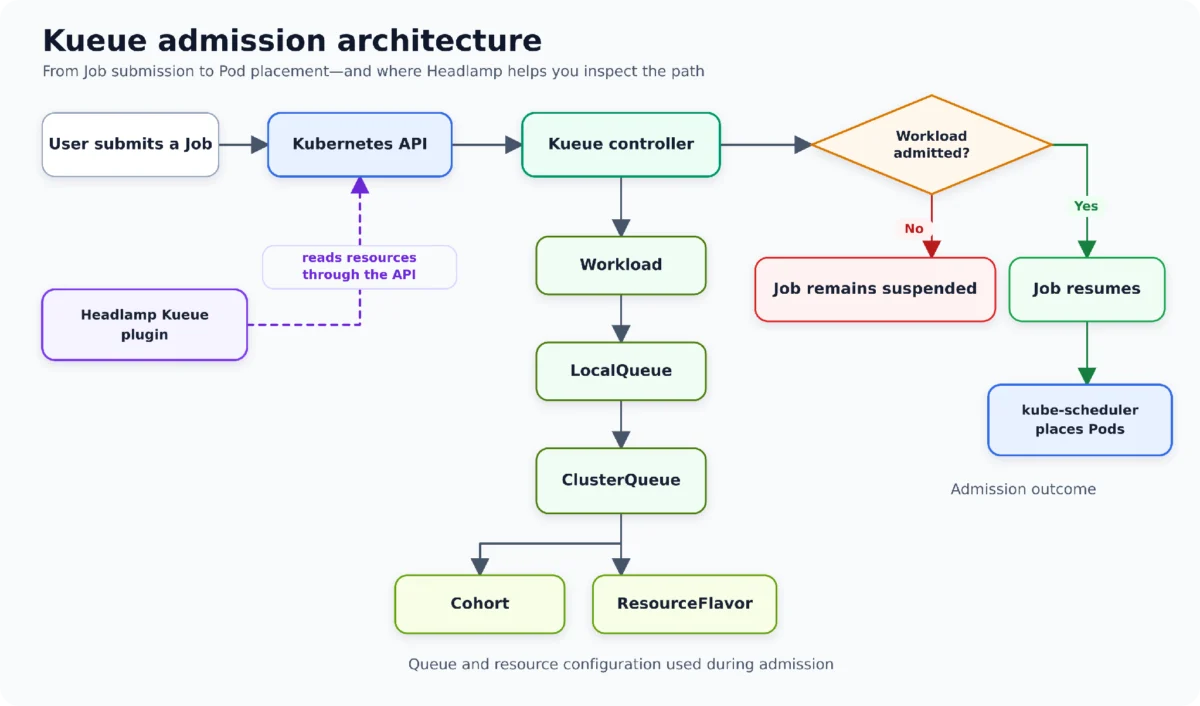
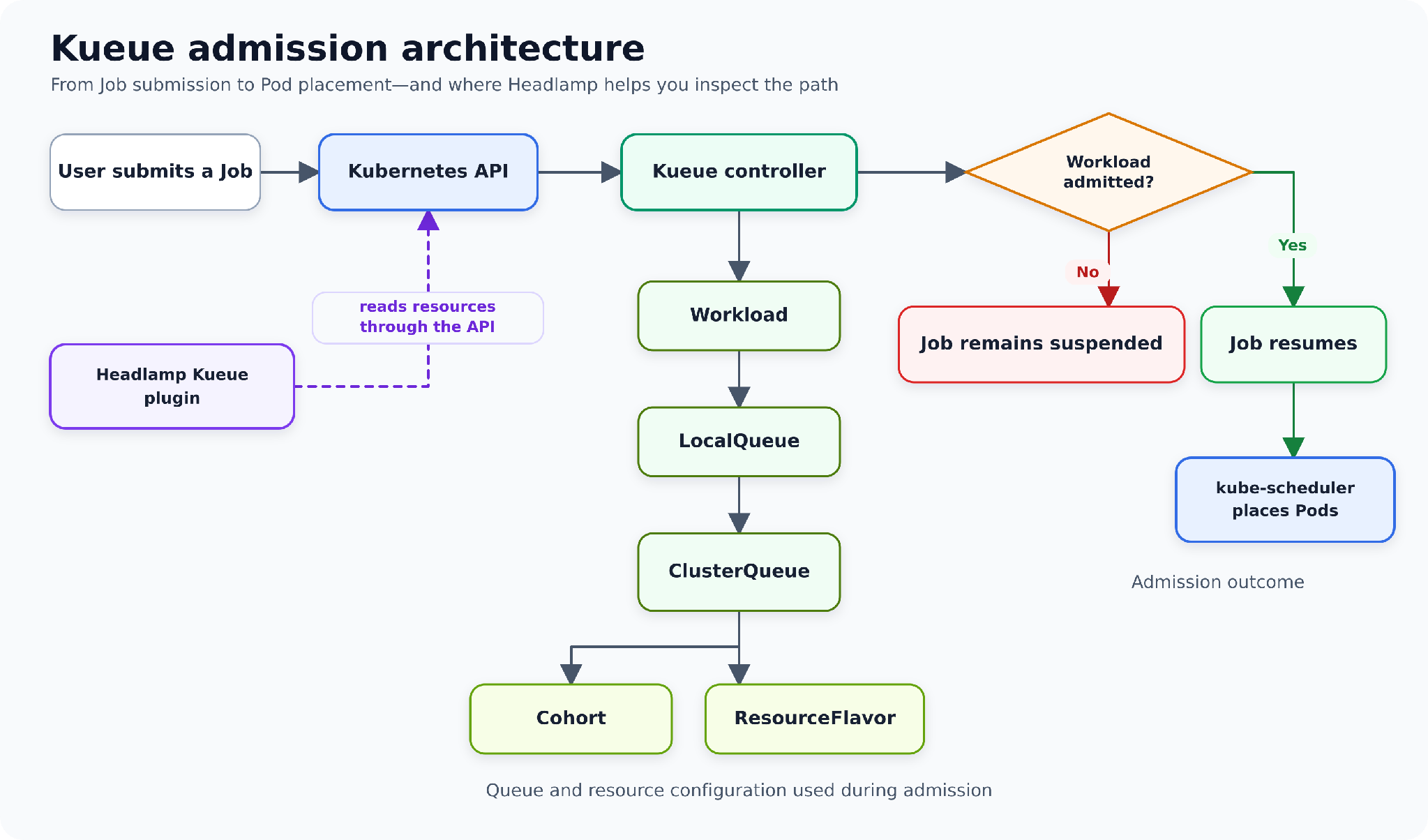
Kueue and the standard Kubernetes scheduler serve fundamentally different functions. Kueue manages quotas and resource fairness; it decides if a workload should be allowed to run. Once Kueue admits the workload, it updates the Job object, effectively signaling the Kubernetes scheduler that it is safe to proceed with node placement.
If a workload is not admitted, the problem lies within the Kueue hierarchy—specifically within its LocalQueue, ClusterQueue, ResourceFlavor, or Cohort. If, however, the workload is admitted but the pods remain in a Pending state, the investigation must shift to the standard Kubernetes scheduler and its associated events. This clear, architectural boundary is the cornerstone of the Headlamp-first troubleshooting methodology.
Chronology of an Investigation: A Step-by-Step Path
The quickest route to resolving a pending job starts not with a terminal window, but with the Workload object itself. The Headlamp-first path replaces the need to manually cross-reference large YAML files and multiple kubectl commands.
1. The Workload View and Initial Assessment
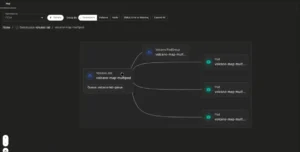
Navigating to Kueue → Workloads within Headlamp allows users to select the relevant namespace and identify the Workload object generated for their Job. In the alpha version of the plugin, owner references provide a clear lineage, allowing operators to verify that they are looking at the correct controller entity. Before diving into the details, the list view provides a high-level scan of the status. If a workload is missing, it serves as an immediate indicator to check namespace selection, LocalQueue submissions, or user permissions.
2. Deep-Diving into Status and Conditions
Once the specific Workload is opened, the focus should remain on its current status and conditions rather than the raw YAML. The conditions QuotaReserved and Admitted are the primary barometers of progress. A negative status here often contains a message detailing exactly why the resource request was rejected—such as insufficient CPU quota or a mismatch in hardware requirements.
3. Resource Requests vs. Assignment
A common pitfall in Kubernetes debugging is looking at a single pod template while ignoring the aggregate request of the entire Job. The plugin highlights the total resource footprint, including CPU and memory, across all pod sets. If the job requests three pods, each requiring one CPU, the plugin shows the cumulative three-CPU demand. This is essential for understanding why a seemingly small job might exceed a cluster’s remaining headroom.
4. Navigating the Hierarchy: LocalQueues and ClusterQueues
The investigation flows naturally from the Workload to its associated LocalQueue—the namespace-level entry point. This confirms whether the job has reached the expected queue. From there, the link to the ClusterQueue reveals the cluster-wide quota policies. By comparing the Workload’s request against the available capacity of the ClusterQueue, an operator can determine if the "pending" state is a result of a hard capacity limit.
5. Advanced Context: ResourceFlavors and Cohorts
In environments with heterogeneous hardware, ResourceFlavors become critical. These define node labels, taints, and topology constraints. When a workload requires specific hardware like GPUs, checking the flavor becomes the next logical step. If the ClusterQueue participates in a Cohort—a mechanism for sharing unused quotas across multiple queues—the plugin visualizes these relationships, allowing users to see if borrowing limits or lending policies are contributing to the bottleneck.
Supporting Data: The Troubleshooting Table
The following comparison illustrates how the Headlamp plugin transforms the traditional, fragmented command-line experience into a unified, linked investigation:
| Question | Headlamp Path | Command-Line Equivalent |
|---|---|---|
| Is the Workload admitted? | Workloads → Status/Conditions | kubectl describe workload |
| Which LocalQueue did it enter? | Workload → LocalQueue link | kubectl get localqueue -o yaml |
| Which ClusterQueue provides quota? | LocalQueue → ClusterQueue link | kubectl get clusterqueue -o yaml |
| Which flavor matters? | ClusterQueue → ResourceFlavor | kubectl get resourceflavor -o yaml |
| What happens post-admission? | Jobs and Pods → Events | kubectl describe job |
This data underscores the efficiency gain: by centralizing these resources, operators reduce the "cognitive load" of switching between different resource types and CLI outputs.
Official Responses and Development Context
The Kueue plugin for Headlamp is a significant milestone in the Kubernetes ecosystem, developed during the 2026 CNCF LFX Mentorship program. Mentee Utkarsh Raj, working alongside mentors René Dudfield and Kevin Hannon, designed the plugin to address a common pain point reported by the Kueue community.
"The goal," says the development team, "was never to replace the power of the command line, but to provide an immediate, visual heuristic for the most common admission-related questions." The feedback from the Headlamp and Kueue communities has been instrumental in shaping the plugin’s current feature set, ensuring that the navigation logic reflects how real-world engineers actually troubleshoot their clusters.
Implications for Cluster Operations
The introduction of this plugin signals a shift toward "Observability-Driven Operations" in Kubernetes. By moving from a reactive command-line workflow to a structured, UI-based troubleshooting path, organizations can:
- Reduce Mean Time to Resolution (MTTR): By surfacing the "why" behind a pending job immediately, operators spend less time searching and more time adjusting configurations.
- Democratize Cluster Management: Lowering the barrier to entry for understanding complex quota systems like Kueue allows junior operators and developers to self-diagnose issues without escalating to platform engineering teams.
- Improve Transparency: The linked nature of the Headlamp UI enforces a better understanding of how workloads relate to cluster-level policies, fostering a more robust, policy-compliant deployment culture.
Current Limitations and Future Roadmap
While the 0.1.0-alpha release is a robust tool for inspection, it is intentionally limited in scope. It provides read-only access, meaning it does not currently support create, edit, or delete actions for Kueue-specific resources. Users needing to modify these objects must still utilize kubectl or standard Kubernetes YAML editing features within Headlamp.
These limitations serve a dual purpose: they prioritize stability and security by preventing accidental modification of sensitive quota policies, while allowing the community to focus on refining the "read-only" navigation experience. Future iterations are expected to incorporate more interactive features, potentially including "stop" or "resume" functionality for workloads, pending further community feedback.
Conclusion: A New Standard for Kubernetes Troubleshooting
When the next Job fails to start, the path forward is clear. By utilizing the Headlamp-first approach, you transform a potentially frustrating "pending" status into an informative, step-by-step diagnostic journey. Whether you are dealing with simple quota exhaustion or complex cross-queue resource sharing, the Kueue plugin for Headlamp provides the context required to make informed decisions.
For those looking to test the environment, the plugin repository offers comprehensive test manifests to simulate quota mismatches. By proactively practicing this workflow, cluster operators can ensure that when real production issues arise, they are prepared to resolve them with precision and confidence, keeping the cluster healthy and the workloads flowing.