Streamlining Game Distribution: itch.io Integrates Butler CLI into Official Desktop App
In a significant move to lower the barrier to entry for independent developers, the platform itch.io has unveiled a major update to its official desktop application. The latest version introduces a comprehensive Graphical User Interface (GUI) for "Butler," the platform’s powerful command-line tool for uploading and managing game builds. This development marks a shift from a developer-centric, terminal-reliant workflow to a more accessible, integrated experience that promises to save time and bandwidth for creators across the ecosystem.
Main Facts: The Evolution of the Butler Tool
For years, Butler has served as the backbone of itch.io’s distribution engine. Unlike traditional browser-based uploads, which require developers to manually package and upload full files, Butler functions as an intelligent synchronization tool. It utilizes a patching system that analyzes the contents of a project directory or archive and pushes only the specific data that has changed since the last iteration.
The primary benefit of this system is efficiency. By sending only the delta (the differences) between builds, both the developer and the end-user experience significantly faster upload and download speeds. For developers, this means faster iteration times; for players, it means shorter wait times when a game receives an update. Furthermore, itch.io’s servers perform background optimizations on these patches, ensuring the file size remains as lean as possible.
However, the power of Butler historically came with a learning curve. Because it was strictly a command-line interface (CLI) tool, it necessitated a degree of technical proficiency. Developers had to be comfortable with terminal commands, file paths, and syntax, which created a friction point for less technical creators. The new update effectively bridges this gap by embedding the full functionality of Butler directly into the itch.io app’s sidebar under a new "Upload" section.
Chronology: From Terminal to Taskbar
The integration of Butler into the desktop app did not happen overnight; it represents the culmination of a long-standing desire to make professional distribution tools accessible to the wider community.
- Pre-2024: Butler existed primarily as a standalone CLI tool. While highly effective, it required manual installation, path configuration, and constant vigilance regarding updates. Developers often had to manage versioning independently, which proved to be a point of frustration for many.
- Early Development Phase: The itch.io development team identified that while the CLI was a favorite among power users, the "fiddly" nature of the terminal was discouraging newer developers from adopting the patching system.
- The Beta/Testing Period: Through iterative testing, the team moved the CLI logic into the desktop client. This included creating the "Builds" page—a centralized dashboard for monitoring project history.
- The Release: As of the current version (v26.12.0 and later), the feature is now live for all users. The app now handles the automatic updating of the Butler binaries, removing the burden of maintenance from the user.
Supporting Data and Technical Workflow
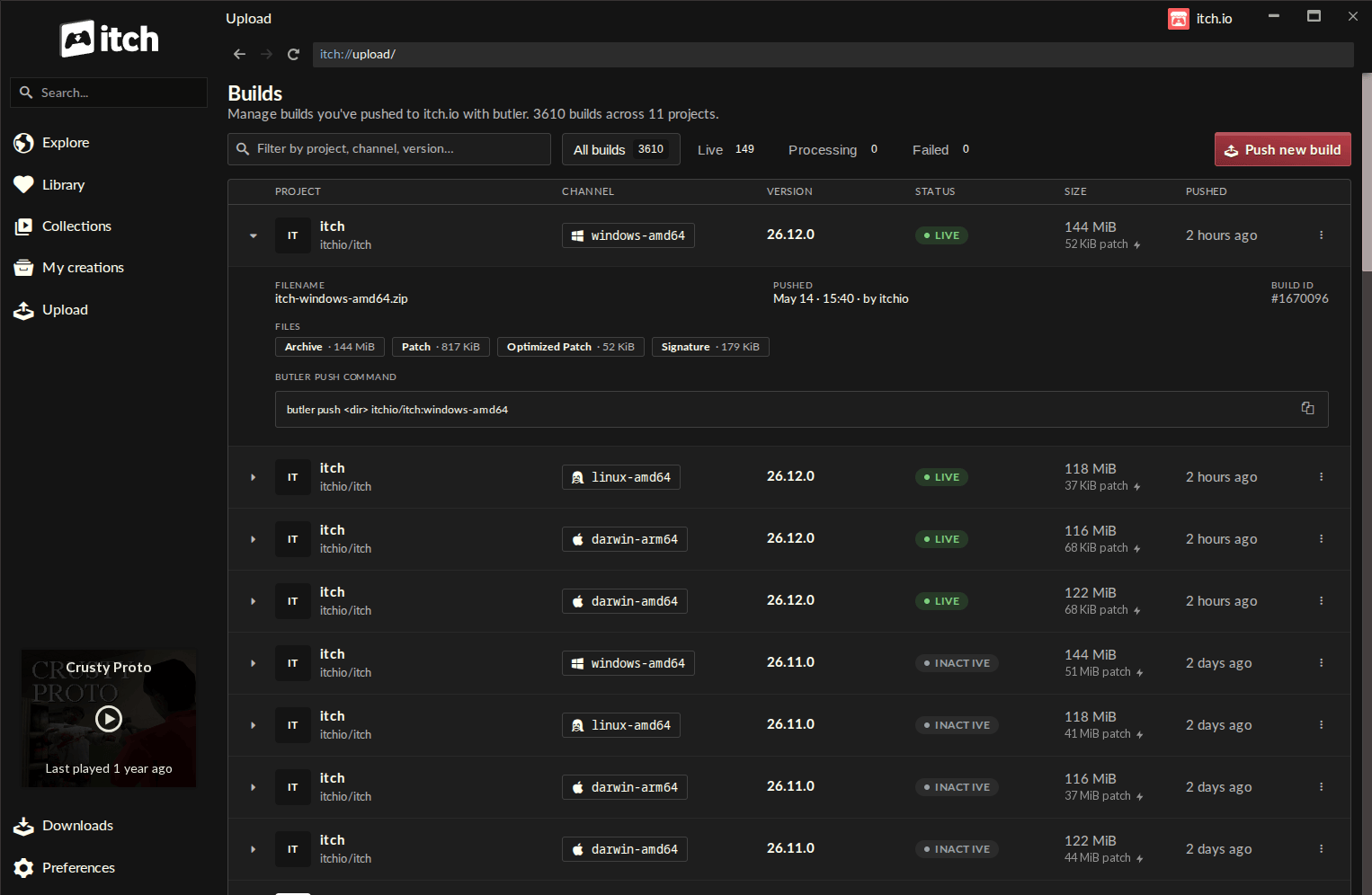
The new "Upload" section is designed for transparency and control. When a user navigates to the Builds page, they are presented with a detailed overview of every build associated with their account. Each entry provides critical metadata, including the project name, the specific distribution channel (e.g., windows-beta, macos-preview), the current version number, the file size, and the exact timestamp of the last push.
The "Push" Workflow
The process of deploying a new build has been simplified into a four-step GUI flow:
- Project Selection: Users select the target project from a list of their authorized titles.
- Channel Assignment: Users choose an existing channel or define a new one, providing granular control over how different versions of a game are distributed.
- Source Input: The app allows users to drag and drop a folder or a .zip file directly into the interface.
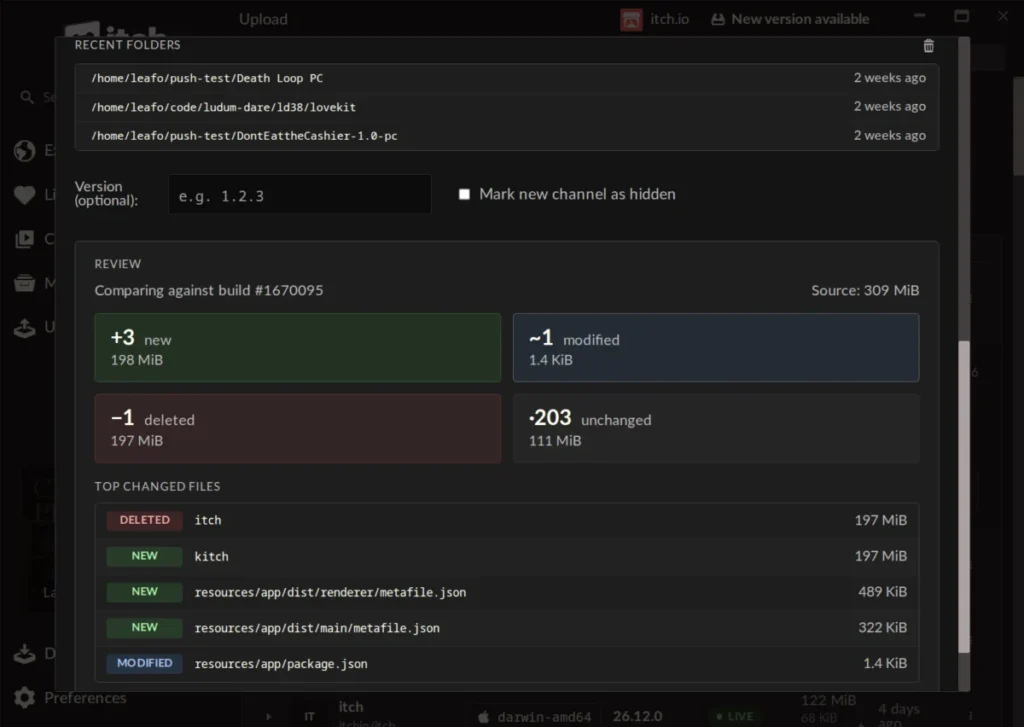
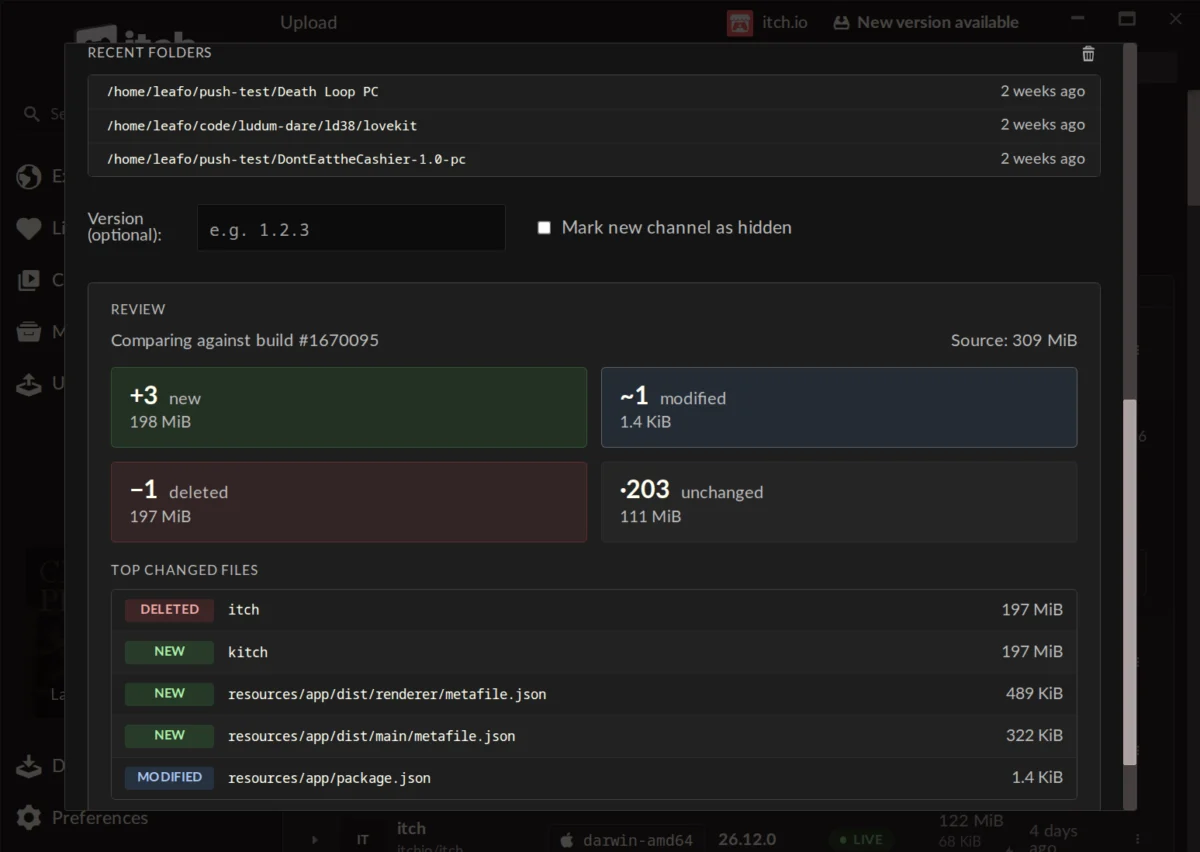
- Preview and Verification: Perhaps the most critical addition is the "Preview" step. Before a single byte is uploaded, the app calculates exactly what will change. It displays the number of new, modified, and deleted files, along with the size implications of the patch.
This "self-enforcing" validation step acts as a safety net. Developers can identify potential errors—such as accidentally including massive temporary files or debug logs—before they are pushed to the live server. This feature addresses the "fragility" that some users previously associated with CLI tools, providing visual confirmation that the patch is correct.
Official Responses and Community Feedback
The reaction from the developer community has been largely positive, reflecting a broad appreciation for the time-saving benefits of the new GUI.
One user on the itch.io forums noted, "This is a lot faster than manually updating the webpage. I used Butler some years ago, but I remember it being complicated and fiddly. The itch app has none of these problems." This sentiment highlights the core achievement of the update: the removal of "technical anxiety."
However, the community also highlighted remaining limitations. When asked about migrating existing non-Butler projects to the new system, itch.io lead developer leafo provided a transparent explanation. He noted that Butler requires specific metadata—computed during the initial upload process—that cannot be retroactively applied to older, traditional uploads. While there are no current plans to implement a conversion tool, the acknowledgment from the platform’s leadership confirms that the team is listening to user workflows and potential friction points.
Other community members expressed concerns regarding platform moderation and feature requests, such as tag exclusion. While these issues remain distinct from the technical implementation of Butler, the dialogue demonstrates the platform’s role as an evolving space where developers feel empowered to demand better tools and greater transparency.
Implications for the Future of Independent Distribution
The implications of this update are profound for the independent gaming ecosystem. By democratizing the use of sophisticated patching technology, itch.io is effectively setting a new standard for self-publishing.
1. Increased Frequency of Updates
When the process of updating a game is reduced from a cumbersome manual upload to a few clicks in a GUI, developers are likely to update their projects more frequently. This fosters a healthier relationship with players, who receive bug fixes and content updates faster.
2. Reduced Server Load and Bandwidth
The shift toward delta-patching, made easier by the new app, is not just a convenience for developers; it is a necessity for the platform’s sustainability. By minimizing the amount of data transferred, itch.io reduces its own server bandwidth costs while ensuring that players can download updates for larger games even on restrictive internet connections.
3. Professionalism and Polish
For many indie developers, the "professional" look and feel of their distribution pipeline is just as important as the code itself. The ability to manage multiple profiles, switch between accounts seamlessly, and track version history in a clean, professional dashboard elevates the perceived quality of the itch.io platform.
4. A Template for Other Platforms
The success of this integration serves as a blueprint for other digital storefronts. As the barrier to publishing games continues to drop, the platforms that offer the most frictionless, intuitive tools for management will likely capture the largest share of the independent market.
Conclusion
The integration of Butler into the itch.io desktop app is a masterclass in user-centric design. By taking a powerful, complex CLI tool and wrapping it in an intuitive, visual, and safe interface, itch.io has managed to make high-level distribution technology accessible to everyone from the hobbyist student to the seasoned professional.
As the app continues to update automatically, ensuring that all users have the latest version of these tools without manual intervention, it is clear that itch.io is committed to removing the administrative overhead of game development. While challenges remain—such as the migration of legacy projects and continued dialogue on platform features—this update stands as a milestone in the platform’s ongoing mission to support the independent creator. Developers looking to optimize their workflow are encouraged to update their apps to version v26.12.0 or higher to begin utilizing these new features immediately.