AWS Reinvents Application Management: Elastic Beanstalk Enters the Kubernetes Era with Fully Managed Cluster Mode
Fifteen years after changing the cloud deployment landscape, Amazon Web Services (AWS) is once again redefining how developers and enterprises build, scale, and maintain cloud applications.
In a major evolutionary leap for one of its most trusted foundational services, AWS has officially announced the general availability of AWS Elastic Beanstalk Cluster Mode. This new fully managed capability integrates the simplicity and operational automation of Elastic Beanstalk with the raw power and flexibility of Amazon Elastic Kubernetes Service (Amazon EKS).
The announcement marks a watershed moment for engineering teams struggling with the operational overhead of modern microservices. By taking full, lifelong operational responsibility for production environments—ranging from deployment and scaling to patching, monitoring, and security—AWS is signaling that developers should spend their time writing business logic, not managing infrastructure plumbing.
Main Facts: What is Elastic Beanstalk Cluster Mode?
At its core, Elastic Beanstalk Cluster Mode is designed for teams managing a diverse portfolio of applications, ranging from a handful of services to hundreds of complex microservices.
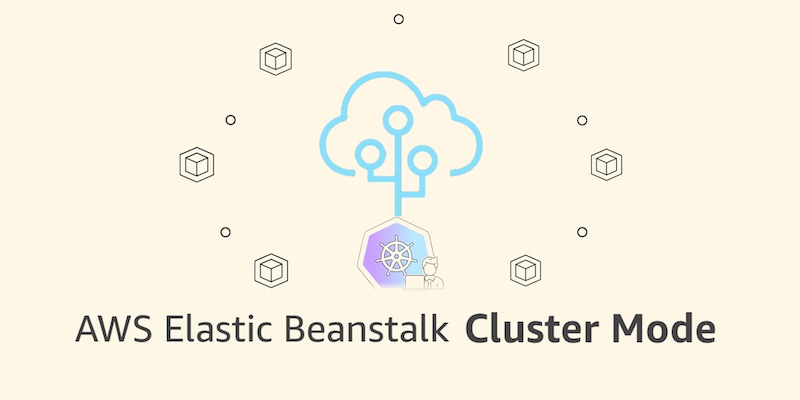
Rather than isolating every single application on its own dedicated infrastructure, Cluster Mode allows multiple applications and microservices to share a unified, highly optimized infrastructure baseline powered by Amazon EKS.
Key Capabilities and Architecture
- Bring Your Own Application: Developers can deploy applications however they exist today. Whether it is raw source code, a standard Dockerfile, or a pre-built container image stored in Amazon Elastic Container Registry (Amazon ECR), Beanstalk handles the heavy lifting.
- Shared Infrastructure Economics: By pooling applications onto a shared EKS-backed foundation, per-application infrastructure costs decrease naturally as the portfolio scales, avoiding the resource fragmentation typical of legacy setups.
- Unified Management Experience: Developers manage dozens or even hundreds of microservices through a single, cohesive interface, ensuring consistent operational guarantees across every stack.
- Intelligent and Modern Tooling: The modernized operational engine underneath includes AI-powered environment analysis for automated health diagnostics and recommendations, official GitHub Actions for seamless CI/CD integration using standard YAML configurations, and OpenTelemetry-based observability.
- Security and Networking by Default: Cluster Mode features automated traffic-splitting deployments with zero-downtime automatic rollbacks, event-driven autoscaling, native secrets management via AWS Secrets Manager, and HTTPS enabled by default through AWS Certificate Manager (ACM).
Crucially, AWS has confirmed that this comprehensive operational responsibility—deploying, patching, scaling, and maintaining the workload—remains with AWS for the entire lifecycle of the application.
Chronology: Fifteen Years of Continuous Evolution
To understand the significance of Cluster Mode, it is helpful to look back at the trajectory of AWS Elastic Beanstalk and the broader evolution of cloud-native architecture.
2011: The Dawn of Simple Deployments
When AWS first launched Elastic Beanstalk in 2011, the cloud computing market looked entirely different. Developers working in Java, .NET, Python, Node.js, PHP, Ruby, and Go needed a way to deploy full-stack applications without manually provisioning individual EC2 instances, load balancers, and security groups. Beanstalk filled that gap, acting as an abstraction layer that shielded developers from low-level infrastructure operations.

The Rise of Containers and Kubernetes
Over the subsequent decade, architectural paradigms shifted dramatically. Monolithic and simple multi-tier applications gave way to distributed microservices architectures. While Docker and Kubernetes (via Amazon EKS) became the industry gold standard for running containerized workloads at scale, they also introduced a steep learning curve and significant operational toil. Managing Kubernetes control planes, node groups, ingress controllers, and service meshes often required dedicated platform engineering teams.
2026: The Modernization Wave
Recognizing these challenges, AWS began a multi-year modernization effort behind the scenes of Elastic Beanstalk.
- February 2026: AWS introduced official GitHub Action integrations, allowing development teams to trigger Beanstalk deployments directly from their version control pipelines using simple YAML configurations.
- April 2026: AWS rolled out AI-powered environment analysis across its Windows and Linux environments, introducing automated health diagnostics and self-healing recommendations.
- September 2026: The culmination of this engineering overhaul arrived with the announcement and immediate general availability of Elastic Beanstalk Cluster Mode, bridging the gap between Beanstalk’s legendary simplicity and EKS’s powerful container orchestration.
Supporting Data and Technical Implementation
Transitioning to Cluster Mode does not require a rewrite of existing toolchains. AWS has built native support across the AWS Management Console, the AWS Command Line Interface (AWS CLI), the specialized EB CLI, and standard AWS SDKs.
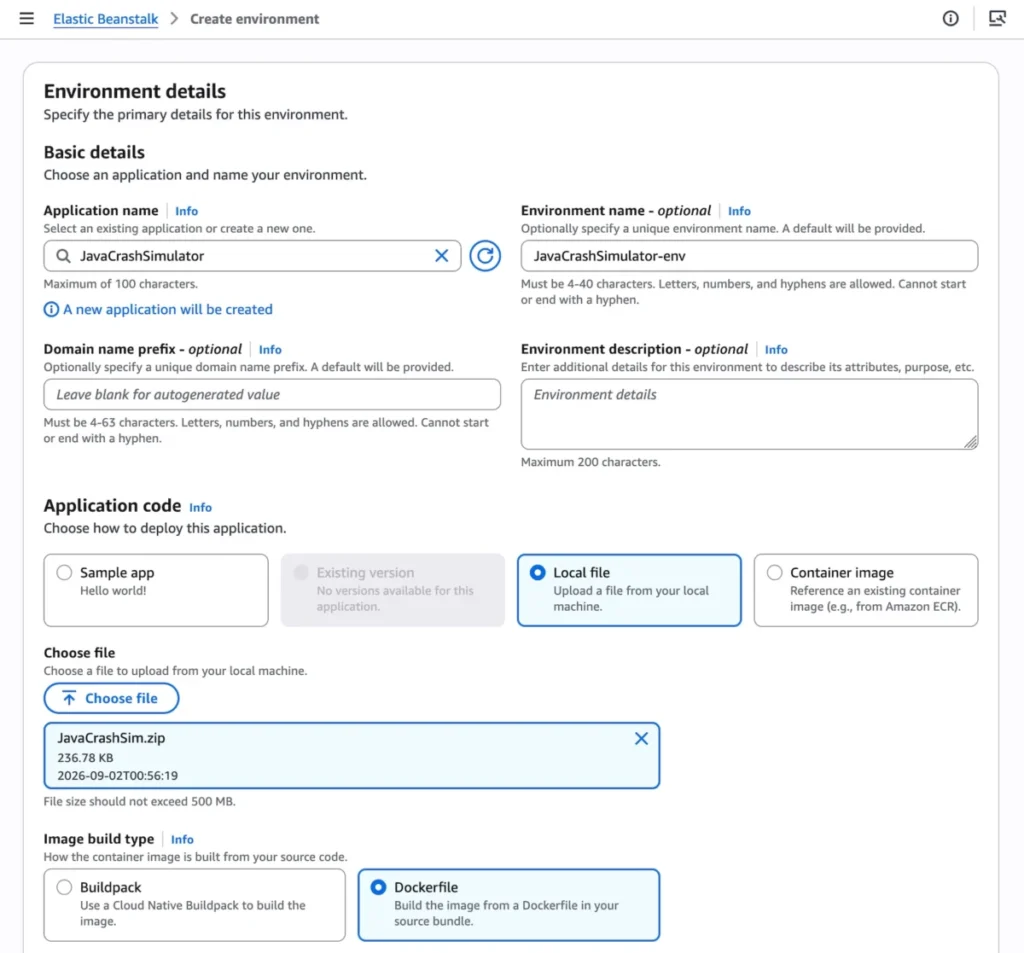
Getting Started via the AWS Console
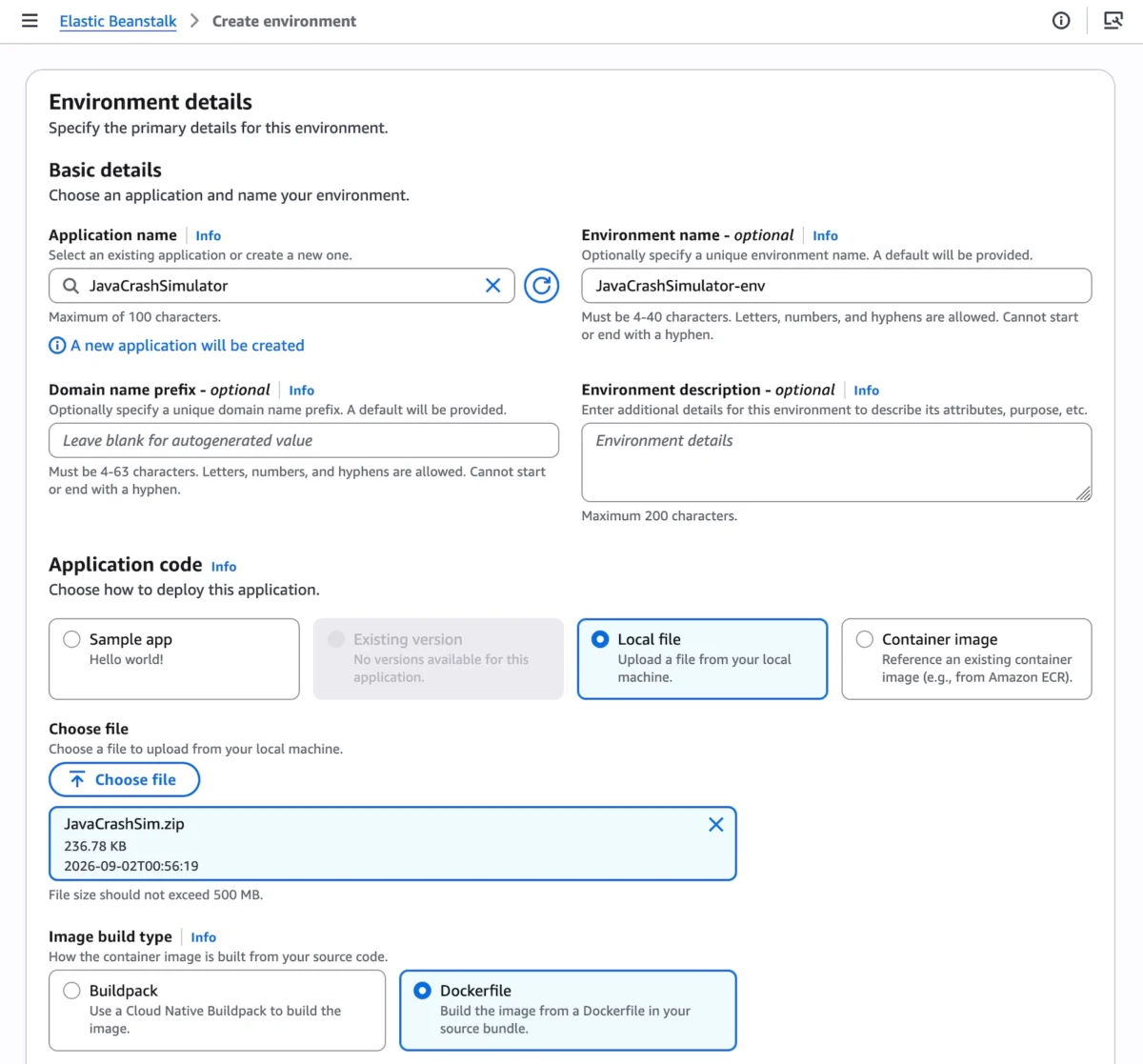
To deploy a workload using Cluster Mode in the console:

- Navigate to the Elastic Beanstalk console.
- Initiate the creation of a new environment and select Cluster under the Deployment type menu.
- Provide your application artifacts (source code, a local file, or a container image URI).
- Click Create.
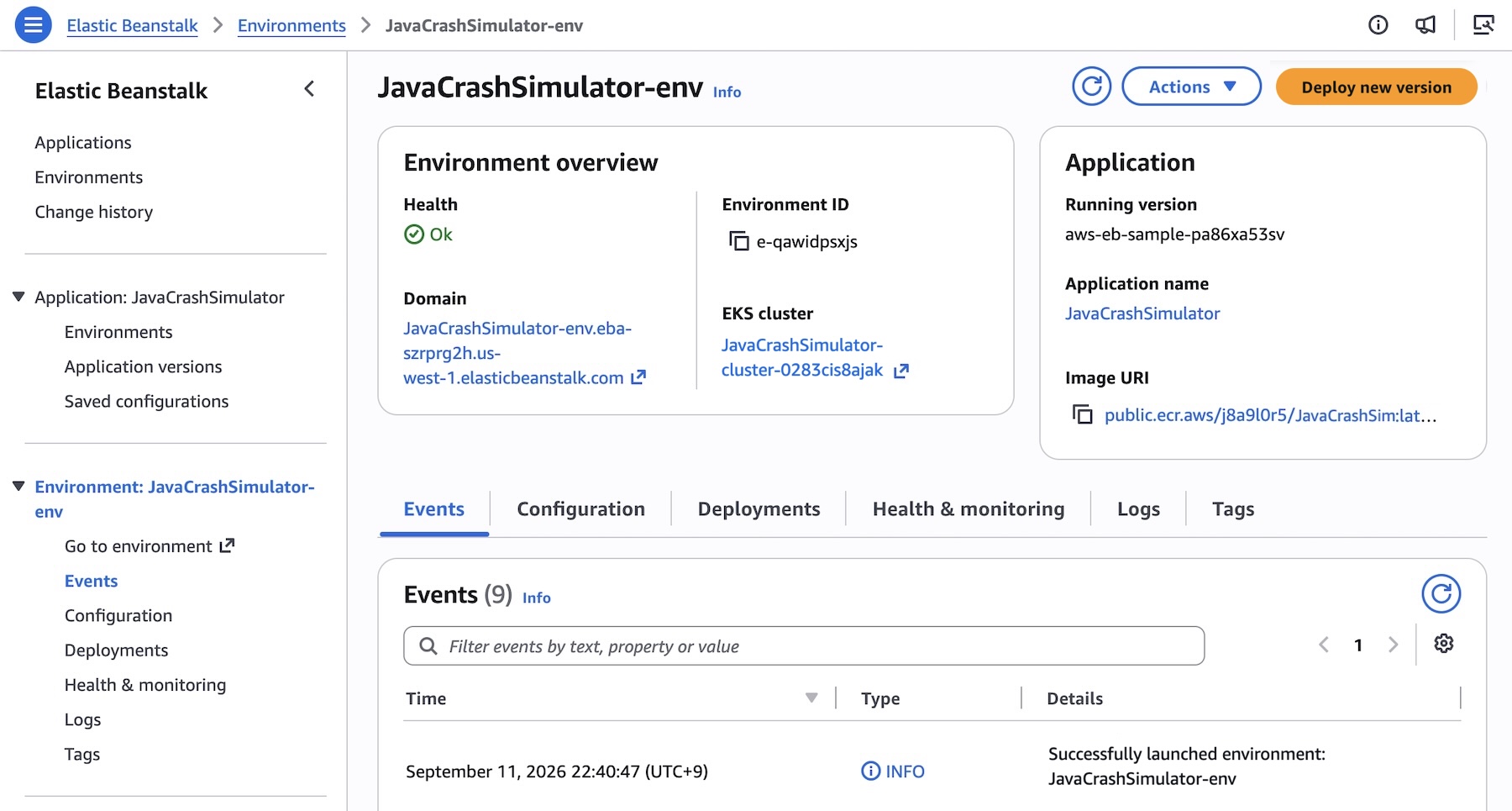
Note: The initial deployment for a given set of subnets triggers the background creation of an underlying EKS cluster, which typically takes approximately ten minutes. Subsequent deployments execute much faster by reusing the established EKS cluster.
Programmatic Deployment with AWS CLI
For automated pipelines and microservices architectures, teams can register and deploy multi-container systems programmatically. Below is an example of how engineering teams can register multiple microservice images into Amazon ECR and manage them via the AWS CLI:
# Define microservice image registry mappings
IMAGES=(
    "frontend-v1|public.ecr.aws/my-microservices/frontend:v1"
    "cartservice-v1|public.ecr.aws/my-microservices/cart:v1"
    "paymentservice-v1|public.ecr.aws/my-microservices/payment:v1"
    "shippingservice-v1|public.ecr.aws/my-microservices/shippings:v1"
)

APP_NAME="my-microservice"

# Register application versions
for entry in "$IMAGES[@]"; do
    IFS='|' read -r label uri <<< "$entry"
    aws elasticbeanstalk create-application-version
        --application-name "$APP_NAME"
        --version-label "$label"
        --image-configuration Source="Uri=$uri"
        --region "us-west-2"
    echo "Registered version: $label"
done
Configuring Service Options
Services within a cluster can be fine-tuned using JSON configuration files. For example, a frontend internet-facing service requiring an Application Load Balancer (ALB) and custom health checks can be configured as follows:
[
    "Namespace": "aws:elasticbeanstalk:eks", "OptionName": "cluster-role", "Value": "arn:aws:iam::0123456789012:role/EksClusterRole",
    "Namespace": "aws:elasticbeanstalk:eks", "OptionName": "node-role", "Value": "arn:aws:iam::0123456789012:role/EksNodeRole",
    "Namespace": "aws:elasticbeanstalk:eks:environment", "OptionName": "observability-role", "Value": "arn:aws:iam::0123456789012:role/ObservabilityRole",
    "Namespace": "aws:elasticbeanstalk:eks:environment", "OptionName": "subnets", "Value": "subnet-1,subnet-2,subnet-3",
    "Namespace": "aws:elasticbeanstalk:eks:environment:autoscaling", "OptionName": "min-replica", "Value": "1",
    "Namespace": "aws:elasticbeanstalk:eks:environment:autoscaling", "OptionName": "max-replica", "Value": "5",
    "Namespace": "aws:elasticbeanstalk:eks:environment", "OptionName": "cpu", "Value": "0.5",
    "Namespace": "aws:elasticbeanstalk:eks:environment", "OptionName": "memory", "Value": "256Mi",
    "Namespace": "aws:elasticbeanstalk:eks:environment", "OptionName": "memory-limit", "Value": "512Mi",
    "Namespace": "aws:elasticbeanstalk:eks:environment", "OptionName": "service-port", "Value": "8080",
    "Namespace": "aws:elasticbeanstalk:eks:alb", "OptionName": "scheme", "Value": "internet-facing",
    "Namespace": "aws:elasticbeanstalk:eks:alb", "OptionName": "healthcheck-path", "Value": "/_healthz"
]
Deploying the environment is then achieved with a straightforward CLI command:

aws elasticbeanstalk create-environment
    --application-name my-microservice
    --environment-name frontend
    --version-label frontend-v1
    --tier Name=Cluster,Type=EKS
    --option-settings file:///tmp/frontend-options.json
    --region "us-west-2"
Official Responses and Coexistence with Standard Mode
Understanding that enterprise migrations require caution, AWS has emphasized that Elastic Beanstalk Standard Mode—powered by Amazon Elastic Compute Cloud (EC2)—remains fully supported, active, and robust.
Standard and Cluster Mode environments can run side by side within the exact same Elastic Beanstalk application structure. This architectural choice enables engineering organizations to migrate their workloads incrementally, moving one environment at a time at their own pace without disruptive, all-or-nothing cutovers. Automated validation checks run prior to modifications, ensuring full compatibility and preventing forced migrations.
Pricing and Availability
- Geographic Availability: Elastic Beanstalk Cluster Mode is generally available starting today in all AWS Regions where Elastic Beanstalk is currently offered. Developers can check specific regional capability rollouts via the AWS Capabilities portal.
- Pricing Model: There is no additional platform charge for using Elastic Beanstalk Cluster Mode. Customers pay strictly for the underlying AWS resources consumed by their workloads—including the standard EKS control plane fee, EKS Auto Mode compute resources, Amazon ECR storage, and Amazon CloudWatch telemetry. Note that Cluster Mode is not eligible for the AWS Free Tier.
- AI-Assisted Operations: For developers looking to query APIs, search documentation, or troubleshoot configurations, AWS has highlighted compatibility with the AWS MCP Server and associated plugins for modern AI developer tools.
Implications for Developers and Enterprise IT
The launch of Elastic Beanstalk Cluster Mode carries profound implications for the software development lifecycle, platform engineering, and enterprise cloud spending.
1. Bridging the Developer Experience Gap
For years, organizations faced a difficult trade-off: use simple PaaS (Platform-as-a-Service) tools that lacked deep container flexibility, or invest heavily in platform engineering teams to build custom internal developer platforms (IDPs) on top of raw Kubernetes. Cluster Mode essentially delivers an out-of-the-box IDP experience backed by AWS, allowing mainstream developers to leverage Kubernetes orchestration without needing to master Helm charts, ingress controllers, or complex cluster networking.
2. Streamlining Microservices Portfolio Management
Managing fifty independent microservices traditionally meant managing fifty separate infrastructure configurations, patching cycles, and monitoring setups. By consolidating multiple services onto a shared EKS baseline managed by Beanstalk, operational overhead drops drastically. Security patches and infrastructure upgrades are handled continuously by AWS, freeing engineering teams to focus entirely on feature velocity.
3. Cost Optimization at Scale
Infrastructure waste is a common pain point in cloud environments, particularly when provisioning dedicated compute instances for under-utilized staging or low-traffic microservices. The shared cluster architecture of Cluster Mode multiplexes workloads efficiently onto shared EKS nodes, reducing idle compute waste and lowering the total cost of ownership (TCO) for enterprise portfolios.
Looking Forward
As organizations continue to seek ways to balance agility with rigorous operational governance, AWS Elastic Beanstalk Cluster Mode represents a mature, pragmatic solution. By marrying fifteen years of deployment pedigree with the enterprise dominance of Amazon EKS, AWS has ensured that its pioneering application management service remains indispensable for the next generation of cloud architecture.