Beyond the Dashboard: A Strategic Guide to Migrating from Kubernetes Dashboard to Headlamp
By Vincent T. (Microsoft) | Monday, July 13, 2026
As the Kubernetes ecosystem matures, the tools used to visualize and manage clusters are evolving. For years, the community-standard Kubernetes Dashboard served as the primary entry point for developers and operators alike. However, with the rise of complex, multi-cluster environments and the demand for more robust identity management, many organizations are shifting toward Headlamp. This guide outlines the strategic migration path from the legacy Kubernetes Dashboard to Headlamp, ensuring a seamless transition that prioritizes security, scalability, and developer productivity.
1. The Strategic Shift: Understanding the Architectural Divide
Before initiating a migration, it is critical to recognize the fundamental architectural differences between the two platforms. While both provide a graphical interface for Kubernetes, they operate on distinct philosophies.
1.1 Kubernetes Dashboard: The In-Cluster Legacy
The Kubernetes Dashboard is designed as a web application that resides permanently within the cluster. It relies heavily on ServiceAccount tokens, often creating a security challenge where the UI effectively acts as a privileged entity within the cluster, necessitating complex RBAC (Role-Based Access Control) configurations to prevent over-privilege.
1.2 Headlamp: The Identity-Centric Client
Headlamp operates as a Kubernetes client with a UI-based interface. When running on the desktop, it leverages the user’s existing kubeconfig, effectively acting as a portal for the user’s own identity and permissions. When deployed in-cluster, it bridges the gap by supporting modern authentication protocols like OIDC (OpenID Connect). Essentially, Headlamp follows the user, whereas the Dashboard requires the user to adapt to the cluster’s internal identity.
2. Pre-Migration Checklist: Setting the Foundation
Transitioning is not merely a software swap; it is a shift in operational workflow. To avoid service disruption, teams should adhere to a strict pre-migration checklist.
2.1 Establishing the Baseline
Audit your current usage of the Kubernetes Dashboard. Document which team members access it, the namespaces they interact with, and the specific administrative tasks performed. This baseline will serve as your validation metric once the migration is complete.
2.2 Validating Identity with Kubeconfig
Headlamp’s power lies in its reliance on standard Kubernetes authentication. Before proceeding, ensure that your kubectl environment is correctly configured:
kubectl config current-context
kubectl get pods -n <your-namespace>
If these commands return the expected results, your identity and RBAC permissions are correctly mapped. Headlamp will mirror this access, ensuring that users cannot perform actions in the UI that they are not authorized to perform via the CLI.
2.3 Rollout Planning
We recommend a Parallel Rollout. By keeping both the Kubernetes Dashboard and Headlamp running concurrently for a defined period, you allow teams to acclimate to the new interface without losing the safety net of the legacy tool. Only after a successful verification phase should you initiate a Cutover, where the Dashboard is decommissioned.
3. Deployment Models: Choosing Your Path
Headlamp offers flexibility that the legacy Dashboard lacks. Teams can choose between a desktop-client approach or a centralized in-cluster deployment.
3.1 Desktop: The User-Managed Advantage
For individual developers, the desktop version of Headlamp is the most efficient starting point. Because it resides on the developer’s local machine, it reads local kubeconfig files, allowing for instant access to multiple clusters without requiring ingress rules or cluster-level service accounts.
3.2 In-Cluster: The Shared Environment
For platform teams, the in-cluster deployment (typically managed via Helm) provides a centralized, URL-accessible interface. This is the ideal solution for teams that require a shared "source of truth" for cluster status, allowing admins to manage updates and OIDC integrations centrally.
4. Installation and Lifecycle Management
Whether you are deploying to a local machine or a production cluster, Headlamp’s installation is designed for standard industry workflows.
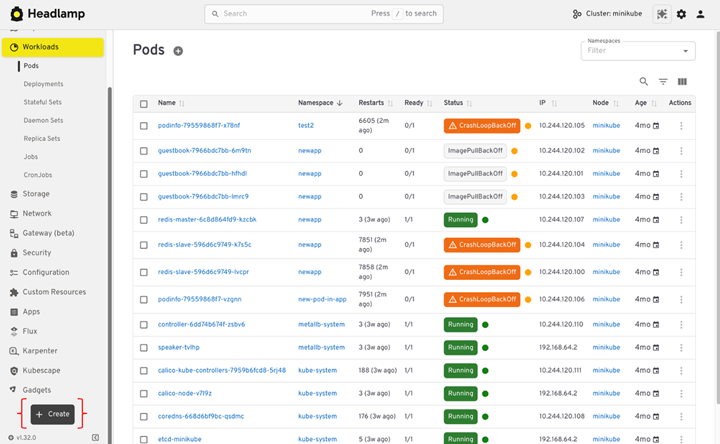
- Desktop: For macOS,
brew install --cask headlampis the standard. Windows users can leveragewingetor Chocolatey, while Linux users have robust support via Flatpak. - In-Cluster: Using the official Helm repository is the recommended path:
helm repo add headlamp https://kubernetes-sigs.github.io/headlamp/ helm install headlamp headlamp/headlamp --namespace headlamp - Updates: Unlike legacy binaries, Headlamp updates are streamlined through package managers. For in-cluster instances, standard Helm upgrades ensure that the interface remains patched and performant.
5. Security: Authentication and RBAC Integration
Security is the primary driver for many organizations moving to Headlamp. By avoiding the use of static service account tokens, Headlamp significantly reduces the attack surface.
5.1 OIDC and Shared Access
In-cluster Headlamp excels in environments requiring SSO. By configuring OIDC, you can force users to authenticate via your corporate identity provider (e.g., Okta, Azure AD, or Google Workspace). This ensures that the audit trail for every action taken in the UI is tied back to a specific individual, not a generic service account.
5.2 The Principle of Least Privilege
Always ensure that your RBAC policies are granular. Because Headlamp respects kubectl logic, if a user lacks the permission to delete pods in the CLI, they will be prevented from doing so in the Headlamp UI. This alignment creates a consistent security posture across all tools in your stack.
6. Multi-Cluster Management: A New Paradigm
One of the most significant frustrations with the standard Kubernetes Dashboard is its "one-cluster-at-a-time" limitation. Headlamp fundamentally changes this by acting as a multi-cluster orchestrator.
By loading multiple kubeconfig files or managing different contexts through the UI, engineers can jump from a development cluster to a production environment in seconds. This capability reduces "context switching tax," allowing engineers to maintain focus during complex troubleshooting sessions.
7. Resource Navigation: Beyond the List View
Headlamp modernizes the user experience by moving beyond static lists.
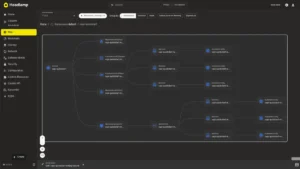
- Map View: This feature is a game-changer for incident response. It visualizes the relationships between pods, services, and ingresses. Instead of manually parsing labels, users can visually trace the flow of traffic, identifying bottlenecks or failed dependencies in seconds.
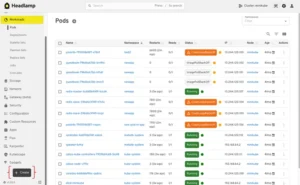
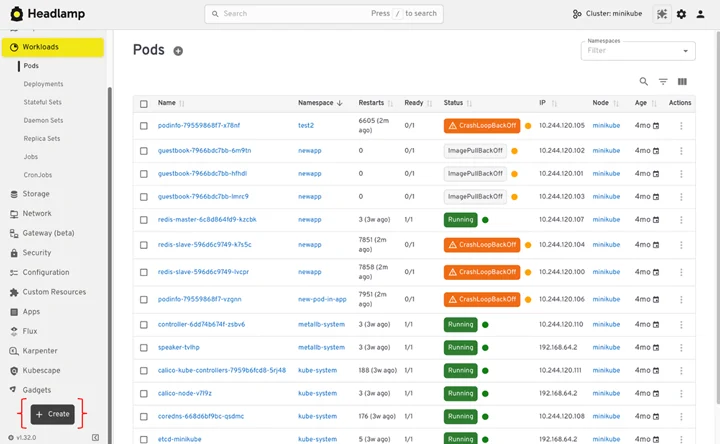
- Search and Filter: Advanced, real-time filtering allows users to isolate specific workloads across namespaces, a feature that feels noticeably faster and more responsive than the legacy Dashboard.
8. Deployment and Debugging Workflows
The transition from "Form-based" deployment (found in the legacy Dashboard) to "Manifest-based" deployment is the most notable change for end-users.
8.1 The Shift to Manifests
While some users may miss the wizard-style forms of the old Dashboard, the shift to YAML-based application management in Headlamp is a necessary evolution. It encourages the use of version-controlled manifests, aligning UI actions with GitOps practices. Users can paste YAML directly, which is then validated by the Kubernetes API server, providing immediate feedback on configuration errors.
8.2 Debugging Power
Headlamp’s logging and exec capabilities are fully integrated. Users can stream logs from multiple containers within a pod or open an interactive shell without leaving the browser. These features are subject to the same RBAC constraints as the CLI, ensuring that debug access is tightly governed.
9. Decommissioning the Legacy Dashboard
Once the team has fully integrated Headlamp into their daily workflow, the removal of the Kubernetes Dashboard is the final step in reducing technical debt.
9.1 The Cleanup Process
- Uninstall: Use
helm uninstall kubernetes-dashboard -n kubernetes-dashboard. - Audit: Remove the ClusterRoleBindings and ServiceAccounts associated with the old dashboard.
- Communication: Inform the team that the old URL will be decommissioned on a specific date, providing them with the new Headlamp endpoint.
10. Conclusion: Looking Toward the Future
The migration from the Kubernetes Dashboard to Headlamp represents more than just a software update; it is an upgrade to a more secure, flexible, and developer-friendly operational model. By aligning your UI with the same identity and RBAC standards used by your command-line tools, you create a more cohesive and transparent environment.
Headlamp’s extensibility through plugins means that as your organization grows, the tool can grow with you. We encourage all teams to begin their migration journey today by exploring the documentation at headlamp.dev. The future of Kubernetes management is here—it is secure, it is multi-cluster, and it is ready for your team.
This article is a comprehensive overview of the transition process. For specific implementation details and troubleshooting, please refer to the official Headlamp documentation.