Beyond the E-Waste Bin: How to Breathe New Life Into Your Legacy Router


In an era of rapid technological advancement, the home networking landscape is constantly shifting. With the advent of Wi-Fi 6, 6E, and the nascent Wi-Fi 7, consumers are frequently encouraged to replace their networking gear to keep pace with higher bandwidth demands and the increasing density of smart home devices. Consequently, many households are left with a surplus of older routers that, while perhaps not cutting-edge, remain fully functional pieces of hardware.
Rather than relegating these devices to a dusty closet or, worse, the landfill, tech-savvy homeowners can repurpose this hardware. By understanding the underlying architecture of these devices—which are, in essence, low-power computers—users can transform legacy routers into powerful tools that enhance network coverage, security, and utility.
The Reality of Networking Hardware Longevity
The primary driver for router replacement is often the cessation of manufacturer firmware updates. When a device no longer receives security patches, it becomes a liability for a primary network. However, the core function of routing—directing packets of data from an internet source to connected devices—has remained fundamentally consistent for decades.
While a three-year-old router may lack the throughput capacity required for a gigabit fiber connection, it is more than capable of handling secondary tasks. Understanding that networking fundamentals remain static allows users to extract value from hardware that would otherwise be considered obsolete.

Chronology of Hardware Evolution
- The Early Era (Pre-2010): Characterized by 802.11n standards and 10/100 Ethernet ports. These devices are best suited for simple wired switching or legacy print server duties.
- The Dual-Band Transition (2010–2016): The introduction of 5GHz bands provided a significant leap in performance. These devices are prime candidates for Wi-Fi repeaters or dedicated VPN gateways.
- The Modern Foundation (2017–Present): Routers supporting MU-MIMO and beamforming offer the robust processing power needed for custom firmware projects like OpenWRT or acting as high-performance mesh nodes.
Enhancing Coverage: Access Points and Mesh Nodes
The most common grievance in modern home networking is "dead zones." Rather than purchasing a dedicated, single-purpose Wi-Fi extender—which often halves the effective bandwidth—you can utilize an old router as a hardwired Access Point (AP).
The Wired Advantage
The gold standard for expanding a network is a wired backhaul. By running an Ethernet cable from your primary router to the old unit, you eliminate the signal degradation inherent in wireless repeating. Once connected, configuring the old router to "Access Point Mode" creates a seamless extension of your network.
Managing Wireless Interference
A critical pitfall in this configuration is signal congestion. If your old router and new router broadcast on the same frequency in close proximity, they will compete for airtime. To mitigate this, consider a strategic split: configure your primary router to handle the 5GHz or 6GHz bands for high-speed traffic, and set your legacy router to broadcast exclusively on the 2.4GHz band. This is particularly effective for IoT devices, which favor the superior wall-penetration capabilities of the 2.4GHz spectrum.
The Network Switch Solution
If your primary router is suffering from a lack of physical LAN ports, your old router can serve as a robust network switch. Modern, managed switches can be pricey; repurposing an old router effectively gives you a 4-port or 8-port switch for free.

By disabling the DHCP server on the secondary router and connecting the primary router to a LAN port (avoiding the WAN port entirely), you can expand your hardwired connectivity for gaming consoles, smart TVs, and desktop workstations. This setup provides high-bandwidth, low-latency connections that far outperform even the best Wi-Fi signals.
Centralized Storage and Print Services
Many mid-to-high-end routers released in the last decade feature a USB port. While often ignored, these ports can turn a legacy router into a rudimentary Network Attached Storage (NAS) device.
By plugging an external hard drive into the router’s USB port and enabling the "Media Server" or "Samba/FTP" settings in the administrative panel, you create a central repository for files accessible by any device on the network. While the throughput will not match a dedicated $500 NAS system, it is an excellent, cost-effective solution for sharing documents or backing up photos across a household. Similarly, connecting an older USB-only printer to this port allows it to function as a wireless network printer, bridging the gap between legacy hardware and modern wireless convenience.
Strengthening Privacy: The Dedicated VPN Gateway
Privacy-conscious users often struggle with the "all or nothing" nature of VPNs. Installing a VPN client on every device can be tedious and, in some cases, detrimental to mobile device battery life.
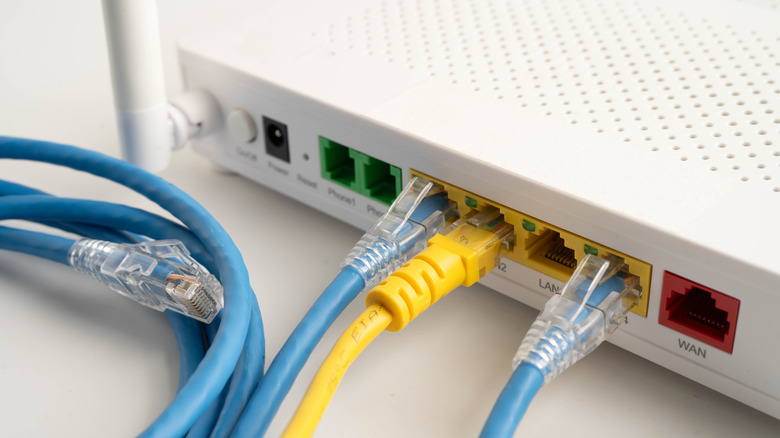
By repurposing an old router as a dedicated VPN gateway, you can route all traffic from specific devices—such as a streaming box or a smart speaker—through a secure tunnel. This allows you to maintain a standard connection for your main devices while ensuring that sensitive traffic is always encrypted. Because the heavy lifting of encryption is offloaded to the old router, your primary devices face no performance penalty.
Advanced Flexibility: The Custom Firmware Revolution
For users willing to delve into more technical territory, custom firmware offers the ultimate escape from manufacturer limitations. Projects such as OpenWRT, DD-WRT, and FreshTomato act as an "operating system" for your router, unlocking features usually reserved for enterprise-grade equipment.
Why Custom Firmware Matters:
- Security: Custom firmware communities often provide security patches long after manufacturers have abandoned the device.
- Advanced Traffic Shaping: Gain granular control over Quality of Service (QoS), ensuring that your Zoom calls take priority over background downloads.
- Third-Party Integration: Install ad-blocking software like AdGuard Home or run lightweight torrent clients directly on the router hardware.
Note: Before proceeding, check the compatibility list on the official websites of these projects. Not all hardware supports third-party software, and the process requires careful attention to detail to avoid "bricking" the device.
Implications for the Consumer and the Environment
Repurposing your router is not merely a cost-saving exercise; it is an act of environmental stewardship. E-waste is one of the fastest-growing waste streams globally, and networking equipment—constructed from complex plastics and heavy metals—is particularly difficult to recycle. By extending the life cycle of a device by three to five years, you significantly reduce your individual carbon footprint.

Furthermore, this practice fosters a deeper understanding of network architecture. As our homes become increasingly connected, the ability to troubleshoot and optimize one’s own network infrastructure is a valuable skill.
Conclusion
Your old router is not a piece of junk; it is a versatile, programmable, and powerful tool waiting for a new assignment. Whether you choose to extend your Wi-Fi range, create a secure VPN gateway, or simply add more ports to your home office, the potential applications are limited only by your ingenuity. Before you discard your next router, take a moment to consider how it might continue to serve your digital life in a new and meaningful capacity.