Beyond the Restore: How Modern PostgreSQL Tooling is Reimagining Database Backup Inspection
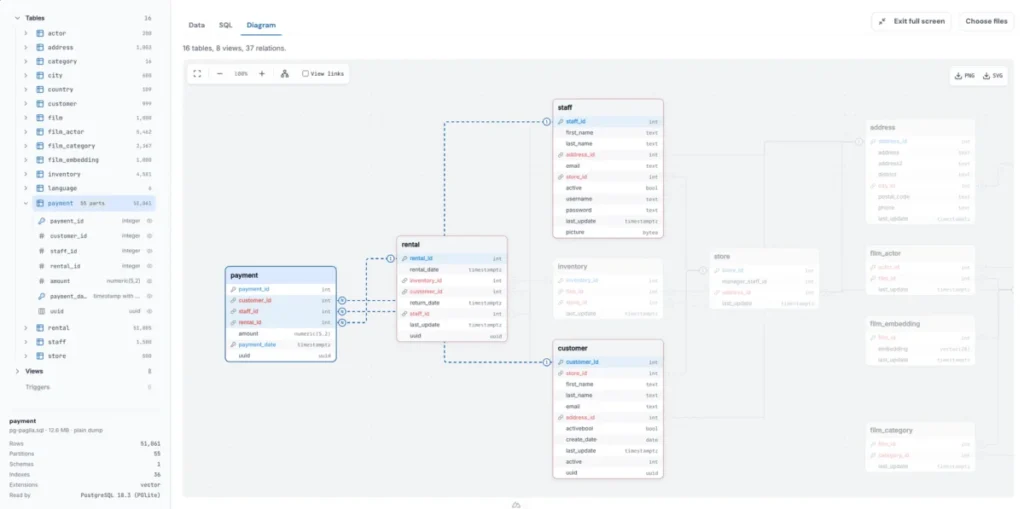
For decades, the standard ritual of database administration has involved a familiar, albeit tedious, friction. When a database backup file lands on an engineer’s desk—whether delivered via a routine security audit, a client handoff, or a frantic midnight incident response—the immediate goal is rarely full-scale recovery. More often than not, the objective is simpler, almost mundane: What is actually inside this file?
Traditionally, answering that question required spinning up a dedicated PostgreSQL server, configuring user roles, establishing an empty database, and executing a full pg_restore. For a minor pre-restore check or a quick schema verification, this setup process introduces an unnecessary tax of time, computing resources, and administrative overhead.
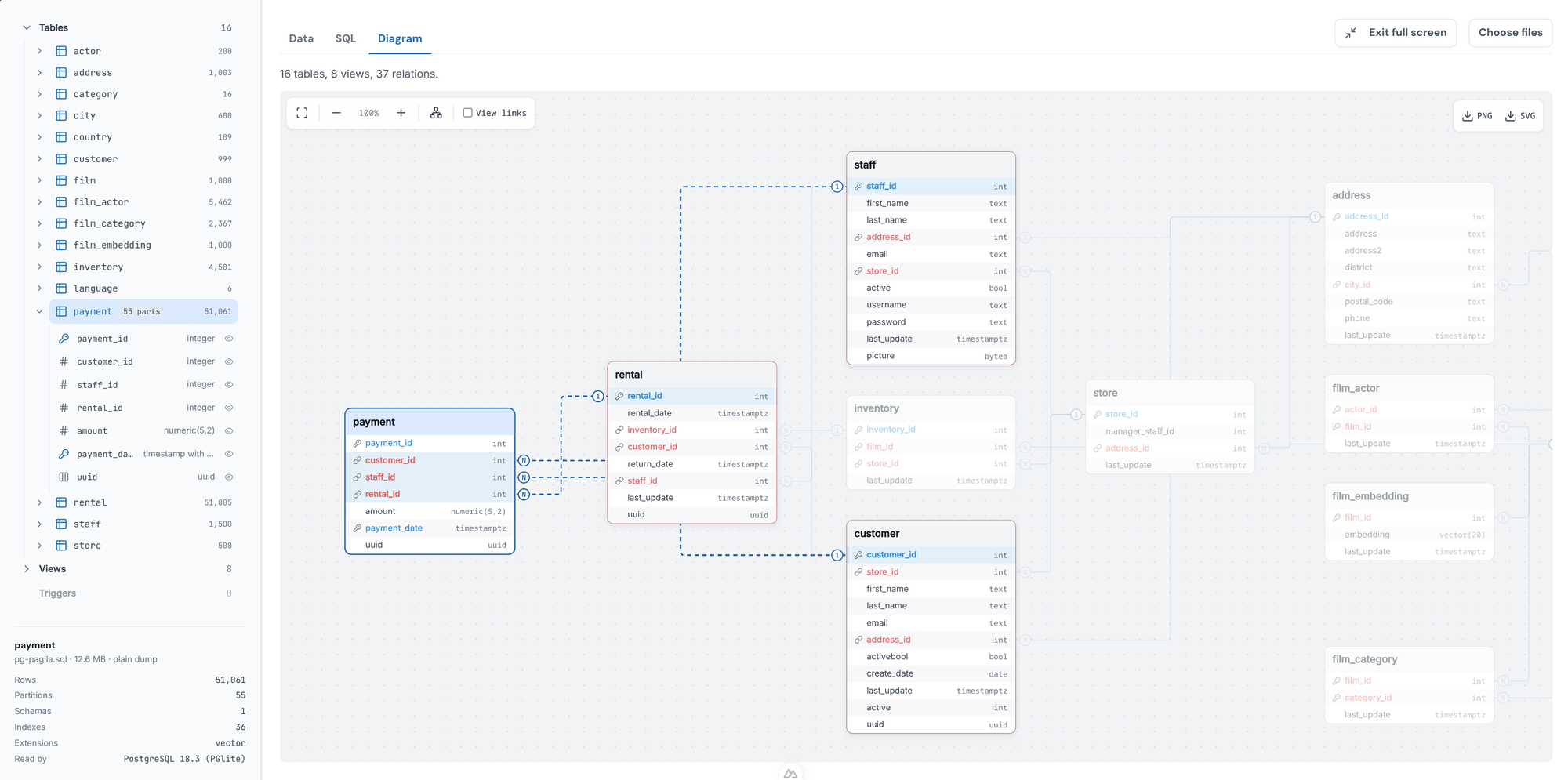
Enter the PostgreSQL Dump Viewer, a specialized, browser-based and editor-integrated utility designed to decouple the concept of inspection from recovery. By running a live, sandboxed instance of PostgreSQL directly inside a client environment—without ever exposing data to the cloud or requiring server installation—this emerging tool aims to fundamentally change how developers and database administrators interact with static backup files.
Main Facts: The Anatomy of Backup Inspection
At its core, the PostgreSQL Dump Viewer addresses a historical blind spot in database workflows: the gap between raw text files and active database servers.
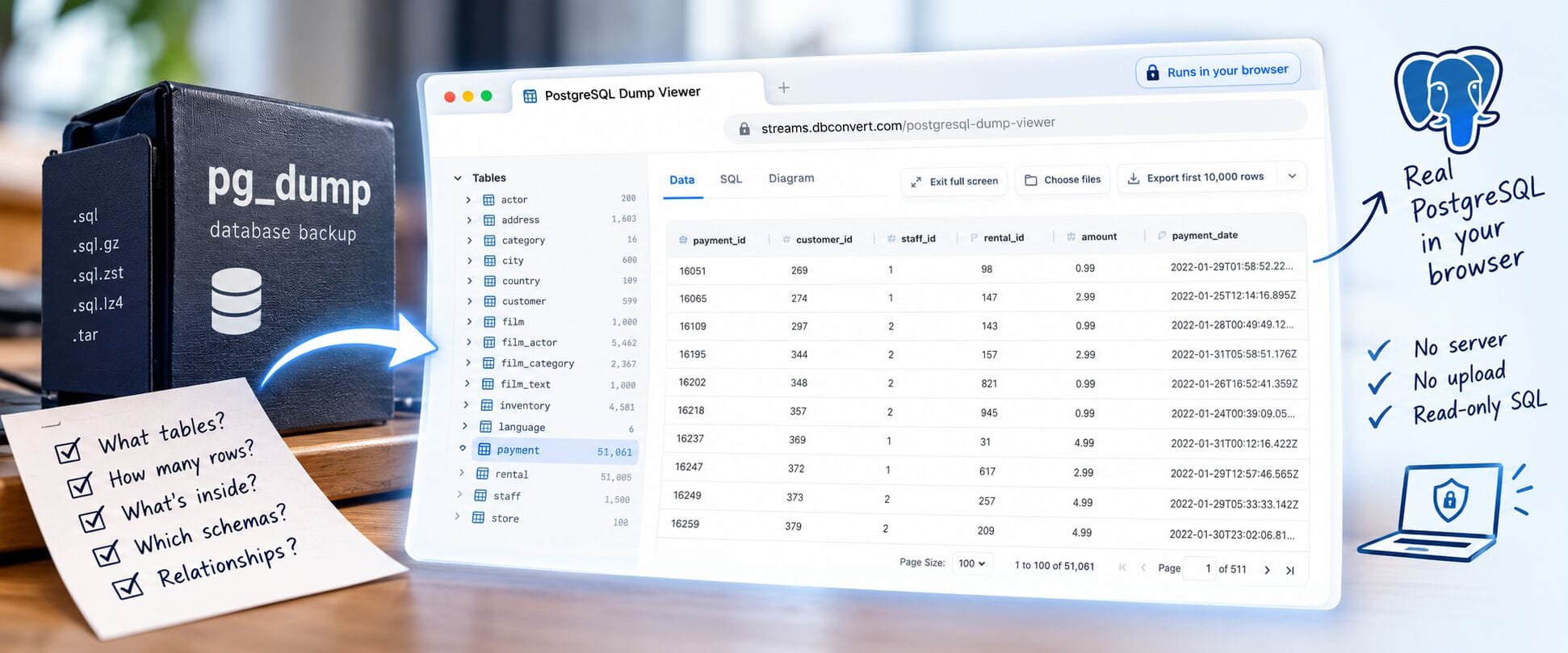
- Zero-Server Inspection: Users can open standard plain SQL
pg_dumpfiles instantly within a web browser tab or code editor, bypassing the need for a local or cloud-based PostgreSQL server installation. - Client-Side Privacy: Security is a primary design pillar. The database dump file is processed entirely within the local environment (or browser tab); it is never uploaded to an external server or third-party cloud.
- Native PostgreSQL Execution: Unlike lightweight parsers that attempt to guess table structures or relationships, the viewer replays the dump file into a real, lightweight instance of PostgreSQL running natively via WebAssembly or local extension runtimes.
- Read-Only Safeguards: The environment enforces strict read-only constraints (
SELECTandWITHqueries only), preventing accidental data corruption or malicious script execution. - Multi-Platform Availability: Beyond the standalone web tool, the utility is available as an extension for Visual Studio Code, Cursor, and VSCodium through the Open VSX registry, complete with native AI agent integration.
Chronology: The Evolution of pg_dump Utilities
To understand the significance of browser-based dump viewers, it helps to examine how database engineers have historically managed backup files over the lifespan of PostgreSQL:
- The Early Era (PostgreSQL 7x–9x): Database backups (
pg_dump) were treated strictly as disaster recovery assets. Interrogating them meant using command-line utilities likegrep,sed, or pipe-filtering text outputs. While fast for plain-text SQL files, these methods completely failed when confronted with schema interdependencies, custom-format compressed dumps (-Fc), or massive data rows. - The Rise of Staging Environments: As cloud infrastructure matured, teams built automated staging pipelines. If an engineer needed to inspect a backup, the standard operating procedure became spinning up a Docker container, running
pg_restore, and querying the container via a GUI tool like pgAdmin or DBeaver. - The Security Paradigm Shift: With supply chain attacks and untrusted data handoffs becoming a primary enterprise concern, restoring arbitrary third-party SQL dumps directly onto development or production infrastructure grew increasingly risky. Security teams began demanding isolation before ingestion.
- The Client-Side Compute Revolution (Present): Advances in browser performance, WebAssembly, and local extension sandboxing made it feasible to run complex database engines natively on client machines. Tools like the PostgreSQL Dump Viewer emerged to bridge the gap, providing rich graphical interfaces, relational diagrams, and SQL querying capabilities without touching a backend infrastructure.
Supporting Data: Feature Comparison and Limitations
While lightweight viewing tools dramatically accelerate pre-restore workflows, they are not intended to completely replace traditional server-side restorations. A side-by-side technical comparison illustrates the precise boundaries of each approach:
| Feature / Capability | PostgreSQL Dump Viewer (Browser / IDE) | Full Restore into a PostgreSQL Server |
|---|---|---|
| Initial Setup | Instant browser tab or IDE extension (Zero install) | Running server daemon, role provisioning, empty DB |
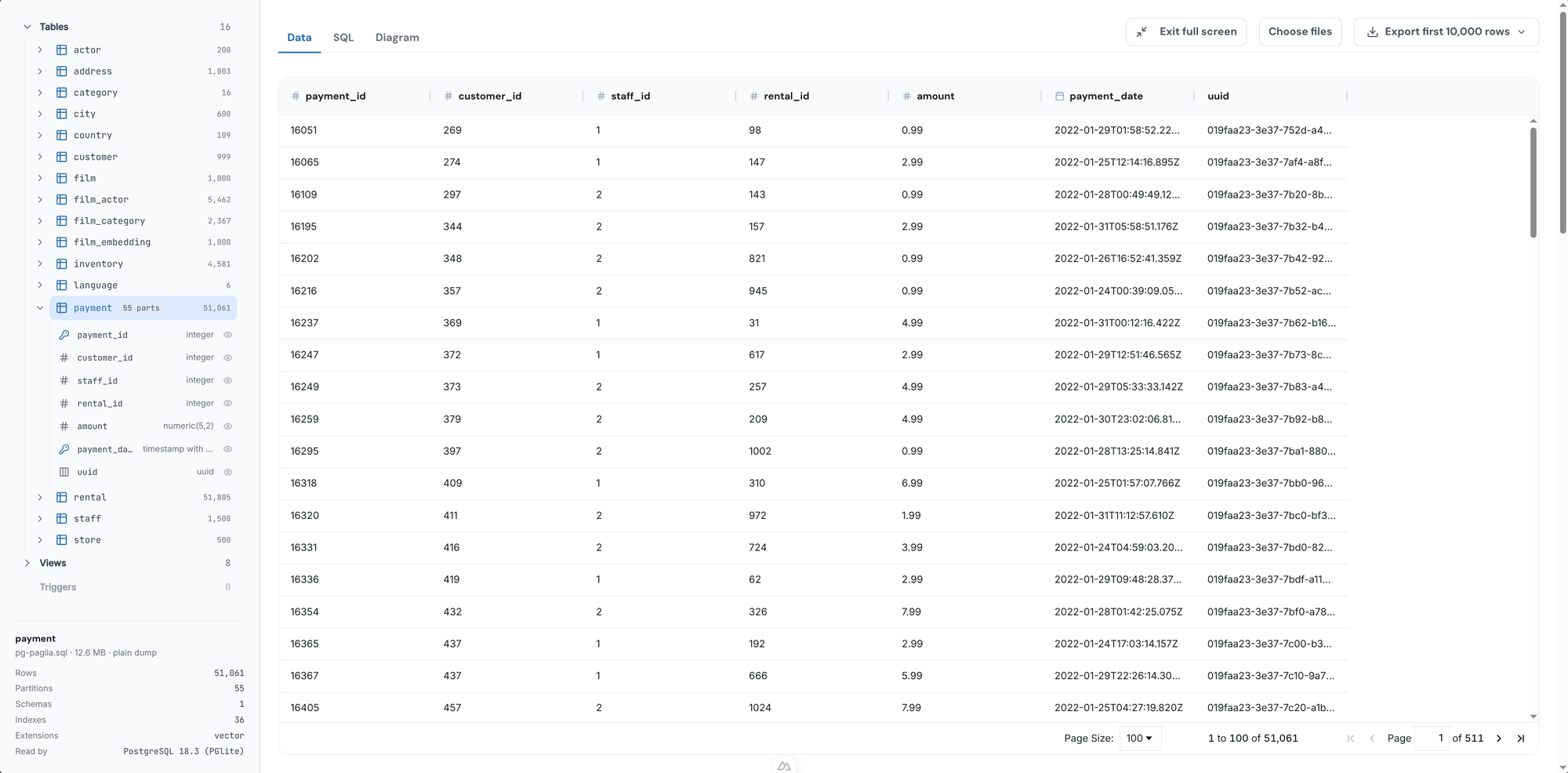
| Schemas, Tables & Row Counts | Fully supported | Fully supported |
| Querying Capabilities | Read-only (SELECT, WITH) |
Full SQL access (INSERT, UPDATE, DROP, etc.) |
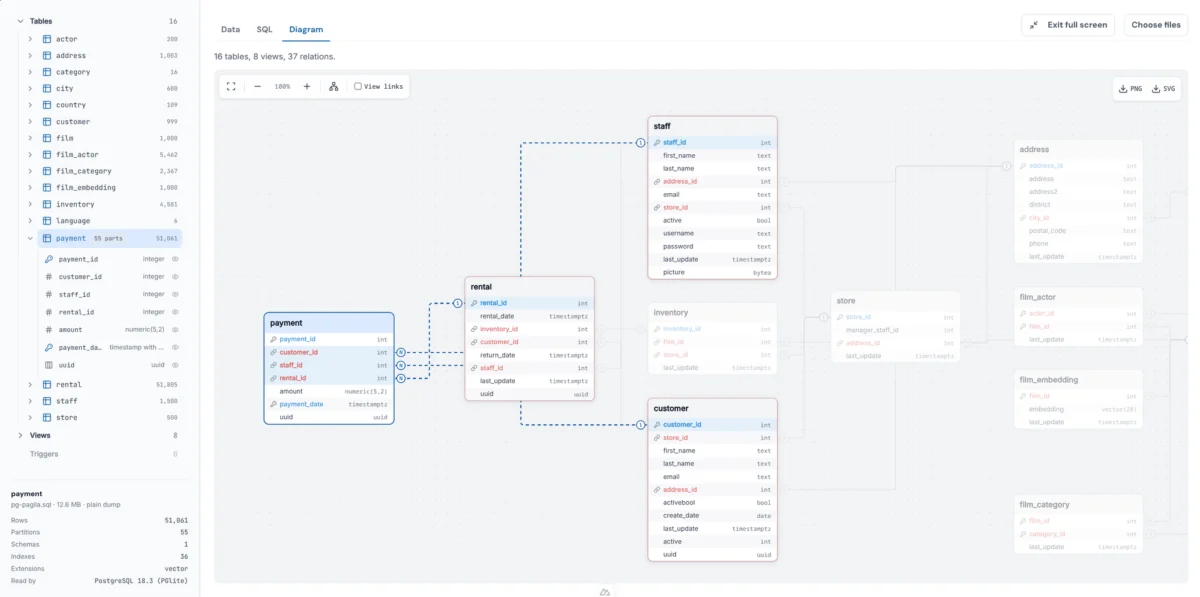
| Relationship Mapping | Interactive Diagram tab (foreign key visualization) | Requires third-party database design/ERD software |
| Data Export Options | CSV or JSON formats | Native psql piping or COPY commands |
| Dump Formats Supported | Plain SQL dumps (Custom -Fc and directory -Fd require preliminary conversion via pg_restore -f) |
All native PostgreSQL dump formats |
| Application Testing | Read-only inspection only | Full application integration and load testing |
Technical Constraints and Resource Limits
Because the viewer instantiates a real, sandboxed PostgreSQL engine within the client application (such as a browser tab or code editor), it operates within strict hardware boundaries:
- Memory Allocation: The entire active database must fit comfortably within the tab’s allocated memory footprint (typically around 2 GB, with the PostgreSQL engine consuming roughly one-third of that space). Multi-gigabyte or enterprise-scale database dumps still require dedicated server hardware.
- Extension Compatibility: Standard extensions like PostGIS and
pgvectorare natively supported and loaded dynamically. However, complex time-series extensions like TimescaleDB cannot be fully initialized in-client, though dependent object names remain visible for auditing purposes.
Official Responses and Developer Philosophy
The creation of specialized dump inspection tools stems from a philosophy held by modern database toolmakers: Make the question before the restore as cheap and friction-free as possible.

Lead developers behind the PostgreSQL Dump Viewer project emphasize that the utility is designed to answer a very specific set of psychological and technical questions during a database lifecycle:
- Is this actually the backup file I think it is?
- Which database schemas are packed inside this archive?
- Do the specific rows or tables I need actually exist in this snapshot before I commit to an hour-long server restore process?
By answering these queries in seconds rather than minutes—and eliminating the need to provision cloud instances or local Docker containers—developers can maintain deep operational velocity without sacrificing safety.
Implications: Security, AI Integration, and Workflow Efficiency
The introduction of client-side database viewers carries profound implications across multiple domains of software engineering, security, and developer productivity.
1. Enhanced Security Against Malicious Dumps
A database backup is, fundamentally, a script of executable SQL statements. When a database administrator restores a backup using administrative privileges (superuser) on a live server, they are executing every line of code contained within that file.
Maliciously crafted or compromised SQL dumps have historically posed severe threats. Attackers can embed hostile commands that leverage features like COPY ... TO PROGRAM to execute arbitrary shell scripts, read sensitive local files, or exfiltrate environment variables.
By executing a backup inside a sandboxed, isolated browser or editor tab—devoid of network access, underlying filesystem hooks, or shell capabilities—the PostgreSQL Dump Viewer acts as a secure airlock. Engineers can safely probe untrusted, third-party database files without fear of systemic compromise.
2. The Rise of AI-Assisted Database Auditing
One of the most innovative integrations of the viewer technology is its presence within modern developer environments like Visual Studio Code, Cursor, and VSCodium.
Through the Ask AI about this file feature, engineers are no longer required to manually write complex queries to inspect unfamiliar schemas. An integrated AI agent can interface directly with the read-only database instance, execute targeted queries against the replayed dump, and translate raw relational data into plain English answers. For example, an engineer can prompt the editor: "Which customer accounts accumulated the highest transaction volumes in this backup?", and receive an immediate, verified tabular response generated directly from the underlying data structures.
3. Streamlining the Modern DevOps Lifecycle
In fast-paced CI/CD pipelines and microservices architectures, teams frequently exchange database snapshots for staging verification, bug reproduction, and data migration testing. Reducing the operational drag of inspecting these files transforms how teams handle auxiliary data.
Ultimately, the goal of modern database engineering is not merely to possess powerful recovery tools, but to make day-to-day data visibility seamless, secure, and universally accessible. By shifting database inspection from server-bound administration to instant, client-side exploration, tools like the PostgreSQL Dump Viewer represent a quiet yet powerful evolution in developer tooling.