Bringing Efficiency to Developers: itch.io Integrates Butler CLI into the Desktop App
The landscape of indie game distribution has long been defined by the struggle between ease-of-use and technical precision. For years, developers using itch.io have relied on butler, a powerful command-line interface (CLI) tool designed to streamline the distribution of game builds. While butler was praised for its efficiency, it was historically gated behind a terminal interface, creating a barrier for creators who preferred a graphical user interface (GUI).
In a significant move to democratize development workflows, itch.io has officially integrated butler directly into the itch.io desktop application. This update, requiring at least version v26.12.0 of the app, transforms the distribution process by replacing manual command-line inputs with an intuitive, visual workflow.
The Core Innovation: What is Butler?
To understand the magnitude of this update, one must first understand the technical foundation of butler. Unlike standard file-transfer protocols—where a developer uploads a massive .zip file every time they release a patch—butler operates on a system of incremental updates.
When a developer pushes a build using butler, the tool does not simply copy the files to the server. Instead, it performs a differential analysis. It compares the current state of the project folder against the previous build, identifies the specific bytes that have changed, and uploads only those modifications.
For the end-user, this is a transformative experience. Instead of downloading a full 5GB game update, a player might only download a few megabytes of changed data. This reduces bandwidth costs for the developer, shortens waiting times for the player, and minimizes the risk of corrupted files during large transfers. By moving this complex technology into a GUI, itch.io has essentially automated the most tedious parts of version control for its creator community.
A Chronology of the Integration
The development of the itch.io app has been an iterative process, constantly evolving to meet the needs of an increasingly professionalized indie game industry.
- The CLI Era: Since its inception, butler served as the backbone for serious developers. It was lauded for its speed but criticized by newcomers for its "fiddly" nature. Developers had to manage terminal paths, API keys, and syntax arguments manually.
- The Vision for Accessibility: The itch.io engineering team identified a growing need for a unified workflow. Developers were increasingly using the itch.io app for managing their libraries and local game files; it was a logical evolution to turn the app into an all-in-one development hub.
- The Beta and Release: Following internal testing, the "Upload" tab was introduced in the latest app update. This was not merely a wrapper for the CLI; it was a complete overhaul of how the app handles project metadata.
- Current State: As of the latest release, the app now handles authentication via the user’s logged-in profile, eliminating the need to manage security tokens manually. The application automatically updates the underlying butler binary, ensuring that developers are always using the most efficient version without needing to perform manual maintenance.
Supporting Data: Efficiency and Transparency
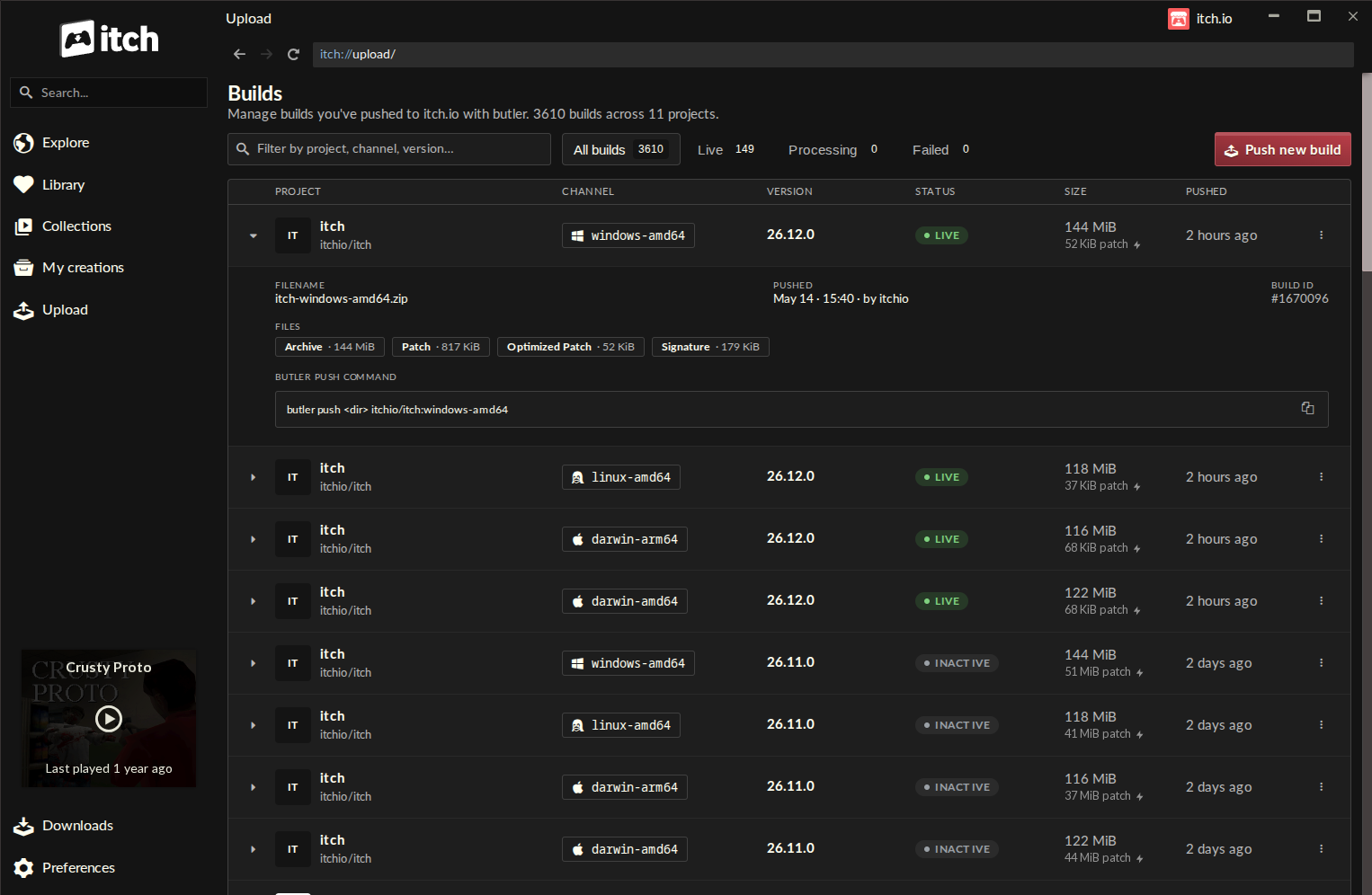
The new "Builds" page is the heart of this update. Located in the sidebar of the itch.io app, it provides a centralized dashboard for all projects associated with a user’s account.
Key Metrics and Visibility
Each entry on the new Builds page provides granular detail:
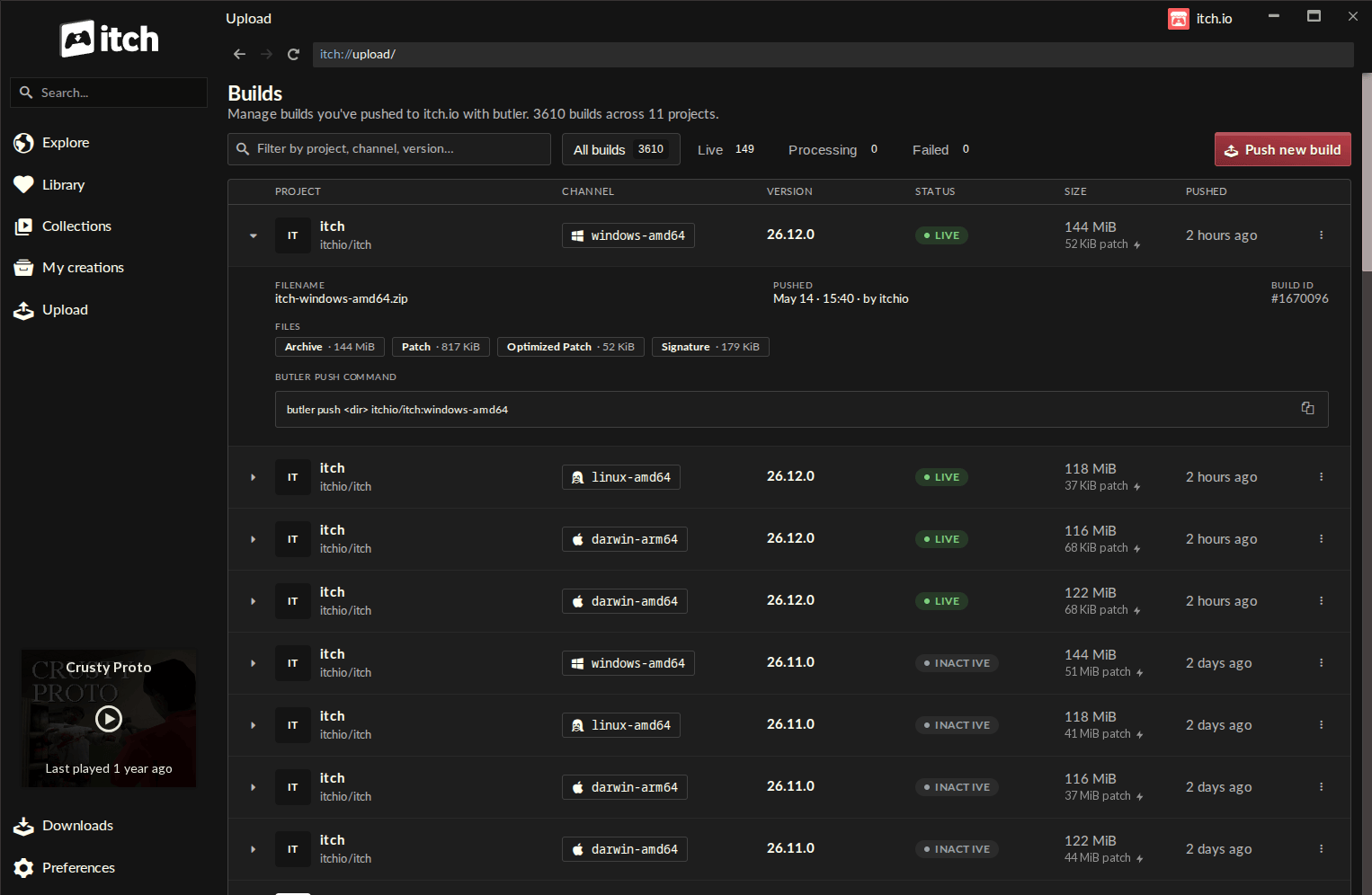
- Project and Channel Tracking: Clearly defined channels (e.g.,
windows-beta,linux-arm64) allow for seamless branching. - Version Control: The GUI allows for explicit version labeling, making it easier for developers to track hotfixes and major releases.
- Status Indicators: Real-time updates on push status, file size, and timestamps ensure developers are never left guessing about the state of their cloud assets.
The "Preview" Feature
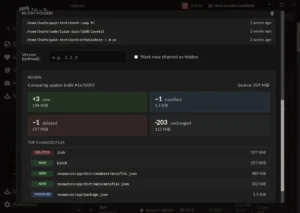
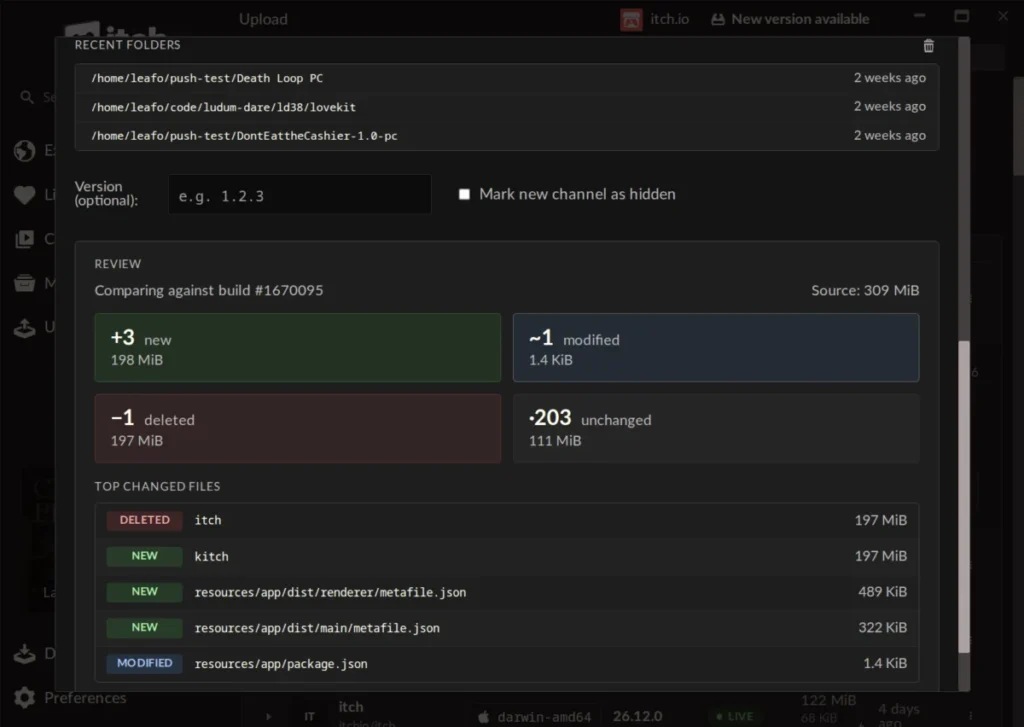
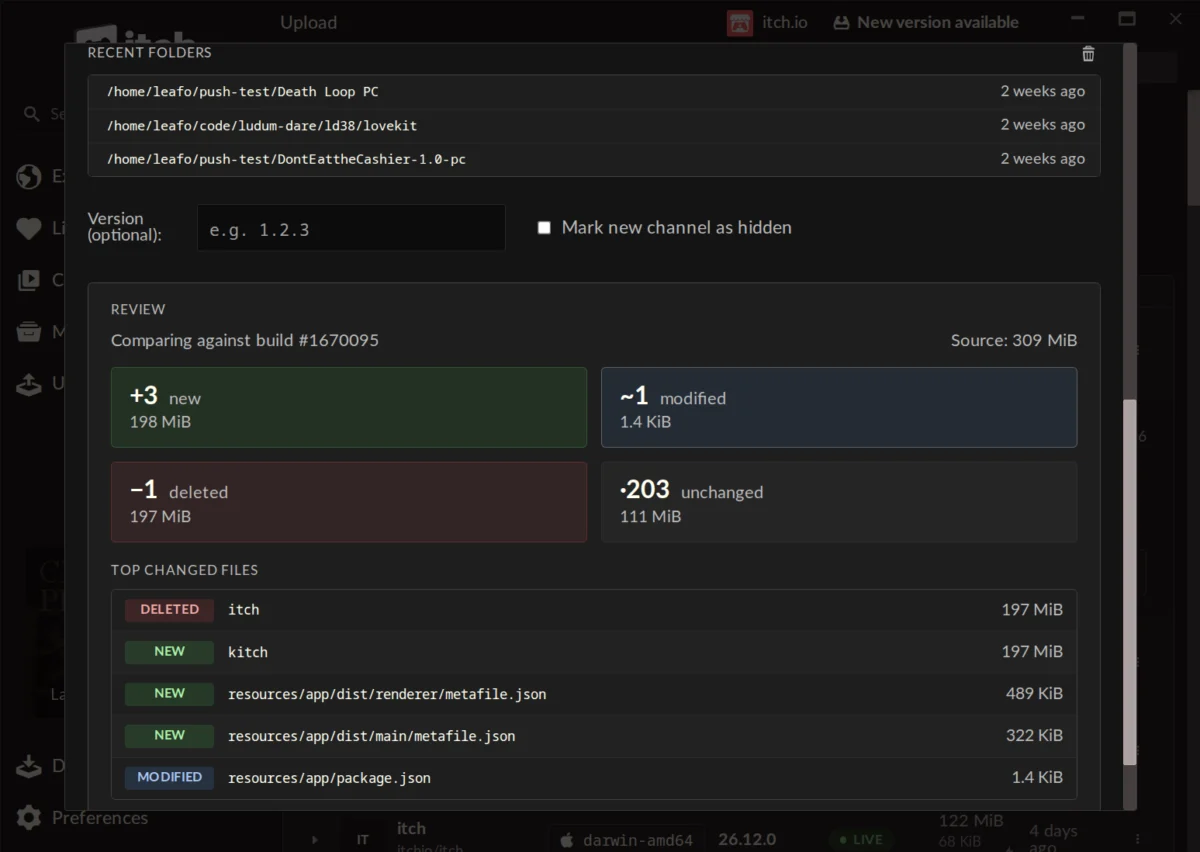
Perhaps the most powerful addition to the UI is the "Preview" functionality. Before committing to a push, the app calculates the scope of the change. It provides a breakdown of:
- New files: Content added to the directory.
- Modified files: Existing assets that have been updated.
- Deleted files: Content removed from the current build.
- Largest changed files: An identification of which files are consuming the most bandwidth, allowing developers to optimize their assets before finalizing the upload.
This "self-enforcing" logic acts as a safety net, allowing creators to catch mistakes—such as accidentally including massive temporary build files—before they are pushed to the server.
Official Responses and Community Reception
The reaction from the developer community has been largely positive, highlighting a shift in how indie developers perceive the platform’s utility.
Community Sentiment
In the official announcement thread, one developer noted, "I used butler some years ago, but I remember it being complicated and fragile. The itch app has none of these problems." This sentiment was echoed by users who previously avoided the command line entirely. For many, the GUI has turned an intimidating technical chore into a routine, stress-free task.
The "Legacy" Limitation
During the rollout, some users inquired about migrating existing projects that were not originally configured for butler to this new system. Leafo, a primary maintainer of the itch.io platform, clarified the current technical limitations: "Unfortunately, it’s not possible right now, as a butler push needs additional metadata alongside the file that’s computed when you’re uploading." While there are no immediate plans to implement a legacy migration tool, the team acknowledged this as a potential area for future development.
Addressing Critiques
It is worth noting that not all feedback was focused on the technical update. Some community members used the announcement as a forum to air grievances regarding platform moderation, search filtering, and support response times. These critiques highlight a broader reality: while the platform’s infrastructure tools are becoming industry-leading, the operational side of managing a massive, community-driven marketplace remains a complex challenge for the itch.io team.
Implications for the Future of Indie Development
The integration of butler into the itch.io app has several profound implications for the industry:
1. Professionalizing the Indie Workflow
By lowering the barrier to entry for advanced versioning tools, itch.io is encouraging best practices among indie developers. When updating a game becomes as simple as clicking "Push," developers are more likely to issue frequent, small, and stable updates rather than infrequent, massive "mega-patches."
2. Multi-Account Management
The app’s ability to store multiple profiles and switch between them instantly is a boon for developers who work on multiple projects or collaborate with different teams. By binding butler to the app’s current user context, the workflow is not only faster but significantly more secure, as it relies on the app’s internal authentication rather than hardcoded scripts.
3. Bandwidth Optimization
As games continue to grow in size, the importance of efficient distribution cannot be overstated. By providing a GUI that encourages the use of patch-based uploading, itch.io is effectively reducing the total server load and the carbon footprint associated with global data transfers. This is a win for the platform’s infrastructure and a win for the end-user’s connection speed.
4. A Template for Other Platforms
The itch.io approach serves as a case study for how to improve developer experience (DX). By taking a "hard-to-use" but "technically superior" tool and wrapping it in a thoughtful, user-friendly interface, the platform has managed to retain the power of the CLI while gaining the accessibility of a consumer-facing app.
Conclusion: A New Standard
The update to the itch.io app represents a maturation of the platform’s developer tools. By bridging the gap between command-line power and graphical simplicity, the team has provided a service that is both highly functional and broadly accessible.
For the solo developer working on their first project, the new "Upload" section provides the professional tools necessary to maintain a high-quality, up-to-date game without requiring a background in software engineering. For the experienced team, it offers a streamlined dashboard that simplifies the daily rhythm of development and distribution.
As the industry continues to evolve, the tools that minimize friction are the ones that will win the loyalty of the creator community. With this update, itch.io has reinforced its commitment to being the most developer-friendly home for independent games on the web. As the community continues to experiment with these new features, it is likely that we will see an even greater frequency of updates and a higher standard of file management across the platform.