For aspiring software engineers, developers, and tech enthusiasts, the journey into coding often begins with an overwhelming amount of jargon. Terms like "servers," "HTTP requests," "DNS lookups," and "client-server architecture" are thrown around casually, leaving beginners feeling as though they need an advanced degree in computer science just to build a simple webpage.
However, mastering web development does not start with memorizing syntax or writing complex algorithms. It begins with a fundamental understanding of how the internet actually functions. Before writing a single line of HTML, CSS, or JavaScript, a developer must grasp the core conceptual framework that powers the global web.
This comprehensive guide breaks down the foundational mechanics of the internet. By demystifying the relationship between browsers, servers, databases, and the protocols that bind them together, readers will gain a crystal-clear "big picture" of web infrastructure.
1. What is a Website?
At its core, a website is not a singular, magical entity living out in the ether. Instead, it is simply a collection of files—text documents, images, stylesheets, and scripts—stored on a computer somewhere else in the world. When you "visit" a website, your local device reaches out to that remote computer, downloads its files, and renders them visually onto your screen.
To understand this process intuitively, consider the analogy of visiting a restaurant:
Restaurant Component
Web Development Equivalent
You (the customer looking for food)
You (the user looking for information or services)
The database storing raw ingredients and user data
The waiter carrying orders and food back and forth
HTTP (the protocol carrying requests and responses)
Key Takeaway: A website is fundamentally just a bundle of files residing on another computer, delivered securely to your device over a vast network of cables and routers.
2. Browser vs. Server: The Dynamic Duo
The backbone of web communication relies on two primary actors: the browser (client) and the server.
The Browser (The Client)
The browser is the software application installed on your personal device—such as Google Chrome, Mozilla Firefox, Apple Safari, or Microsoft Edge. Its primary responsibilities include:
Initiating communication by asking for web pages.
Parsing and rendering code (HTML, CSS, JavaScript) into a human-readable interface.
Executing client-side scripts to create interactive user experiences.
Because the browser is always the entity asking for data, it is formally referred to in computer science as the client.
The Server
A server is a specialized computer (typically housed in a high-security, climate-controlled data center) that remains powered on and connected to the internet 24 hours a day, 7 days a week. It waits patiently for incoming signals from clients.
Its responsibilities include:
Listening for incoming requests from across the globe.
Processing those requests securely and efficiently.
Sending back the requested data, files, or error messages.
Real-world analogy: Imagine walking into a bookstore. You (the browser/client) walk up to the information desk and ask for a specific book. The librarian (the server) goes into the back room, locates the book on a massive shelf (the database), and hands it back to you.
Pro Tip: Your personal laptop can act as a server! When you begin learning backend development, you will run a "local server" directly on your own machine. It is simply a software program designed to listen for requests and send back responses locally.
3. Frontend vs. Backend
As web applications grew more sophisticated, developers divided the ecosystem into two distinct disciplines: the frontend and the backend.
Frontend (Client-Side)
The frontend encompasses everything the user directly sees, touches, and interacts with inside their web browser. This includes fonts, colors, buttons, navigation bars, images, and animations.
Core Technologies: HTML (Structure), CSS (Styling), JavaScript (Interactivity), alongside frameworks like React, Angular, and Vue.js.
Restaurant Analogy: The dining room—the polished, welcoming space where customers sit and enjoy their meal.
Backend (Server-Side)
The backend comprises everything that happens behind the scenes, far away from the user’s view, operating securely on the server.
Core Responsibilities: Processing user authentication, managing business logic, communicating with databases, and securing sensitive data.
Core Technologies: Node.js, Python (Django/Flask), Java, Go, PHP, and Ruby.
Restaurant Analogy: The kitchen—where ingredients are chopped, meals are cooked, and chaotic organization transforms into a finished product.
A database is a structured, highly organized system designed to store electronic data. Think of it as a turbocharged, infinitely scalable electronic spreadsheet.
When you register a new account on a platform like Instagram, your profile details do not vanish when you close the app. Instead, they are captured by the backend server and permanently written to a database.
Major Database Types
Database Type
Common Examples
How Data is Structured
Relational (SQL)
MySQL, PostgreSQL, SQLite
Structured tables containing strict rows and columns (similar to Excel sheets)
Non-Relational (NoSQL)
MongoDB, Firebase, Cassandra
Flexible, schema-less documents (similar to JSON files)
Note: Beginners do not need to master database architecture on day one. The crucial concept to remember is simply that data has to live somewhere, and that designated permanent home is the database.
5. HTTP: The Language of the Web
HTTP stands for HyperText Transfer Protocol.
It is the standardized rulebook that defines how browsers and servers communicate with one another. If the server and the browser are people from different countries, HTTP is the universal language they both agree to speak so that conversations can take place smoothly.
6. The Request
An HTTP request is the data packet sent by your browser to a server whenever you attempt to load a resource.
When you type https://www.google.com into your address bar and press Enter, your browser constructs an HTTP request that looks structurally similar to this:
GET / HTTP/1.1
Host: www.google.com
User-Agent: Chrome/120
Accept: text/html
Anatomy of a Request:
GET: The HTTP method indicating an intent to retrieve data.
/: The path indicating you want the root directory (homepage).
HTTP/1.1: The specific version of the protocol being used.
Host: The exact server address you wish to target.
User-Agent: Metadata telling the server what browser and device you are using.
7. The Response
An HTTP response is what the server fires back across the network once it has successfully processed your request.
HTTP/1.1 200 OK
Content-Type: text/html
Content-Length: 14523

<!DOCTYPE html>
<html>
  <head><title>Google</title></head>
  <body>... the Google homepage content ...</body>
</html>
Understanding Status Codes
Every response includes a numeric status code indicating the health or outcome of the transaction:
Code
Status Meaning
When You Encounter It
200
OK
The page loaded successfully without any errors.
301
Moved Permanently
The website has permanently relocated to a new URL.
404
Not Found
The server cannot locate the specific file or page requested.
500
Internal Server Error
The server experienced a fatal bug or unexpected crash.
403
Forbidden
You lack the proper authentication or permissions to view the page.
8. URLs: The Addresses of the Web
A URL (Uniform Resource Locator) serves as the exact geographic coordinate for any given resource on the internet.
https://www.example.com:443/products/shoes?color=red&size=10#reviews
  │        │              │       │              │              │
  │        │              │       │              │              └── Fragment (scroll position)
  │        │              │       │              └── Query parameters (filters/search)
  │        │              │       └── Path (specifies the exact page)
  │        │              └── Port (the digital "door" on the server)
  │        └── Domain name (identifies the server)
  └── Protocol (specifies communication rules)
9. Domains, IP Addresses, and DNS
Every computer connected to the internet possesses a unique numeric identifier known as an IP address (e.g., 142.250.190.46). Because human memory struggles to recall strings of numbers for every website we visit, we use domain names (like google.com) as human-friendly aliases.
The DNS (Domain Name System) acts as the global phonebook of the internet, instantly translating user-friendly domain names into machine-readable IP addresses behind the scenes.
10. HTTP vs. HTTPS
While standard HTTP transmits data in plain text, making it vulnerable to interception by malicious actors on public Wi-Fi networks, HTTPS (HyperText Transfer Protocol Secure) wraps all communications in robust SSL/TLS encryption.
Caution: Never input sensitive data—such as passwords or credit card numbers—into a website operating over unencrypted http://. Modern web browsers will proactively flag these pages with a prominent "Not Secure" warning.
11. GET vs. POST Methods
HTTP methods dictate the nature of the interaction between client and server:
GET: Used exclusively to retrieve or read data without altering server state. (e.g., loading a webpage, reading an article).
POST: Used to send or create new data on the server. (e.g., submitting a registration form, posting a comment, uploading a photo).
12. Client-Server Architecture in Action
The entire architecture of the web relies on a simple, unbreakable loop: The client requests, and the server responds.
When you load Instagram, your browser asks for your personalized feed, the server verifies your session tokens, queries the database for your friends’ latest posts, compiles the data, and returns an organized response back to your device—all in less than half a second.
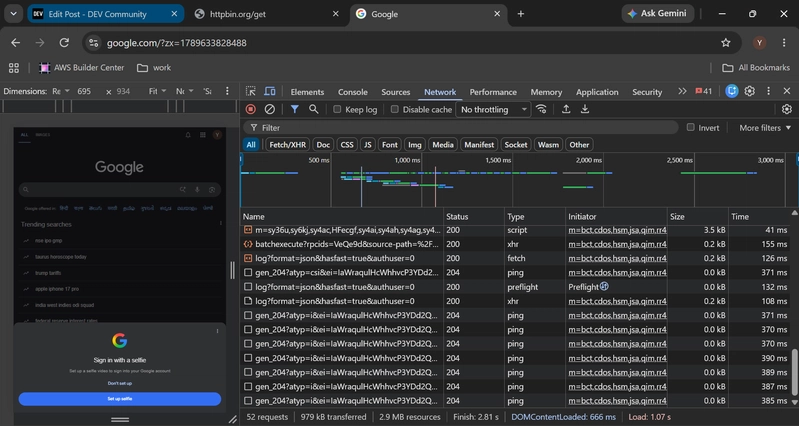
13. Practical Exercise: Exploring Web Traffic via Browser DevTools
To cement these abstract concepts, developers use built-in browser tools to observe network activity in real time.
Open DevTools: Right-click anywhere on a webpage and select Inspect, or press Ctrl+Shift+I (Windows/Linux) or Cmd+Option+I (Mac).
Navigate to Network Tab: Click on the Network tab in the developer panel.
Observe Requests: Refresh the page and watch as dozens of individual HTTP requests populate the screen. A single modern webpage often triggers between 30 and 100+ distinct requests to fetch stylesheets, scripts, fonts, and images.
Summary Cheat Sheet
Concept
Definition
Website
Files stored on a remote server, downloaded and rendered by a browser.
Browser
The client application running on your local device.
Server
A persistent computer listening for and processing network requests.
Frontend / Backend
What the user sees vs. the hidden logic running on the server.
HTTP / HTTPS
The protocols used for communication, with HTTPS adding vital encryption.
GET / POST
Methods for retrieving data versus submitting new data.
By understanding this fundamental architecture, you are now fully prepared to move past the theory and begin building real web applications.