Mastering the Road: The Ultimate Guide to Optimizing Apple CarPlay
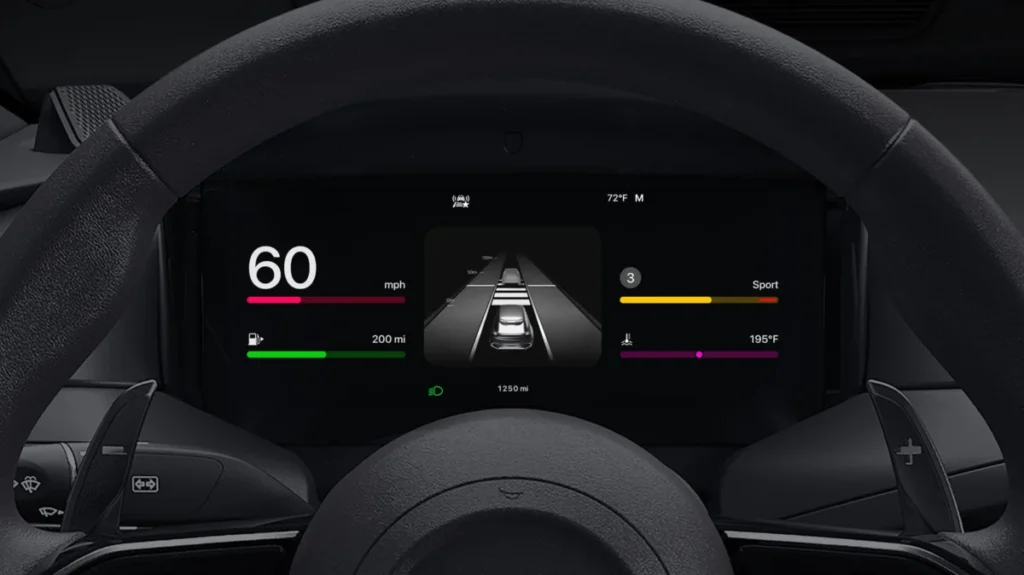
For millions of drivers, Apple CarPlay has transitioned from a novel luxury to an essential automotive companion. By seamlessly integrating the iPhone’s ecosystem into the vehicle’s infotainment center, CarPlay serves as a vital navigation and communication hub. However, many users treat the interface as a "set it and forget it" utility. In reality, a few minutes of strategic customization can transform your daily commute, enhancing both safety and entertainment. With the advent of iOS 27, Apple has introduced a suite of new features that make deep-diving into CarPlay settings more rewarding than ever.
Main Facts: The Core of the CarPlay Experience
At its foundation, CarPlay is designed to minimize cognitive load, allowing drivers to keep their eyes on the road while accessing essential services. The system relies on a tether—either wired or wireless—between your iPhone and your vehicle’s infotainment screen.
The primary truth that new users often overlook is that CarPlay is not a standalone operating system; it is a mirror of your iPhone’s logic. Consequently, most of the "heavy lifting" regarding customization—such as app arrangement and permission management—must be performed directly on your iPhone, not on the car’s touchscreen. Understanding this architectural reality is the first step toward mastering your in-car experience.
Chronology of CarPlay Evolution
To appreciate the current capabilities of CarPlay, it is necessary to look back at how the platform has evolved through the lens of iOS updates:
- The Early Years (iOS 7.1 – iOS 12): CarPlay launched as a simplified, tethered-only interface focused on basic media playback and Apple Maps.
- The Dashboard Era (iOS 13): Apple introduced the "Dashboard" view, allowing users to see maps, music, and calendar appointments simultaneously, effectively turning the display into a multi-tasking hub.
- The Personalization Wave (iOS 14 – 15): Apple allowed for third-party wallpapers and expanded support for navigation and parking apps.
- The Widget Expansion (iOS 26): This update fundamentally changed the visual layout, introducing interactive widgets that mirrored the functionality of the iPhone Home Screen, such as weather updates and calendar snapshots.
- The AI Revolution (iOS 27): The current era of CarPlay is defined by the integration of advanced AI through a revamped Siri, which offers more context-aware responses and proactive suggestions, making the system feel less like a tool and more like an assistant.
Customizing Your Command Center: Layout and Display
The most immediate improvement you can make to your CarPlay experience is refining the app layout. Because car displays vary wildly in resolution and aspect ratio, a "one-size-fits-all" approach does not work.
Rearranging Your Digital Dashboard
To reorganize your icons, navigate to Settings > General > CarPlay on your iPhone. Select your specific vehicle to access the Apps menu. Here, you will see a list of every CarPlay-compatible application installed on your device. By dragging and dropping these apps, you can prioritize the tools you use most—such as Spotify, Waze, or Overcast—placing them on the first page of your dashboard.
Utilizing Widgets for Real-Time Data
Starting with iOS 26, the interface became significantly more dynamic. Within the same Apps menu, you can select Widgets. This allows you to add weather, calendar, and activity monitors directly to the main screen. If you enable Smart Rotate, CarPlay will intelligently shuffle these widgets based on the time of day or your current location, ensuring you aren’t overwhelmed by information while navigating complex traffic.
Visual Ergonomics
A common frustration is the "blinding" effect of a bright screen during night driving or the difficulty of seeing a dark screen in direct sunlight. CarPlay allows for granular control over brightness and color modes. By navigating to Settings > Appearance on the CarPlay screen, you can set the system to Automatic. This forces the interface to sync with your vehicle’s headlights or ambient light sensors, ensuring the display is always at the optimal contrast level for the current conditions.
Maximizing Utility: AI, Voice, and Productivity
The true power of CarPlay lies in its ability to handle complex tasks without manual input. The recent AI enhancements in iOS 27 have elevated Siri from a simple command-taker to a predictive assistant.
The New Siri: Context-Aware Assistance
With the latest updates, Siri is better at understanding conversational requests. You can now ask, "Siri, play my commute playlist," or "Find a gas station on my way to the office," and the system will filter results based on real-time traffic data and your previous habits. If you find that Siri’s voice interrupts your audio too frequently, you can adjust the "Siri Responses" settings to minimize interruptions, ensuring that your music or podcast remains the focus during navigation.
Accessibility and Voice Control
For drivers who prefer a completely hands-free experience, Apple’s Voice Control feature is a game-changer. By enabling this in Settings > Accessibility > Voice Control, you gain the ability to interact with almost every UI element on the screen using voice commands. You can instruct the system to "swipe right," "tap the third icon," or "scroll down," effectively bypassing the need to touch the infotainment screen at all.
Driving Focus: The Productivity Shield
Distracted driving remains the leading cause of traffic incidents. Apple’s Driving Focus is a sophisticated solution that silences non-essential notifications while allowing critical alerts (such as incoming calls from designated "favorites") to reach you. By setting this to Activate with CarPlay in your iPhone’s Focus settings, you ensure that your device becomes a distraction-free zone the moment you connect to your car.
Official Responses and Industry Implications
Apple’s official stance on CarPlay, as documented in their recent accessibility and usage guides, emphasizes "safety-first design." The company has consistently stated that the goal of CarPlay is not to replace the driver’s attention but to augment it with information that is safely consumable at a glance.
Industry analysts observe that the evolution of CarPlay is a strategic move to keep the iPhone at the center of the consumer’s life, even while they are in the driver’s seat. By integrating features like Shortcuts—which allow users to automate tasks like opening the garage door or sending an "I’m on my way" text upon connecting to the car—Apple is turning the vehicle into a node within the user’s broader smart home ecosystem.
Strategic Tips for the Power User
To truly master the ecosystem, consider these advanced strategies:
- The Wired vs. Wireless Trade-off: While wireless CarPlay is undeniably convenient, it is a significant drain on your iPhone’s battery. On long-distance road trips, always opt for a high-quality MFi-certified Lightning or USB-C cable. This ensures your phone remains fully charged upon arrival.
- Pinning Conversations: The Messages app in CarPlay reflects your iPhone’s pinned conversations. By pinning your most frequent contacts in the Messages app on your phone, you keep their threads at the top of your CarPlay screen, significantly reducing the time spent scrolling through lists.
- Shortcuts for Automation: The Shortcuts app is the "secret weapon" of the CarPlay user. You can build complex automations, such as automatically launching your favorite news podcast and setting your destination to the office as soon as your phone connects to the car’s Bluetooth.
Conclusion
CarPlay is far more than a simple mirror of your phone; it is a sophisticated interface that, when properly customized, acts as an extension of your own productivity. From the layout of your icons to the intelligent use of Focus modes and voice commands, the platform offers a level of depth that caters to both the casual driver and the tech enthusiast. As Apple continues to integrate AI and deeper vehicle data into the experience, the importance of maintaining an optimized CarPlay setup will only increase, ensuring your time on the road is as efficient, safe, and enjoyable as possible.