Android Studio Quail 4: A New Era of AI-Driven Development
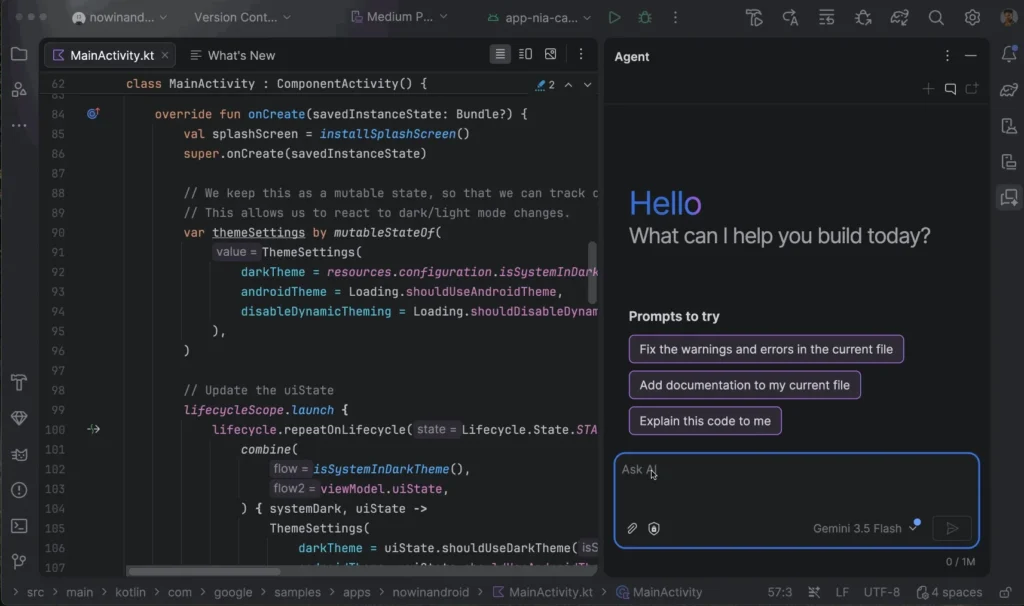

Google has officially pushed the "Stable" button on Android Studio Quail 4, marking the culmination of its "Quail" series of IDE releases. This update is not merely a collection of bug fixes or minor performance tweaks; it represents a fundamental shift in how developers interact with the Android ecosystem, placing advanced, context-aware Artificial Intelligence at the very core of the development lifecycle.
For developers building high-performance, professional-grade mobile applications, Quail 4 promises to reduce the friction of complex API migrations and boilerplate generation. By integrating curated "Android Skills" and offline-capable model support, Google is signaling a departure from generic AI coding assistants toward a specialized, expert-guided development environment.
The Core Transformation: Android Skills
One of the most persistent complaints regarding general-purpose LLMs in coding has been their tendency to hallucinate outdated API methods or suggest deprecated patterns. As Android APIs evolve at a rapid clip, keeping pace has become a primary bottleneck for teams.
With Quail 4, Google has introduced Android Skills—a proprietary suite of modular, AI-optimized instructions. These are not merely prompts; they are curated logic structures built by the very engineers responsible for the Android platform. By adhering to the open-standard agent skills specification, these modules allow the Android Studio agent to access "domain expertise" that standard models lack.
When a developer submits a query, the IDE’s agent analyzes the intent and automatically invokes the relevant skill. This allows the AI to apply Google’s internal best practices, security standards, and architectural patterns without the developer needing to provide lengthy, manual "context-stuffing" prompts. With 23 pre-loaded skills covering everything from Jetpack Compose migrations to complex configuration management, the barrier to entry for adopting modern Android standards has been significantly lowered.
Chronology: The Evolution of the Quail Series
The release of Quail 4 is the latest chapter in a long-term strategic pivot for the Android developer toolchain. Understanding how we arrived at this point requires looking back at the progression of the Quail release cycle:
- Android Studio Quail (Initial Launch): Established the groundwork for AI-integrated development, introducing basic code completion and chat interfaces within the IDE.
- Android Studio Quail 2: Introduced the industry-changing concept of "agentic multitasking." This allowed developers to run multiple, parallel AI chat sessions, enabling them to troubleshoot bugs while simultaneously generating documentation or unit tests.
- Android Studio Quail 3: Focused on refining the underlying model architecture, improving the latency of AI responses, and integrating more deeply with the Gradle build system to provide real-time error analysis.
- Android Studio Quail 4 (Current): The "Production-Ready" milestone. It synthesizes the multitasking capabilities of Quail 2 with the deep expertise of Android Skills and the privacy-first approach of local model integration.
Local AI: The Gemma 4 Integration
Privacy and security are often the primary barriers to corporate adoption of AI-assisted coding tools. Many organizations are hesitant to send proprietary codebases to cloud-based LLMs. To address this, Quail 4 brings native, offline-capable integration of Gemma 4, Google’s high-performance open model.
By allowing developers to run Gemma 4 locally, Android Studio Quail 4 ensures that sensitive intellectual property never leaves the developer’s machine. This "Air-Gapped AI" approach is a game-changer for industries with strict compliance requirements, such as fintech or healthcare app development. The integration is seamless—no complex third-party setup or container management is required. Users can simply select the model version within the IDE settings, download it, and enjoy robust code assistance without an internet connection.
Supporting Data and UI Enhancements
The shift to AI-driven development is validated by the sheer volume of developer activity within the IDE. According to Google’s internal metrics, developers using the "Parallel Agents" feature introduced in Quail 2 showed a 30% reduction in context-switching time.
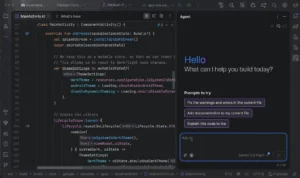

Quail 4 doubles down on this efficiency with a revamped Recent Chats panel. This UI enhancement provides real-time monitoring of parallel threads, allowing developers to track the status of long-running tasks—such as a large-scale refactoring job—in a dedicated dashboard. Other enhancements include:

- Proactive Notification System: A more nuanced UI that alerts developers only when an agentic task requires human intervention, reducing "notification fatigue."
- Canvas Integration: Enhanced visual feedback for AI-generated code blocks, making it easier to accept, diff, or discard suggested changes.
Official Responses and Strategic Vision
During the launch briefing, the Android developer tools team emphasized that Quail 4 is not about replacing the developer, but rather about "accelerating the journey from ideation to production."
"We recognize that modern Android development has become incredibly complex," said a lead spokesperson for the Android Tools team. "By bundling expert-curated skills directly into the IDE, we are giving every developer on the team access to a senior-level Android architect who knows the codebase inside and out. Quail 4 is the realization of our vision to make the IDE an active partner, not just a passive editor."
Google has also opened the door for customization. Teams can now create their own "Custom Skills," effectively training the IDE to understand the specific architectural patterns or internal libraries used by their organization.
Implications: The New Standard for Mobile Development
The release of Quail 4 carries significant implications for the software industry at large.
1. The Death of Boilerplate
With the maturity of AI-optimized agents, the time spent on "plumbing"—setting up navigation graphs, database schemas, or dependency injection—will shrink significantly. Developers will be able to spend more time on high-value tasks like UI/UX design and business logic, rather than configuration.
2. Standardization Across Teams
By using shared, custom-defined "Android Skills," large teams can enforce a uniform coding style. If a team decides that a specific pattern for asynchronous data loading is the "gold standard," they can encode that pattern as a skill, ensuring that all team members—regardless of seniority—adhere to the same best practices.
3. The Shift to Offline-First Tools
The integration of Gemma 4 sets a new precedent for privacy. Expect other major IDE providers to scramble to provide similar local-first AI capabilities. For the developer, this means a future where the most powerful tools are as reliable and secure as the machines they run on.
4. Monetization of AI Features
While the default experience remains free, Google’s introduction of three distinct "upgrade paths" for premium AI capabilities suggests that the future of IDEs will mirror the "SaaS" model. Developers and enterprises will have the option to pay for higher quotas, more powerful model versions, and advanced collaborative AI tools, potentially changing the cost structure of professional development.
Getting Started: The Path Forward
Android Studio Quail 4 is now available on the stable channel. To begin, developers are encouraged to:
- Download the update: Available via the official Android Studio portal.
- Explore the Skill Library: Browse the 23 pre-installed skills to understand how they can automate common tasks.
- Test the Local Model: Configure Gemma 4 in the settings to evaluate performance in your specific, offline coding environment.
- Provide Feedback: As this is a major architectural shift, the Android team is actively soliciting feedback via the bug tracker to refine future iterations.
As we look toward the post-Quail future, one thing is clear: the era of the static text editor is effectively over. The modern IDE is becoming a dynamic, learning, and collaborating entity. For the Android developer, Quail 4 is not just an update; it is an essential toolkit for the next decade of mobile innovation. Whether you are an independent developer or part of a global enterprise, the tools are now in place to build faster, safer, and with greater precision than ever before.