Streamlining Development: How the New itch.io App GUI Transforms the ‘Butler’ Experience
In the rapidly evolving landscape of indie game development, efficiency is the currency of success. For years, the itch.io platform has stood as a bastion for independent creators, offering a flexible, creator-friendly ecosystem. At the heart of its technical infrastructure has been "Butler," a powerful command-line interface (CLI) tool designed to handle the heavy lifting of build deployments. However, for many developers, the barrier to entry for CLI tools can be significant.
Recognizing this, the itch.io development team has unveiled a major upgrade to the official itch.io application: a fully integrated, graphical user interface (GUI) for the Butler deployment system. This update marks a significant shift in the platform’s philosophy, moving from a "tech-first" deployment method to a more accessible, visual workflow that promises to save time, reduce human error, and democratize professional-grade update management for developers of all skill levels.
Main Facts: Bringing Professional Deployment to the Desktop
The core of this update lies in the transition of Butler—a tool historically reserved for those comfortable with terminal commands—into the user-friendly environment of the itch.io desktop app. Developers no longer need to navigate command prompts, remember complex flags, or manually manage authentication tokens.
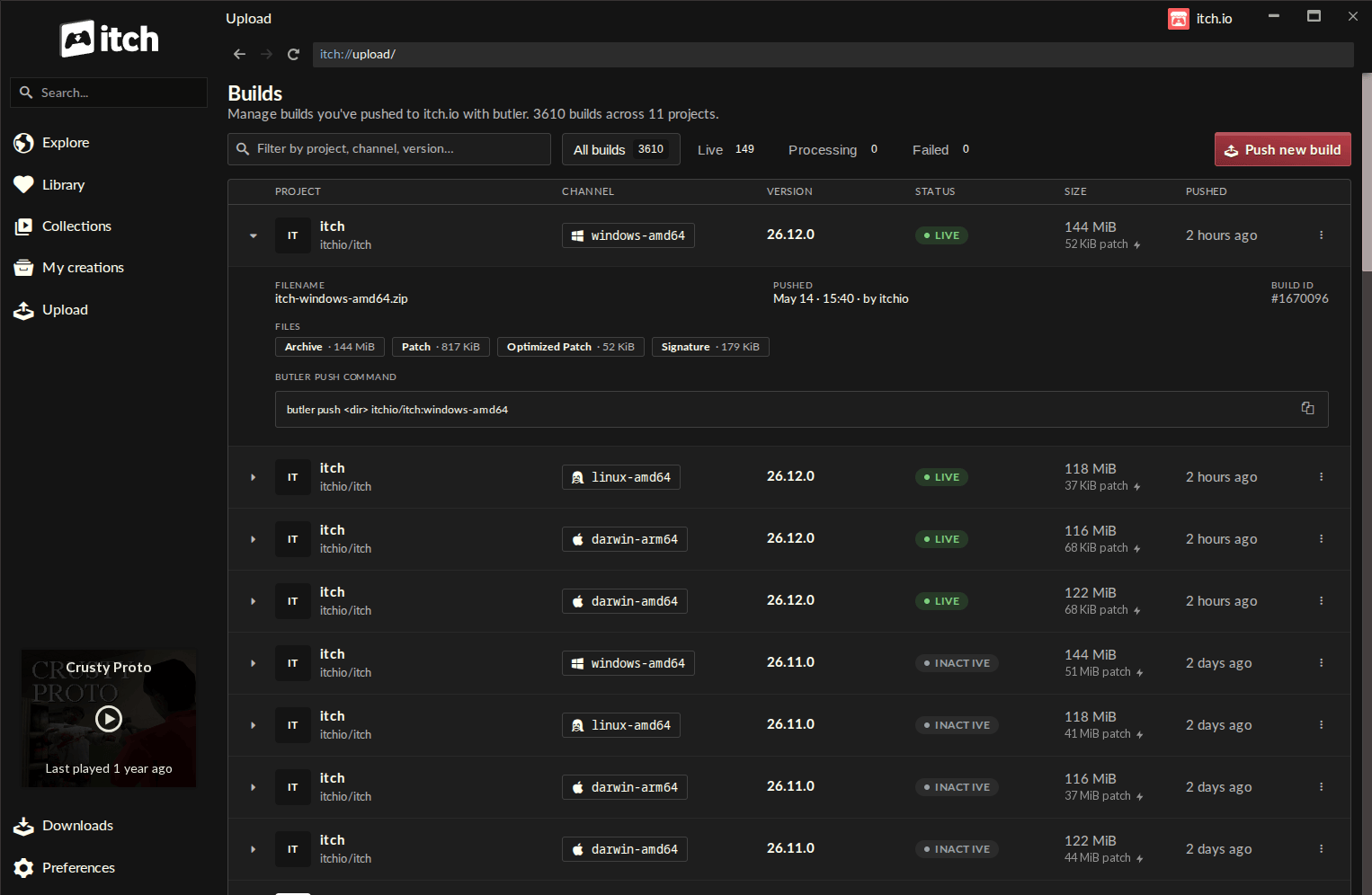
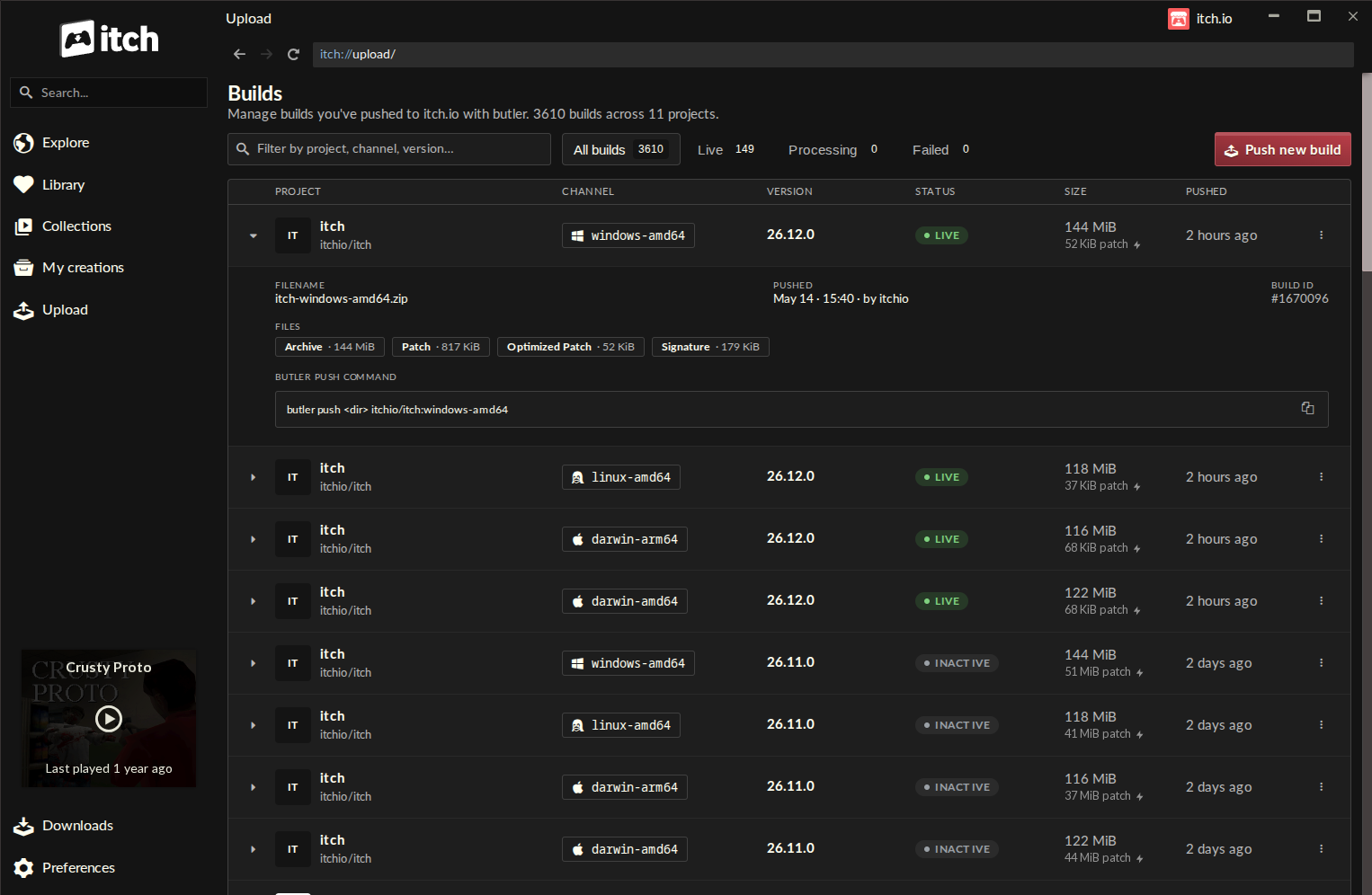
The new "Upload" section within the app provides a centralized hub where users can push builds directly from their local directories. Key features of this integration include:
- Visual Build Management: A dedicated "Builds" page lists every active project, channel, version number, and deployment status, providing a bird’s-eye view of a developer’s entire catalog.
- Intuitive Push Dialogs: A simplified interface allows users to drag and drop folders or
.zipfiles, define target channels (such aswindows-alphaormac-stable), and set version numbers with ease. - Automated Updates: The app handles the versioning of Butler itself, ensuring that developers are always using the most stable and feature-rich version without needing to perform manual maintenance.
- Multi-Profile Support: Seamless switching between multiple itch.io accounts, allowing developers who manage portfolios for studios or collaborative projects to switch identities instantly without re-authenticating.
Chronology: From Terminal Dependency to GUI Integration
The history of itch.io’s deployment tools is one of steady, iterative improvement. When Butler was first introduced, it was a revolutionary step forward for the platform. By utilizing "patch-based" uploading, it fundamentally changed how indie games were updated. Instead of forcing players to download a massive, multi-gigabyte file for a minor bug fix, Butler allowed developers to upload only the "deltas"—the specific data blocks that had changed.
The CLI Era (The Foundation)
For years, the command line was the only gate to this optimization. While powerful, it created a divide: developers who were proficient with terminal scripting could iterate rapidly, while those who favored visual interfaces were often forced to rely on manual browser uploads. Manual browser uploads, while simple, lacked the optimization power of Butler, leading to larger download sizes for players and higher bandwidth costs for creators.
The Development Phase
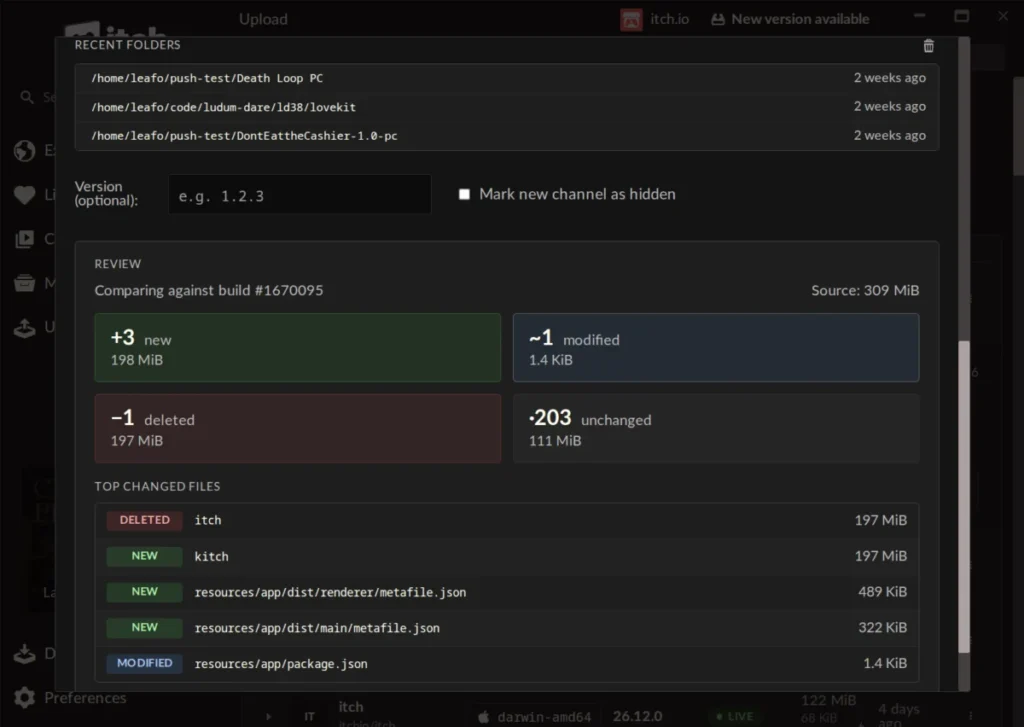
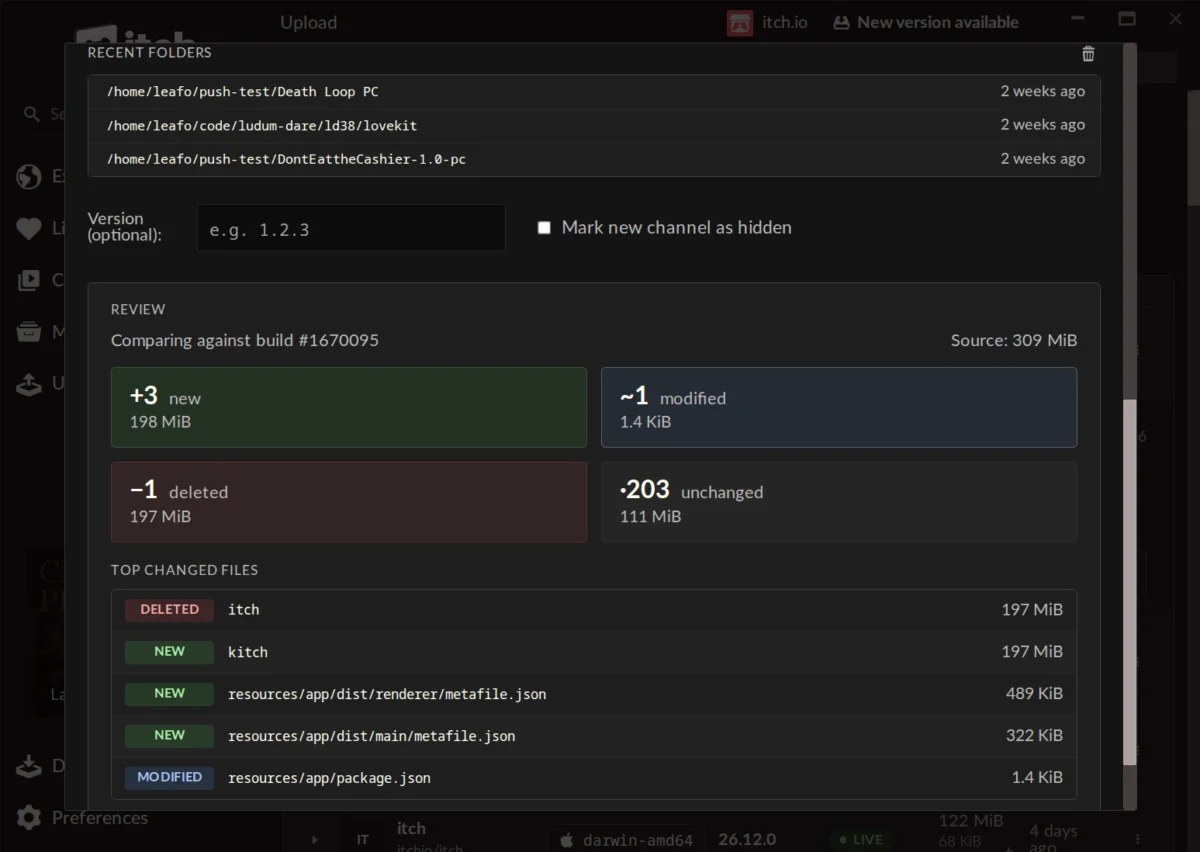
Over the last several months, the itch.io team has been quietly porting the core functionality of the Butler engine into the Electron-based itch.io desktop app. By leveraging the app’s existing architecture, the team was able to wrap the CLI’s robust backend in a responsive, user-friendly frontend. This period of development focused on ensuring that the "Compare" logic—the engine that calculates the difference between old and new builds—was visually represented so that developers could audit their updates before they went live.
The Launch
With the release of version v26.12.0 of the app, this functionality was pushed to the public. The update was not merely a cosmetic change but a fundamental shift in how the platform handles data ingestion, effectively bridging the gap between high-level command-line utility and modern software design.
Supporting Data: Why Patch-Based Uploads Matter
To understand why this update is a turning point, one must look at the data-efficiency provided by the underlying technology. In the traditional browser-upload model, a 5GB game remains a 5GB download for the player, even if the developer only changes a single line of text in a configuration file.
Butler, however, operates on a different plane. During the first push, the system calculates a fingerprint for every file. When a subsequent update is pushed, the system compares the new local directory against the last known state. It identifies precisely which bytes have changed.
Efficiency Metrics:
- Bandwidth Reduction: By uploading only the differences, the amount of data transferred can be reduced by 90% or more for incremental updates.
- Optimized Compression: After a patch is uploaded, the itch.io servers perform background re-compression, further shrinking the file size before it reaches the end-user.
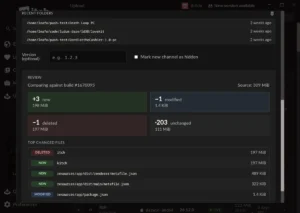
- Validation: The new GUI allows developers to see a preview of these changes—file by file—before the push is finalized. This "safety net" prevents accidental uploads of debug folders or sensitive temporary files that might have been included in a drag-and-drop scenario.
Official Responses and Community Feedback
The response from the developer community has been overwhelmingly positive, reflecting a long-standing desire for a more polished workflow.
User Perspectives
Early adopters have highlighted the speed and clarity the new GUI provides. One user noted that "the self-enforcing nature of the Compare step" means that even developers new to the ecosystem are unlikely to make critical mistakes. Another developer, who previously found the CLI "fiddly and fragile," praised the app for its stability and professional presentation.
The "Conversion" Question
One common query during the initial rollout was whether existing, non-Butler games could be "converted" to the new system. Addressing this in the community forums, the itch.io team clarified that conversion is not currently possible.
“Unfortunately, it’s not possible right now,” noted the lead developer. “A Butler push needs additional metadata alongside the file that is computed during the initial upload process. While we are looking into future possibilities, there are no immediate plans to implement a legacy conversion tool.”
This technical limitation serves as a reminder of the depth of the integration: the Butler system isn’t just a file-uploader; it is a structural management system that requires a specific data handshake between the developer’s local machine and the platform’s servers.
Implications: The Future of Indie Game Distribution
The integration of Butler into the itch.io app has several profound implications for the future of the platform.
1. The Death of "Terminal Anxiety"
For years, the "terminal barrier" has prevented many indie developers from utilizing the best tools at their disposal. By removing this barrier, itch.io is effectively raising the quality bar for the entire platform. As more developers adopt the Butler workflow, the average game update on the site will become smaller, faster, and more frequent. This encourages a "living game" culture where developers can patch bugs or add features without worrying about the friction of the distribution process.
2. Studio-Grade Workflow for Solo Developers
The ability to manage multiple profiles and projects through a centralized GUI brings the professional-grade deployment workflows used by large studios to the solo developer. This professionalization of the itch.io ecosystem makes it a more viable competitor to other distribution platforms, as it simplifies the administrative burden on the creator.
3. A Focus on Reliability
The visual nature of the new "Builds" page—which tracks project, channel, version, status, and file size—transforms the deployment process from a blind "fire-and-forget" action into a manageable piece of production software. Developers can now track their deployment history with the same rigor they apply to version control systems like Git.
4. Continued Growth
The fact that the app handles its own updates and the updates of the underlying Butler engine ensures that the ecosystem remains self-sustaining. Developers no longer need to worry about deprecated CLI versions or environment path issues; the itch.io app serves as a controlled, sandboxed environment for professional deployment.
Conclusion
The introduction of the Butler GUI into the itch.io app is a masterclass in how to modernize developer tools. By taking a complex, powerful, and previously inaccessible technology and wrapping it in an intuitive interface, itch.io has empowered its community to distribute their work more effectively than ever before.
For the developer, this means more time spent creating and less time spent wrestling with deployment pipelines. For the player, it means faster downloads and a more responsive update cycle. As indie game development continues to push boundaries, tools like this will be the silent engines that allow the industry to scale, iterate, and flourish. Whether you are a veteran developer or a newcomer just uploading your first prototype, the path to a polished, professional distribution is now clearer and more accessible than it has ever been.