Mastering Functional Testing: A Comprehensive Guide to Software Quality Assurance, Methodologies, and Automation Strategies
In the rapidly evolving landscape of software engineering, ensuring that an application behaves exactly as intended is paramount. As digital transformation accelerates across global industries, the tolerance for software glitches, broken user journeys, and functional failures has dropped to zero. At the heart of this quality assurance (QA) ecosystem lies functional testing—a foundational black-box testing methodology designed to validate software systems against functional specifications and business requirements.
This in-depth guide explores the core facets of functional testing, covering its various types, industry-standard techniques, practical implementation examples, automation considerations, and the overarching implications for modern software development life cycles (SDLC).
Main Facts: What is Functional Testing?
Functional testing is a type of black-box testing—meaning testers evaluate the application’s functionality without inspecting its internal code structure, database queries, or underlying architecture. Instead, testers focus exclusively on the inputs provided to the system and the corresponding outputs generated, validating them against the functional requirements document (FRD).

The Core Objective
The primary goal of functional testing is to verify that an application or system functions in strict accordance with pre-defined business rules and user expectations. It dictates what a user is permitted to do and ensures that the system yields accurate results under diverse operational conditions.
The Functional Testing Series Overview
For QA professionals and developers looking to master this discipline, comprehensive curriculum frameworks typically break down into specialized learning modules:
- Foundations: Core definitions, methodologies, and test planning.
- Career Readiness: Advanced functionality testing interview questions for QA engineers.
- Tooling: Top functional automation tools and open-source frameworks.
- Complementary Methodologies: Understanding non-functional testing, unit testing, and integration testing.
- Performance Synergy: Why functional and performance testing should be executed concurrently.
Chronology: The Functional Testing Process and SDLC Integration
Implementing functional testing is not a localized event; it is an iterative process integrated throughout the software development life cycle.

1. The Three-Step Testing Process
At its operational core, the functional testing workflow follows a strict chronological sequence:
- Input Identification: Based on the requirements specification, testers identify appropriate input data (both valid and invalid).
- Execution: Inputs are fed into the system under test (SUT) through user interfaces, APIs, or command lines.
- Output Validation: The actual output generated by the system is compared against the expected result outlined in the specifications.
2. Entry and Exit Criteria
To maintain rigorous quality gates, QA teams enforce strict thresholds before initiating and concluding functional testing cycles:
- Entry Criteria: Requirements documentation must be signed off; the build must be successfully deployed to the test environment; smoke testing must pass; and test cases must be reviewed and approved.
- Exit Criteria: A targeted percentage of test cases must be executed successfully; all critical and high-severity defects must be resolved and retested; and a final test summary report must be signed off by QA leadership.
Supporting Data: Types and Techniques of Functional Testing
Functional testing is an umbrella term encompassing several sub-categories, each tailored to specific validation goals during the development cycle.

[ Functional Testing ]
 ├── Unit Testing (Developer-led)
 ├── Smoke & Sanity Testing (Build Verification)
 ├── Integration Testing (Module Interoperability)
 ├── System & End-to-End Testing (Complete SUT validation)
 └── User Acceptance / Beta Testing (Real-world feedback)
1. Key Functional Testing Types
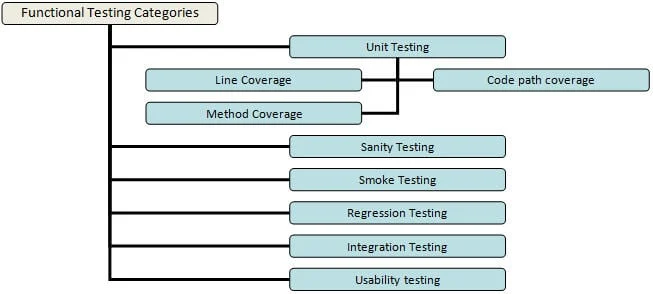
- Unit Testing: Typically performed by developers, this involves testing individual code units or methods independently to ensure they return expected values when specific parameters are passed. Code coverage (line, path, and method coverage) is critical here.
- Smoke Testing: A preliminary "build verification" test executed immediately after a new build is released to ensure vital functionalities are operational.
- Sanity Testing: Performed after a smoke test, this verifies that specific bug fixes or minor updates haven’t destabilized core features.
- Regression Testing: Executed whenever new code, bug fixes, or enhancements are introduced, ensuring that existing functionalities remain unbroken.
- Integration Testing: Validates the harmonious interaction between multiple distinct functional modules when combined into an end-to-end workflow.
- Beta / Usability Testing: Exposes the product to actual end-users in a production-like environment to gather qualitative feedback and validate user comfort.
2. Industry-Standard Testing Techniques & Practical Examples
To optimize testing coverage without inflating timelines and budgets, QA engineers leverage specialized testing techniques.
Example Use Case: Online HRMS Portal Login
Consider an online Human Resource Management System (HRMS) portal login page featuring a User ID field, a Password field, and "Login" / "Cancel" buttons.
- Rule 1: User ID requires 6–10 characters (letters, numbers, underscores, periods, hyphens only; no leading special characters; cannot be blank).
- Rule 2: Password requires 6–8 characters (all special characters allowed; cannot be blank).
Based on this scenario, QA teams deploy several distinct techniques:

- Equivalence Partitioning: Data is divided into valid and invalid partitions. For instance, if the User ID allows up to 10 characters, entering an 11-character string falls into an invalid partition, and testing one such value is statistically sufficient to represent the entire class.
- Boundary Value Analysis (BVA): Tests are conducted on the edges of acceptable limits. For the User ID minimum length of 6, boundary tests would include inputs with exactly 5 characters (negative) and 6 characters (positive).
- Decision-Based Tests: Focuses on system outcomes based on logical combinations (e.g., Valid User ID + Invalid Password = Error prompt; Valid User ID + Valid Password = Successful Dashboard redirect).
- Alternate Flow Tests: Validates secondary paths to accomplish a goal (e.g., using the "Forgot Password" workflow rather than direct login).
- Ad-hoc Tests: Unscripted, exploratory testing conducted with a mindset of "breaking" the system to uncover unexpected vulnerabilities.
Official Perspectives: Functional vs. Non-Functional Testing
Industry veterans emphasize that functional testing alone cannot guarantee a market-ready application. While functional testing evaluates what the system does, non-functional testing measures how well the system performs.
According to QA thought leaders, organizations frequently suffer from "defect escapes" due to a lack of test coverage, compressed delivery timelines, or overburdened testing teams. Industry experts advocate for a balanced hybrid approach: manual exploratory testing paired with robust, automated functional frameworks.
Implications: The Rise of Functional Test Automation
As software release cycles shrink through Agile and DevOps methodologies, manual functional testing alone becomes a bottleneck. Automated functional testing has thus transitioned from a luxury to an enterprise necessity.

The Benefits of Automation
- Efficiency & Speed: Dramatically reduces execution time for repetitive regression suites.
- Consistency: Eliminates human error during routine checks.
- Reusability: Automated test scripts can be executed across multiple environments and builds.
Critical Considerations for Effective Automation
- Choosing the Right Tool: Organizations must evaluate tools based on project requirements, team skillset, and licensing costs. While Selenium remains an open-source favorite, other prominent tools include UFT (Unified Functional Testing), Ranorex Studio, Sahi, Watir, and Robotium.
- Selecting the Right Test Cases: Not everything should be automated. Stable, repetitive regression tests and data-driven tests are prime candidates for automation, while tests requiring frequent manual visual verification are best left manual.
- Dedicated Automation Teams: Imposing automation duties indiscriminately across a mixed QA team often leads to friction. Establishing a dedicated automation engineering cell yields superior long-term ROI.
- UI Resilience: Test scripts must be engineered to withstand minor User Interface (UI) updates without triggering widespread false-positive failures.
Limitations of Functional Testing
Despite its immense value, functional testing inherently overlooks non-functional parameters such as response times, throughput, and system scalability under high user loads. Consequently, quality assurance strategies must integrate functional and performance testing concurrently to deliver a resilient, high-performing software product to the end-user.