Pocket-Sized Nostalgia: How a Raspberry Pi Pico 2 Becomes a Fully Functional 1990s i386 PC
In the relentless march of technological progress, today’s microcontrollers possess computational capabilities that would have seemed like science fiction to the engineers of the early 1990s. Yet, a fascinating subculture in the maker community exists not just to push forward, but to look backward—recreating, compressing, and revitalizing the computing architectures of yesteryear.
The latest marvel in this retro-computing renaissance is Pico-286, a project developed by Mikhail Matveev. By leveraging the newly released Raspberry Pi Pico 2 and its powerful RP2350 microcontroller, Matveev has successfully transformed a multi-euro development board into a complete, pocket-sized i386 personal computer. Capable of booting MS-DOS, Windows 3.x, Windows 95, and even Linux, this miniature rig drives VGA or HDMI displays, reads SD cards, accepts inputs from vintage and modern peripherals, and even generates authentic AdLib audio.
Main Facts: Hardware Architecture and Emulation Capabilities
At its architectural core, the Pico-286 project relies on Chunhui He’s Tiny386 CPU emulator core. This software layer provides full emulation of an Intel i386 processor, complete with partial instruction set support for the subsequent i486 and i586 generations, alongside an optional x87 Floating Point Unit (FPU).
The hardware platform hosting this emulation is the Raspberry Pi Pico 2, powered by the RP2350 microcontroller. To bridge the gap between a modern microcontroller and a vintage PC architecture, Matveev adapted hardware design patterns from QuakeGeneric. Peripheral emulation is pulled directly from QEMU, while system initialization is handled by SeaBIOS, paired with a dedicated VGA BIOS. Everything operates seamlessly on the Raspberry Pi Pico SDK version 2.0 or later.
Memory and Clock Speeds
The most significant bottleneck for running an x86 architecture on a microcontroller is memory. Standard microcontrollers lack the extensive RAM spaces demanded by PC operating systems. Pico-286 overcomes this constraint via an 8MB PSRAM chip mounted onto the expansion board.
- RAM Configuration: The emulator can utilize up to 8MB of RAM, with an interactive settings menu allowing users to scale allocations dynamically between 1MB and 8MB.
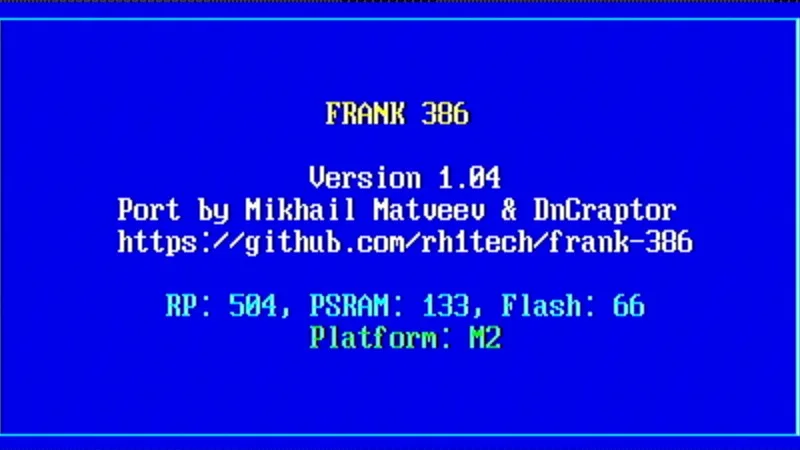
- Clock Frequencies: By default, the CPU core is clocked at 378 MHz, with an aggressive overclocking profile pushing it to 504 MHz. Meanwhile, the external PSRAM operates at 133 MHz, configurable up to 166 MHz. While these higher frequencies yield smoother emulation performance, builders must account for increased power draw and thermal output.
Storage and I/O Subsystems
Storage management is handled via an SD card operating in SPI mode, managed by the FatFs module to support standard FAT filesystems. Disk images—spanning floppy disks, hard drives, and CD-ROMs—are swapped at runtime through an on-screen disk manager triggered via Win + F12.
- Hard Disk Limit: Supports disk images up to 2GB.
- Floppy Standard: Standard 1.44MB (1,474,560 byte) floppy disk images.
- Live Configuration: Pressing
Win + F11opens an on-the-fly settings menu, allowing users to reconfigure system parameters without performing a hard reboot.
Display and Peripherals
Visual output is rendered through either a VGA or HDMI connector, supporting text and graphical modes up to a crisp 640×480 resolution.
Input methods are exceptionally flexible, offering a dual-path approach:
- Classic PS/2: Dedicated ports for legacy keyboards and mice.
- USB Host: Native USB Host support native to the RP2350 allows standard USB keyboards and mice to be plugged directly into the board. Additionally, NES gamepads are supported and can even double as mouse emulators.
Audio output is channeled through an I2S Digital-to-Analog Converter (DAC), while authentic FM synthesis for AdLib-compatible sound effects is powered by the MAME FM Sound Generator via the fmopl module.
Chronology: The Evolution of Microcontroller-Based x86 Emulation
To understand the significance of Mikhail Matveev’s work on the RP2350, it is helpful to trace the developmental timeline that led to pocket-sized desktop emulation.
- Early 2010s – The Arduino Era of Retro Emulation: Early attempts to run x86 operating systems on microcontrollers were largely confined to conceptual proofs. Limited by kilobytes of RAM and single-digit megahertz clock speeds, platforms like the Arduino Mega could barely manage stripped-down, custom-written kernels, let alone full commercial operating systems.
- Mid-2010s – The ESP32 Breakthrough: The introduction of the ESP32 chip, featuring dual-core tensilica architectures and external PSRAM support, changed the landscape. Developers began successfully porting simple DOS emulators, proving that low-cost IoT chips could handle vintage PC workloads.
- 2021 – The Raspberry Pi Pico Launch: The debut of the original Raspberry Pi Pico (powered by the RP2040 chip) introduced the maker community to programmable I/O (PIO) state machines and high clock speeds. However, the lack of native external memory interfaces made running robust x86 emulators a monumental hurdle.
- Late 2023 – Chunhui He’s Tiny386 Core: Software breakthroughs like Chunhui He’s Tiny386 provided a streamlined, highly efficient software emulation core designed specifically for resource-constrained platforms, laying the groundwork for modern bare-metal PC emulators.
- Mid-2024 – The RP2350 and Pico-286 Integration: Raspberry Pi releases the RP2350 microcontroller, featuring enhanced security, faster ARM Cortex-M33 cores (alongside Hazard3 RISC-V cores), and superior bus architectures. Mikhail Matveev seizes this hardware leap, merging Chunhui He’s Tiny386 core with the Pico SDK 2.0 to create Pico-286. Within months, stable boots of Windows 95 and Linux on a multi-euro board become a viral reality.
Supporting Data: Technical Specifications at a Glance
| Component / Feature | Specification Details |
|---|---|
| Microcontroller | Raspberry Pi Pico 2 (RP2350) |
| Emulated CPU | Intel i386 (with partial i486/i586 instructions & optional x87 FPU) |
| Memory (RAM) | 8MB PSRAM (configurable from 1MB to 8MB in settings) |
| Clock Speeds | Default: 378 MHz CPU / 133 MHz PSRAM (Optional: 504 MHz CPU / 166 MHz PSRAM) |
| Storage Medium | MicroSD Card via SPI interface (FatFs FAT filesystem) |
| Storage Limits | Up to 2GB Hard Disk images; 1.44MB Floppy images |
| Video Output | VGA / HDMI (Resolutions up to 640×480 in text/graphics modes) |
| Input Interfaces | PS/2 (Keyboard/Mouse), USB Host (RP2350 native), NES Gamepad support |
| Audio Output | I2S DAC with AdLib FM synthesis via MAME fmopl module |
| Software Support | MS-DOS, Windows 3.x, Windows 95, Linux |
| Required SDK | Raspberry Pi Pico SDK 2.0 or later |
Official Responses and Developer Insights
The maker community’s reaction to the Pico-286 project has been overwhelmingly enthusiastic, drawing widespread attention across platforms like GitHub, Hacker News, and various retro-computing forums.
In documentation accompanying the open-source repository, Mikhail Matveev emphasized that the project was designed to bridge the gap between high-level emulation and accessible, low-cost hardware engineering:
"The goal was never to build a replacement for modern productivity hardware, nor even to rival high-end emulation rigs like MiSTer FPGA," notes the project’s documentation framework. "Instead, it is about exploring the absolute boundaries of what a microcontroller costing less than a cup of coffee can achieve. By combining the processing headroom of the RP2350 with clever memory management via external PSRAM, we have built a fully self-contained computing time machine that fits in the palm of your hand."
Open-source contributors have similarly praised the modularity of the build, noting that the integration of QEMU peripheral code with bare-metal Pico architecture provides a reusable blueprint for future embedded system emulators. Software engineers have highlighted the elegance of utilizing the inih library for configuration parsing and the FatFs module for straightforward, reliable disk image handling over basic SPI connections.
Implications: What Pico-286 Means for Education, Retro-Gaming, and Maker Culture
The successful deployment of a fully functioning i386 PC on a Raspberry Pi Pico 2 carries several profound implications for multiple technology sectors.
1. Democratization of Computer History Education
For decades, preserving and demonstrating vintage computing environments required maintaining aging, increasingly fragile hardware from the 1980s and 1990s—capacitors leak, CRT monitors fail, and mechanical hard drives seize up. Projects like Pico-286 offer an affordable, maintenance-free educational tool. Computer science educators can now supply entire classrooms with pocket-sized retro-PCs for a fraction of the cost of traditional hardware restoration, allowing students to experience firsthand the operating systems and programming environments that shaped the modern digital age.
2. The Evolution of Microcontroller Capabilities
The RP2350 chip’s success in hosting a complex, multi-threaded x86 emulation environment signals a shift in how engineers view microcontrollers. No longer restricted to simple sensor-read loops and basic automation tasks, modern microcontrollers are increasingly blurring the line between micro-controllers and full-fledged microprocessors. The ability to handle memory mapping, dynamic clock overclocking, and multi-protocol peripheral management (USB, VGA/HDMI, I2S) opens new avenues for embedded systems design.
3. A New Paradigm for Portable Retro-Gaming
While high-end emulation handhelds running Android or Linux have dominated the retro-gaming space for years, they typically rely on powerful application processors running resource-heavy operating systems. Pico-286 points toward a hyper-minimalist alternative: bare-metal, instant-on retro gaming rigs that boot straight into DOS in fractions of a second, drawing minimal power and offering deep hardware-level understanding to hobbyists who assemble them from raw components.
4. Open-Source Longevity and Community Collaboration
Because the entire build utilizes readily available, inexpensive components—the Pico 2 board, an 8MB PSRAM chip, a standard MicroSD card reader module, an I2S DAC audio converter, and basic connectors—supply chain shortages or proprietary vendor lock-ins cannot kill the project. Everything is documented, open-source, and hosted on GitHub under Mikhail Matveev’s repository (rh1tech/frank-386), ensuring that the community can continue to fork, optimize, and expand the architecture for years to come.
Conclusion
The Pico-286 project stands as a triumphant exercise in technical ingenuity. By wringing every last drop of performance out of the Raspberry Pi Pico 2 and pairing it with smart memory solutions, Mikhail Matveev has proven that the spirit of 1990s computing can live on in hardware smaller than a deck of cards. Whether utilized as a portable DOS benchmarking tool, an educational gateway into computer architecture, or simply a nostalgic vehicle for running Windows 95 on a chip that costs a few euros, Pico-286 redefines what is possible at the intersection of modern silicon and retro software.