The GUI Revolution: Itch.io Bridges the Gap Between Command-Line Power and User Accessibility
In a significant move to streamline the game development lifecycle, the itch.io team has officially integrated its powerful command-line tool, butler, directly into the itch.io desktop application. This update marks a pivotal shift for the platform, effectively lowering the technical barrier to entry for developers who wish to utilize delta-patching technology without needing to navigate the complexities of terminal-based workflows.
For years, butler has been the gold standard for itch.io developers, offering a sophisticated method for uploading game builds. However, its reliance on a command-line interface (CLI) created a distinct "technical divide" between veteran developers comfortable with scripting and newer creators who prefer intuitive, visual interfaces. With this latest update, itch.io is bringing the power of butler to the masses, wrapped in a user-friendly Graphical User Interface (GUI).
The Core Innovation: Bringing Butler to the Forefront
At its heart, butler is more than just an upload tool; it is a synchronization engine. Unlike traditional browser-based uploads, which require developers to re-upload massive files even if only a single line of code or a minor asset has changed, butler operates on a system of "channels" and "patches."
When a developer uses butler, the tool performs a differential analysis of the project. It compares the local directory or archive against the existing build on the server. During the initial upload, the full project is transferred. However, for every subsequent update, butler intelligently calculates the delta—the precise bytes that have changed—and transmits only those differences.
For end-users, this is a transformative experience. Instead of forcing players to download a massive 10GB game file for a 5MB bug fix, the itch.io app utilizes these patches to update games near-instantaneously. This not only reduces bandwidth consumption for players but also significantly lowers server costs for developers, making it an essential tool for live-service games and projects with frequent update cycles.
A New Workflow: The "Builds" Dashboard
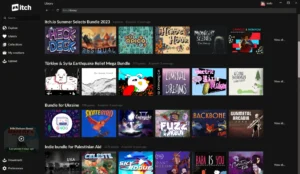
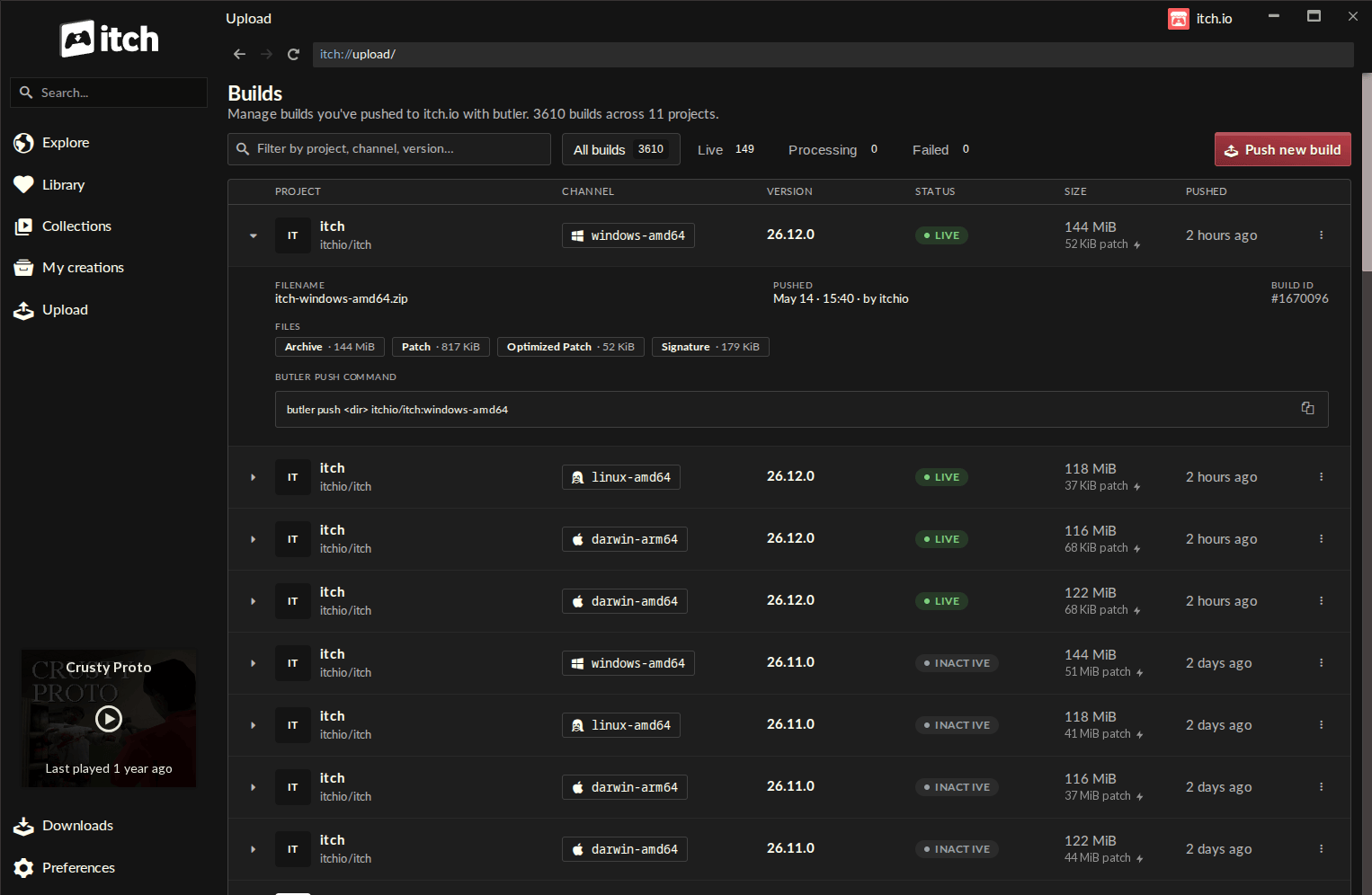
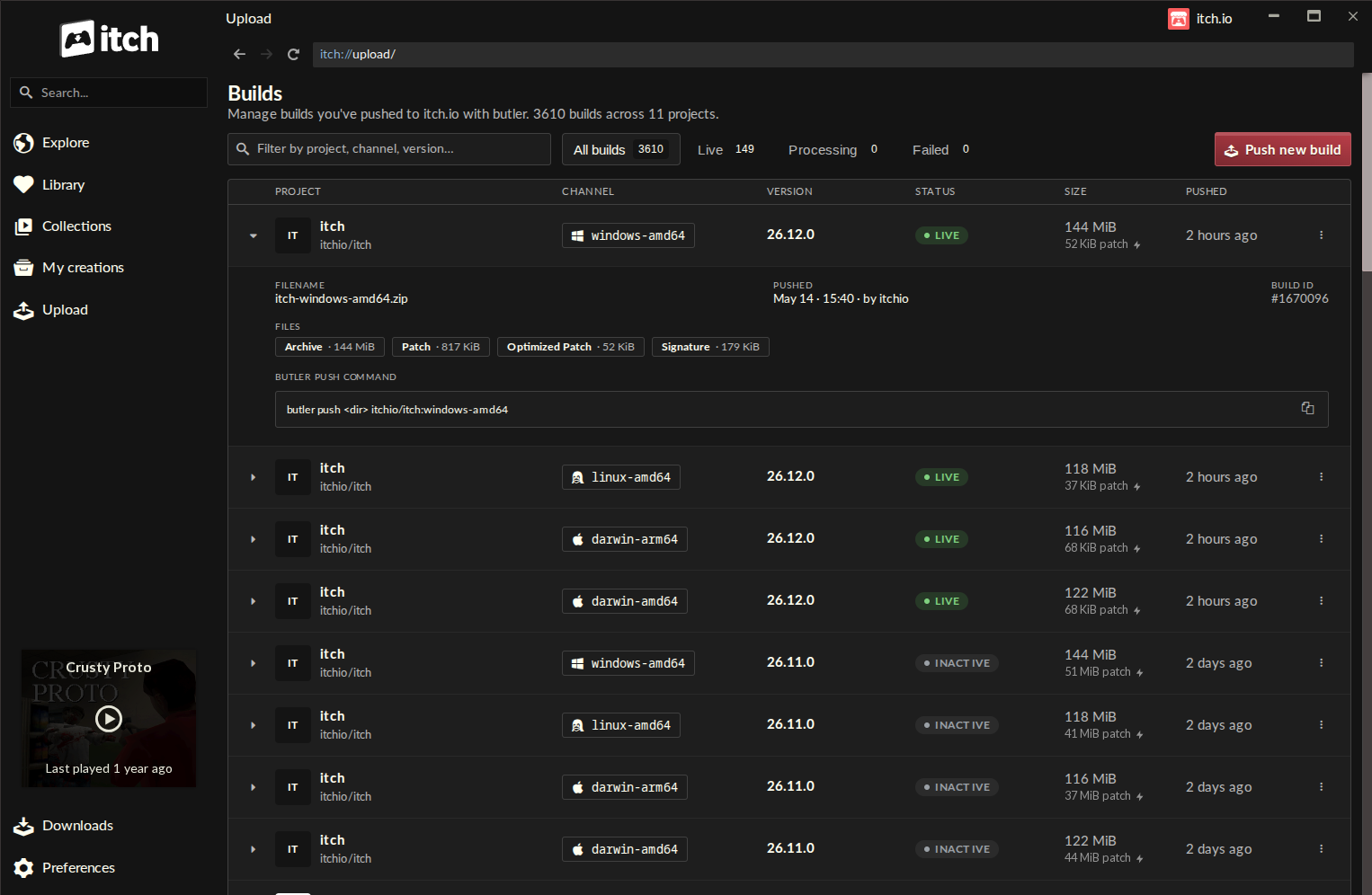
The centerpiece of this update is the new "Upload" section within the itch.io app’s sidebar. By navigating to the "Builds" page, developers are greeted with a centralized dashboard that provides complete visibility over their project history.
Previously, tracking build statuses—such as version numbers, channel names (e.g., windows-beta or linux-arm64), and file sizes—often required jumping between the web browser and the terminal. Now, every build associated with an account is displayed in a clean, tabular format. This visibility allows for quick audits of project health and ensures that developers can confirm at a glance when a specific build was pushed and what its current status is.
Pushing Builds: A Streamlined GUI Experience
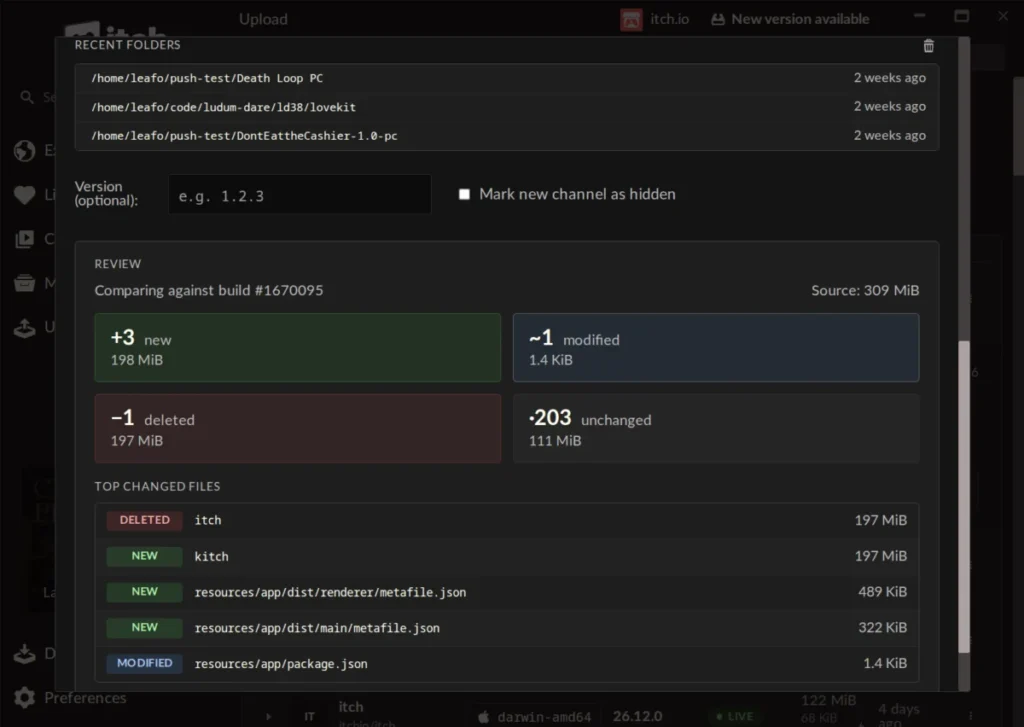
The transition from CLI to GUI is most evident in the new "Push new build" dialog. The process is now simplified into a few logical steps:
- Project Selection: A dropdown menu allows users to select from their existing projects.
- Channel Configuration: Users can select an existing channel or define a new one on the fly.
- Source Input: Developers can simply drag and drop their project folders or
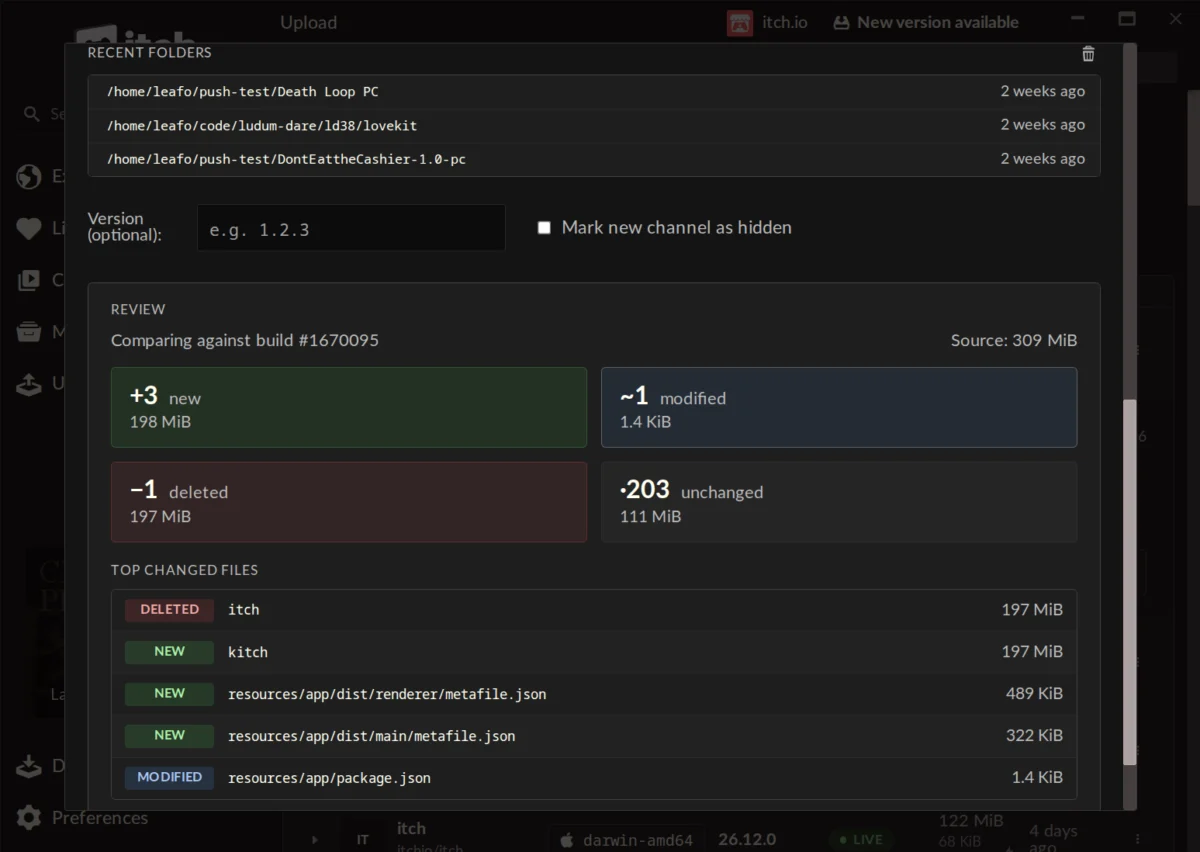
.zipfiles into the app. - Preview and Verification: Perhaps the most valuable addition is the "Preview" feature. Before the actual upload commences, the app generates a breakdown of exactly what will change. It quantifies how many files are new, modified, or deleted, and lists the largest changed files. This "pre-flight check" acts as a safety net, allowing developers to spot errors or accidental inclusions before they are pushed to the live server.
Chronology of the Update
The integration of butler into the itch.io app did not happen in a vacuum. It follows a long trajectory of iterative improvements to the platform’s infrastructure.
- The CLI Era (2015–2023): butler was introduced as a standalone tool to solve the problem of slow, manual browser uploads. It quickly became the industry standard for itch.io developers, though it remained restricted to power users.
- The Desktop App Evolution: Over the last few years, the itch.io app shifted from a simple launcher to a comprehensive developer suite.
- Version 26.12.0 (The Milestone): With the release of version
v26.12.0, the GUI-based butler was officially rolled out to all users. This version marked the culmination of months of testing, aimed at ensuring that the embedded version of butler remains self-updating, eliminating the common headache of "version mismatch" errors.
Implications for the Developer Ecosystem
The move toward a GUI-based workflow has profound implications for the accessibility of independent game development.
Lowering the Barrier to Entry
By removing the necessity of learning terminal commands—such as navigating directories via cd or managing authentication tokens via butler login—itch.io is inviting a new wave of developers to utilize high-end deployment practices. The "fear factor" associated with the terminal is gone, replaced by the safety of the preview window.
Enhanced Multi-Account Management
For developers who manage multiple accounts—perhaps for different studios, collaboration projects, or personal portfolios—the app’s profile-switching capability is a game-changer. The GUI handles authentication tokens seamlessly behind the scenes, allowing a developer to switch from a personal project to a team project with a single click, without needing to re-authenticate via the terminal for each session.
The "Self-Enforcing" Nature of Updates
As noted by community members during the rollout, the UI design forces a "look before you leap" mentality. By presenting a summary of changes, the app inadvertently acts as a quality control mechanism. It is much harder to push a broken build when the interface explicitly lists the exact files being altered, making the update process more deliberate and less prone to human error.
Official Responses and Community Feedback
The reception within the itch.io community has been largely positive, reflecting a mixture of relief and excitement.
In response to a query regarding the potential to convert legacy projects that were not originally uploaded with butler, itch.io founder Leafo clarified the technical constraints: "Unfortunately, it’s not possible right now, as a butler push needs additional metadata alongside the file that’s computed when you’re uploading." While there are no immediate plans to implement a conversion tool, the openness of the development team in communicating these constraints highlights the ongoing dialogue between the platform and its users.
The feedback from the community has highlighted a distinct trend: developers who previously felt intimidated by butler are now expressing interest in adopting it. One user noted, "I used butler some years ago, but I remember it being complicated and fiddly… the itch app has none of these problems." This sentiment underscores the success of the update in reclaiming a powerful tool from the domain of the technical elite and making it a standard feature for all creators.
Challenges and Future Outlook
Despite the success of the release, the platform faces the inevitable challenge of managing expectations. As seen in the comments sections of the update, users continue to request broader site improvements, such as the ability to exclude specific tags from searches—a feature that has been requested for nearly a decade.
Furthermore, some users have raised concerns regarding the moderation and support infrastructure of the site. While the technical update to the app is a massive leap forward in deployment technology, the community remains vocal about the need for parity in support and discovery features.
Looking ahead, the successful integration of butler suggests that itch.io is doubling down on its identity as a developer-centric platform. By continuing to bridge the gap between complex backend tools and user-facing GUIs, the platform is positioning itself to be more than just a storefront—it is becoming an end-to-end development ecosystem.
Conclusion
The integration of butler into the itch.io app is more than a quality-of-life update; it is a democratization of professional development tools. By providing a GUI that is both intuitive and transparent, itch.io has empowered a wider segment of the independent developer community to adopt best practices in version control and deployment. As the industry continues to move toward faster, more efficient iteration cycles, tools like this will prove indispensable. Developers, whether they are CLI veterans or newcomers to the terminal, now have a unified, reliable, and powerful way to bring their creative visions to the world.