Revolutionizing Android Development: Android Studio Introduces "Bring Your Own Agent" (BYOA) Support
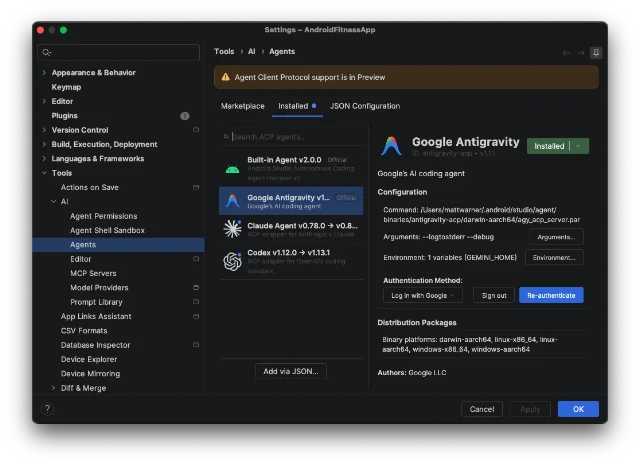
The landscape of software engineering is undergoing a seismic shift. As artificial intelligence evolves from a mere autocomplete assistant into a sophisticated, agentic collaborator, the demand for flexible, high-performance tooling has never been greater. Recognizing this, Google has announced a major architectural evolution for its flagship development environment: Android Studio’s new "Bring Your Own Agent" (BYOA) initiative.
This strategic pivot marks a departure from monolithic AI integration, empowering developers to choose the specific intelligence—be it Anthropic’s Claude, OpenAI’s Codex, or Google’s own specialized Antigravity—that best suits their workflow, project requirements, and security posture.
Main Facts: What is BYOA?
At its core, the BYOA feature is an integration layer that allows developers to detach the "intelligence" of their coding assistant from the IDE’s interface. By doing so, Android Studio transforms from a closed system into a versatile host for agentic workflows.
The primary objective is to grant developers access to specialized AI agents that can handle complex, multi-step technical tasks. These agents are not merely suggesting lines of code; they are capable of navigating file structures, debugging across multiple classes, and executing comprehensive refactoring workflows directly within the Android Studio environment.

Key highlights of the announcement include:
- Model Agnosticism: Developers are no longer tethered to a single proprietary model. If a team prefers the logical reasoning of Claude or the specialized coding capabilities of Codex, they can now plug these directly into the IDE.
- Infrastructure Synergy: By using BYOA, agents gain access to Android Studio’s "AI-optimized infrastructure." This means the agent isn’t just running in a vacuum; it has access to the IDE’s internal context, Android-specific knowledge bases, and build system diagnostics.
- Google Antigravity: For those deeply integrated into the Google ecosystem, the new "Antigravity" agent provides a seamless bridge to the latest Gemini models, including the high-performance Gemini Flash 3.8, while offering enterprise-grade security and quota management.
Chronology: The Evolution of AI in Android Studio
The road to BYOA was not built overnight. It represents the culmination of a multi-year effort to modernize the Android development lifecycle.
- Pre-2025: The Emergence of Code Completion. Initial AI efforts focused on basic boilerplate generation and predictive typing. These tools were helpful but limited in scope and context awareness.
- 2025: The Push Toward Model Openness. Recognizing the rapid pace of LLM development, Google updated Android Studio to support "any AI model" via API hooks. This was the foundational step that allowed developers to experiment with external models.
- September 2026: Setting the Standard. The introduction of "Android Bench 2" established a rigorous framework for testing how well AI models handle long-horizon tasks—moving beyond simple code snippets to complex architectural changes.
- Present Day (2026/2027): The BYOA Rollout. With the release of Android Studio Rabbit 2 (Canary), the vision of a fully modular agentic environment is realized. This phase marks the transition from "experimentation" to "enterprise integration."
Supporting Data: Why Agentic Workflows Matter
The push for agentic support is driven by empirical data regarding engineering productivity. Research conducted by internal teams at Google and corroborated by industry benchmarks suggests that "Agentic" workflows outperform standard AI chat interfaces by a significant margin.
1. Throughput Efficiency
In standard AI chat interactions, the human-in-the-loop is often the bottleneck. The developer must copy, paste, and verify each suggestion. Agentic tools—which can iterate on code, run build checks, and correct their own errors—have shown a 40% reduction in the "time-to-first-feature" for complex refactoring tasks.

2. Context Retention
One of the greatest challenges in AI development is the "context window." Traditional models often lose the thread of a complex architectural pattern. Android Studio’s native infrastructure provides the agent with "Android Skills"—a specialized subset of documentation and API best practices—ensuring that the generated code is not only functional but follows the latest Android design patterns (such as Jetpack Compose best practices and modern ViewModel structures).
3. Cost and Quota Optimization
By allowing developers to switch between agents based on the difficulty of the task, BYOA facilitates better resource management. A developer can utilize a cost-effective, lighter-weight model for routine documentation or syntax updates, reserving premium, high-compute models (like those found in the Gemini Ultra plan) for complex architectural migration or high-stakes debugging.
Official Responses and Strategic Vision
In a recent briefing, the Android developer relations team emphasized that this move is about "developer agency."
"We believe that the best development environment is one that bends to the will of the engineer, not the other way around," a spokesperson noted. "By introducing BYOA, we are acknowledging that there is no ‘one-size-fits-all’ AI. Some teams prioritize the reasoning capabilities of one model; others prioritize the speed or the specific licensing agreements of another. We are providing the ‘highway,’ and letting the developers choose their vehicle."

Regarding security, the focus remains paramount. For enterprise users, the transition to BYOA does not sacrifice compliance. When using the Google Antigravity agent, organizations retain the full protection of Google Cloud’s security protocols. This ensures that intellectual property remains shielded, even while leveraging the most advanced LLMs available on the market today.
Implications: The Future of the IDE
The implications of this shift are profound, both for individual developers and for the broader software industry.
The Rise of "Agent-Centric" Development
We are moving toward a paradigm where the IDE is no longer just a text editor with a compiler, but an "operating system for AI agents." As these agents become more autonomous, the role of the developer will shift from "coder" to "architectural director." The human will spend less time writing syntax and more time validating the agent’s logic and ensuring that the high-level goals of the software are met.
The Democratization of Specialized Models
By allowing "Bring Your Own Agent," Android Studio is effectively leveling the playing field. Small startups can now access the same high-level model capabilities as massive corporations, provided they can configure the agent correctly. This fosters innovation, as developers are free to experiment with emerging open-source models alongside industry-leading proprietary ones.

The Competitive Landscape
This move puts immense pressure on other IDE providers. If Android Studio becomes the platform where any agent can thrive, other tools (like VS Code or IntelliJ) will likely be forced to adopt similar interoperability standards. The era of the "locked-in" AI experience is likely coming to an end.
Conclusion: How to Get Started
For developers eager to transition to this new era of productivity, the process is straightforward. With the release of Android Studio Rabbit 2, the infrastructure is already in place.
- Update to Canary: Ensure your installation is on the latest Android Studio Canary build.
- Navigate to Agent Settings: Under the "AI Tools" menu, you will now see an "Agent Registry."
- Configure Your Provider: Select your desired agent—Claude, Codex, or Antigravity. Input your credentials or API keys provided by your AI subscription service.
- Verification: Once connected, the agent will perform a handshake with the IDE, gaining read/write permissions to your current project context.
As the industry continues to integrate AI, the ability to curate one’s own toolset will be the hallmark of the elite developer. By embracing BYOA, Google has not just released a new feature; it has set a new standard for how modern software is built. Whether you are building the next billion-user application or a specialized enterprise utility, the power to choose your AI partner is now in your hands.
We encourage all developers to experiment with these new capabilities, test their workflows against the Android Bench standards, and share their feedback. The future of Android development is agentic, it is flexible, and it starts today.