The "Ghost Focus" Crisis: Why Your Modal’s Console Warning is a Moral Imperative
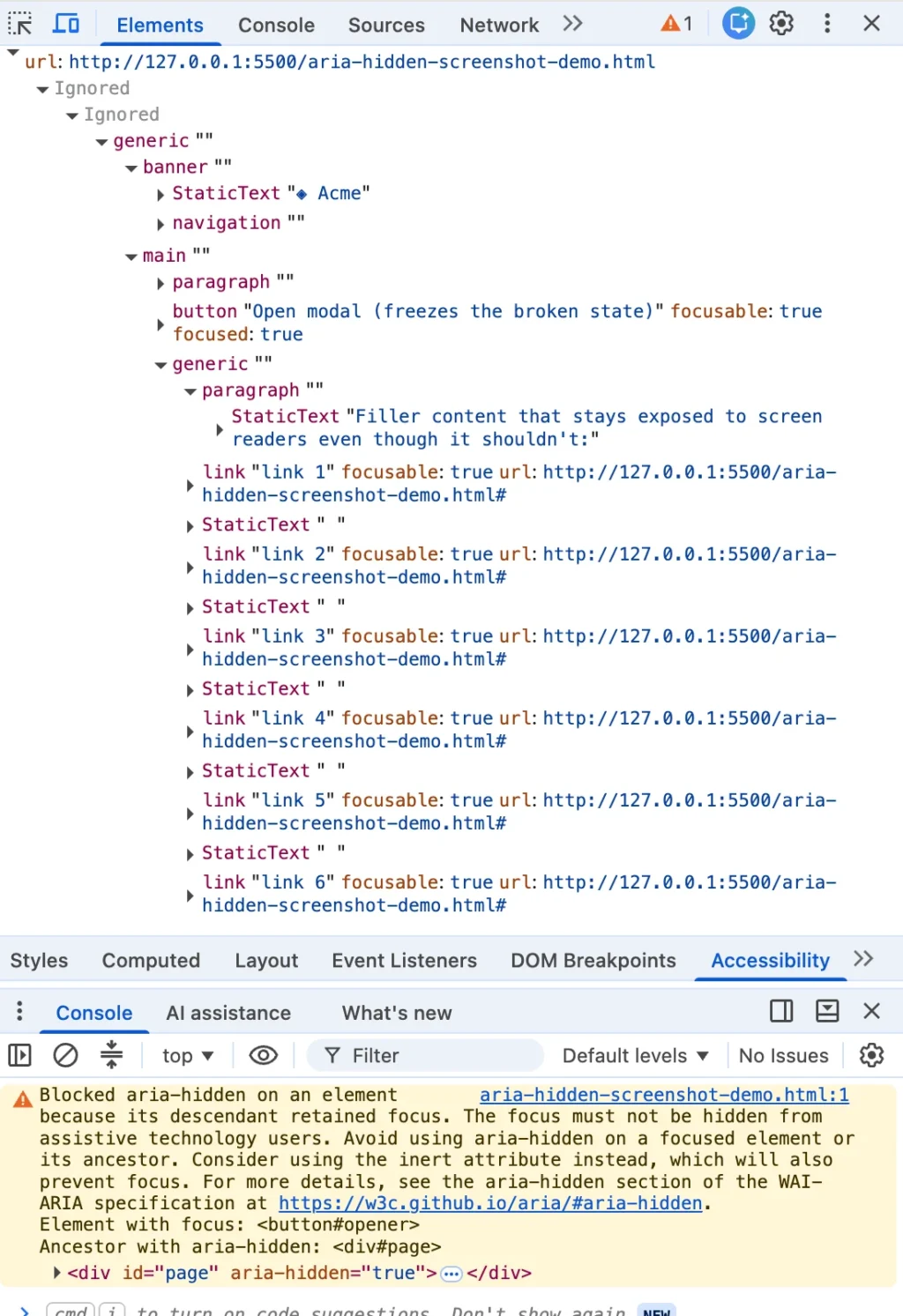
If you have spent any time in modern web development, you have likely encountered it: the angry mustard-yellow line in your browser console that appears the moment you close a modal, dialog, or dropdown. You highlight the message, copy it into a search engine, and find yourself in a digital echo chamber. Whether you are working in Angular, Bootstrap, Ionic, or managing a database through phpMyAdmin, that specific string—a warning about a hidden element receiving focus—appears with alarming consistency.
For most developers, the first instinct is to find a "quick fix" to silence the noise. There is no shortage of them: the blur() one-liner, the setTimeout wrapper, or the aggressive stripping of aria-hidden attributes. These solutions are widely shared on GitHub issues and Stack Overflow threads, often garnering hundreds of upvotes. They work, in the sense that the console goes quiet and your CI/CD pipeline turns green.
However, there is a hard truth buried beneath these "solutions." The warning is correct. There is a real person on the other side of your code—a user relying on assistive technology like a screen reader—whose focus is about to fall into a structural void on your page. By silencing the console, you may be silencing the only mechanism ensuring that user remains oriented.
The Anatomy of the Warning: Chromium’s Silent Overrule
It is a common misconception that the browser is merely "advising" you. When Chrome flags a "retained focus" error, it is not just providing a suggestion; it is informing you that it has already intervened. By the time you read the warning, the browser has already analyzed your markup, determined it is architecturally flawed, and modified the accessibility tree sent to the user’s operating system.
The issue stems from a paradox within the aria-hidden attribute. While aria-hidden successfully removes content from the accessibility tree, it does not remove that content from the browser’s focus order. This creates a state of "ghost focus": an element is simultaneously imperceptible to a screen reader and yet fully capable of holding the keyboard’s focus. When a user tabs onto such an element, the screen reader fires a focus event for a node it has been told does not exist. The result? Silence. The user presses a key, the machine acknowledges nothing, and they are left to wonder if the application has crashed or if their own assistive hardware is malfunctioning.
A Chronology of the Console Chaos
The visibility of this issue spiked significantly in the summer of 2024. As Chrome 127 rolled out, developers across the globe saw a sudden surge in accessibility warnings. The issue clustered around major component libraries: MUI, Ant Design, and Flowbite all saw an influx of tickets as their modals began triggering browser intervention.
By late 2024, with the release of Chrome 131, the warning evolved to include specific "retained focus" language. This was not a new bug; Chromium had been quietly patching these accessibility trees for years. As early as 2020, ARIA Working Group issue #1185 recorded engineers proposing that focusable nodes inside hidden subtrees should at least be acknowledged by screen readers to avoid the "total silence" trap.
For years, developers were protected by the browser’s silent repairs. Because the browser papered over the cracks, the broken code continued to ship. When Chrome finally decided to make these repairs "loud," it exposed a systemic architectural flaw that had been hiding in plain sight for nearly a decade.

The Four Traps: How You Get Here
Developers arrive at this warning from four distinct directions. Understanding which path you are on is the only way to avoid applying a fix that makes the user experience worse.
- The Close-Time Race: This is the most common scenario. When a user clicks "close," the modal begins a CSS fade-out animation. If your code hides the modal before the animation finishes, but the focus remains on the close button, you have a hidden region containing a focused node.
- The Open-Time Inversion: This is the inverse of the close-time race. A modal is opened, and the background is marked
aria-hidden. However, the button the user just clicked still holds focus for a split second before the logic moves it into the modal. - The Turf War: This occurs when nested components—such as a
selectmenu inside adialog—both attempt to "hide" the rest of the page. Under React 19, this has proven fatal for keyboard navigation, as the unmounting of one component can inadvertently strip focus from the entire page. - The User Walkout: Sometimes, nothing changes in your code at all. If a user Alt-Tabs or switches browser windows while an overlay is active, the browser’s focus bookkeeping can strand an
aria-hiddenstate, leaving the application in a state of confusion upon the user’s return.
The "Fixes" That Hurt: Why blur() is a Failure
The most popular "fix" found online is calling .blur() on the active element. This is, by every accessibility standard, a failure. When you call blur() without moving the focus to a logical, pre-determined element, the browser drops the user onto the <body> tag.
For a screen reader user, this is disastrous. They are effectively transported to the top of the page, forcing them to re-tab through the header, navigation, and sidebar just to return to the point of interaction. This is a direct violation of WCAG 2.4.3 (Focus Order). By "fixing" the console, you have effectively broken the navigation flow for your most vulnerable users.
The Teardown Contract: A New Standard
If you cannot migrate to the native <dialog> element—which handles this focus dance automatically—you must implement a strict teardown contract. The goal is to ensure focus leaves the modal region before that region is hidden or made inert.
The Four-Step Order of Operations:
- Un-inert the background: Before moving focus, ensure the trigger point is accessible. If the trigger is inside an
inertcontainer,focus()will silently fail. - Move focus home: Send the focus back to the trigger button immediately, synchronously, before the hide state is committed.
- Inert the dying shell: Do not use
aria-hiddenon the closing modal. Instead, apply theinertattribute. This removes the closing animation from the focus order and the accessibility tree simultaneously, ensuring that while the modal fades out, it cannot be interacted with. - Cleanup: Remove the modal from the DOM only after the transition finishes.
Official Responses and Industry Implications
The debate over this warning has pitted browser vendors against framework maintainers. Component library maintainers argue that the browser’s "scolding" tone is unfair, given that the code was considered idiomatic as recently as 2019. Browser vendors, conversely, argue that they are simply enforcing long-standing WAI-ARIA guidelines that developers had ignored for too long.
The consensus among accessibility experts is shifting. The W3C ARIA Working Group has moved toward standardizing these heuristics. For the developer, the implication is clear: the era of "silent fixes" is over. Automated testing tools like Axe or Lighthouse often fail to catch these issues because they take a "snapshot" of the DOM, missing the critical milliseconds between frames where the bug actually lives.
Conclusion: Looking Beyond the Logs
A clean console is not a proxy for a high-quality application. If you reach for a one-line fix simply to silence the browser, you are optimizing for your own convenience at the expense of your users.
The next time you see that mustard-yellow warning, do not reach for the mute button. Treat it as a report from the field. It is your architecture speaking, telling you exactly what happens to a screen reader user when you are not looking. By honoring the teardown contract—prioritizing focus restoration over the hiding of elements—you move from merely silencing warnings to building an experience that is truly inclusive. The warning is not the problem; the problem is what the warning reveals.