Unlocking On-Device AI: TensorFlow Lite Plugin Officially Migrated to the Official TensorFlow GitHub Repository for Flutter Developers
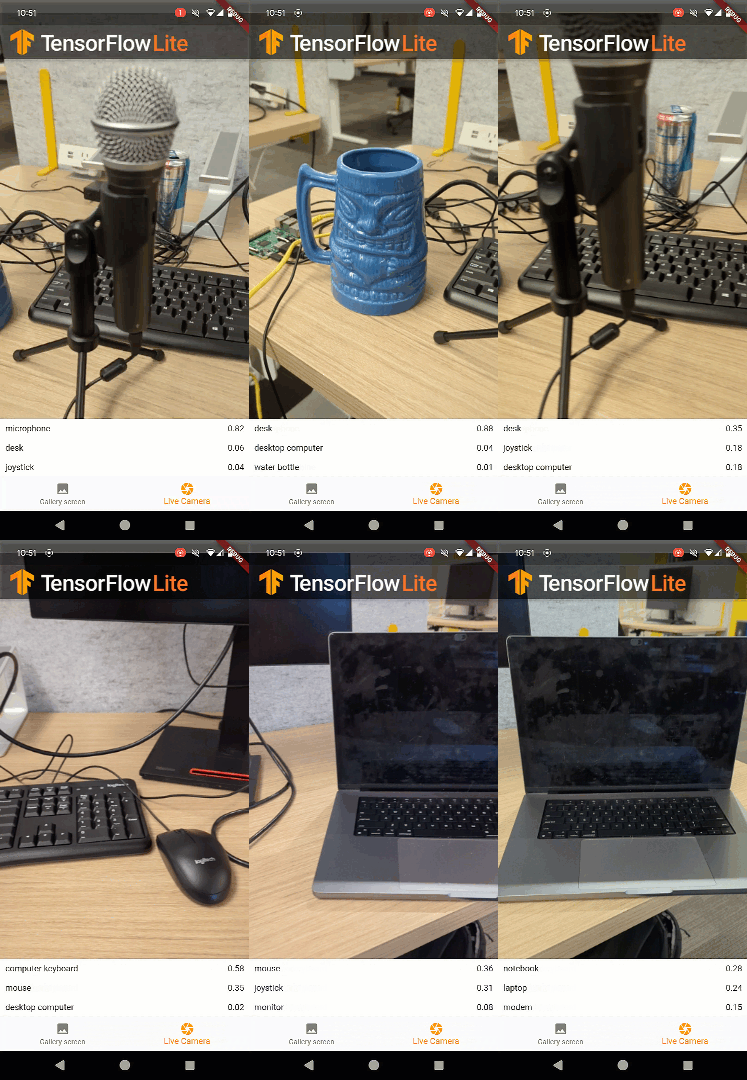
SAN FRANCISCO — In a major development for the cross-platform application ecosystem, Google has officially announced the migration and release of the TensorFlow Lite plugin for Flutter directly under the official TensorFlow GitHub account. This strategic shift transitions a community-staple project into an officially supported, Google-maintained resource, promising enhanced stability, regular updates, and deeper integration for millions of mobile and embedded developers worldwide.
The announcement, spearheaded by Developer Relations Engineer Paul Ruiz, marks a pivotal moment in the convergence of high-performance machine learning and accessible mobile app development. By bringing the plugin into the core TensorFlow repository, Google aims to streamline how developers embed on-device artificial intelligence into their Flutter applications.
Main Facts: What the Migration Means for Developers
The newly released TensorFlow Lite plugin bridges the gap between Google’s powerful machine learning framework and Flutter, the dominant UI toolkit for building natively compiled applications for mobile, web, and desktop from a single codebase.
- Official Ownership: The plugin is now housed under the official TensorFlow GitHub repository, ensuring long-term maintenance, security patches, and direct alignment with future TensorFlow updates.
- Core Capabilities: TensorFlow Lite enables developers to run pre-trained or custom machine learning models directly on edge devices. This local execution ensures low latency, offline functionality, and enhanced user data privacy because sensitive information does not need to be transmitted to a cloud server.
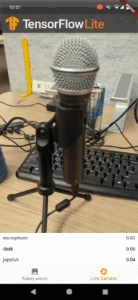
- Community-Driven Enhancements: Prior to its official adoption, the codebase received substantial updates from the developer community, bringing it up to date with the latest TensorFlow Lite binaries and introducing robust new capabilities, such as real-time object detection via live camera feeds.
- Resource Availability: Developers can source ready-to-use models from established repositories like Kaggle Models or train custom architectures tailored to specific application needs.
Chronology: The Evolution of the TensorFlow Lite Flutter Plugin
The journey toward official integration spans several years of grassroots development, community collaboration, and strategic scaling by Google’s engineering teams.
2021–2022: The Google Summer of Code Origins
The foundation of the modern Flutter TensorFlow ecosystem was laid three years ago by Amish Garg, a participant in the Google Summer of Code (GSoC) program. Recognizing a glaring gap in the market for efficient, easy-to-use machine learning bindings in Flutter, Garg developed an independent TensorFlow Lite plugin.
The project quickly caught fire within the open-source community. Its intuitive API and solid performance made it the de facto standard for developers looking to inject computer vision and natural language processing into their Flutter projects.

2023–2024: Community-Led Modernization
As TensorFlow Lite evolved, maintaining independent community plugins became increasingly challenging. Developers across the globe stepped in to bridge the gap. Through collaborative pull requests and community maintenance, the plugin was overhauled to support the latest iterations of TensorFlow Lite, incorporating advanced features like multi-threaded processing and streamlined memory management. Furthermore, contributors began laying the groundwork for desktop platform support (macOS, Windows, and Linux).
Late 2024: Official Migration to TensorFlow GitHub
Recognizing the undeniable utility and widespread adoption of the plugin, Google decided to bring the project in-house. By migrating the codebase to the official TensorFlow organization on GitHub, Google ensured that the project would receive dedicated engineering resources, standardized release cycles, and official documentation support.
Supporting Data: Technical Implementation and Workflow
Integrating the TensorFlow Lite plugin into a Flutter application has been designed to be as seamless as possible. Below is a detailed look at how developers can implement core machine learning workflows, such as image classification using the standard MobileNet architecture.
Step 1: Installation and Model Initialization
Developers begin by adding the plugin dependency via pub.dev (tflite_flutter). Once integrated, the application must load the model interpreter and configure the input and output tensor shapes. For MobileNet, the input typically expects a 224×224 RGB image matrix, while the output yields confidence scores across 1,001 distinct categories.
// Load model and configure tensor shapes
Future<void> _loadModel() async
    final options = InterpreterOptions();

    // Load model from assets
    interpreter = await Interpreter.fromAsset(modelPath, options: options);

    // Get tensor input shape [1, 224, 224, 3]
    inputTensor = interpreter.getInputTensors().first;

    // Get tensor output shape [1, 1001]
    outputTensor = interpreter.getOutputTensors().first;
Step 2: Loading Classification Labels
To translate raw numerical output into human-readable predictions, applications load the corresponding label text files associated with the trained model.
// Load labels from assets
Future<void> _loadLabels() async
    final labelTxt = await rootBundle.loadString(labelsPath);
    labels = labelTxt.split('n');
Step 3: Executing Inference
Once the input image is pre-processed into the correct multi-dimensional array format, developers invoke the interpreter’s run method to execute real-time inference on the device hardware.

// Run inference
Future<void> runInference(
 List<List<List<num>>> imageMatrix,
) async
   // Format input tensor [1, 224, 224, 3]
   final input = [imageMatrix];

   // Format output container [1, 1001]
   final output = [List<int>.filled(1001, 0)];

   // Execute inference on-device
   interpreter.run(input, output);

   // Extract primary results
   final result = output.first;
Official Responses and Developer Community Reception
The developer ecosystem has greeted the official migration with immense enthusiasm. Open-source contributors who nurtured the project through its infancy have expressed relief and excitement seeing their work validated at an institutional level.
Paul Ruiz, emphasizing Google’s gratitude during the rollout, stated:
"We are deeply grateful to Amish Garg and the broader community of developers who kept this plugin alive, updated, and thriving. Because of their tireless efforts, bringing this project into the official TensorFlow umbrella was a natural next step to guarantee its long-term viability."
Industry analysts note that this move signals Google’s broader commitment to democratizing artificial intelligence. By reducing the friction required to deploy lightweight models on consumer hardware, Google is positioning Flutter not just as a UI framework, but as a premier client-side AI development platform.
Implications: The Future of On-Device AI and Flutter
The official integration of the TensorFlow Lite plugin carries profound implications for the future of software development, mobile architecture, and edge computing.
1. Privacy-First Application Architecture
As regulatory frameworks surrounding data privacy (such as GDPR and CCPA) tighten globally, developers face mounting pressure to process user data locally rather than uploading it to remote servers. By leveraging TensorFlow Lite in Flutter apps, developers can execute facial recognition, text translation, biometric analysis, and predictive typing entirely on the user’s device. This ensures absolute data sovereignty and compliance with strict privacy standards.

2. Zero-Latency User Experiences
Cloud-based AI inference inherently suffers from network latency, jitter, and complete failure points when users lose internet connectivity. On-device machine learning bypasses network bottlenecks entirely. Live camera feeds can process objects at 30+ frames per second, providing instant feedback for augmented reality (AR) applications, industrial scanners, and interactive gaming.
3. Expanding Horizons: MediaPipe Tasks on the Horizon
Google is not stopping at TensorFlow Lite. In addition to the Flutter TFLite release, the engineering team has confirmed that they are actively developing a brand-new plugin specifically tailored for MediaPipe Tasks.
MediaPipe Tasks represents Google’s next-generation, low-code solution for on-device machine learning. Designed for maximum efficiency and ease of use, the upcoming MediaPipe Flutter plugin will support sophisticated machine learning pipelines out-of-the-box, including:
- Advanced object detection and image segmentation
- Face landmark tracking and mesh generation
- Real-time hand and gesture recognition
- Audio classification and acoustic event detection
What’s Next for Developers?
Developers eager to experiment with the newly released plugin can dive straight into the official GitHub repository. The repository features robust, ready-to-run sample applications showcasing text classification, neural style transfer, super-resolution image enhancement, and live object tracking.
Google encourages the global developer community to build innovative applications, push the boundaries of on-device intelligence, and share their creations across social channels by tagging @googledevs and @TensorFlow. The era of accessible, cross-platform, local artificial intelligence has officially arrived.