Revolutionizing Desktop Navigation: How a DIY Wireless Smart Dial is Replacing the Traditional Keyboard and Mouse
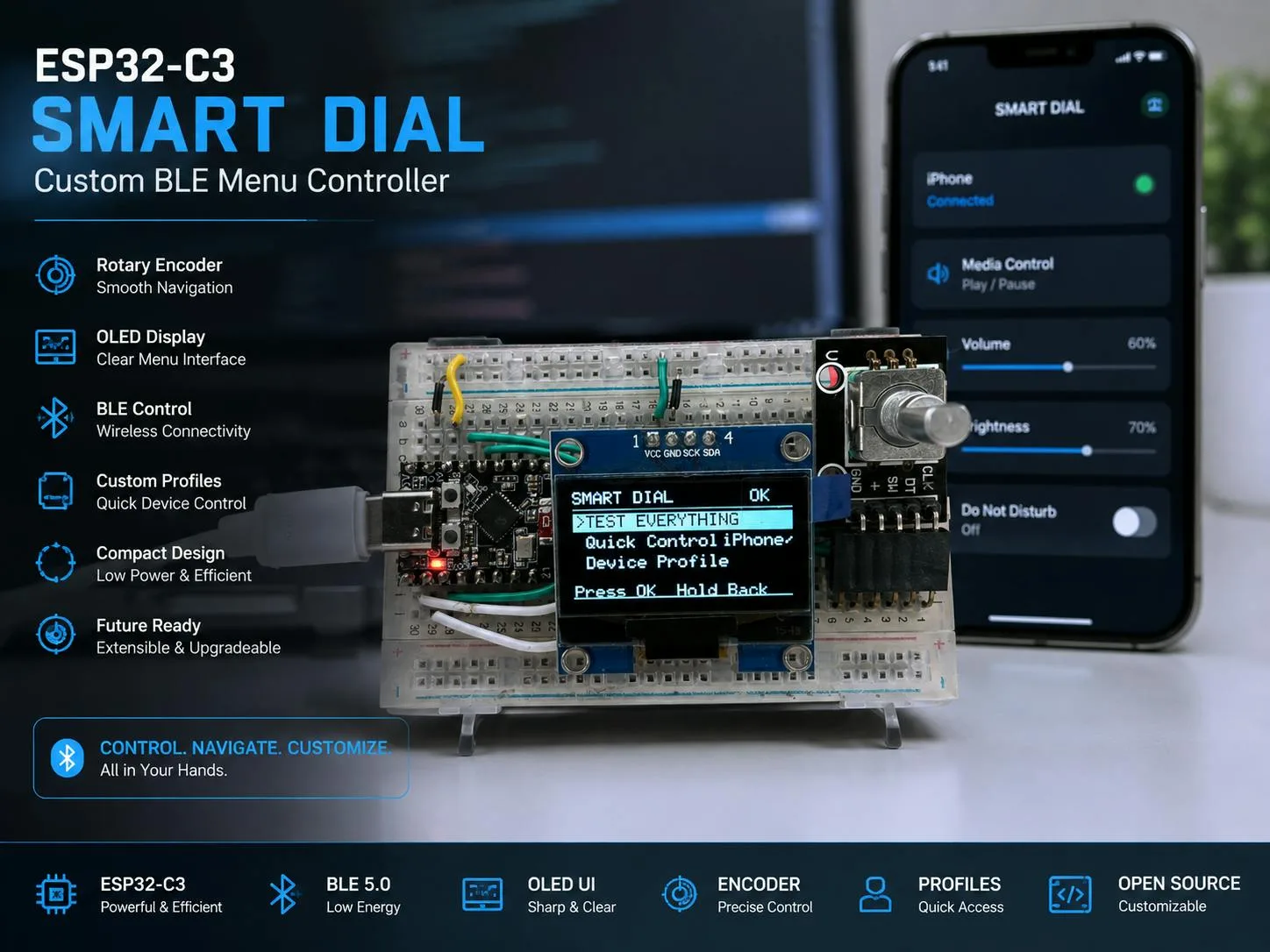
In the modern digital workspace, efficiency is paramount. Whether navigating dense timelines in video editing software, scrolling through endless lines of code, or executing complex macros in spreadsheet applications, professionals constantly seek ways to streamline repetitive tasks. While macro pads and specialized input devices have flooded the market, they often come with steep price tags and proprietary software limitations.
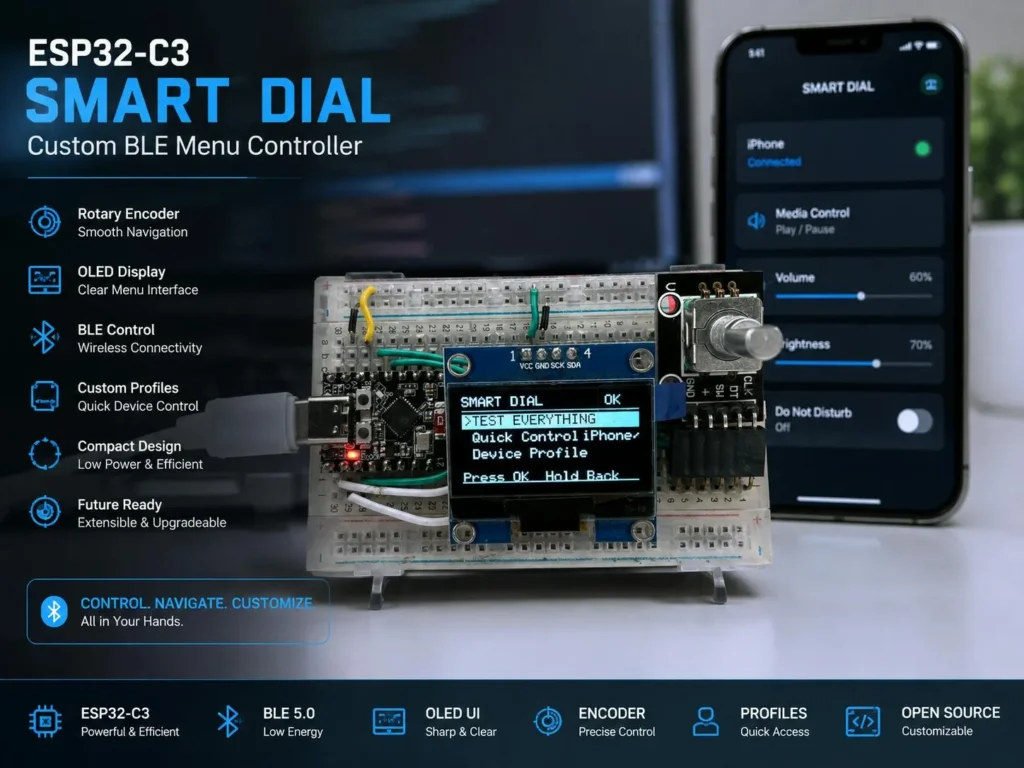
Enter a clever, open-source hardware solution crafted by maker Afraz Ali: the ESP32-C3 Wireless Smart Dial. Designed to reduce reliance on the keyboard and mouse for repetitive operations, this compact peripheral transforms a simple turn of a knob and a click of a button into a powerhouse of customizable commands. Operating seamlessly via Bluetooth Low Energy (BLE) Human Interface Device (HID) protocols, the smart dial bridges the gap between physical ergonomics and digital productivity.
Main Facts: Anatomy of the Smart Dial
At its core, the Wireless Smart Dial is an exercise in minimalist engineering, proving that profound utility can stem from inexpensive, readily available components.
The hardware architecture relies on three primary pillars:
- The Processing Brain: An ESP32-C3 SuperMini board, selected for its compact footprint, integrated Wi-Fi and Bluetooth capabilities, and exceptional energy efficiency.
- The Visual Interface: An SH1106 128×64 pixel OLED display, connected via the I²C protocol at address
0x3C, which provides crisp, real-time visual feedback of menu options and active profiles. - The Tactile Input: A KY-040 rotary encoder (with an alternative option for the M274 360-degree continuous rotation module), which handles menu navigation through rotation and command execution via its integrated push-button switch.
Operating as a standard BLE HID device, the hardware requires no custom drivers on the host computer. Upon pairing, the operating system natively recognizes the smart dial as a wireless keyboard or mouse, ensuring universal compatibility across Windows, macOS, Linux, Android, and iOS devices.
Chronology: From Concept to Open-Source Reality
The journey of the ESP32-C3 Smart Dial reflects the iterative nature of modern maker culture, moving from a localized hardware concept to a globally shared open-source project.
-
Phase 1: Conceptualization and Prototyping
Recognizing the ergonomic strain and inefficiency of using a standard mouse and keyboard for repetitive software adjustments, Afraz Ali set out to design a universal physical controller. The goal was to build a device small enough to sit comfortably on any desk yet powerful enough to manage multi-tiered menus.
-
Phase 2: Hardware Selection and Integration
The ESP32-C3 SuperMini was chosen for its low idle power consumption and robust BLE stack. By coupling it with a standard KY-040 rotary encoder and an SH1106 OLED screen, Ali established a hardware baseline that avoided expensive custom PCBs. The firmware was written to utilize the microcontroller’s internal pull-up resistors on the encoder’s GPIO pins (CLK, DT, and SW), drastically simplifying the wiring process. -
Phase 3: Firmware Optimization and OS Profiling
A major engineering hurdle in BLE HID development is handling cross-platform behavioral inconsistencies. Ali solved this by developing dedicated firmware profiles for Auto/Universal, Windows, macOS, Android, and iOS/iPadOS. Furthermore, to make the device practical for daily use, the ESP32’s built-in Preferences library was implemented to save custom text macros and user configurations persistently. -
Phase 4: Public Release and Documentation
With the firmware stabilized and the build process streamlined, the project was published to GitHub. Complete with Arduino sketches, library dependencies, and architectural diagrams, the repository opened the project to the global maker community.
Supporting Data: Technical Specifications and Performance
For developers and hobbyists looking to replicate or build upon Ali’s work, the technical specifications underline the project’s accessibility and efficiency.
Hardware Specifications
- Microcontroller: ESP32-C3 SuperMini (featuring 11 digital GPIOs with PWM support and 4 analog ADC inputs).
- Display: SH1106 128×64 OLED module utilizing I²C communication.
- Input Device: KY-040 rotary encoder or M274 360-degree encoder module.
- Power Requirements: USB power or external DC source ranging from 3.3V to 6V.
Performance and Power Metrics
- Deep Sleep/Standby Consumption: Approximately 43 µA, enabling prolonged battery life when paired with an independent power source.
- Estimated Assembly Time: ~5 hours, making it an ideal weekend project for beginners stepping into the world of ESP32 and BLE development.
- Software Toolchain Requirements:
- Arduino IDE
- ESP32 Arduino Board Package
- Adafruit GFX Library
- Adafruit SH110X Library
HijelHID_BLEKeyboardNimBLE-Arduino- Lynx Serial Monitor
Official Insights and Community Response
While commercial smart dials—such as the Microsoft Surface Dial or custom audio-editing consoles—often carry restrictive price tags and closed ecosystems, the open-source community has warmly embraced Ali’s DIY alternative.
In developer forums and GitHub discussions, the project has been praised for its modular approach. By leveraging the NimBLE-Arduino stack, the firmware avoids the heavy memory overhead often associated with standard Bluetooth implementations on microcontrollers. This optimization ensures snappy response times, virtually eliminating the input lag that plagues poorly configured wireless peripherals.
Furthermore, educators have highlighted the project as an exemplary teaching tool. It touches upon multiple disciplines within electrical and software engineering:

- Digital Logic: Understanding rotary encoder quadrature signals (phase shift between CLK and DT pins).
- Communication Protocols: Implementing I²C addressing and BLE HID descriptors.
- Embedded Software Architecture: Managing persistent storage, state machines for menu navigation, and multi-platform HID report mapping.
Implications: The Future of Ergonomic Input Devices
The proliferation of projects like the ESP32-C3 Smart Dial signals a broader shift in how users interact with their digital environments. As software applications grow more complex, the limitations of the century-old QWERTY keyboard and two-button mouse become increasingly apparent.
1. Democratization of Ergonomic Hardware
Ergonomic and specialized workflow controllers have historically been luxury items aimed at high-end professionals. By reducing the bill of materials to a few inexpensive modules and utilizing a sub-$5 microcontroller, projects like this democratize workspace customization. Users can tailor physical hardware precisely to their workflows—whether that means mapping the dial to timeline scrubbing in Adobe Premiere, zooming in CAD software, or cycling through browser tabs.
2. The Rise of Hyper-Personalized Peripherals
Off-the-shelf macro pads offer generalized utility, but a custom-built ESP32 device allows for hyper-personalization. Through the integration of the ESP32 Preferences library, users can write and store custom text macros directly onto the device. A single press can output complex code snippets, execute terminal commands, or input login credentials, drastically cutting down on repetitive keystrokes.
3. Energy Efficiency in IoT Peripherals
With a standby power consumption of just 43 µA, the project highlights the incredible efficiency of modern RISC-V-based microcontrollers like the ESP32-C3. This low power draw opens the door for fully untethered, battery-powered desktop accessories that can operate for months on a small lithium-ion cell without requiring constant recharges.
Conclusion
Afraz Ali’s Wireless Smart Dial is much more than a weekend tinkering project; it is a testament to the power of open-source hardware and community-driven innovation. By combining an ESP32-C3, an OLED screen, and a rotary encoder, the project delivers a professional-grade input device that rivals commercial alternatives at a fraction of the cost.
As the boundaries between hardware prototyping and daily productivity continue to blur, projects like this pave the way for a more efficient, ergonomic, and customizable digital future. For those interested in building their own wireless control surface, the complete source code, wiring diagrams, and documentation are publicly available via Afraz Ali’s GitHub Repository.