The Open-Source ePaper Smart Journal: Bridging the Gap Between Distraction-Free Writing and Modern Computing
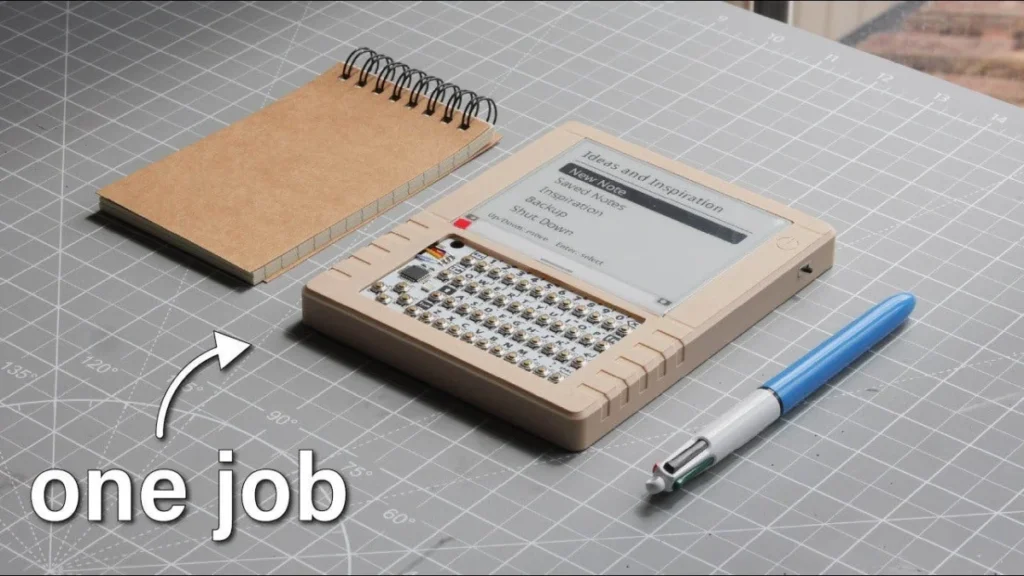
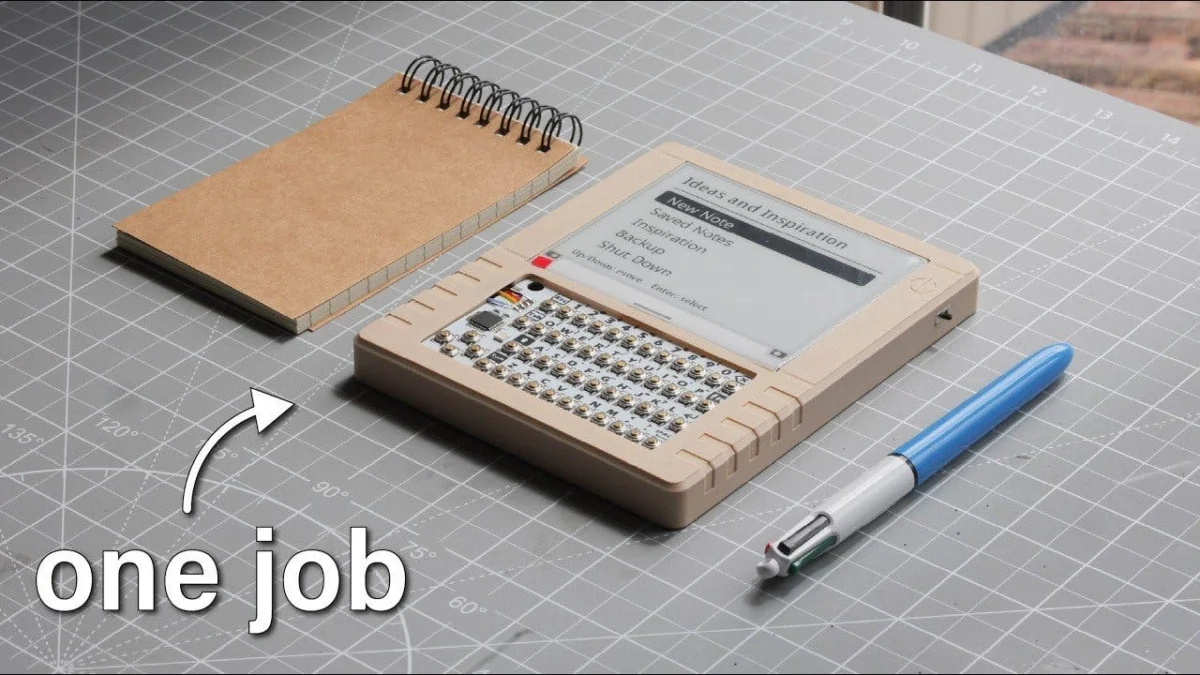
In an era dominated by hyper-connected smartphones, constant notifications, and glowing, high-refresh-rate LCD and OLED screens, a growing counter-movement is quietly gaining momentum. Writers, developers, and minimalists are increasingly seeking refuge in low-tech or simplified digital environments that allow for deep, uninterrupted focus. Enter the open-source ePaper smart journal—an ingenious hybrid device created by maker Mirza Makes that marries the tactile simplicity of a physical notepad with the computational utility of a micro-computer.
Designed specifically to capture fleeting ideas without dragging the user into the digital vortex of social media alerts and endless web browsing, this portable writing companion represents a masterclass in functional minimalism. Built using readily available maker components and powered by entirely open-source software, the project is capturing the imagination of the DIY hardware community.
Main Facts: What is the ePaper Smart Journal?
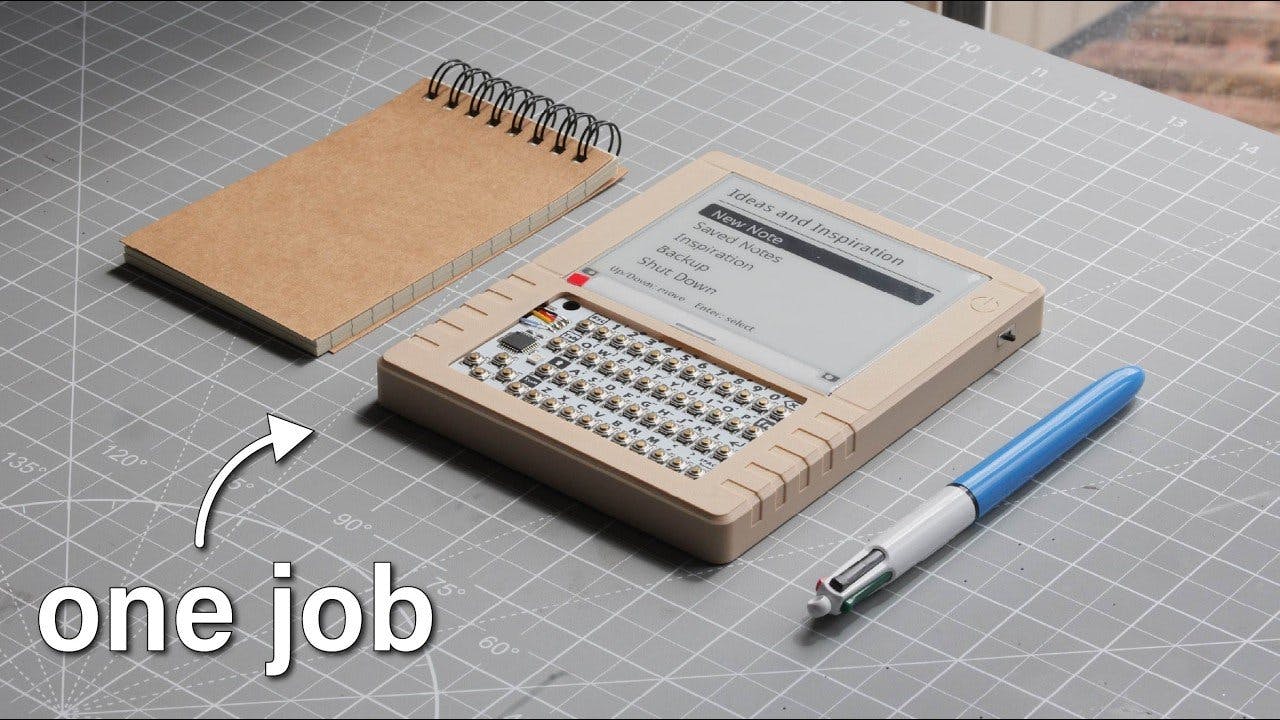
At its core, the ePaper smart journal is a dedicated, distraction-free electronic notebook engineered for portable note-taking, creative writing, and journaling. Unlike a tablet or a smartphone, which runs myriad multitasking applications, this device does one thing exceptionally well: it lets you write text, save it securely, and back it up effortlessly.
The hardware architecture relies on a carefully selected triad of components:
- The Processing Brain: A Raspberry Pi Zero 2 W serves as the central computing unit. Despite its diminutive form factor, this quad-core board packs enough computational horsepower to manage the user interface, handle file input/output, and process user commands seamlessly.
- The Visual Interface: Output is handled by a 4.2-inch Waveshare ePaper display. Utilizing electronic paper technology, this panel requires power only when the image changes, offering stunning readability under direct sunlight and eliminating the eye strain associated with traditional backlit screens.
- The Input Method: Text entry is facilitated by an M5Stack CardKB—a remarkably compact, physical QWERTY keyboard that interfaces with the Raspberry Pi over the I2C protocol, requiring minimal wiring while providing tactile feedback.
- Power Management: Portable operation is sustained by a 3.7V Lithium-Polymer (LiPo) battery, paired with an Adafruit PowerBoost 1000 charging and regulation module that guarantees a stable 5-volt output to the Raspberry Pi.
The entire operating logic is driven by custom Python scripts made freely available by the creator, inviting developers and enthusiasts to inspect, modify, and expand upon the foundational code.
Chronology: The Evolution of Distraction-Free Writing Tools
To understand the significance of Mirza Makes’ creation, it is helpful to examine the historical trajectory of portable writing technology and how this project came to fruition.
The Pre-Digital and Early Digital Eras
For centuries, the paper notebook reigned supreme as the ultimate portable journaling tool. While peerless in its simplicity, paper suffers from inherent limitations: it cannot be easily searched, backed up, or edited without crossing out text, nor can its contents be dynamically transmitted across networks.
When electronic word processors and personal digital assistants (PDAs) emerged in the late 20th century, they introduced digital storage but quickly evolved into multi-purpose computers. The introduction of modern smartphones and tablets in the late 2000s pushed convenience further, but introduced an unprecedented level of cognitive fragmentation. Notifications, pop-ups, and algorithmically optimized apps transformed writing spaces into arenas of perpetual distraction.
The Rise of Dedicated E-Writers
In response, the past decade has seen a niche market emerge for dedicated electronic writing tools—ranging from expensive e-ink tablets like the reMarkable and Supernote to specialized writing appliances like the Astrohaus Freewrite. However, these commercial products often come with steep price tags, proprietary software ecosystems, and closed source code that locks users into specific platforms.
The Birth of the Mirza Makes ePaper Journal
The open-source ePaper smart journal project represents a democratization of this concept. Rather than waiting for a consumer electronics giant to build an affordable, open, distraction-free device, Mirza Makes leveraged the modular nature of the maker ecosystem—specifically the Raspberry Pi and Adafruit hardware pipelines—to engineer a bespoke solution.
By documenting the build process step-by-step and publishing the code repositories online, the project transformed from a solitary maker experiment into a blueprint for a global community of DIY builders looking to reclaim their attention spans.
Supporting Data: Hardware Specifications, Performance, and Capabilities
A closer technical examination of the ePaper smart journal reveals a remarkably thoughtful integration of hardware and software designed to optimize battery life, usability, and data portability.
Power Efficiency and Display Metrics
The choice of a 4.2-inch Waveshare ePaper display is central to the device’s utility. Traditional LCD and OLED screens emit light directly into the user’s eyes, drawing continuous current and washing out under bright ambient light. E-ink technology, by contrast, relies on ambient light to reflect off microscopic pigment particles suspended in microcapsules.
- Power Draw: The ePaper display draws power only during a screen refresh. Once text is rendered, power consumption drops to absolute zero.
- Readability: Whether used in a dimly lit room or under the glaring midday sun, legibility remains pristine, closely mimicking the contrast of ink on physical paper.
- Battery Longevity: Combined with the low idle draw of the Raspberry Pi Zero 2 W and the efficient regulation of the Adafruit PowerBoost 1000, the 3.7V LiPo battery delivers impressive field endurance, allowing for hours of continuous writing across multiple days of casual use without requiring a recharge.
Software Interface and Workflow
The user experience has been streamlined to prevent friction between thought and text:
- The Main Menu: Upon booting, the user is greeted with a clean, text-based interface offering clear options: create a new note, browse historical entries, generate creative writing prompts, initiate a system backup, or execute a safe shutdown.
- Note Creation and Management: Selecting a new note automatically appends an accurate timestamp to the file. As the user types via the M5Stack CardKB, text renders smoothly on the ePaper panel.
- The Escape Menu: Pressing the physical Escape key halts active typing and triggers a prompt allowing the user to save their current progress, continue editing, or discard the note entirely.
- Local Network Backups: Recognizing that local storage on a micro-SD card is vulnerable to hardware failure, the creator integrated a clever backup mechanism. Selecting the backup option spins up a lightweight local web server on the Raspberry Pi. Any other device connected to the same local Wi-Fi network—such as a laptop or smartphone—can access the Pi’s IP address through a standard web browser to download stored text and Markdown files directly.
Official Responses and Community Reception
The open-source maker community has greeted the ePaper smart journal with immense enthusiasm. Published via Mirza Makes and widely shared across open-source hardware aggregator platforms like Open Electronics, the project has sparked rigorous discussions regarding the philosophy of modern tool design.
Maker and Developer Feedback
Initial reactions highlight the project’s modularity as its strongest selling point. Unlike commercial distraction-free devices that are sealed units, hobbyists appreciate that every layer of the ePaper journal can be customized:
- Code Modifiability: Because the control logic is written in accessible Python, developers have already begun brainstorming forks of the repository. Suggested community modifications include adding full-text search capabilities, integrating encryption for sensitive diary entries, and establishing synchronization pipelines with self-hosted cloud platforms like Nextcloud.
- Hardware Scalability: While the Raspberry Pi Zero 2 W hits the sweet spot for cost and power efficiency, advanced builders have noted that the software can easily be adapted to run on beefier boards—such as a Raspberry Pi 5 with 2GB or 4GB of RAM—should someone wish to build an expanded workstation with heavier background processes.
Ergonomic and Psychological Insights
Psychologists and digital wellness advocates have also weighed in on the broader implications of devices like this. In interviews and forum discussions regarding digital minimalism, users repeatedly emphasize the psychological barrier that standard computers create.
When a writer opens a laptop, they are one keystroke away from email, news feeds, and instant messaging. By contrast, booting a dedicated, single-purpose text appliance creates a sacred cognitive boundary. The tactile click of the M5Stack CardKB combined with the quiet, ghost-free refresh of the ePaper screen signals to the brain that it is time to produce, rather than consume.
Implications: The Future of Modular Minimalism and Open-Source Hardware
The success and viral spread of the ePaper smart journal point toward several larger trends in technology, hardware modification, and digital lifestyle design.
1. The Backlash Against Hyper-Complexity
For decades, the trajectory of consumer technology has pointed unswervingly toward "more"—higher resolutions, faster processors, more background applications, and deeper integration into ad-driven ecosystems. Projects like Mirza Makes’ journal represent a deliberate, user-led pivot toward "enough." By proving that a low-cost, low-power device can successfully unseat expensive commercial gadgets for specific workflows, the maker movement demonstrates that consumers are increasingly willing to embrace purposeful technological constraints.
2. The Right to Repair and Modify
Commercial e-writers often suffer from closed ecosystems, proprietary file formats, and planned obsolescence. If a battery dies or a screen cracks on a commercial writing tablet, repair costs can rival the price of a brand-new device.
An open-source, component-based smart journal completely inverts this paradigm. Because every part—from the Waveshare display to the Raspberry Pi Zero and LiPo battery—is modular and commercially available off-the-shelf, the device is inherently repairable, upgradeable, and immune to forced obsolescence. If a better e-paper panel or a more efficient controller board hits the market next year, the user can simply swap it into their existing chassis.
3. Scaling Up: Potential Commercial and Educational Impacts
While currently rooted in the DIY maker community, concepts pioneered by projects like this hold immense potential for broader sectors:
- Education: Schools and universities continually struggle with student distraction caused by laptops and tablets in classrooms. Inexpensive, network-isolated writing terminals could revolutionize note-taking by keeping students focused purely on text generation without internet-induced interruptions.
- Field Research: Journalists, field biologists, and anthropologists working in remote environments with limited access to grid power could benefit immensely from rugged, ultra-low-power, solar-chargeable ePaper note-taking appliances that run for weeks on a single charge.
Conclusion: Building Your Own ePaper Journal
For those inspired to step away from glowing screens and embark on their own hardware build, the barrier to entry is lower than ever. As outlined in the project documentation, replicating or expanding upon the ePaper smart journal requires only a modest investment in components, basic soldering skills, and a willingness to experiment with Python scripts.
Whether you choose to follow the exact blueprint—pairing a Raspberry Pi Zero 2 W with a Waveshare 4.2-inch ePaper panel, an M5Stack CardKB, and an Adafruit PowerBoost 1000—or decide to customize the build with alternative OLED screens and larger batteries, the underlying philosophy remains the same.
In a digital world engineered to fracture our attention, building your own distraction-free writing tool is more than a fun weekend electronics project—it is an act of reclaiming your focus, one line of open-source code at a time.